Hetman RAID Recovery: Rebuild a Failed RAID or NAS Array and Save the Files
Hetman RAID Recovery is a Windows, macOS and Linux program from $197.95, one-time, that rebuilds failed hardware and software RAID arrays and NAS volumes virtually from the member disks and recovers the files, with a free scan and preview first. It's for NAS owners and IT staff whose array won't mount. The $197.95 Home edition handles arrays of up to 3 disks, so a four-bay NAS needs the $397.95 Office edition.
The NAS died, or a rebuild started with the wrong disk, and the array has gone. The temptation is to try another rebuild. Don't. Take the disks out, label their order, and work on images or read-only.
Quick facts
- Version: 3.2, released October 9, 2026
- Developer: Hetman Software, Ukraine
- Platforms: Windows, macOS, Linux (installer or portable version on Windows)
- RAID levels: JBOD, 0, 1, 1E, 4, 5, 5E, 5EE, 6, 10, 01, 50, 51, 60, 61
- Storage: hardware controllers, motherboard RAID, Linux MD, LVM, Windows Storage Spaces, ZFS, Btrfs, Synology, QNAP and many more NAS platforms
- Price: $197.95 Home (up to 3 member disks), $397.95 Office (up to 5), $497.95 Business (unlimited)
- Trial: scan and preview for free, saving files needs a registration key
- What we checked: Windows installer 92.3 MB, dated October 9, 2026, and all three edition prices on the order page on November 6, 2026. We didn't rebuild an array ourselves.
Before you buy
Count your disks, including failed ones. The member limit is the key buying decision: Home 3, Office 5, Business unlimited. Office is for internal company use and Business for paid client work. Then preview your files with the free version. Hetman's 30-day guarantee is conditional, and it usually won't refund a partial result caused by a rebuild, controller behavior or physical failure, nor a purchase after the trial showed files missing. Physically failed disks need a lab or at least a sector-level image.
Download Free TrialBuy Now
Overview
RAID Recovery is Hetman's flagship. It includes everything in Partition Recovery and adds the layer that matters here: working out how an array was built, then assembling it virtually in memory, so the disks are never written to. When a rebuilt volume appears, you scan it like an ordinary drive.
Everything hinges on identifying the array parameters: level, disk order, stripe size, offsets and parity layout. The program reads the metadata that controllers leave on each member disk and usually does this automatically. If that metadata is gone, its RAID Constructor can search for or accept the configuration.

An array detected from metadata appears at the top under RAID Volumes, here an encrypted RAID 5 logical volume. The title bar shows the previous version 3.1 and the Unlimited Edition.
Features
Hetman RAID Recovery detects arrays automatically from metadata
It scans every connected disk, mounted image and remote device for RAID metadata and reads level, member count, disk order, stripe size, offsets, parity layout and missing members. Hetman lists Dell PERC, HPE Smart Array, Broadcom MegaRAID, Adaptec, Areca, Intel RST and VROC, AMD RAIDXpert and many other controllers.
Hetman RAID Recovery has a RAID Constructor for lost metadata
The Constructor offers an automatic search of candidate configurations, a search by manufacturer or NAS model, and full manual entry. A live preview shows recognizable partitions and files as you change settings, which is how you tell a right guess from a wrong one.
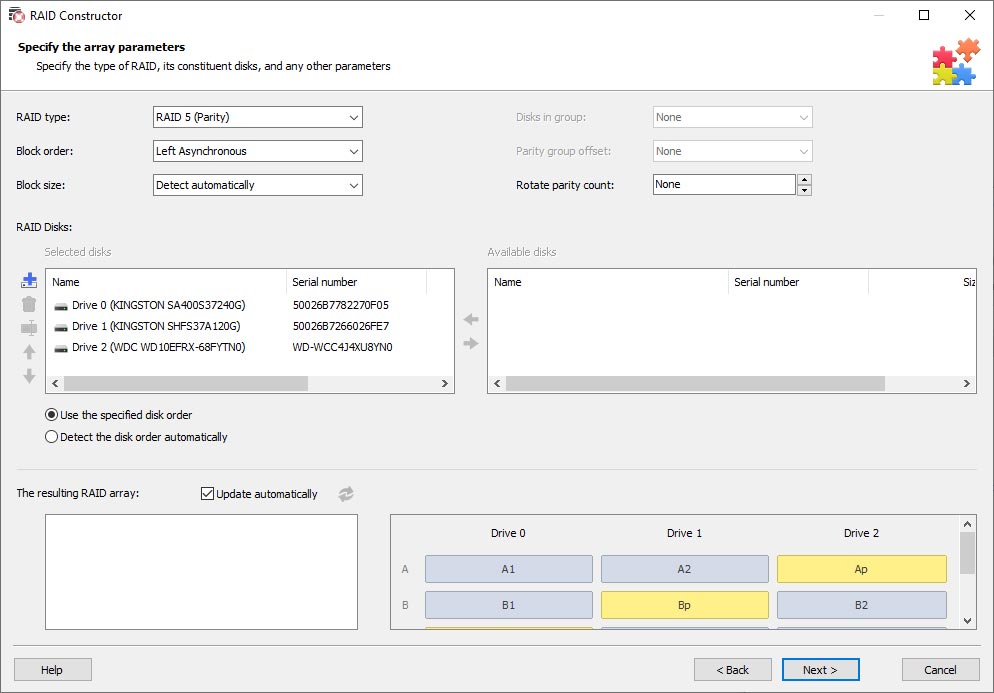
Manual mode: set RAID type, block order and size, arrange the disks, and see the resulting block layout at the bottom.
Hetman RAID Recovery covers NAS and software-defined storage
Listed platforms include Synology, QNAP, NETGEAR ReadyNAS, Thecus, Buffalo, ASUSTOR, TerraMaster and UGREEN, plus TrueNAS, OpenMediaVault, Unraid and StarWind. It handles Linux MD, LVM, Windows Storage Spaces, and multi-disk ZFS and Btrfs pools.
Hetman RAID Recovery can mix physical disks, images and remote devices
One array can be built from local disks, sector-by-sector images, virtual disks and block devices reached over SSH. If a NAS still boots, you can connect to it remotely without pulling the drives.
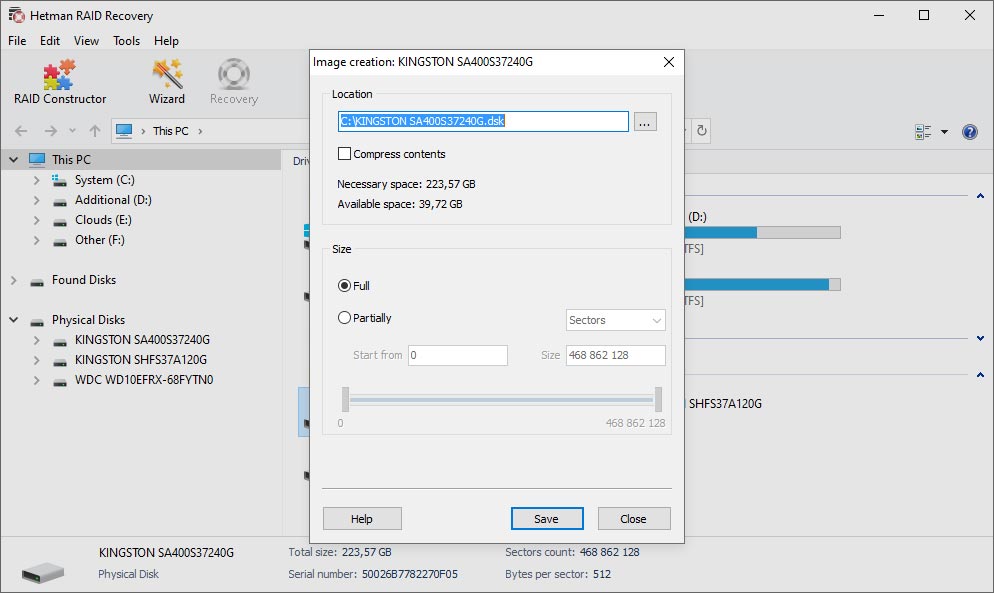
Imaging a member disk first means later work runs on the copy, which reduces stress on a failing drive.
Hetman RAID Recovery opens encrypted and virtual storage inside arrays
After the rebuild, it can analyze BitLocker, LUKS, VeraCrypt and FileVault volumes, Windows EFS and Linux fscrypt, given the correct credentials. It also opens virtual disks and snapshots stored on the array.

The BitLocker dialog takes a password, a 48-digit recovery password or a startup key file. Without one of those, the volume stays closed.

The Mount Disk dialog lists the supported images: RAW, EnCase, AFF, Apple images and virtual machine disks.
Benefits
- Your disks aren't touched. The reconstruction is virtual, so a wrong guess costs time rather than data.
- Failed hardware doesn't block you. The disks can move to another PC, independent of the dead controller or NAS.
- You can compare it with a lab quote. Hetman's own price list gives typical RAID lab costs of $1,000 to $4,000 or more. Software won't replace a lab for physical failures, but a logical failure may not need one.
Real-World Uses
- A Synology or QNAP unit dies but its disks are fine. Connect them to a PC, let the program detect the array, then copy the shares to a new drive.
- A controller failed in a Dell server. The disks hold PERC metadata, so the array can be read without an identical replacement card.
- Someone rebuilt a degraded RAID 5 with the wrong disk order. The Constructor tests the original layout virtually.
- A ZFS pool on a home server won't import. RAID Recovery reads multi-disk ZFS, including RAIDZ levels.
- Windows Storage Spaces disappeared after a failed update. The program reconstructs it independently of the operating system.
Who It's For, and Who Should Skip It
Buy it if you're comfortable pulling drives and connecting several disks to one PC, your array has a logical failure, and the data is worth more than the license. Small IT firms will want Office, and recovery shops Business.
Skip it if your array is healthy and still assembled: Partition Recovery can scan it for less, including over SSH or iSCSI. Skip it too if more disks have physically failed than the RAID level can tolerate, because missing parity can't be invented. If the data is critical and you aren't confident, stop and call a lab, as DIY mistakes on a degraded array can make things worse. You'll also need enough SATA ports or adapters for every disk.
Usage Guide
- Power down the NAS or server. Label the disks in order and connect them to a separate computer. Don't let any OS initialize them, and run the program with administrator or root rights.
- If a disk is unstable, image it first and mount the image.
- Open RAID Recovery and check RAID Volumes for an automatically detected array.
- If nothing appears, open RAID Constructor and try the automatic search or your manufacturer's presets, then manual settings.
- Preview each candidate. The right configuration shows expected folders and file contents without obvious corruption.
- Scan the rebuilt volume, preview your important files, and buy the edition that fits your disk count.
- Save everything to a separate disk with enough room.
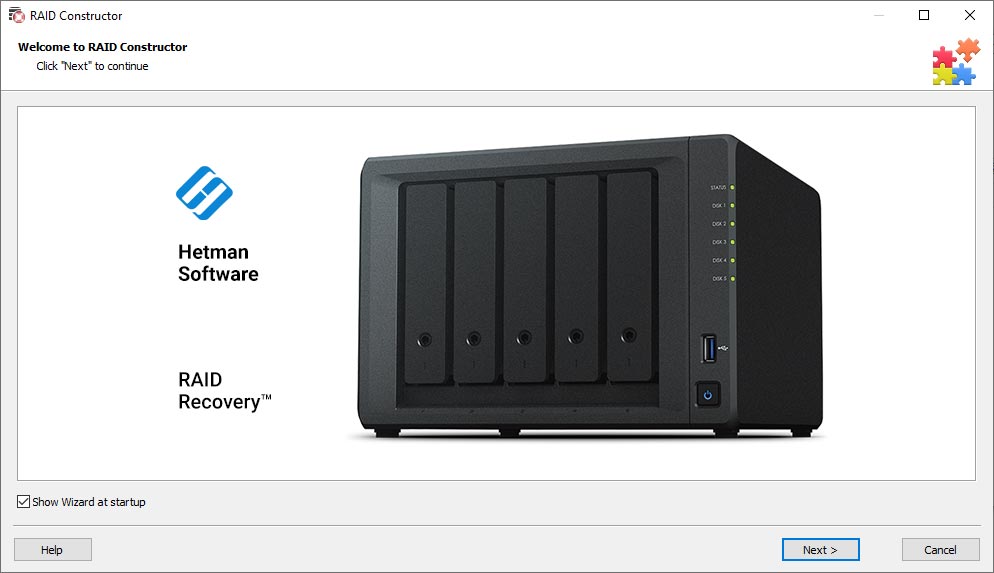
The RAID Constructor wizard starts here when automatic detection doesn't find your array.
Where it falls short
- Disk limits on the cheaper editions. A 6-bay NAS needs the $497.95 Business edition, even for a home user, unless the array has fewer members.
- No guarantee with too many failed disks. Results depend on RAID level, surviving members and overwrites. Hetman's own policy rules out refunds for partial results of this kind.
- Manual configuration is expert work. The presets help, but stripe sizes and parity delay aren't beginner concepts.
- Not many ports on most PCs. One reviewer below had to image each disk in turn because of a shortage of SATA ports.
What Users Say
We found no independent lab test of this program. Hetman Software as a company scores 3.8 out of 5 on Trustpilot from 88 reviews on November 6, 2026, split between 74% five-star and 24% one-star, and RAID jobs account for many of the positive stories. Many of those five-star reviews were posted within a few weeks in spring 2025. Trustpilot blocks direct access, so excerpts reached us through a page summarizer.
Praise on Trustpilot
"It successfully recovered all of my data from a RAID 6 array on my Thecus N7700Pro NAS." Alasdair Turnbull, March 2025
"I successfully recovered my data from the Netgear NAS RND4000V2 with Hetman RAID Recovery." customer, Ukraine, May 2025
"It was the only one that recognised my RAID volume and I am currently recovering my files." José Fernandes, updated November 2022, in a review titled "Everything was great until entering the licence registration"
Complaints on Trustpilot
"They refused it, because there is a free try you can download." Leo Blok, 1 star, October 2025, about Partition and RAID recovery tools
"But in the end it could not read my hard drives" customer, Australia, 1 star, May 2025, product not named
On Hetman's own review page
The vendor shows six RAID Recovery reviews, all five stars. The page is moderated, but the details are informative.
"My QNAP TS-419P+ RAID 5 NAS failed due to a power loss while booting up. Could not access my data. Hetman RAID Recovery was able to extract the data. I didn't have enough sata ports so I had to image each disk with the HDD1 attached and then with each other drive in the array in turn." Ivan Morrone, December 2023
"It is with the help of Hetman RAID Recovery that I managed to recover data from a crashed RAID 5 array where two out of the four disks lost power simultaneously." Mikhail, August 2022
"After a disk failed in RAID 5, it was replaced but in an incorrect manner. After I turned the computer on again, the RAID was gone. This tool was the only program that helped me to rebuild the array." Aleksandr, September 2022
The pattern: NAS owners regularly report success after other tools failed, and a free preview means you can verify that for your own array. Complaints concern refunds and cases where drives couldn't be read.
Comparisons
RAID Recovery vs UFS Explorer RAID Recovery
UFS Explorer RAID Recovery for Windows lists at $145.75 on this site and is a long-standing rival for the same job. Compare it with Hetman's disk limits in mind: a Hetman array of more than 3 disks costs $397.95 or more. Try both trials on your array and see which finds your files.
RAID Recovery vs Hetman Partition Recovery
Partition Recovery ($67.95 Home) reads an array only when something else has already assembled it. RAID Recovery reconstructs a broken one from its members. Multi-disk ZFS and Btrfs also need RAID Recovery.
Editions and Pricing
| Edition | Price | RAID member disks | Allowed use |
|---|
| Home | $197.95 | Up to 3 | Personal, non-commercial |
| Office | $397.95 | Up to 5 | Internal business and IT use |
| Business | $497.95 | Unlimited | Commercial client recovery |
Each is a lifetime license for one computer, picked from the Licenses menu on the order page. You can step up later by paying the difference. For a company with many machines, Hetman also sells an Unlimited License.
FAQs
Do I need to know my RAID settings to use Hetman RAID Recovery?
No. Hetman RAID Recovery reads level, disk order and stripe size from the disks' metadata when it's present. If it isn't, the RAID Constructor can search for possible configurations.
Can Hetman RAID Recovery recover a RAID 5 with two failed disks?
Not in full, in general. RAID 5 tolerates one lost member, so Hetman RAID Recovery has limited data to work with when two are truly gone. If a disk only dropped out and can still be read, chances are better. Preview before you buy.
Can Hetman RAID Recovery connect to a NAS over the network?
Yes, if the NAS still runs and offers SSH access to its disks. Hetman RAID Recovery adds them as remote sources without pulling any drives.
What if Hetman RAID Recovery finds several possible configurations?
Preview each one before a full scan. In Hetman RAID Recovery, the right one shows expected partitions, folders, names and file contents without obvious corruption.
Can Hetman RAID Recovery rebuild Windows Storage Spaces and Linux MD arrays?
Yes. Hetman RAID Recovery reconstructs Windows Storage Spaces, Linux MD RAID and LVM independently of the original operating system, so the disks can be read on another computer.
Does the Hetman RAID Recovery license expire?
No. Hetman RAID Recovery is a perpetual license for the version you buy. A one-year updates and priority support plan is optional at $19.95.
System Requirements
- Windows, macOS or Linux (the vendor doesn't publish minimum versions)
- Administrator or root rights for low-level disk access; root on any remote device reached by SSH
- Enough SATA, SAS or USB connections for every member disk, or disk images of them
- A separate destination big enough for all recovered data
Conclusion
Hetman RAID Recovery is worth buying when an array has a logical failure and a lab quote runs into four figures. The one reason to choose it is that you can watch it rebuild your array and preview your files for free before spending anything, without writing to the disks. The main reason not to is price against disk count: above 3 disks you're paying $397.95 or more, and refunds won't cover a partial result. If the preview shows your files, it's good value next to a lab; if it doesn't, you've lost nothing.
Download Free TrialBuy Now