Hetman Photo Recovery: Get Deleted Photos and RAW Files Back From Cards and Drives
Hetman Photo Recovery is a $47.95 one-time program for Windows, macOS and Linux that recovers deleted or lost photos and camera RAW files from SD cards, USB drives, cameras, hard drives and SSDs, even after formatting. It suits photographers and families who lost pictures and want a step-by-step wizard. It finds images only, so videos and documents need a different tool.
You formatted the wrong card, or a card that held a wedding or a holiday now asks to be formatted. The first rule: take it out of the camera and write nothing to it.
Quick facts
- Version: 7.3, released October 20, 2026
- Developer: Hetman Software, Ukraine
- Platforms: Windows, macOS, Linux (installer or portable version on Windows)
- Formats: JPEG, PNG, TIFF, BMP, GIF, PSD and RAW files including CR2, CRW, NEF, ARW, DNG, RAF, PEF and X3F
- Price: $47.95 Home, one-time lifetime license for 1 computer
- Trial: scan and preview for free, saving files needs a registration key
- Guarantee: 30-day conditional money-back guarantee
- What we checked: Windows installer 71.5 MB, dated October 20, 2026, and the three edition prices on the order page on November 6, 2026. We didn't run a recovery ourselves.
Before you buy
Scan the card with the free version and open your photos in the preview before paying. Hetman generally won't refund you if the trial already showed the photos missing or damaged, if you skipped the trial, or once the key has saved files. The $47.95 Home edition is for personal use. A wedding photographer recovering work for a business needs Office, and recovering clients' cards for a fee needs Business.
Download Free TrialBuy Now
Overview
Photo Recovery uses the same file system analysis as Hetman's Partition Recovery but filters everything down to images. That's useful: instead of sifting through thousands of system files, you see a gallery of what can be restored. A wizard walks you through choosing a drive, picking the scan type and selecting photos.

The wizard's first screen lists logical drives, removable storage and physical disks, and tells you to use a card reader if your camera doesn't appear.
If the camera doesn't show up as a drive, pull the card and connect it through a reader. Many phones won't appear as a disk at all, so the software only reaches their internal storage when the phone exposes it as accessible storage.
Features
Hetman Photo Recovery reads camera RAW formats as well as JPEG
Hetman lists RAW files from Canon, Nikon, Sony, Fujifilm, Pentax, Olympus, Panasonic and Sigma cameras, alongside everyday formats and Photoshop PSD files.
Hetman Photo Recovery recovers after formatting, not only deletion
Fast Scan finds freshly deleted photos from file system records. Full Analysis goes sector by sector for formatted cards, lost partitions and RAW volumes. Content-aware analysis then looks for image signatures when no records remain, though those photos lose their names, folders and dates.
Hetman Photo Recovery checks images before listing them
The program validates detected images internally and filters out invalid results, which reduces the junk you have to go through. You still confirm each picture yourself in the preview.
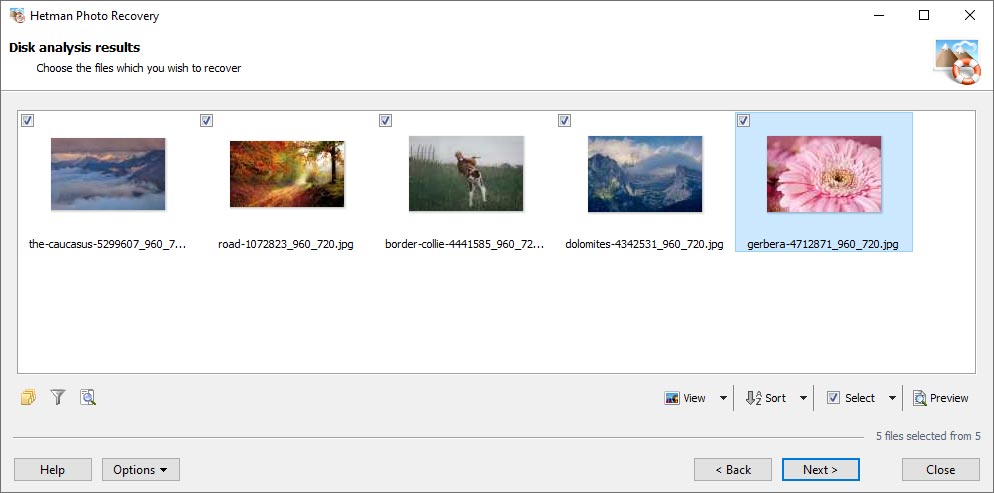
Disk analysis results: thumbnails of recoverable photos with checkboxes, plus view, sort, select and preview controls.
Hetman Photo Recovery narrows large results with filters
You can search for selected image types only, and filter by date and size, which helps find one shoot on a large card or drive.
Hetman Photo Recovery shows a full-size preview
Thumbnails, a built-in viewer and full-screen preview show the actual image, so you can spot damage before spending anything. Scans can be saved and resumed without rescanning.
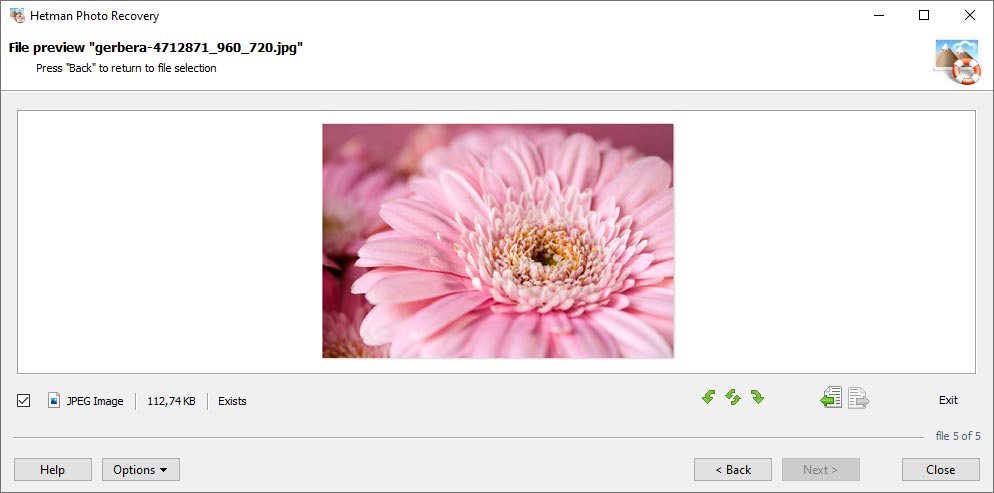
The file preview shows the recovered image with its size and status, one file at a time.
Benefits
- Less to wade through. A results list of photos only is far easier for a non-technical user than a whole-disk dump.
- You see the pictures first. Paying only after the preview takes most of the risk out of the purchase.
- Lab prices avoided. For a logical problem on a working card, software costs a fraction of sending it away.
Real-World Uses
- You formatted an SD card in the camera before copying it. Connect it through a reader, run Full Analysis, and save the images to your PC.
- A card now shows as RAW or asks to be formatted. Decline, and scan it directly.
- Holiday folders were deleted from a laptop and the Recycle Bin emptied. Fast Scan looks for them on the disk.
- A photo library sat on a partition that disappeared during an OS reinstall. Full Analysis searches for the previous file system.
Who It's For, and Who Should Skip It
Buy it if you lost photos, and only photos, and want a guided process. It fits hobby photographers, parents and anyone with a card that failed in a logical way.
Skip it if you also need videos from the same card: Photo Recovery doesn't handle them, and Hetman points you to Partition Recovery. The same goes for encrypted volumes, virtual disks and forensic images. A card that isn't detected at all needs a lab. If you're comfortable with command-line tools, the free PhotoRec can recover photos by signature, without keeping names or folders.
Usage Guide
- Stop shooting. Remove the card, and connect it with a card reader. Install the program on your computer's own drive.
- Start the wizard and pick the card or disk.
- Choose Fast Scan for a recent deletion, or Full Analysis after formatting or damage. Set file types, date or size filters if you know them.
- Check the thumbnails and open full previews.
- Buy and enter a key if you're happy. You don't need to scan again.
- Save to a different disk, a ZIP archive or FTP. Never back to the same card.
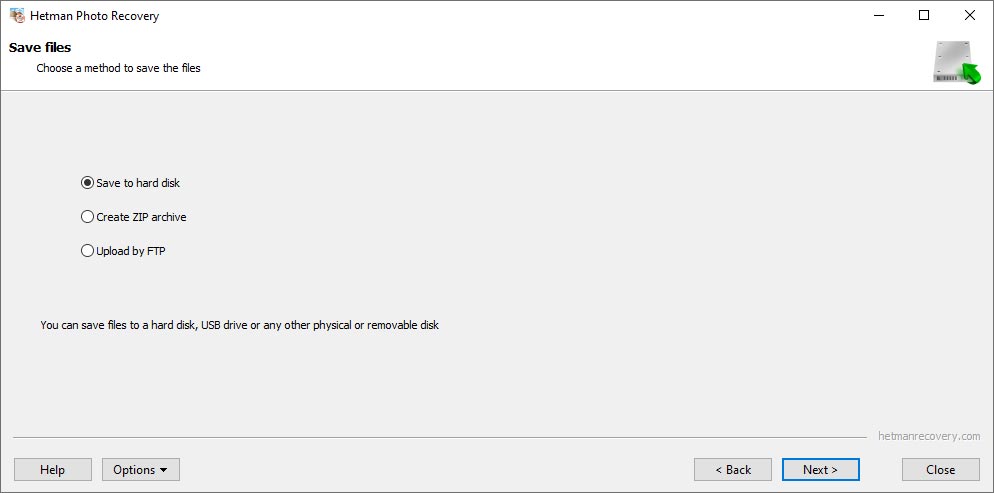
The final wizard step: save to a hard disk, create a ZIP archive or upload by FTP.
Where it falls short
- Overwritten photos are gone or partial. If you kept shooting after the loss, some images may be intact while others are damaged.
- Names, dates and folders may be lost. Photos found by signature come back with generic names, and scans can show several copies, including thumbnails.
- SSDs with TRIM may hold nothing. Once the drive has processed the blocks, the data isn't there to find.
- Independent testing is old. The only published head-to-head test we found dates from 2009.
What Users Say
Hetman Software as a company scores 3.8 out of 5 on Trustpilot from 88 reviews on November 6, 2026, split between 74% five-star and 24% one-star. Few of those name Photo Recovery. Trustpilot blocks direct access, so excerpts reached us through a page summarizer.
Trustpilot
"I helped restore important photos after improper formatting. I recommend it to everyone!" Darran Brien, May 2025
"we almost lost years of family pictures when our RAID array broke after a sudden power surge." Taha Al-Khalidi, April 2025, in a review titled "Our Family Photos Rescued"
"every time the files recovered were 0KB in size with no data." William, 1 star, November 2019, product not named
On Hetman's own review page
The vendor shows 18 Photo Recovery reviews averaging 4.89. The page is moderated, and most are years old.
"I'm not an IT person, just an average person who accidentally deleted files from a jump drive and I easily navigated this software." Marie Savage, July 2016
"A familiar photographer recommended Hetman Photo Recovery. It recovered all the photos in the RAW format from my damaged memory card." Igor Mokshin, December 2014
"I recovered my entire photo archive after a file system error. I am a freelance photographer and mostly work at proms and graduation ceremonies at schools and universities." Artiom Sidnev, February 2011
An older independent test
An October 2009 comparison by Shweta Sharma, reposted on NYU Tandon's site, tested four tools on a 1 GB USB card with 121 deleted images. Hetman recovered 109 fully and 11 partially, behind Adroit Photo Recovery (120 and 1) and Digital Photo Recovery (113 and 8). That version didn't detect the drive without a restart of the app and didn't seem to support RAW, so the result says little about version 7.3, which is a very different program.
The pattern: non-technical users praise the wizard, and photographers report RAW success. Complaints sit at company level, about corrupted results and refunds. Current independent data is thin, so your own preview counts for more than any review.
Comparisons
Photo Recovery vs Hetman Partition Recovery
Partition Recovery costs $67.95, uses the same analysis technology, and adds video, documents, archives and other file types, so it's worth the extra $20 if your card held video. Choose Photo Recovery if photos are all you need and you prefer the simpler view.
Photo Recovery vs Stellar Photo Recovery
Stellar Photo Recovery for Windows lists at $49.99 on this site, nearly the same price. That listing is the Windows version; Hetman also has macOS and Linux downloads. Compare what each free preview finds on your own card before choosing.
Editions and Pricing
| Edition | Price | Allowed use |
|---|
| Home | $47.95 | Personal, non-commercial |
| Office | $137.95 | Internal company use |
| Business | $237.95 | Data recovery services for clients |
Each is a lifetime license for one computer, picked from the Licenses menu on the order page. The editions differ in permitted use, and you can upgrade by paying the difference.
FAQs
Can Hetman Photo Recovery get photos back from a formatted SD card?
Yes, often. Hetman Photo Recovery uses Full Analysis and signature search on formatted cards, provided the photos weren't overwritten. Original names and folders may not survive.
Does Hetman Photo Recovery work with iPhones and Android phones?
Only when the phone's storage appears as an accessible disk. Hetman Photo Recovery reads phones and cameras that do, and otherwise you need to remove the memory card and use a reader.
Why does Hetman Photo Recovery show the same photo several times?
Hetman Photo Recovery can find deleted originals, edited copies, thumbnails and RAW files, or the same image by different scan methods. Compare them in the preview and pick the best.
Does Hetman Photo Recovery recover videos?
No. Hetman Photo Recovery covers images and camera RAW files only. For video, use Hetman Partition Recovery.
Can I recover photos if I kept using the memory card?
Partly, perhaps. Hetman Photo Recovery can't restore overwritten data, so results depend on how much was written. Some photos may stay intact while others are damaged. A free scan will show you.
Is Hetman Photo Recovery a subscription?
No. Hetman Photo Recovery is a one-time purchase, and your version keeps working. A one-year updates and priority support plan is optional at $19.95.
System Requirements
- Windows, macOS or Linux (the vendor doesn't publish minimum versions)
- Administrator or root rights for direct disk access
- About 72 MB for the Windows installer
- A card reader for most cameras, and a separate drive for the recovered photos
Conclusion
Hetman Photo Recovery is worth $47.95 if you lost pictures and want a simple wizard, particularly with RAW files. The one reason to buy it is the photo-only results view with a free preview of each image first. The main reason not to is its scope: if your card also held video, buy Partition Recovery for $20 more. Scan first, and pay only if your photos appear intact in the preview.
Download Free TrialBuy Now