Cisdem Data Recovery for Mac: Get Back Deleted, Formatted and Lost Files
Cisdem Data Recovery for Mac is a $149.95 one-time-purchase Mac app that scans internal and external drives, SD cards and USB sticks for deleted or lost files and restores them, with monthly and annual plans for a single rescue. The free trial shows you what it can find before you pay.
You emptied the Trash, formatted the wrong card, or a drive stopped behaving. Until something overwrites those sectors, the files are usually still there. The app's job is to find them, show them to you, and copy them to a safe disk.
Quick facts
- Version: 20.6.0, released June 1, 2026
- Developer: Cisdem
- Platform: macOS 10.15 Catalina through macOS 27 Golden Gate, Intel and Apple Silicon. A separate Windows version exists.
- Recovers from: HDD, SSD, Fusion Drive, SD and CF cards, USB drives, cameras, iCloud
- File systems: APFS, HFS+, HFS X, FAT16, FAT32, exFAT, NTFS
- Price: $149.95 lifetime for one Mac at checkout
- Trial: scan and preview for free. Recovery and repair need a license.
- Guarantee: 30-day money back
- What we checked: installer size 83.6 MB from the vendor's download link, version history and tech specs on the vendor's site, order page price $149.95 for the lifetime license on November 6, 2026. We did not run a recovery on a failed drive.
Download Free TrialBuy Now
Before you buy
Stop writing to the affected drive now. Every new file, including this installer, can overwrite what you want back, so download the app to a different disk if you can. Run the free scan first: if the file you need shows up and previews properly, the purchase is much safer. You also need a second drive, because Cisdem Data Recovery can't safely save recovered files back to the disk they came from.
Overview
Cisdem Data Recovery works in three steps: pick a location, scan, then filter and preview the results and save them. A quick scan runs first and finds recently deleted items, and a deep scan digs out older files, including RAW finds that have lost their names. Results sit in a sidebar by type: pictures, videos, documents, audio, archives, emails, unsaved files and browser bookmarks.
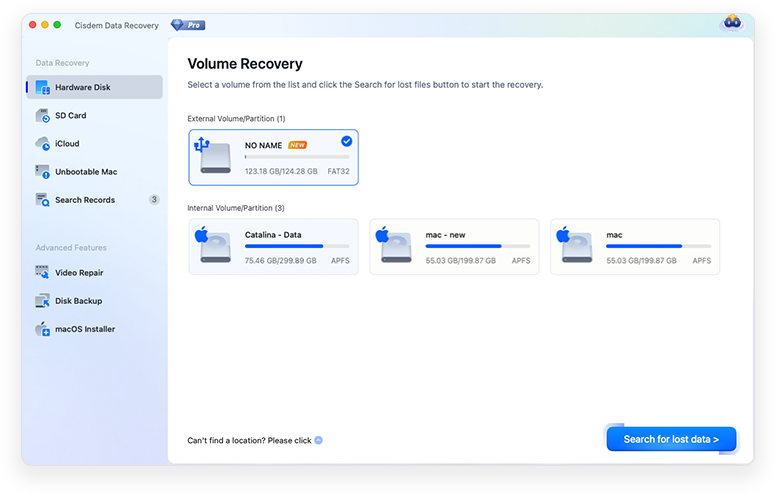
The start screen lists every volume, with SD Card, iCloud, Unbootable Mac, Video Repair, Disk Backup and macOS Installer in the sidebar.
Features
Recover files after deletion, formatting or a crash
Cisdem Data Recovery for Mac handles emptied Trash, formatted volumes, partition problems, interrupted macOS updates and software crashes. A normal macOS erase leaves the data area alone, so a formatted disk is often recoverable. A low-level format is not.
Hundreds of file types, including camera RAW
Cisdem Data Recovery reads common photo formats plus camera RAW such as CR2, NEF, ORF, RAF and DNG, video such as MOV, MP4, MKV and MXF, Office, iWork and PDF documents, audio, archives, Mail and Outlook data, and browser bookmarks. There is a dedicated view for unsaved documents, which helps after a Word or Pages crash.
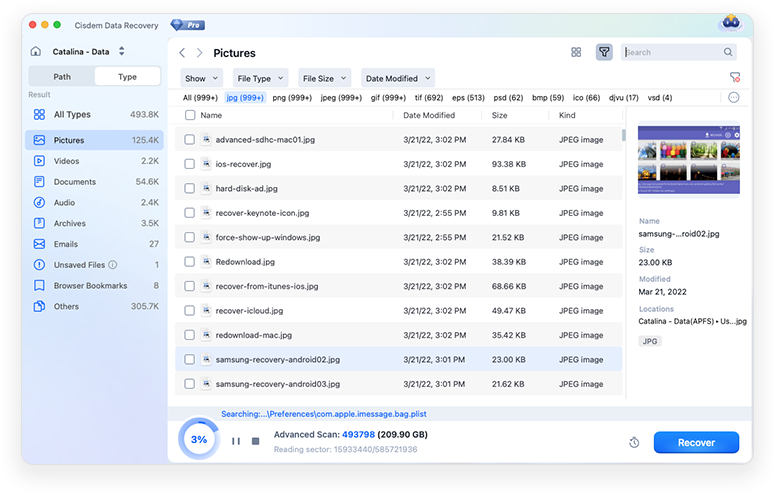
A quick scan in progress. Documents are grouped into folders by extension while the scan runs.
Preview, filter and search before you save
Cisdem Data Recovery lets you search by name or extension, filter by size and type, and preview pictures, videos and documents before recovering. You can save a scan record and reload it later, so a long deep scan doesn't have to be repeated.
Repair damaged photos, videos and documents
Cisdem Data Recovery has a repair tool for files damaged by a power cut or disk fault: JPG, PNG, BMP, GIF and TIFF photos, batches of videos with or without a sample clip, and Word, Excel and PDF files. Reviewers report that this doesn't rescue everything.
Recover from iCloud and from a Mac that won't start
Cisdem Data Recovery can pull files directly from iCloud in two modes. For a Mac that won't boot, it runs from Recovery Mode. It can also create a bootable macOS installer from Tahoe and earlier versions.
Back up a failing drive first
Cisdem Data Recovery can create a drive backup so you recover from the copy rather than stressing a disk that is dying. You can save results to a local drive or to Dropbox, OneDrive, pCloud or Box.
Benefits
- You see the recoverable files before spending anything, so you pay only if your file is really there.
- One lifetime payment covers future accidents, not just today's.
- Saved scan records protect you from losing a 10-hour scan to a closed lid or a restart.
- Repair and disk imaging are in the same app, which saves buying separate tools after a bad day.
Real-World Uses
- A photographer formats the wrong SD card on a shoot and pulls the RAW files back onto the Mac that evening.
- A student loses an unsaved Word essay after a crash and checks the Unsaved Files view.
- An external drive starts throwing errors, so you image it first and scan the copy.
- A Mac won't boot after an interrupted update, and you copy your documents out from Recovery Mode to a USB drive.
- You delete a folder from iCloud and download what is still retrievable.
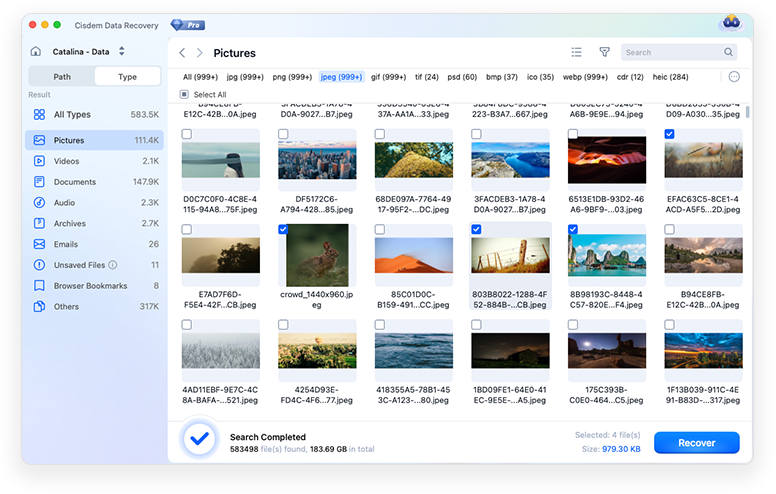
After a completed scan, photos appear as thumbnails. Tick the ones you want and click Recover. These finds have generated file names.
Who It's For, and Who Should Skip It
Cisdem Data Recovery suits home users, freelancers and small offices whose Mac still sees the affected drive and who want a simple, guided recovery. It is a sensible buy if you have lost data once and want a tool ready for next time.
Skip it if your drive clicks, doesn't appear in Disk Utility, or holds irreplaceable business data: stop and call a recovery lab, since this software can't work on a drive Disk Utility can't see. Skip it too if a recent Time Machine backup has your files, because restoring from that is free. If you have one job to do, the $59.95 monthly plan is far cheaper than the lifetime license.
Usage Guide
- Download the DMG to a disk other than the one you are recovering from, then drag the app to Applications. macOS will ask for your password.
- Open Cisdem Data Recovery and choose Hardware Disk, SD Card, iCloud or Unbootable Mac.
- Select the volume and click Search for lost data. Let the scan finish.
- Use Path or Type view, the search box and the filter to find your files, then preview them.
- Tick what you want, click Recover, and save to a different drive or a cloud folder.
Tips for a better result
- Save the scan record before closing the app.
- Connect an external drive directly with a good cable: a drop-out mid-scan can give a Disk Read Failed error.
- If a file from the named results won't open, look for a copy among the finds with random names.
- Mount the drive in Disk Utility first. An unmounted volume can't be scanned.
Where it falls short
Time is the first cost: Cisdem itself quotes around 10 to 12 hours for a deep scan of a healthy 1 TB drive. Results can be messy, because several scan methods can find the same file and RAW finds lose their names and folders. Not every format previews, so you sometimes can't tell whether a file is good until you have recovered it. Overwritten data is gone, and SSD TRIM limits what any tool can get back from an SSD. The trial can't recover even one test file.
What Users Say
Trustpilot: 4.9 out of 5 from 304 reviews of Cisdem
These cover all Cisdem products, and the ones we read mostly praise support rather than this app. Trustpilot notes the company has not invited reviews recently.
- "The customer service is amazing. I always get a fast response from support" John, April 7, 2026
- "I had a problem with my licence, and they solved it in under 5 minutes." Simon, August 27, 2026
MacUpdate: 3.9 out of 5 from 20 ratings
This score is lower and more mixed than the others. It includes 1-star ratings from 2022 and 2023 with no comment, and one 5-star rating from Cisdem Inc. itself.
- "it has found me the documents in just like 10 minutes. The recovery process was straightforward" markjackson, August 27, 2026, version 20.6.0
- "Cisdem Data Recovery was one of the few that actually felt built for normal Mac users instead of technicians." LoisVale, May 11, 2026, version 20.0.0
- "It worked perfectly to restore a lost client project folder for me." dewey98, February 3, 2026, version 20.0.0, 4 stars
Slashdot: 4.8 out of 5 from 4 reviews
These reviews list pros and cons, and the cons are the useful part. Two of the four reviews on that page are from Windows users, so they are left out or marked here.
- "Not all found Pages documents can be previewed," Karen M., April 24, 2026
- "some photos are severely damaged and cannot be opened." Anonymous verified reviewer, June 13, 2025, after recovering a formatted USB drive on a Mac
- "some damaged Word files cannot be repaired." Daniel S., March 19, 2026, on the Windows version
SoftwareSuggest: 4 out of 5 from 1 review
- "this software literally saved months of work." Ann Z., engineer, June 30, 2025. She also says some files show blank thumbnails, so you have to recover them before you can check them.
Independent write-ups
- "Cisdem Data Recovery 20.6 is a well-equipped Mac recovery application with a clear workflow" and it "deserves consideration when macOS still recognises the affected device and the loss is logical rather than physical." Harrij Mensinga, Mac App Critic, whose cons include "Large scans can take many hours."
- "Cisdem Data Recovery works as well as any similar recovery tool, but it also packs some additional features you don't always find in such applications." Softpedia, as quoted on Cisdem's site
- "It may not be the fastest file recovery tool, but the accuracy of the results exceeds the average recovery rate of other similar programs." Ioana Dumitrescu, Mac Informer, as quoted on Cisdem's site
Customers quoted on Cisdem's own site
Cisdem shows 4.8 out of 5 from 119 reviews. The vendor hosts and chooses these, so give them less weight.
- "Cisdem worked flawlessly on my SanDisk SSD. It detected the device immediately and helped me recover over 100GB of lost videos from it." Thomas
- "I'm not good at the technical stuff, but Cisdem was incredibly easy to use." Edward
The pattern: people like the simple interface, the preview and the support replies, and many got back what they lost. The recurring complaints are formats that won't preview, damaged files that stay damaged and long scans. Rating counts are small outside Cisdem's own site, so MacUpdate's 3.9 is a useful counterweight to the high scores.
Comparisons
Cisdem Data Recovery vs. Time Machine
Time Machine restores cleanly and for free, but only what it backed up before the loss. Cisdem Data Recovery is for when there is no backup: it searches the disk itself, gives no certainty of success, and costs money. Check Time Machine first.
Mac version vs. Windows version
Cisdem Data Recovery for Windows is a separate product with its own buy page and license. A Mac license plan on this page covers one Mac.
Editions and Pricing
| Plan | Price | License term | Devices |
|---|
| Monthly | $59.95 (list $69.95) | One month | One Mac |
| Annual | $99.95 | One year | One Mac |
| Lifetime | $149.95 | Lifetime | One Mac |
The monthly and annual prices are from Cisdem's buy page. The Buy Now button on this page is for the Lifetime plan. Cisdem offers 30% off to academic users and to owners of another Cisdem product.
FAQs
Is Cisdem Data Recovery for Mac free?
Cisdem Data Recovery for Mac is free only for scanning and preview. Saving recovered files or repairing them requires a license.
Does Cisdem Data Recovery work on Apple Silicon Macs?
Yes, Cisdem Data Recovery runs on Intel and Apple Silicon Macs. The vendor names M1 to M4 and T2 Macs, and the tech specs run through macOS 27 Golden Gate.
Can Cisdem Data Recovery recover files lost a long time ago?
Cisdem Data Recovery can recover old files as long as nothing has overwritten them. Age alone isn't the problem, but the longer a drive stays in use, the lower the odds.
Why did Cisdem Data Recovery find more files than I lost?
Cisdem Data Recovery uses several scan methods, and each can list its own copy of a file. Try the copies one by one and keep the one that opens.
Why do recovered files have random names?
Those files came from RAW recovery, which reads file content after the directory information has been damaged. Cisdem Data Recovery can bring the data back but not the original name or folder.
Can I save recovered files to the same drive?
No. Cisdem advises against it, since writing to the source drive can overwrite the data you are still recovering. Use another disk or one of the supported cloud services.
Why does Cisdem Data Recovery ask for my password?
macOS asks for your login password because the app doesn't come from the App Store. Cisdem says the app is identified by Apple and safe to use.
Is there a refund if the files don't come back?
Cisdem advertises a 30-day money-back guarantee. Read its refund terms before you buy, and use the free scan first, since that shows what can be found.
System Requirements
- macOS 10.15 Catalina, 11 Big Sur, 12 Monterey, 13 Ventura, 14 Sonoma, 15 Sequoia, 26 Tahoe or 27 Golden Gate
- Intel or Apple Silicon processor
- 1 GB RAM or more
- 200 MB free space or more for installation
- A separate drive or cloud account for the recovered files
Conclusion
Cisdem Data Recovery for Mac is worth it if your Mac can still see the drive, you have no backup, and the free scan shows your file. The preview, repair tool and saved scans make it friendly for non-technical users.
At $149.95 the lifetime license is only good value if you expect to need it again. The main reason not to buy it is a physically failing drive, which needs a lab. For one rescue, take the monthly plan.
Download Free TrialBuy Now