At a glance
| App |
Price at checkout |
Free before you pay |
Renews? |
Stands out for |
| Wondershare Recoverit for Mac |
$144.99 Perpetual Plan, 2 Macs |
Recover up to 500 MB |
✗ (Perpetual); monthly and quarterly plans renew |
iCloud recovery, camera-card mode, file repair |
| EaseUS Data Recovery Wizard for Mac |
$119.95 with 1 year of updates, 1 Mac |
500 MB, 2 GB after a social share (Free edition) |
✗ one-time payment |
Biggest free allowance, remote help |
| Stellar Data Recovery Professional for Mac |
$89.99 for 1 year, 1 Mac |
Recover up to 1 GB |
✓ every 12 months |
Unbootable Macs, photo and video repair |
| Cisdem Data Recovery for Mac |
$149.95 lifetime, 1 Mac |
Scan and preview only |
✗ |
Lifetime license, saved scan records, file repair |
| UFS Explorer Standard Recovery for macOS |
$69.95 perpetual, 1 year of updates |
Any number of files up to 256 KB each |
✗ |
Windows and Linux file systems, disk imager |
| Disk Drill |
$89 a year or $149 lifetime (vendor's store) |
Scan and preview only |
✓ yearly plan; ✗ lifetime |
One license for Mac and Windows, 3 devices |
How we picked and what we checked
- We started from the Mac recovery apps listed on this site, kept the ones whose vendors still sell and update them, and dropped iPhone-only tools (they have their own roundup).
- We read each vendor's current version history, Mac system requirements and free-edition limits on the vendor's own pages.
- We opened each order page for the price in US dollars, and compared it with earlier copies of the same pages to tell everyday prices from Black Friday prices.
- We downloaded every screenshot and kept only real windows of the Mac app (one exception, marked in its caption).
- We collected reviews from Trustpilot, magazines and download sites, keeping the complaints as well as the praise.
What we checked: the six order pages, free-edition limits and version histories on November 22, 2026: Recoverit for Mac 15.0.0, EaseUS Data Recovery Wizard for Mac 20.9.0, Stellar Data Recovery for Mac 14.0.0.0 (November 2026), Cisdem Data Recovery 20.9.0 (November 1, 2026), UFS Explorer Standard Recovery 10.23.1 (November 19, 2026) and Disk Drill 6.3.2326 (July 22, 2026). We compared features, prices and free limits and didn't run a recovery on a failed drive, so we can't rank the apps by how many files they find.
Try the free way first
Most lost files on a Mac never need recovery software. Go through these in order, and stop using the disk while you do, because anything you save or install can overwrite what you're trying to get back.
- The Trash. If the Trash hasn't been emptied, open it, select the file and choose File > Put Back.
- Time Machine. Apple's own instructions: open the folder the item was in, open Time Machine with Spotlight, use the arrows to move back through your backups, select the items and click Restore. They return to their original place. Many apps also offer File > Revert To > Browse All Versions for earlier versions of a document.
- iCloud. Files deleted from iCloud Drive and photos deleted from Photos go to a Recently Deleted area first. Check there before anything else if you use iCloud Drive or iCloud Photos.
- The app's own recovery. Office, Pages and many other apps keep autosaved or unsaved versions. Look in the app's File menu before you scan a whole disk.
If none of those has your file, a recovery app is the next step. Each one in this article lets you scan and preview for free, so you can see whether your files are recoverable before you spend anything. For Windows PCs, see our Windows and RAID roundup or the tools under $50 with no subscription.
APFS, T2 and Apple silicon: limits every Mac app shares
All six apps read APFS, the file system every current Mac uses, plus HFS+, exFAT and FAT for external drives and cards. What they can't change is how a modern Mac stores data:
- The internal SSD is the hardest case. Macs with SSDs clear deleted blocks quickly (TRIM), so files deleted from the internal disk some time ago are often gone for good. External hard drives, USB sticks and memory cards give far better odds.
- Encryption needs your password. FileVault and encrypted APFS volumes can only be read with the password or recovery key. Stellar's FAQ states it plainly, and UFS Explorer decrypts APFS only when you give it the key. No app in this list gets around that.
- Security stays on. On T2 and Apple silicon Macs, current versions don't ask you to turn off System Integrity Protection. Stellar, for one, only needs Full Disk Access. Treat any guide that tells you to disable Mac security for a home recovery with caution.
- A dead drive is a lab job. If a drive clicks, isn't detected or won't show up in Disk Utility, no software can help. Stop powering it on and call a recovery lab.
What you can recover before paying
Free recovery allowance on a Mac (MB)
EaseUS Data Recovery Wizard for Mac Free (after a social share)2,048 MB
Stellar Data Recovery for Mac1,024 MB
Wondershare Recoverit for Mac500 MB
Cisdem Data Recovery for Mac0 MB (preview only)
Disk Drill Basic for Mac0 MB (preview only)
From each vendor's free-edition page on November 22, 2026. EaseUS's Free edition starts at 500 MB and doesn't cover SD cards; its trial is a separate download that saves nothing. UFS Explorer Standard Recovery isn't on the chart because its limit is per file: the trial saves any number of files up to 256 KB each, enough for many documents but not for photos or videos.
Wondershare Recoverit for Mac
Wondershare Recoverit for Mac 15.0.0 · macOS 10.10 Yosemite to macOS 26 Tahoe, Intel and Apple silicon · Perpetual Plan $144.99 for 2 Macs · free version recovers 500 MB · Best for: paying once and covering two Macs, iCloud Drive deletions and camera cards.
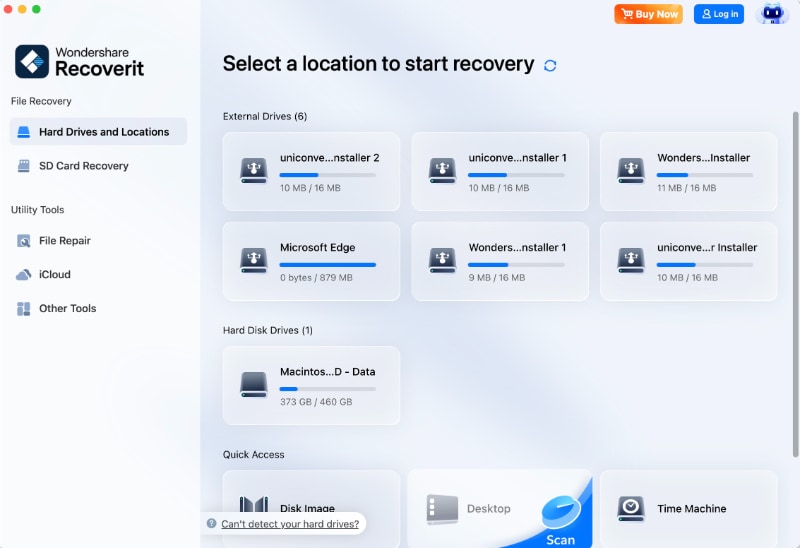
Recoverit for Mac's start screen: the Mac's data volume, plus Quick Access to a disk image, the Desktop, Time Machine, a chosen folder and the Trash.
Wondershare Recoverit for Mac is the most Mac-specific app here. Its start screen offers the Trash, the Desktop, a single folder, Time Machine and disk images next to the drives themselves, and the sidebar adds an iCloud mode that recovers files deleted from iCloud within the past 30 days (it needs an email-based Apple ID). The SD card mode is built for photographers and video makers: it reassembles fragmented 4K and 8K clips and sorts finds by capture time. File Repair for videos, photos and documents sits in the same app, and a bootable USB drive handles a Mac that won't start.
Pricing is where Recoverit differs most. There is no yearly plan on the Mac. The Perpetual Plan at $144.99 covers two Macs and never renews, but it covers version 15 and its minor updates, not the next major version. The Monthly Plan costs $68.84 in Wondershare's Black Friday sale (it was $76.49 on the same page on November 15, 2026, and the order page gives no end date), and the Quarterly Plan is $94.99. Both renew automatically.
What we like
- One payment covers two Macs
- iCloud, Time Machine and Trash as scan sources
- Camera-card mode and file repair included
- 500 MB free is enough to test a few documents
Watch out for
- No yearly plan; the monthly and quarterly plans renew
- Perpetual means version 15 only
- 7-day guarantee only when support can't solve the problem
- Trustpilot complaints about renewals and blocked licenses
What reviewers say
Recoverit (Windows and Mac share one Trustpilot page) is rated 4.7 out of 5 from 6,866 reviews. TechRadar's Krishi Chowdhary tested the shared engine on Windows 11 and reported that "Recoverit successfully identified and recovered the entire dataset without any missing files", but listed "Free plan doesn't save scans" as a con.
On Trustpilot, Giovanna Lo Faro (1 star, October 25, 2026) wrote: "The advertisement is very misleading.You can't recover anything without subscribing." Mr Alan Gough (5 stars, November 20, 2026): "I had a failed HDD 90%full - This recovered it to a HDD".
Download Recoverit for Mac FreeBuy Recoverit for Mac
EaseUS Data Recovery Wizard for Mac
EaseUS Data Recovery Wizard for Mac 20.9.0 · OS X 10.9 Mavericks to macOS 27, Intel, T2 and Apple silicon · $89.95, $119.95 or $169.95, one Mac, no renewal · Free edition recovers 500 MB, 2 GB after a share · Best for: testing for free with real files, and anyone who wants no subscription.
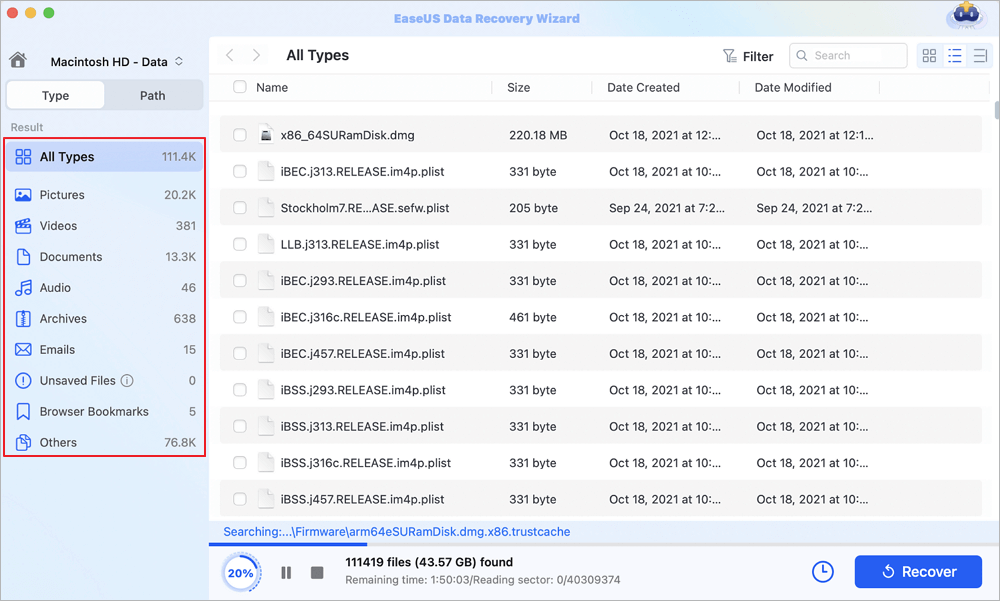
A scan of Macintosh HD - Data at 20%: 111,419 files (43.57 GB) found so far, grouped into Pictures, Videos, Documents, Emails and other types.
EaseUS Data Recovery Wizard for Mac has the most generous free tier in this group. The separate Free edition saves 500 MB, and 2 GB after you share it on social media, though it doesn't cover SD cards, and the trial download (a different file) can scan and preview but save nothing. The paid Pro edition adds SD card recovery with fragmented photo and video rebuilding, Time Machine and iTunes backup recovery, a bootable USB drive for a Mac that won't start, disk images and saving straight to cloud storage. Version 20.9.0 (September 2026) added macOS 27 support.
All three Mac plans are one-time payments labelled "no auto-renewal" on the order page: $89.95 with one month of updates, $119.95 with one year and $169.95 with lifetime updates. They recover the same amount of data; the only difference is how long you get new versions. For a one-off rescue, the $89.95 plan does the job. The same prices were on the page on November 13, 2026, so they aren't Black Friday discounts. Paid users also get free one-on-one remote help, and there's a 30-day money-back guarantee if the software can't solve the problem.
What we like
- Up to 2 GB free with the Free edition
- No subscription on any Mac plan
- Runs back to OS X 10.9 for older Macs
- Free remote help for paid users
Watch out for
- Trial and Free edition are different downloads
- Free edition doesn't cover SD cards
- Deep scans of 1 TB take 10 to 12 hours, by EaseUS's own FAQ
- Heavy upgrade prompts in the app and site
What reviewers say
EaseUS has a Trustpilot TrustScore of 4.9 out of 5 from 39,743 reviews, mostly for its Windows products. Appleosophy (Chris Grainger, April 2022, on a 2019 MacBook Pro) called the Mac app "trustworthy and stable" but warned that for a 1 TB drive "a recovery can take up to 10 – 12 hours".
On Trustpilot, Stefano GUDC (5 stars, February 2026): "I accidentally formatted a Mac drive in MS-DOS and EASEUS managed to recover everything!" Jay Bones (1 star, September 2026): "It says Free trial all over the website, but you download it and NOTHING works until you pay to upgrade".
Download EaseUS for MacBuy EaseUS for Mac
Stellar Data Recovery Professional for Mac
Stellar Data Recovery Professional for Mac 14.0.0.0 · macOS 10.13 High Sierra to macOS 27, Intel (T1, T2) and Apple silicon M1 to M6 · $89.99 for one year on one Mac · free download recovers 1 GB · Best for: the lowest price for a full year, Macs that won't boot, and damaged photos or videos.

Scan results sorted by file type, with a PNG open in the preview window and the Recover button below (from Stellar's version 12 Mac manual).
Stellar Data Recovery Professional for Mac gives you the most for the lowest first-year price. The free download recovers 1 GB, twice Recoverit's allowance. The paid edition scans lost and unmounted volumes, recovers from a Mac that won't start by running from macOS Recovery, reads Time Machine drives that macOS can't use, images failing disks and, since Stellar dropped the separate Premium edition, repairs corrupt JPEG, RAW, MOV and MP4 files too. It works on T2 and Apple silicon Macs with System Integrity Protection left on.
The catch is the term. The $89.99 license lasts one year and is set up to renew every 12 months. Stellar's own store marks that price as a special offer until November 26, 2026, against a $99.99 list price, and sells a lifetime Professional license for $149 (list $199). Version 14.0.0.0 came out in November 2026; the Download button below still served the September 2026 build (version 12.8) on November 22.
What we like
- 1 GB free recovery
- Photo and video repair now included
- Unbootable Mac and Time Machine drive recovery
- No need to disable Mac security
Watch out for
- The one-year license renews unless you cancel
- Large deep scans are slow
- The cleanup extras are the buggy part, per Macworld
- An Upgrade button stays in the app after you buy
What reviewers say
Chris Barylick reviewed it for Macworld in September 2024: "Despite the need for a bug hunt, Stellar Data Recovery for Mac is a good program that is able to dig deep to help reconstruct and recover deleted data." He also wrote that "Stellar's Clean Up Junk Files crashed the application repeatedly and had to be force quit under macOS Sonoma 14.6.1".
MacSources rated it 80% in December 2024 and listed slow scans on large drives as a con. Stellar's Trustpilot page, which covers all its products, showed 4.8 out of 5 from about 5,600 reviews on November 5, 2026.
Download Stellar for Mac FreeBuy Stellar Data Recovery Professional for Mac
If you're torn between EaseUS and Stellar specifically, our EaseUS vs Stellar comparison goes through both in more depth.
Cisdem Data Recovery for Mac
Cisdem Data Recovery for Mac 20.9.0 · macOS 10.15 Catalina to macOS 27, Intel and Apple silicon · $149.95 lifetime for one Mac · free scan and preview, no free recovery · Best for: a simple app you keep for years, with long scans you can save and resume.
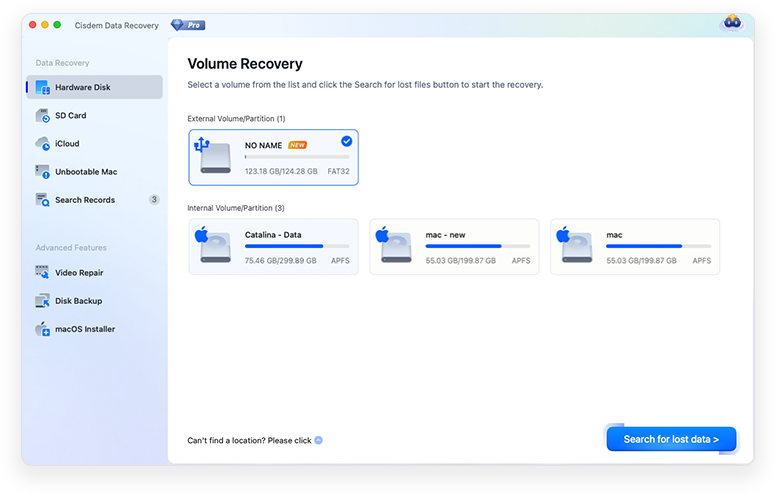
Cisdem's Volume Recovery screen: an external FAT32 volume and three internal APFS volumes, with SD Card, iCloud, Unbootable Mac, Video Repair, Disk Backup and macOS Installer in the sidebar.
Cisdem Data Recovery for Mac covers the same ground as the bigger names: deleted and formatted files, SD and CF cards, iCloud, a Mac that won't boot (it runs from Recovery Mode), a disk backup before you scan a failing drive, and repair for damaged photos, videos and Word, Excel and PDF files. Its most practical touch is the saved scan record: a 10-hour deep scan isn't lost if the lid closes. Version 20.9.0 (November 1, 2026) added macOS 27 compatibility and an updated interface.
The free trial shows what Cisdem can find but recovers nothing, not even a test file. The Lifetime Plan costs $149.95 at checkout for one Mac; Cisdem's own store also sells a One-Month Plan at $59.95 (list $69.95) and a One-Year Plan at $99.95, neither of which renews. The guarantee is 30 days.
What we like
- Lifetime license with no renewal
- Save and reload scan records
- Repair for photos, videos and documents
- Save to Dropbox, OneDrive, pCloud or Box
Watch out for
- No free recovery at all
- Most expensive of the one-Mac lifetime options
- Duplicate finds and nameless RAW files to sort through
- Small number of independent reviews
What reviewers say
Harrij Mensinga at Mac App Critic called version 20.6 "a well-equipped Mac recovery application with a clear workflow", with "Large scans can take many hours." among its cons. MacUpdate users rate it 3.9 out of 5 from 20 ratings, lower than Cisdem's own site shows.
On Slashdot, Karen M. (April 24, 2026) noted: "Not all found Pages documents can be previewed,". On MacUpdate, markjackson (August 27, 2026) wrote: "it has found me the documents in just like 10 minutes. The recovery process was straightforward".
Download Cisdem Data RecoveryBuy Cisdem Data Recovery Lifetime
UFS Explorer Standard Recovery for macOS
UFS Explorer Standard Recovery for macOS 10.23.1 · macOS 11 and later (separate build for 10.9 to 10.15), Intel and Apple silicon · $69.95 perpetual license with 1 year of updates · trial saves files up to 256 KB each · Best for: the lowest one-time price, and disks formatted on Windows or Linux.
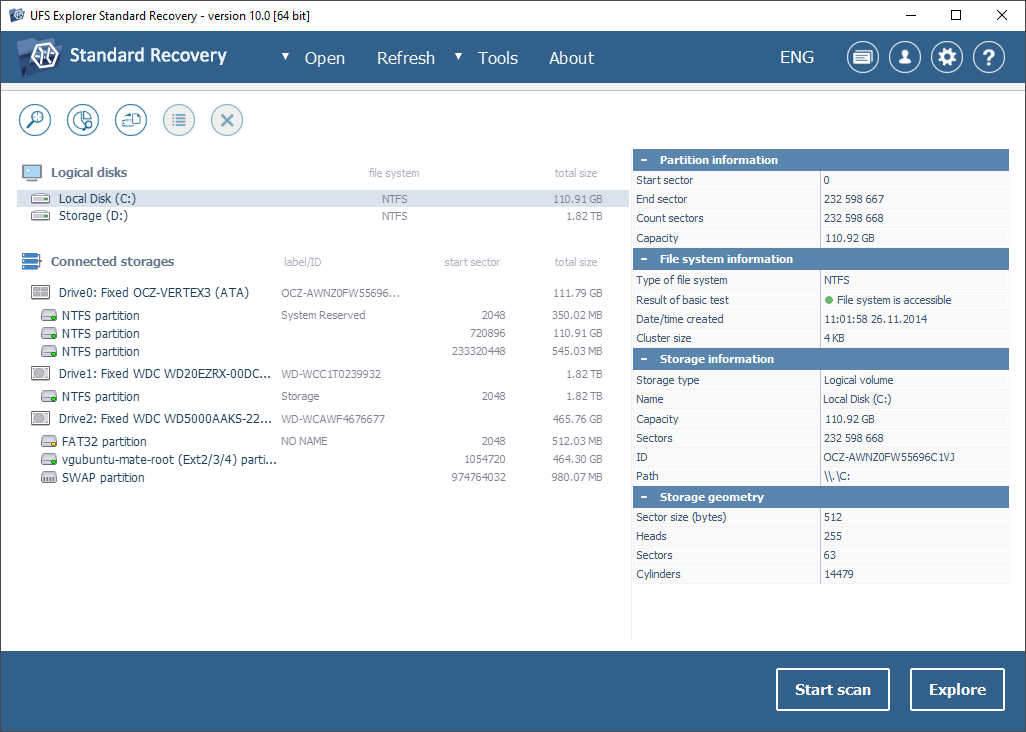
The main window (version 10.0 on Windows, from SysDev's product page; the macOS build has the same layout): connected drives with NTFS, FAT32 and Ext2/3/4 partitions, details on the right, and the Start scan and Explore buttons.
UFS Explorer Standard Recovery for macOS is the technical pick. It reads APFS and HFS+ like the others, but also NTFS, ReFS, Ext4, XFS, Btrfs and ZFS, so a Windows or Linux disk plugged into your Mac is no problem. It opens virtual machine disks, assembles Apple RAID and Linux LVM volumes, decrypts APFS and BitLocker volumes when you give it the key, and has a multi-pass disk imager for failing drives that works fully in the trial. Every operation is read-only. Version 10.23.1 came out on November 19, 2026.
At $69.95 for a perpetual license with a year of updates, it's the cheapest way here to own a recovery tool outright. The trial has no time limit and no scan limit, but saves only files up to 256 KB each, which tests documents well and photos not at all. The interface uses partition and file-system terms, so it suits readers who already know them; it has no iCloud mode, camera-card mode or file repair.
What we like
- $69.95 perpetual license
- Reads Windows, Linux and BSD file systems on a Mac
- Full disk imager in the free trial
- Read-only by design
Watch out for
- Technical interface
- No iCloud, camera-card or repair tools
- Single disks only; RAID and NAS need a higher edition
- Very few public reviews
What reviewers say
Public reviews are thin: TechJockey shows 4.4 out of 5 from 4 verified ratings, with sub-scores of 4.5 for ease of use and 4.6 for support. The unlimited-scan trial is the better test: it shows exactly what it finds on your disk before you pay.
Download UFS Explorer for macOSBuy UFS Explorer Standard Recovery
Disk Drill
Disk Drill 6.3.2326 · macOS 10.15 to 27 · PRO $89 a year or $149 lifetime on CleverFiles' store, Mac and Windows, up to 3 devices · Basic scans and previews free, no free recovery on a Mac · Best for: households with both Macs and Windows PCs, and protecting files before they're lost.
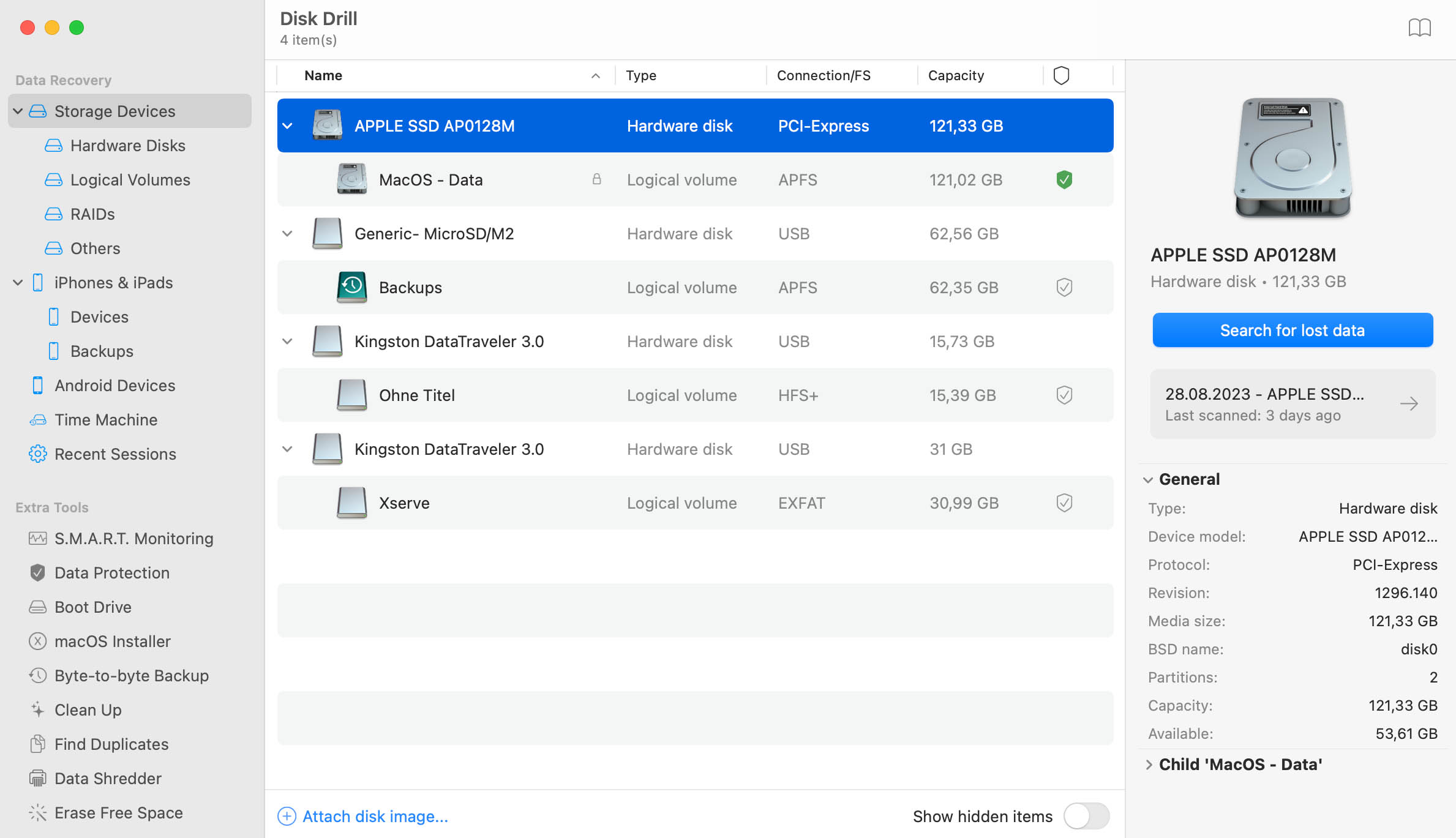
Disk Drill for Mac: an Apple SSD with its APFS data volume, a microSD card and two USB sticks, with Time Machine, iPhone and Android sources and extra tools such as Byte-to-byte Backup in the sidebar.
Disk Drill is one of the best-known Mac recovery apps, and its free Basic edition is a sound first scan: it finds and previews lost files on the Mac's disks, cards, iPhones and Android devices. On a Mac it doesn't recover them, though. Saving needs Disk Drill PRO. Its Guaranteed Recovery feature, once switched on, keeps a hidden copy of everything you move to the Trash, which helps next time, not this time. The extras include S.M.A.R.T. monitoring, byte-to-byte backups of failing drives and a bootable recovery drive.
PRO costs $89 a year (renews yearly) or $149 for a lifetime license, and both cover Mac and Windows for one user on up to three devices, a real advantage over the one-Mac licenses above. Two things to know: CleverFiles says purchases are non-refundable except where the law requires, and you buy PRO on CleverFiles' own store.
What we like
- One license for Mac and Windows, 3 devices
- Guaranteed Recovery protects future deletions
- Byte-to-byte backup and S.M.A.R.T. monitoring
- Free preview shows what's recoverable
Watch out for
- No free recovery on a Mac
- Non-refundable purchases
- Paywall complaints on Trustpilot
What reviewers say
CleverFiles has a Trustpilot TrustScore of 4.4 out of 5 from 496 reviews. Leo V (5 stars, February 7, 2026) wrote: "A 2 TB external Mac drive broke and I thought it couldn't be salvaged."
The low ratings are about price and paywalls. One reviewer, LlightningLlama (1 star, July 17, 2026), titled the review "Disk Drill's paywalls are ridiculous." and Sioux Tiyuh (2 stars, August 27, 2026) wrote: "There are better paid and cheaper software if you really just need it to recover a few files". These Trustpilot excerpts reached us through a summarizing tool.
Download Disk Drill
Price compared: owning it outright
Cheapest license you keep using with no renewal (USD)
UFS Explorer Standard Recovery for macOS (1 year of updates)$69.95
EaseUS Data Recovery Wizard for Mac (1 month of updates)$89.95
Wondershare Recoverit for Mac Perpetual (2 Macs, version 15)$144.99
Disk Drill PRO Lifetime (Mac and Windows, 3 devices)$149
Stellar Data Recovery Professional for Mac Lifetime (Stellar's store)$149
Cisdem Data Recovery for Mac Lifetime$149.95
Order-page and store prices checked on November 22, 2026. Stellar's $89.99 one-year license (it renews) is cheaper still for a single year. Recoverit's Perpetual Plan covers two Macs and Disk Drill's three devices; the rest cover one Mac.
Which should you choose?
| Your situation |
Pick |
Why |
| A few documents, and you'd rather not pay |
EaseUS Data Recovery Wizard for Mac Free |
Up to 2 GB free; Stellar's 1 GB is next |
| Two Macs in the house, pay once |
Wondershare Recoverit for Mac |
$144.99 Perpetual Plan covers both |
| Deleted from iCloud Drive |
Wondershare Recoverit for Mac |
Recovers iCloud deletions from the past 30 days |
| Mac won't start, or photos and videos are damaged |
Stellar Data Recovery Professional for Mac |
Runs from macOS Recovery, repair included, $89.99 |
| One rescue, no subscription |
EaseUS Data Recovery Wizard for Mac |
$89.95 one-time payment, never renews |
| Windows or Linux disk, or you're comfortable with partitions |
UFS Explorer Standard Recovery for macOS |
Widest file-system support, $69.95 perpetual |
| A tool on hand for years, one Mac, simple app |
Cisdem Data Recovery for Mac |
Lifetime license, saved scan records |
| Macs and Windows PCs in one household |
Disk Drill |
One license, both platforms, 3 devices |
Our overall pick: for most Mac owners, start with the EaseUS or Stellar free download, because both let you get real files back before paying. If the files are there and you need more, Stellar Data Recovery Professional for Mac at $89.99 is the best value for one Mac this year, and Wondershare Recoverit for Mac is the better buy when you want to pay once for two Macs.
Who should skip each one
- Wondershare Recoverit for Mac: skip it if you want a single year's license; there is none, and the short plans renew.
- EaseUS Data Recovery Wizard for Mac: skip the Free edition for SD cards (it doesn't cover them) and buy Pro, or pick another app.
- Stellar Data Recovery Professional for Mac: skip it if you won't remember to cancel; the one-year license renews.
- Cisdem Data Recovery for Mac: skip it if you want to test a recovery before paying; the trial saves nothing.
- UFS Explorer Standard Recovery for macOS: skip it if terms like partition table and file system put you off.
- Disk Drill: skip it if you might want a refund; CleverFiles doesn't offer one by default.
What commonly goes wrong
- Installing on the disk you're rescuing. Downloading and installing the app on the same drive can overwrite the files. Use another Mac or an external drive where you can.
- Saving recovered files back to the source. Writing to the disk you're recovering from can overwrite files you haven't saved yet. Always save to a different disk.
- Paying because of the file count. A scan can list thousands of files that won't open. Preview the ones you need first; if they don't preview, paying won't fix them.
- Expecting names and folders back. Files found by deep or RAW scanning often come back as FILE001.JPG with no folder. Sorting a photo library afterwards takes time.
- Losing a long scan. Deep scans of a 1 TB drive take 10 to 12 hours by EaseUS's and Cisdem's own figures. Keep the Mac plugged in and save the scan where the app allows it.
- Forgetting renewals. Stellar's one-year license, Disk Drill's yearly plan and Recoverit's monthly and quarterly plans renew. EaseUS's Mac plans and the lifetime licenses don't.
FAQs
Is there a truly free data recovery app for Mac?
EaseUS Data Recovery Wizard for Mac Free is the closest: it recovers 500 MB, or 2 GB after a social share, though not from SD cards. Stellar's free download recovers 1 GB and Recoverit's 500 MB. Cisdem and Disk Drill Basic only scan and preview on a Mac.
Can recovery software get files back from a MacBook's internal SSD?
Recovery software can scan a MacBook's internal SSD, but the chances are lower than on an external hard drive or a card, because SSDs clear deleted data quickly. Recently deleted files have the best chance. Run a free scan from Stellar, EaseUS or Recoverit before you buy anything.
Do Mac recovery apps work on Apple silicon (M1 to M5) and T2 Macs?
Yes. Stellar Data Recovery Professional for Mac supports M1 to M6 and T1/T2 Macs, EaseUS lists M1, M2, M3 and T2 Macs, and Recoverit, Cisdem and UFS Explorer list Apple silicon support too. Current versions don't require turning off System Integrity Protection.
Can I recover files from a FileVault-encrypted Mac?
Stellar, UFS Explorer and the others can scan a FileVault or encrypted APFS volume only with your password or recovery key. Without it, macOS won't allow access, and no app in this list bypasses that.
Which Mac data recovery software has no subscription?
EaseUS Data Recovery Wizard for Mac's three plans are one-time payments that never renew. Recoverit's Perpetual Plan, Cisdem's Lifetime Plan, Disk Drill PRO Lifetime, Stellar's lifetime license on its own store, and UFS Explorer's perpetual license are also one-time.
Should I use Time Machine before buying recovery software?
Yes. If Time Machine was backing up your Mac, restoring from it is free and returns files exactly as they were backed up. Recovery software is for files deleted before the last backup or never backed up. Stellar Data Recovery Professional for Mac can also read a Time Machine drive that macOS can't use.
Can these apps recover files from my iPhone?
No, these apps recover files from Mac disks, external drives and cards. For an iPhone, see our iPhone data recovery roundup.
What if the drive isn't detected at all?
If Disk Utility can't see the drive, EaseUS, Cisdem and the others can't either. Check the cable and port first. A drive that clicks or stays undetected needs a recovery lab; repeated scans can make a failing drive worse.
Conclusion
Check the Trash, Time Machine and iCloud first. If your files aren't there, the free scans decide the rest: install a recovery app on a different disk, scan, and preview the files you need. For most people that means the free version of Wondershare Recoverit for Mac, EaseUS or Stellar, which all let you recover real files before paying. Buy Recoverit for Mac if you want one payment that covers two Macs plus iCloud and camera-card recovery; choose Stellar for the cheapest full year, or EaseUS for a one-time payment with the biggest free allowance.
Download Recoverit for Mac FreeBuy Recoverit for Mac