Coolmuster Screen Recorder: A Plain Windows Recorder That Saves MP4 and Screenshots Locally
Coolmuster Screen Recorder is a $25.95-a-year Windows program that records your full screen or a chosen region to MP4, with either system sound or your microphone, and takes annotated screenshots. It's for people recording short tutorials or demos who want a simple tool that keeps everything on their own PC.
The catch is in that "either": it can't record system sound and your voice together, which rules it out for narrated software demos with sound or game commentary.
Quick facts
- Version: 1.1.69 for Windows, released September 10, 2026
- Developer: Coolmuster
- Video output: MP4 only
- Screenshots: PNG, JPG/JPEG or BMP, with shapes, arrows, lines and text
- Price: $25.95 for one year on one PC, $35.95 lifetime
- Trial: free download. Registering removes the watermark
- What we checked: Windows version 1.1.69 in the vendor release notes, 43 MB installer from the vendor (file dated September 10, 2026), checkout price $25.95 on November 10, 2026. We worked from the vendor manual and its screenshots and did not make test recordings.
Before you buy
- One audio source at a time. System sound or microphone, not both. The vendor presents this as a benefit, but most recording software can mix them.
- The sales page promises "no time limit", yet the recording timer in the manual's own screenshot reads "00:07 / 120:00". Plan for a possible two-hour cap per recording until you've checked it in the trial.
- Video saves only as MP4, and the vendor doesn't describe a video editor, webcam overlay or scheduled recording.
- The one-year plan renews automatically until you cancel it, and a renewal charge is non-refundable.
Download Free Trial Buy Now
Overview
The window is a small panel: a capture-area button, a System Sound toggle, a Microphone toggle and an orange REC button. Pick Full Screen or Custom, drag the frame if needed, click REC, then Start Recording. A short countdown runs, and a Stop Recording button sits below the frame with a running timer.
When you stop, a preview window lets you copy the file or save it. Screenshots work from a separate button or the Win + Shift + X hotkey, and open in a small editor with shapes, arrows, lines and text.
Features
Coolmuster Screen Recorder captures the full screen or a custom region
Choose Full Screen or Custom from the main panel and, for Custom, drag the red frame, which shows its pixel size as you go. Recordings save as MP4 on your PC.
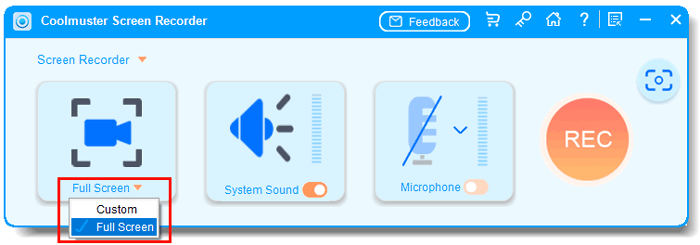
The main panel with Full Screen and Custom capture modes, audio toggles and the REC button (from the vendor manual).

While recording: the timer reads 00:07 / 120:00.
Pick system sound or microphone, not both
Coolmuster Screen Recorder has a toggle for each source, but the manual says you can turn on only one, or none for a silent recording.
Annotated screenshots are built in
Coolmuster Screen Recorder also captures the full screen or a region and lets you add boxes, circles, arrows, lines and text before saving as PNG, JPG or BMP.
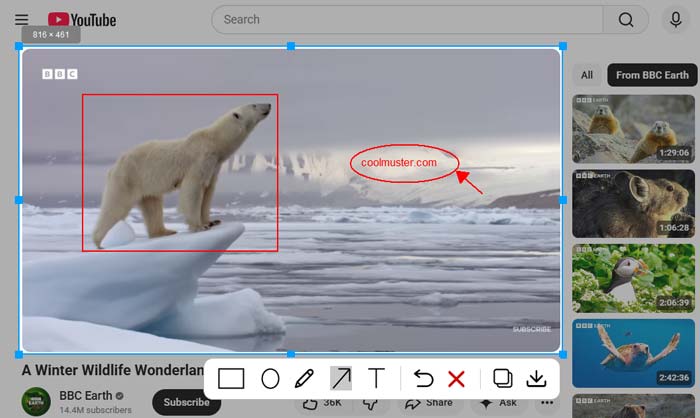
The screenshot editor with a box and an arrow added.
Everything stays on your computer
Coolmuster Screen Recorder processes recordings locally, with no uploads or cloud storage, according to the vendor, which matters if you're recording anything confidential.
Benefits
- A short control panel means there's almost nothing to learn.
- Nothing is uploaded, so client or company screens stay on your machine.
- Screenshot markup saves opening a separate tool.
- MP4 output is ready to upload or share without conversion.
Real-World Uses
- You're recording a quick silent how-to for a colleague.
- You're capturing a game clip with only the game audio.
- A teacher records a voice-over lesson over slides with the microphone on.
- You're taking annotated screenshots for a support ticket.
Who It's For, and Who Should Skip It
It suits Windows users who want basic recording and screenshots, and who care about keeping the files local.
Skip it if you need your voice and system sound in the same recording, a webcam overlay, editing or output formats other than MP4. Free tools such as OBS Studio do those things, with more to learn. It's Windows-only, too.
Usage Guide
- Install and launch the program.
- Choose Full Screen or Custom.
- Turn on System Sound or Microphone, or neither.
- Click REC, adjust the frame if you chose Custom, then click Start Recording.
- Click Stop Recording, then copy or save the MP4 from the preview.
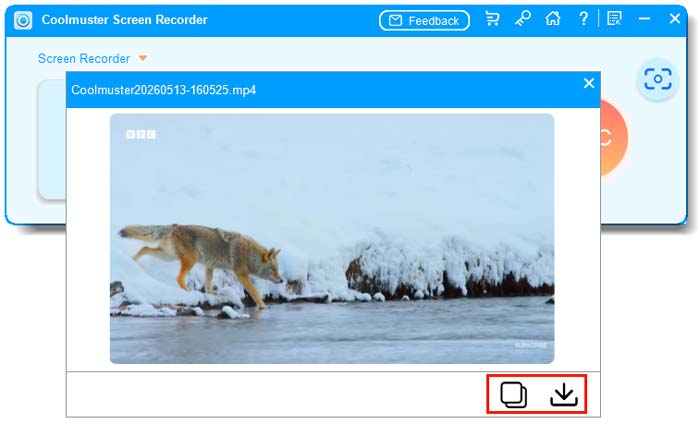
The preview after recording, with copy and save icons.
Where it falls short
- It records one audio source only, so it can't combine your voice with system sound.
- The on-screen timer suggests a 120-minute limit despite the "no time limit" claim.
- MP4 is the only video format.
- It has just six reviews on the vendor's site, and we found no independent ones.
What Users Say
This is a new product with very little feedback, so what follows comes from Coolmuster's own site. Coolmuster runs a write-a-review-to-win-a-free-license promotion, so read the praise on its own site, and on small blogs, with that in mind.
On Coolmuster's product and review pages (6 reviews shown)
These appear on the vendor's own site.
"I handle sensitive client data, and cloud-based recorders are a no-go. Coolmuster processes everything locally – my recordings never leave my PC."
Lisa Thompson, vendor product page
"As a gamer, I only want to capture game sounds, not my voice. This software lets me choose system audio alone, so my clips are clean and professional."
Sarah Chen, vendor product page
"I tried it out with a 16-minute tutorial; the results were nearly flawless - ready for use in teaching without the need for any additional conversion."
glean Doo~, October 21, 2026, vendor review page
Trustpilot, for the Coolmuster company overall
Coolmuster scores 4.6 out of 5 from 223 Trustpilot reviews, read through a page summarizer. None we read names this product.
"Coolmuster Support team is the best!!!- Reply is immediate and prompt - clear, concise and direct to the point."
Virgie Aznar, August 5, 2025, Trustpilot (excerpt)
The small number of reviews all praise local processing and simplicity. There isn't enough feedback yet to say much about reliability.
Comparisons
Coolmuster Screen Recorder vs OBS Studio
OBS Studio is free, mixes several audio sources and supports scenes and webcams, but takes time to learn. Coolmuster is far simpler and handles the basics, at a price.
Coolmuster Screen Recorder vs the Windows Snipping Tool
Recent versions of Windows include basic screen recording in the Snipping Tool for free. Coolmuster adds a choice of audio source and a built-in markup editor.
Editions and Pricing
| Plan | Price | Term | Covers |
|---|
| 1 Year, 1 PC | $25.95 | 1 year, renews automatically | 1 PC |
| Lifetime, 1 PC | $35.95 | One payment, lifetime updates | 1 PC |
| 1 Year, 5 PCs | $35.95 | 1 year, renews automatically | 5 PCs |
| Lifetime, 5 PCs | $45.95 | One payment, lifetime updates | 5 PCs |
| 1 Year, 10 PCs | $65.95 | 1 year, renews automatically | 10 PCs |
| Lifetime, 10 PCs | $85.95 | One payment, lifetime updates | 10 PCs |
A screen recorder is something you'd keep using, so the lifetime license is the sensible choice at $10 more.
FAQs
Can Coolmuster Screen Recorder record my voice and system sound at the same time?
No. Coolmuster Screen Recorder allows only one audio source at a time, or none.
Does Coolmuster Screen Recorder add a watermark?
The vendor says there's no watermark after registration, which implies the trial adds one. Check a trial recording before you buy.
Is there a time limit in Coolmuster Screen Recorder?
Coolmuster advertises no time limit, but the timer in its own manual shows 120:00, so test a long recording in the trial if that matters to you.
Can Coolmuster Screen Recorder record a webcam?
Coolmuster doesn't list webcam recording for Screen Recorder.
Does Coolmuster Screen Recorder work on a Mac?
No. Coolmuster Screen Recorder is sold for Windows only.
What is the refund policy for Coolmuster Screen Recorder?
Coolmuster offers a 30-day guarantee for one-year and lifetime licenses, but it can refuse refunds without a reasonable reason, and automatic renewal charges aren't refunded.
System Requirements
- Windows 11, 10, 8 or 7
- 1 GHz CPU or faster, 32-bit or 64-bit
- 256 MB RAM, 1 GB recommended
- 200 MB free disk space
Conclusion
Worth it only for simple, single-audio recordings where you value keeping everything local. It's easy to use, and the screenshot editor is a nice extra.
The main reason not to buy is the one-audio-source limit: if you want to talk over a demo with its sound playing, this isn't the tool, and free options like OBS Studio can do it.
Download Free Trial Buy Now