Leawo Screen Recorder: Screen, Webcam and Audio Recording for Windows, and Why the Free Edition May Be Enough
Leawo Screen Recorder is a 64-bit Windows program that records your screen, webcam and system or microphone sound, takes screenshots, and can run recordings on a schedule. The paid license came to $49.95 a year or $69.95 lifetime on the order page when we checked, although Leawo's product page advertises $29.95 and $39.95. Before paying anything, know that Leawo also gives away Leawo Free Screen Recorder, which has the same recording tools without a watermark or time limit; the paid version mainly adds more output formats and your own watermark.
It's aimed at people making tutorials, recording calls and webinars, or capturing gameplay, who want a simple four-button program rather than a studio like OBS.
Quick facts
- Version: 1.0.0.2, installer dated April 25, 2025
- Developer: Leawo Software (installer signed by ShenZhen Moyea Software Co., Ltd.)
- Runs on: Windows 7, 8, 10 and 11, 64-bit only; no Mac version
- Modules: Record Screen, Record Webcam, Record Audio, Screen Capture
- Video output: MP4, MKV, FLV, 3GP, MOV, TS, M2TS, AVI, MPEG, VOB, F4V, M4V; frame rate 5 to 60 fps
- Audio output: MP3, WMA, AAC, M4A, OGG, DTS, OPUS, AC3, MKA, FLAC, WAV
- Screenshots: JPG
- Trial: recordings stop at 3 minutes and carry a watermark
- Money-back guarantee: 5 days (yearly) or 14 days (lifetime), for technical problems Leawo can't fix
What we checked: the installer from Leawo's download page (screenrecorder_setup.exe, file version 1.0.0.2, 67,805,088 bytes, dated April 25, 2025, with a valid digital signature) and the order page, which charged $49.95 for 1 year and $69.95 for lifetime on November 1, 2026. We didn't make any recordings with it.
Before you buy
- Try the free edition first. Leawo's own comparison table gives the free version every recording feature (screen, region, webcam, system sound, microphone, screenshots, scheduling, preset length, mouse effects, drawing, hotkeys) except adding your own watermark, and limits it to MP4, MP3 and JPG output. Leawo's free product page says its recordings are watermark-free, up to 4K.
- The price on the order page is higher than the product page. Leawo's page lists $29.95 a year and $39.95 lifetime; the order page showed $49.95 and $69.95 on November 1, 2026. Check the total before you pay.
- Updates are slow. Version 1.0.0.2 dates from April 2025, and nothing newer had appeared by November 2026.
- A lapsed yearly license falls back to the trial, with the 3-minute limit and watermark, according to Leawo's registration guide.
Download Free TrialBuy Now
Overview
Leawo Screen Recorder opens as a compact dark window with four big buttons and a status bar for recording history, record length, task schedule and watermark. You pick a module, choose what to capture, and press the red record button or Ctrl + Alt + S. A floating control bar shows the elapsed time and file size while you record, and finished files appear in a Record History list.
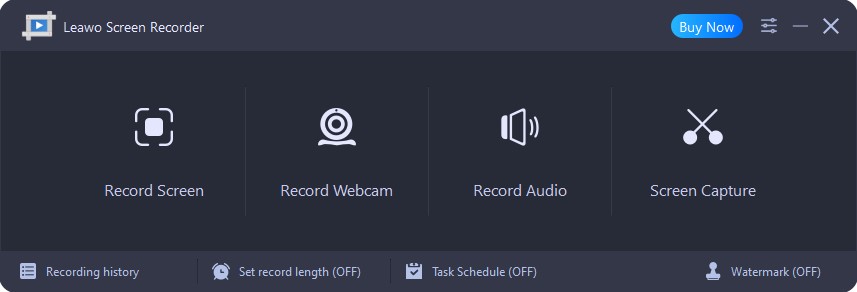
The main window: Record Screen, Record Webcam, Record Audio and Screen Capture, with Recording history, Set record length (OFF), Task Schedule (OFF) and Watermark (OFF) along the bottom.
Features
Record the whole screen, a window or a fixed size
Leawo Screen Recorder's Record Screen button offers Full Screen, Select region/window, Fixed region and Recently used size. Fixed sizes include your monitor's full resolution, 1080p, 720p, 480p, 1024 x 768 and 640 x 480, which saves fiddling when you need an exact frame for YouTube or a course platform. System sound is on by default, and microphone and webcam switch on with one click each.

The Record Screen menu open on Fixed region, listing 2560x1440 (FullScreen), 1920x1080, 1280x720, 854x480, 1024x768, 640x480 and Customize.
Draw and annotate while recording
Leawo Screen Recorder's paint board adds rectangles, ellipses, lines, arrows, a brush, an airbrush, text and numbered callouts on top of the recording as you talk, with undo, redo and erase. It's the feature that makes it useful for teaching: you circle the button you're explaining instead of editing an arrow in later.
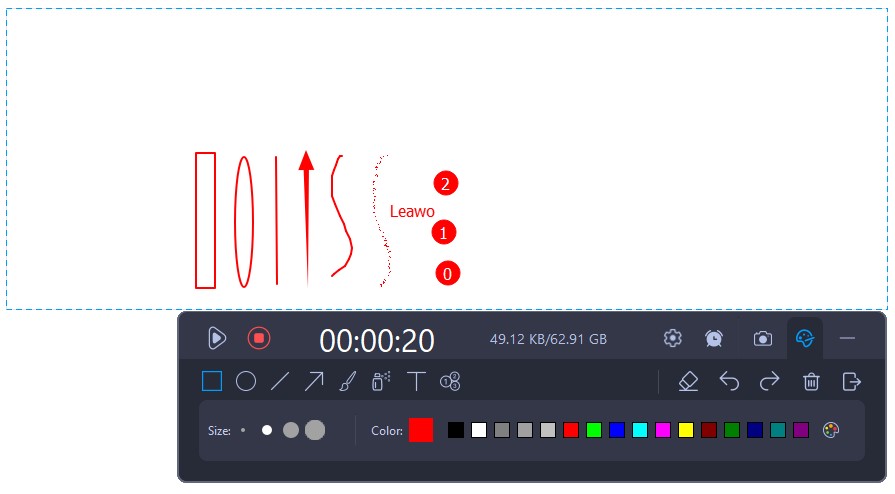
Recording in progress at 00:00:20 with the paint board open: a rectangle, ellipse, line, arrow, brush strokes, the text "Leawo" and numbered callouts drawn in red inside the recording frame.
Scheduled and timed recordings
Leawo Screen Recorder's Task Scheduler sets start and stop times, a repeat period, the area, sound sources and an ending action for each task, and the Auto Timer stops a recording after a set length and can shut the PC down afterwards. That suits recording a weekly webinar or a live stream while you're away. Leawo notes the PC must not sleep or lock, and the program sets itself to start with Windows so tasks run.

The Task schedule window: two 3-minute tasks with start times, one disabled and one enabled, and a tip that the software starts with Windows so tasks run on time.
Your own text or logo watermark
Leawo Screen Recorder's watermark editor stamps a text or image watermark on every recording, with font, color, opacity, size and position. This is the one recording feature the free edition doesn't have, and it's the main reason to pay if you publish branded videos.

The Default watermark dialog: Text watermark selected with font, color, opacity, size and position settings, and a red text preview over a sample image.
Output settings and hardware encoding
Leawo Screen Recorder's Preferences set the video format, a hardware or software encoder, quality (High, Medium, Low), frame rate up to 60 fps, the audio format and sample rate (32, 44.1 or 48 kHz). Hardware encoding on an NVIDIA card keeps the CPU free during gameplay recording.

Preferences, Output tab: output and screenshot folders, JPG screenshots, MP4 video, Nvidia Hardware Encoder, Medium quality, 25 fps, MP3 audio at 44100 Hz.
Real-World Uses
- Software tutorials: record a 1080p region with your microphone, circle buttons with the paint board and brand the result with your logo.
- Recording a recurring webinar: a weekly scheduled task captures it even when you're not at the desk.
- Webcam or reaction videos: record the webcam alone or on top of the screen.
- Saving audio: the Record Audio module captures system sound and/or microphone to MP3, FLAC or WAV.
Who It's For, and Who Should Skip It
Good fit: Windows users who want a simple recorder with drawing and scheduling and need either their own watermark or formats other than MP4 and MP3.
Skip it if:
- MP4 video and MP3 audio are all you need. Leawo Free Screen Recorder does the same recording with no watermark.
- You use a Mac or 32-bit Windows. It's 64-bit Windows only.
- You want scenes, overlays and live streaming. The free, open-source OBS Studio is built for that.
- You need DRM-protected streaming video. Leawo itself points those users to a different product.
Usage Guide
- Install and register: run the installer, open the three-bar menu, choose Register and paste your key.
- Set output: in the three-bar menu choose Settings, then Output, and pick the folder, format, encoder, quality and frame rate.
- Pick the area: click Record Screen and choose Full Screen, a region or window, or a fixed size; drag the corners to adjust.
- Choose sound: leave System Sound on, and click the microphone or webcam icon to add them.
- Record: click REC or press Ctrl + Alt + S; Ctrl + Alt + R pauses, and the camera icon takes a screenshot mid-recording.
- Find the file: stop with Ctrl + Alt + S and open Recording history.
Where it falls short
- No editor. There's no trimming or cutting; Record History links to other Leawo tools ("Convert and edit recording", "Burn recording into DVD/Blu-ray") instead.
- Screenshots are JPG only, so text-heavy captures lose some sharpness compared with PNG.
- Scheduled tasks need an awake PC, and the program sets itself to start with Windows to make them work.
- A careless product page. Parts of Leawo's Screen Recorder page describe Blu-ray burning features copied from another product, so rely on the user guide for what it does.
What Users Say
Independent reviews are scarce: most pages about Leawo Screen Recorder are license giveaways.
Leawo's review page
Leawo's moderated review page held three 5-star reviews on November 1, 2026, two of them in English. Lasie (August 2022): "Just tested the recorder on skype, audio and video quality is excellent. Can't wait to put it through its paces, thanks for the giveaway". Hoàng Linh (August 2024): "The product is very good. I hope that the quality will always be improved and that more new features will be added, with even better sound and image quality." Leawo's product page also shows testimonials it chose, such as Fiona's: "I found that this screen recorder offers much more features than others do."
WinningPC giveaway comments
On WinningPC's giveaway page, BluePT (August 16, 2023, 2.6 out of 5) wrote: "No updates for this software for more than 1 year. This is "abandonware"!", with the pro "Not the better choice, but enough for home users." Leawo did release the current build after that, in April 2025. Other comments there are about the giveaway's registration server, not the program.
Trustpilot (Leawo as a company)
Leawo's Trustpilot page showed 4.4 out of 5 from 151 reviews on November 1, 2026, mostly about its Blu-ray and DVD software and support. We found none about the screen recorder.
The pattern: the few users who mention it find the recording quality good and the program simple; the complaint is slow development.
Paid vs Free Edition
| | Leawo Screen Recorder (paid) | Leawo Free Screen Recorder | Paid version's trial |
|---|
| Price | $49.95 / year or $69.95 lifetime at checkout | Free | Free |
| Recording length | Unlimited | No limit listed | 3 minutes |
| Leawo watermark | No | No | Yes |
| Your own watermark | Yes | No | Not stated |
| Output formats | 12 video, 11 audio, JPG | MP4, MP3, JPG | 12 video, 11 audio, JPG |
Both the yearly and lifetime licenses cover one PC and include free upgrades; the yearly plan renews automatically until cancelled.
FAQs
What's the difference between Leawo Screen Recorder and Leawo Free Screen Recorder?
Leawo Screen Recorder adds your own text or image watermark and saves in many video and audio formats; Leawo Free Screen Recorder records the same things but only to MP4, MP3 and JPG. Leawo says the free one leaves no watermark of its own on recordings.
Does Leawo Screen Recorder work on a Mac?
No. Leawo Screen Recorder runs only on 64-bit Windows 7, 8, 10 and 11, and Leawo doesn't sell a Mac edition.
Can Leawo Screen Recorder record Netflix or other protected streams?
No. Leawo Screen Recorder is meant for unprotected content, and Leawo points users who want DRM-protected streaming video to a separate product.
What happens when my Leawo Screen Recorder yearly license runs out?
Leawo Screen Recorder goes back to trial mode: recordings are limited to 3 minutes and carry a watermark until you renew.
Can Leawo Screen Recorder record at 60 fps?
Yes. Leawo Screen Recorder lets you choose a frame rate from 5 to 60 fps in Preferences, and it can use a hardware encoder to keep the load off the processor.
Can I edit recordings in Leawo Screen Recorder?
No. Leawo Screen Recorder only records; trimming or converting means another program, such as Leawo's own video converter that the history window links to.
System Requirements
- Windows: 7, 8, 10 or 11, 64-bit
- Processor: 1 GHz Intel or AMD or faster
- Memory: 1 GB RAM or more
- Disk: a 65 MB installer
Conclusion
Leawo Screen Recorder is easy to use and well equipped, but for most people the paid license isn't worth $49.95 a year when Leawo's own free edition records the same way without a watermark. Pay only if you need your logo on every video or a format other than MP4 and MP3.
The reasons to hold back are the price gap between the product page and the order page, slow updates, and the lack of any editing. If you do buy, the lifetime license costs little more than a year and a half of the subscription.
Download Free TrialBuy Now