Vov Screen Recorder: One-Click Screen Recording for Windows
Vov Screen Recorder is a $19 Windows program from Vovsoft that records your screen, a region or a window to MP4, MKV, GIF and other formats, with system sound and your microphone. It's for people who want to press one button and get a video file, not learn a video studio. The $19 is a one-time lifetime license with free updates, and the free version has no time limit.
Many screen recorders either bury the Record button under editing tools or stamp a watermark on everything until you subscribe. Vov Screen Recorder is the opposite: one small window, one hotkey (Ctrl+Alt+V), and the file lands in your output folder.
Quick facts
- Version: 5.2, released September 10, 2026
- Developer: Vovsoft, the one-person software company of Fatih Ramazan Çıkan in Turkey
- Platform: 64-bit Windows 11, 10, 8/8.1 and 7 (no 32-bit version)
- Editions: installer (22.54 MB) and portable (27.89 MB)
- Capture: this monitor, all monitors, a drawn region or a window
- Audio: system sound, microphone, or both at once
- Output: MP4, MKV, AVI, MOV, MPEG, FLV, WMV and animated GIF
- Encoding: software, or hardware H.264/HEVC on AMD, Intel Quick Sync and NVIDIA GPUs
- Price: $19, one-time payment, lifetime license with free updates
- Trial: free, no time limit; a nag screen and no commercial use until licensed
- Refunds: generally none; refunds are at the vendor's discretion, mainly for accidental orders
- What we checked: the installer we downloaded from vovsoft.com on November 8, 2026 is version 5.2.0.0, 22.55 MB, digitally signed by Fatih Ramazan Çıkan; the order page showed $19.00 with no auto-renewal on November 8, 2026. We didn't install it or make test recordings.
Overview
The whole program is one compact window: a big RECORD button, a STOP button, a Video box (This Monitor, All Monitors, Region), an Audio box (System Audio plus a microphone list), the output folder and the file format. Everything else, from the theme to the encoder, sits in the Settings menu. It uses the FFmpeg libraries it ships with, so you don't install codecs.
It has been developed steadily since 2018. Recent releases added GIF output and window selection (4.4, June 2025), separate This Monitor and All Monitors options (5.0, April 2026), and recording the microphone and system audio at the same time (5.1, September 2026).
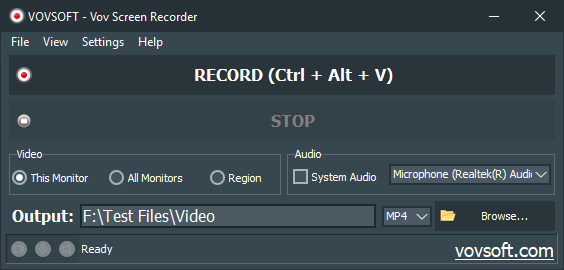
The main window in the dark theme on Windows 11: This Monitor selected, a Realtek microphone chosen, MP4 output, status Ready.
Features
Record your voice and the computer's sound together
Vov Screen Recorder captures system audio and your microphone in the same recording since version 5.1, which is what you need for a narrated tutorial or a recorded online meeting where both sides should be heard. Status icons at the bottom show whether video, microphone and system sound are active.
GPU encoding for smooth, light recordings
Vov Screen Recorder detects AMD (AMF), Intel Quick Sync and NVIDIA (NVENC) encoders at startup and can record H.264 or HEVC on the graphics card, which keeps the CPU free for the game or program you're recording. Without a supported GPU, it falls back to software encoding.

The Settings menu in the light theme: mouse pointer options, software or hardware encoding, with NVIDIA GPU (h264) selected and the AMD and Intel options unavailable on this PC.
Full screen, a region, a window, or every monitor
Vov Screen Recorder records the current monitor, all monitors as one video, or a region you draw or pick by window, and the region box shows the monitor's scaling percentage on high-DPI screens. The mouse pointer can be hidden, drawn or highlighted, which helps viewers follow a tutorial.
Animated GIFs and eight video formats
Vov Screen Recorder saves straight to MP4, MKV, AVI, MOV, MPEG, FLV, WMV or an animated GIF, so a short GIF for a bug report or a chat message needs no converter. MKV is the default for software encoding, for better compatibility.
Portable and out of the way
Vov Screen Recorder comes as a portable edition you can run from a USB stick, can minimize itself when recording starts and restore when it ends, and can sit in the system tray. A global hotkey starts and stops recording without bringing the window back.
Who It's For, and Who Should Skip It
A good fit if you record how-to videos, software demos, bug reports or meetings and just want a clean file, especially on a work PC where a portable, no-install recorder helps.
Skip it if you want to cut, annotate or add a webcam overlay: Vov Screen Recorder only records. Streamers and YouTubers who need scenes, overlays and live streaming are better served by a full broadcasting tool, and Mac or 32-bit Windows users can't run it.
Usage Guide
- Download the installer or portable edition from vovsoft.com and run it.
- Under Video, choose This Monitor, All Monitors or Region (drag the region box, or pick a window).
- Under Audio, tick System Audio and/or pick your microphone.
- Set the output folder and format (MP4 for sharing, GIF for short clips). If you have a recent graphics card, choose hardware encoding under Settings.
- Click RECORD or press Ctrl+Alt+V; press the same hotkey or STOP to finish. The file is saved in the output folder.
Before you buy
- Test it on your own PC first. Vovsoft's refund policy is generally no refunds, because the free version is there to evaluate the program; refunds are at its discretion, mostly for accidental orders. Check that your microphone, system sound and GPU encoder all work.
- 64-bit Windows only. There's no 32-bit build.
- Hardware encoding depends on your GPU and drivers. Vovsoft notes that most mobile NVIDIA GPUs lack NVENC, early Intel Quick Sync chips give poor quality (Haswell or newer is recommended), and Quick Sync can be unstable on Windows 7.
Download Free TrialBuy Now
Where it falls short
- Recording only. No trimming, no annotations, no webcam picture-in-picture, no live streaming.
- Few options. One buyer's whole review on Vovsoft's site is "Good software, but need more options." There are no frame-rate or bitrate settings to tune.
- Audio has been its weak spot. Older versions recorded no system sound at all, and several releases since fixed system-audio bugs; a buyer reviewing in September 2026 needed the developer's help before his own voice was captured. Do a test recording with sound before anything important.
What Users Say
Vov Screen Recorder is rated 4.1 out of 5 from 12 reviews on Vovsoft's product page. We found no editorial review, so these are buyer and giveaway-user comments.
Praise (Trustpilot and vovsoft.com)
Clyde, Trustpilot, 5 stars, September 2026, under the title "Superb Portable Screen Recording Software": "I was looking for a portable screen recording software, which would record meetings." The first version he tried recorded the system's audio but not his voice; he contacted the developer, "who very kindly fixed the issue," and the same happened with an error on a second PC. His verdict: "If you're looking for a simple screen-recording software, try Vov Screen Recorder. It's simple, economical, & easy to use."
"I am an old-school computer scientist myself and for me the decisive factor for the quality of a program is whether it is easy to start and then works. It does .... ;-)" (STB, Trustpilot, 5 stars, May 2024)
"Bought VOV Screen recorder. Nice tool." (Alan Napier, Trustpilot, 5 stars, December 2021)
"Good software, but need more options." (Biohazard, vovsoft.com)
Criticism (SharewareOnSale giveaway comments, 2018 and 2020)
"I tried to record a tutorial from YouTube in mp4 format but I only got video part of it and NO SOUND. Very disappointing, as I have no problem with doing that with other screen recorders." (jayk, April 2020; system audio recording was added in version 3.4 in 2022)
"Tried Region to cover a program I have written. Would not Start and stop with Ctl-Alt-1 and 2 – tried to capture a Youtube video 27 minutes as well – nope didn't copy a minute of it." (David Roper, April 2020; the hotkey has been Ctrl+Alt+V since version 2.5)
"Basic record. Nothing special. Usability could be improved." (Ant, September 2018)
"Interesting tool – it records both of my screens (dual monitors) so that the images of each are very small. Is there a way to direct it to record only the main monitor?" (Goldenbarstewart, September 2018; multi-monitor support came in 3.2 and the This Monitor option in 5.0)
Vovsoft as a company has a Trustpilot TrustScore of about 4.6 from roughly 410 reviews across all its programs and support. The pattern: buyers like that it's simple, starts quickly and that the developer answers and fixes problems. The early complaints were about missing features (system sound, single-monitor capture) that later versions added, which leaves "basic" as the fair criticism today.
Comparisons
Vov Screen Recorder vs free open-source broadcasting tools
Free broadcasting tools do far more (scenes, webcam overlays, live streaming) but take time to set up. Vov Screen Recorder costs $19 and has almost nothing to configure. If you record a screen now and then, it's quicker; if you stream or produce polished videos, the bigger tool is worth learning.
Vov Screen Recorder vs the Windows Snipping Tool and Game Bar
Windows' built-in recorders are free but limited in where and how they capture. Vov Screen Recorder adds all-monitor capture, GIF and MKV output, a choice of GPU encoders and a portable edition.
Editions and Pricing
| Option | Price | License term | What you get |
|---|
| Free trial | $0 | No time limit | Screen recording with a nag screen; personal use only |
| Vov Screen Recorder license | $19 | One-time payment, lifetime, free updates | No nag screen, commercial use allowed; installer and portable |
Vovsoft also sells a $99 Universal License covering all of its 115+ programs.
FAQs
Is Vov Screen Recorder a one-time purchase?
Yes. Vov Screen Recorder costs $19 once for a lifetime license with free updates, and the order page shows no auto-renewal.
Can Vov Screen Recorder record my voice and the game or video sound at the same time?
Yes, since version 5.1 (September 2026) Vov Screen Recorder records the microphone and system audio together. Older versions could record only one of them.
Can Vov Screen Recorder record just one monitor on a dual-monitor setup?
Yes. Vov Screen Recorder's This Monitor option records only the current screen, and All Monitors records every screen in one video.
Does Vov Screen Recorder have a video editor?
No. Vov Screen Recorder only records. To trim or annotate, open the file in a separate video editor.
Can I run Vov Screen Recorder without installing it?
Yes. Vov Screen Recorder has a portable edition (27.89 MB) that runs from a folder or USB stick, and one license covers both editions.
Does Vov Screen Recorder work on 32-bit Windows?
No. Since version 4.1 Vov Screen Recorder is a 64-bit program, so it needs 64-bit Windows 7 or later.
System Requirements
- 64-bit Windows 11, 10, 8/8.1 or 7
- About 23 MB for the installer or 28 MB for the portable edition
- Optional: an AMD, Intel (Haswell or newer recommended) or NVIDIA GPU with current drivers for hardware encoding
- A microphone, if you want to narrate
Conclusion
Vov Screen Recorder is worth $19 if you want a simple, lightweight recorder that captures the screen with your voice and the computer's sound, saves to MP4 or GIF, and never asks for a subscription. The reason to buy it is how little stands between you and a finished recording; the reason not to is that it does nothing else, with no editor, webcam overlay or streaming. Since refunds are rare, make a test recording with sound in the free version first.
Download Free TrialBuy Now