Screenpresso PRO: Screenshots, Screen Video and Instant How-To Guides on Windows
Screenpresso PRO is a $29.99 one-time-purchase Windows screen capture tool that takes screenshots and HD video, marks them up in a full image editor, and turns them into PDF or Word guides. It's for support staff, trainers and anyone who explains things on screen, and the free version already covers basic capture with Screenpresso branding on some output.
The Windows Snipping Tool is fine for a quick grab. It falls short the moment you need numbered steps, a scrolling page, a blurred email address or a 12-page manual. Screenpresso handles all of that, starting with the Print Screen key.
Quick facts
- Version: 2.4.1.0, released November 4, 2026
- Developer: Learnpulse SAS, Toulouse, France
- Runs on: Windows 11 or Windows Server 2022, x64 or ARM64
- Download size: 151 MB, and it can run without installing
- Price: $29.99 one-time
- Free version: image capture, HD video with branding and a limited editor; also usable at work
- Guarantee: 30-day money-back
- Languages: 22 interface languages
What we checked: release 2.4.1.0 in the vendor's release log, the 151 MB download dated November 4, 2026, and the price of $29.99 with no renewal on the order page, all on November 6, 2026. We didn't run the program.
Before you buy
- Start with the free version. Screenpresso's vendor says it can be used at work without limits, and many people never need more. Pay for video without branding, the full editor, OCR, subtitles or the document generator.
- Windows 11 is the stated requirement. The features page lists Windows 11 or Server 2022, so check it runs on Windows 10 before you pay.
- Activation has a limit. You can reuse your key when reinstalling, but it locks after more than 5 hardware changes, and then you need an upgrade.
- Virtual desktops need Enterprise. Citrix, RDS and VMware VDI require the Enterprise license.
Download Free TrialBuy Now
Overview
Screenpresso runs in the background using very little memory and waits for the Print Screen key. Press it and the cursor becomes a crosshair that snaps to windows and page regions. Each capture lands in the Workspace, a side panel of your recent images and videos, so you never have to name a file. From there you edit, drag it into another program, or publish.

The Workspace panel on the desktop, with thumbnails of recent captures and Capture, Edit and Publish buttons along the bottom.
Features
Capture screens, regions and scrolling pages
Screenpresso captures the full screen, a window or a region from the same hotkey, with a zoom lens for pixel-level selection. Version 2.4.0 added Scrolling capture, which builds one image as you scroll with the mouse, scrollbar or keyboard, in any direction. That even includes panning a map.

Selecting part of a news page: the red outline marks the detected region and the zoom lens sits at the bottom right.
Record HD and 4K video
Screenpresso PRO records the screen in HD and 4K as lightweight MP4 files, with microphone, system sound and webcam. It can generate subtitles from your speech and clip or merge recordings. Export frames, change the speed or mute the sound afterwards.

Recording a browser window with a webcam overlay, with the controls below the capture area.
Mark up images in a full editor
Screenpresso's editor adds arrows, spotlights, speech bubbles, text boxes and a numbered Step tool, where each click adds the next number. PRO adds the full editor, with effects and watermarking, plus AI image generation and automatic blurring of sensitive data.
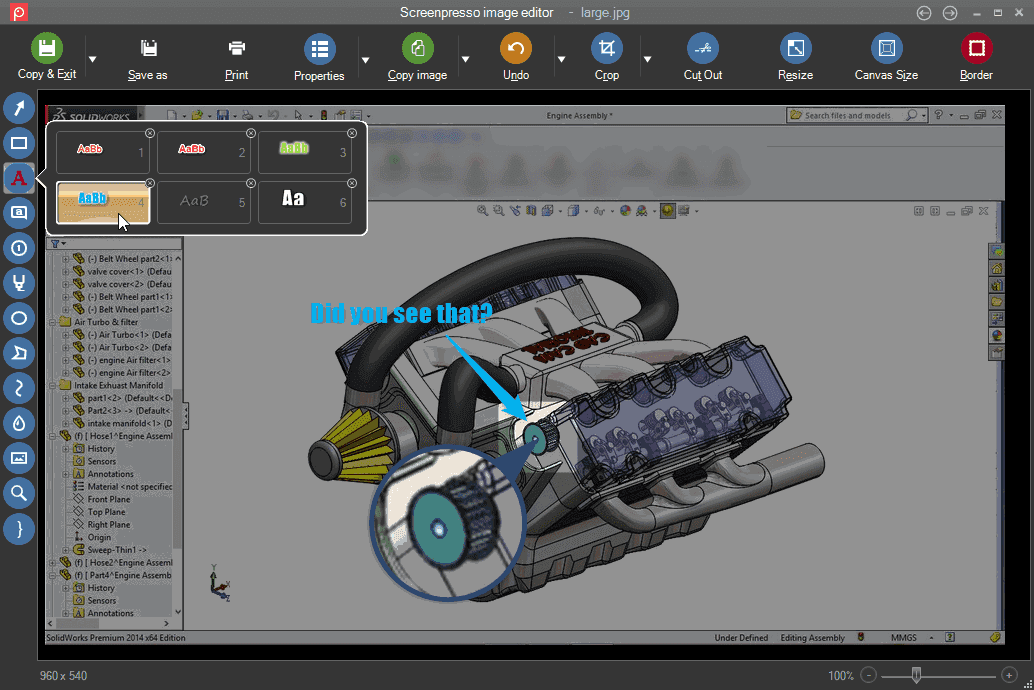
The image editor with a text style menu open, an arrow, a magnified detail and a Did you see that callout.
Turn captures into documents
Screenpresso PRO's document generator builds a PDF, Word (DOCX) or HTML file from your images and comments. It's a quick route to a user manual or training guide, and it's what sets this tool apart from free capture tools.

The document editor turning three screenshots into a PDF called My quick guide. This image shows an older Windows version.
Share to 143 services
Screenpresso publishes captures to 143 online services, the vendor says, including Google Drive, YouTube, OneDrive, OneNote, Dropbox, Imgur, Amazon S3 and email. Screenpresso Cloud creates a short public link with no registration.
Extras for specialists
Screenpresso PRO adds text capture from images (OCR), a color picker, multiple workspaces and Android device capture. It also reads QR codes, and a Chrome extension captures whole scrolling pages in one click.
Benefits
- Fewer back-and-forth emails. A marked-up image replaces a paragraph of explanation.
- No file naming. The Workspace keeps recent captures one drag away.
- Pay once. There's no subscription to keep up.
- Frequent fixes. The release log shows several updates in the last month alone.
Real-World Uses
- An IT help desk turns six screenshots into a PDF guide for a recurring question.
- A teacher shows students exactly what should be on their screen.
- A QA tester records a bug with narration and shares a link.
- A trainer automatically blurs email addresses in a software demo before publishing.
- A researcher clips sources and sorts them into separate workspaces by topic.
Who It's For, and Who Should Skip It
Screenpresso PRO fits people who produce instructions, support replies or training material on Windows and want one cheap tool for all of it.
Skip it if you want only occasional screenshots: Screenpresso's own free version, ShareX or the Snipping Tool will do. Skip it for serious video work, since reviewers rate its recording below its screenshots, and OBS or Camtasia go further. There's no Mac version. And large companies needing offline activation should look at Enterprise.
Usage Guide
- Download Screenpresso, then install it or run it directly.
- Press Print Screen and drag across a region, or hover to snap to a window.
- Find the capture in the Workspace, and double-click it to open the editor.
- Add arrows, numbered steps or blur, then save.
- Click Publish to share, or drag the file into your email or document.
- To activate PRO, enter the key from your order email in the program.
Where it falls short
- Video is the weaker half. G2's review summary notes that some users think the video recording could be improved.
- The workspace can pile up. A Capterra reviewer says images are sometimes stored in several copies.
- The editor takes some learning. One Capterra reviewer asked for a quick tutorial for the edit mode.
- The license model annoys some users. One reviewer called it annoying, and the hardware-change limit is worth knowing about.
- Free-version updates are mandatory. You can't stay on an old free build.
What Users Say
Review sites
G2 shows 4.6 out of 5 from 43 reviews. G2 and Capterra blocked direct reading, so this is a summary of what their results pages show, not quotes.
- Praise: automatic organizing of captures, quick access to editing, fast and easy screenshots, and scrolling capture, especially in manual mode.
- Complaints: video capture quality on some setups, a lack of a keyboard shortcut for one reviewer, and the license model.
- Pricing: G2's comparison pages list Limited Features and Expensive among its few reported cons, each from only a handful of reviews.
Customers quoted on Screenpresso's own site
The vendor chooses these, so give them less weight.
- "This is the only screen capture software I know of that isn't bloated and "just works". Perfect. Hope it stays that way." Ryan R., SAP Architect
- "I am loving screenpresso – I have recently upgraded to Windows 11 and the convoluted way of using the snipping tool has been driving me spare!" Jenny Iselin, Senior Business Analyst
- "I use Screenpresso everyday, all day long at work. I am now a capture addict." Chris Cassil, ADP Implementation Consultant
- "Your product is wonderful! It really makes it easy for me to explain something to my colleagues or clients" Jonathan Vargas, IT Dept.
- "I do a lot of genealogy research so I use a lot of clipping so I can compare information and use for source material data." Screenpresso customer
The pattern: people who take screenshots all day love how little friction it adds. Video and licensing draw the criticism. Rating counts on review sites are modest, so try it yourself.
Comparisons
Screenpresso vs Windows Snipping Tool
The Snipping Tool is free and built in, but it can't make numbered guides or automatic blur, and it has no shared workspace. Screenpresso is the step up when capturing is part of your job.
Screenpresso vs ShareX
ShareX is free and very capable, but its interface is busy. Screenpresso is simpler, and its document generator is its strongest argument.
Screenpresso vs Snagit
Snagit is the better-known paid option. Screenpresso's case is its simple one-time $29.99 license, so compare the two trials if video matters most to you.
Editions and Pricing
Details are from the vendor's pricing page on November 6, 2026. The PRO license at $29.99 is the one sold through the buttons on this page.
| Edition | Price | License | Adds |
|---|
| Free | $0 | Free, also at work | Image capture, HD video with branding, limited editor |
| PRO | $29.99 | One-time | 4K video, OCR, subtitles, full editor, document generator, blur |
| Enterprise | $2,190 | One-time, unlimited users | Citrix, RDS, VMware VDI, no internet needed, simple activation |
FAQs
Is Screenpresso a subscription?
No. Screenpresso PRO is a one-time purchase, and the order page shows no renewal.
Does Screenpresso work on Windows 10?
Screenpresso's features page lists Windows 11 or Windows Server 2022. Recent fixes still mention Windows 10 computers, so try the free version there first.
How many computers does a Screenpresso PRO license cover?
Screenpresso sells PRO per user, and this SKU's description says 5 PCs are included.
Can I move my Screenpresso license to a new PC?
Yes. You can reuse your activation key when you reinstall Screenpresso, but it locks after more than 5 hardware changes.
Can Screenpresso run without being installed?
Yes. Screenpresso can run directly after download, which is handy on a locked-down work PC.
Does Screenpresso capture Android phones?
Yes. Screenpresso PRO includes Android capture, with images and video from a connected device through its Android center.
System Requirements
- Windows 11 or Windows Server 2022
- x64 or ARM64 processor, running natively
- 151 MB download, plus space for your captures
Conclusion
Screenpresso PRO is worth $29.99 if you make guides or explain things on screen every week. The one reason to buy it is the document generator and full editor for the price of a couple of lunches, with no subscription. The main reason not to is that the free version already does what many people need, and it's weaker on video. Start free, and upgrade when you hit a limit.
Download Free TrialBuy Now