Coolmuster iOS Eraser: Overwrite an iPhone or iPad Before It Leaves Your Hands
Coolmuster iOS Eraser is a $25.95-a-year Windows program that overwrites an iPhone, iPad or iPod touch from a PC after you've run Apple's Erase All Content and Settings, at one of three security levels, and now produces a PDF report. It's for people who want a record of the wipe when they sell, trade in or hand down a device.
It wipes the entire device, and it doesn't replace Apple's own reset: the program asks you to do that reset as part of the process.
Quick facts
- Version: 4.0.19 for Windows, released October 13, 2026
- Developer: Coolmuster
- Works with: iPhone, iPad and iPod touch, iOS 5 through iOS 27
- Security levels: Low, Medium (one pass), High (two passes)
- Price: $25.95 for one year (3 devices, 1 PC), $35.95 lifetime
- Connection: USB, no jailbreak
- What we checked: Windows version 4.0.19 in the vendor release notes, 31 MB installer from the vendor (file dated October 13, 2026), checkout price $25.95 on November 10, 2026. We worked from the vendor manual and its screenshots and did not wipe a device or test whether its data could be recovered afterwards.
Before you buy
- The wipe can't be undone. Back up first and keep the backup.
- Turn off Find My: the program shows a warning if it's on. Close iTunes as well, or the program will ask you to.
- You'll run Erase All Content and Settings on the device midway through. The October 2026 release replaced the old automatic reset with this manual step.
- Coolmuster's refund policy says refund requests for eraser products will not be approved, even though the product page advertises a 30-day guarantee. The one-year plan also renews automatically until you cancel it.
Download Free Trial Buy Now
Overview
Connect the device, trust the computer, and the program shows the device name, iOS version and storage. Click Erase, choose a level, type "delete" and then follow the prompts to reset the device from Settings. After you reconnect it, the program writes over the storage. The latest version fills the phone with 100 fake contacts as part of that deeper overwriting and creates a PDF report at the end.
Apple's own reset already destroys the keys that protect your data, which is why it's quick. What Coolmuster adds is overwriting on top and a document that says it happened.
Features
Coolmuster iOS Eraser has three security levels
Low Level is a fast single pass. Medium, the recommended level, overwrites the data once. High Level writes twice for confidential data. Note that the iOS version's High level is two passes, while Coolmuster's Android Eraser uses three.
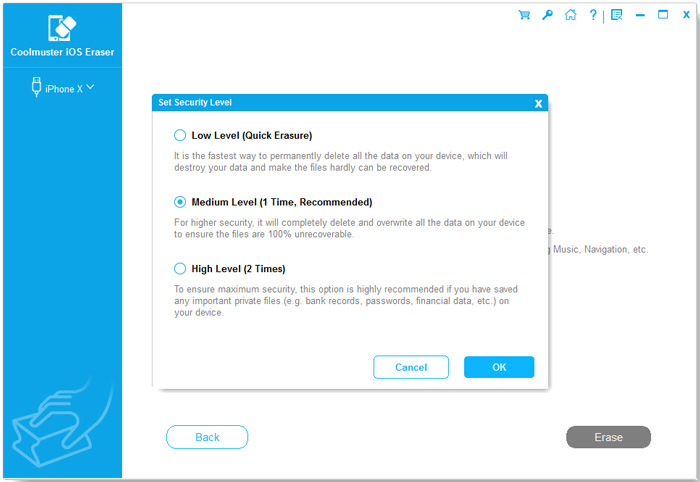
The security level dialog (from the vendor manual).
Creates a PDF report after erasure
Coolmuster iOS Eraser added PDF report generation in version 4.0.19, so you can keep a record of the wipe or give it to a buyer.
Erases account traces and app data
Coolmuster iOS Eraser targets contacts, messages, call logs, photos, videos, music, notes, voice memos, calendars, reminders, Safari data, apps and account settings, according to the vendor.
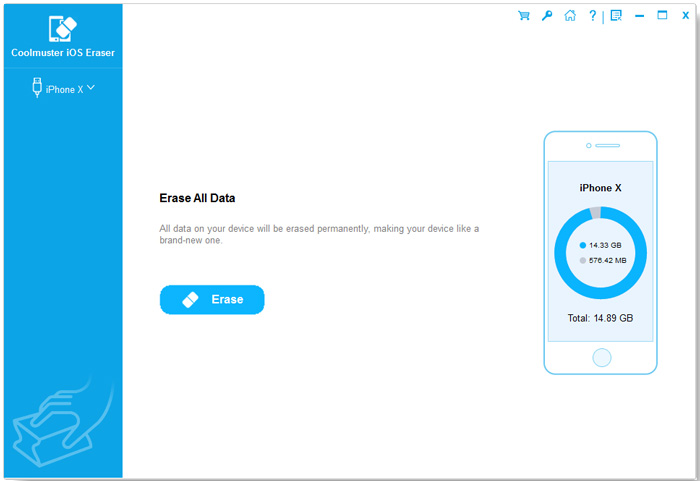
The Erase All Data screen shows the connected device, its iOS version and storage use.
Needs no jailbreak
Coolmuster iOS Eraser works with a stock iPhone over USB after you tap Trust. If the device isn't recognized, the vendor suggests installing Apple's mobile device driver or the desktop iTunes.
Benefits
- You get a document that records the wipe, which a built-in reset doesn't give you.
- The base license covers three devices, so a household's old phones are covered.
- You pick the level, trading time for extra passes.
- It runs locally on your PC, with no cloud service involved, according to the vendor.
Real-World Uses
- You're selling an old iPhone on a marketplace and want something to show the buyer.
- A small office is reassigning iPads and wants a report for each.
- An iPhone that held banking apps is being recycled.
- A family is clearing out a drawer of old iPods and iPhones.
Who It's For, and Who Should Skip It
It suits careful sellers and small organizations who want a report and a repeatable routine.
Skip it if a report isn't important to you: Apple's Erase All Content and Settings is free, quick and, given how iPhones encrypt their storage, very effective. It's also the wrong tool for deleting selected items, because it erases everything. Android phones need Coolmuster Android Eraser, and Mac users need the separate Mac edition.
Usage Guide
- Back up the device, turn off Find My and close iTunes, then launch the program.
- Connect the device by USB, unlock it and tap Trust.
- Click Erase, choose a security level and type "delete" to confirm.
- When prompted, run Erase All Content and Settings on the device and complete its setup, then reconnect.
- Let the program overwrite the storage, and save the PDF report.
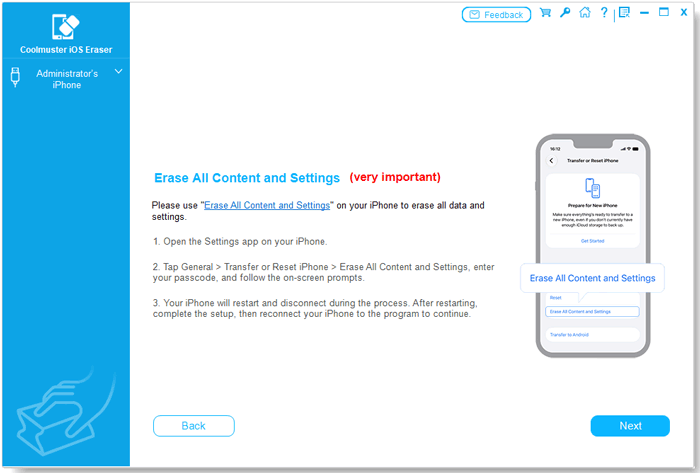
The manual step added in October 2026: run Apple's reset, then continue in the program.
Where it falls short
- Whole-device only, with no way to erase just some items.
- It needs a working device and USB connection, so a phone that won't turn on can't be wiped.
- Customers mention slow erasing, and one wishes the report were more detailed.
- There's little independent testing to support the "unrecoverable" claim, and we didn't test it either.
What Users Say
We found no independent review of this product, so product quotes come from Coolmuster's own site. Coolmuster runs a write-a-review-to-win-a-free-license promotion, so read the praise on its own site, and on small blogs, with that in mind.
On Coolmuster's product and review pages (101 reviews shown)
These appear on the vendor's own site.
"I like this newly released iOS Data Eraser tool. There are three 3 different data erasing levels. I chose the Medium level to erase data on my iPhone 7. It's great, after erasing, my iPhone 7 just like a new one. So I can trade it safely."
Jane, vendor product page
"Does exactly what it says, though the erasing process felt a little slow."
Jessica Turner, September 4, 2026, vendor review page
"Cleaned everything well, but is data truly unrecoverable afterward?"
Sarah Wilson, April 3, 2026, vendor review page
"Good solution for privacy protection, although I would like more detailed erase reports."
Emma Richardson, July 31, 2026, vendor review page
Trustpilot, for the Coolmuster company overall
Coolmuster scores 4.6 out of 5 from 223 Trustpilot reviews, read through a page summarizer. These are about support generally.
"Great product supported by a responsive staff."
James Bellas, July 3, 2026, Trustpilot (excerpt)
Customers say the process is simple and that it left a device like new. The questions are about speed, the level of detail in the report, and whether the data is truly gone.
Comparisons
iOS Eraser vs Apple's Erase All Content and Settings
Apple's reset is free and takes minutes. iOS Eraser requires that reset as well, then adds overwriting and a PDF report. If you don't need the report, you may not need the program.
iOS Eraser vs Coolmuster Android Eraser
Same price and similar steps, but iOS Eraser is for Apple devices and is USB-only, while Android Eraser also works over Wi-Fi and offers three passes at its High level.
Editions and Pricing
| Plan | Price | Term | Covers |
|---|
| 1 Year, 3 devices, 1 PC | $25.95 | 1 year, renews automatically | 3 devices |
| Lifetime, 3 devices, 1 PC | $35.95 | One payment, lifetime updates | 3 devices |
| 1 Year, 9 devices, 3 PCs | $35.95 | 1 year, renews automatically | 9 devices |
| Lifetime, 9 devices, 3 PCs | $45.95 | One payment, lifetime updates | 9 devices |
| 1 Year, 30 devices, 1 PC | $185.95 | 1 year, renews automatically | 30 devices |
| Lifetime, 30 devices, 1 PC | $245.95 | One payment, lifetime updates | 30 devices |
Most people will need this once, so pay the extra $10 for lifetime, or cancel the one-year plan as soon as you've finished.
FAQs
Does Coolmuster iOS Eraser remove Activation Lock?
No, and it doesn't claim to. Coolmuster iOS Eraser asks you to turn off Find My before you start, so sign out of iCloud first.
Can Coolmuster iOS Eraser delete only my photos?
No. Coolmuster iOS Eraser's process erases all content on the device.
Why does Coolmuster iOS Eraser need me to reset the iPhone myself?
Since version 4.0.19, Coolmuster iOS Eraser uses a manual reset rather than an automatic one, and the program says this improves speed and efficiency while reducing the risk of recovery.
Which iPhones does Coolmuster iOS Eraser support?
Coolmuster iOS Eraser supports iPhone, iPad and iPod touch models through iOS 27, including the iPhone 18 series.
Does Coolmuster iOS Eraser need iTunes?
Not directly, though Coolmuster suggests installing the desktop iTunes or Apple's driver if the device isn't recognized. iTunes must be closed while iOS Eraser runs.
Are refunds available for Coolmuster iOS Eraser?
Hardly ever. The policy lists iOS Eraser under a 7-day guarantee and says refund requests for eraser products will not be approved.
System Requirements
- Windows 11, 10, 8 or 7 (a separate Mac edition exists)
- iOS 5 or later, up to iOS 27
- Intel Pentium 1 GHz or above, 256 MB RAM, 1 GB recommended
- 200 MB free disk space, USB cable
Conclusion
Worth it if you need a written record of a wipe. The PDF report and the choice of levels are what you're really buying.
The main reason not to buy is that Apple's built-in reset is free and strong on its own, and iOS Eraser makes you perform it anyway.
Download Free Trial Buy Now