Coolmuster Android Eraser: Overwrite an Android Phone Before You Sell It
Coolmuster Android Eraser is a $25.95-a-year Windows program that wipes an entire Android phone from a PC and then overwrites the storage, at one of three security levels, and can produce a report of the wipe. It's for people selling, trading in or giving away a phone who want more assurance than a factory reset alone.
It's an all-or-nothing tool. The screen says Erase All Data, and the process has you run a factory reset on the phone as part of the job, so you can't use it to delete a single thread or photo.
Quick facts
- Version: 4.1.36 for Windows, released November 5, 2026
- Developer: Coolmuster
- Works with: Android 6 and later, up to Android 17
- Connection: USB or Wi-Fi
- Security levels: Low, Medium (one overwrite), High (three overwrites, based on DoD 5220.22-M)
- Price: $25.95 for one year (3 devices, 1 PC), $35.95 lifetime
- What we checked: Windows version 4.1.36 in the vendor release notes, 41 MB installer from the vendor (file dated November 5, 2026), checkout price $25.95 on November 10, 2026. We worked from the vendor manual and its screenshots and did not wipe a phone or test whether its data could be recovered afterwards.
Before you buy
- The wipe can't be undone. Back up everything first. Type "delete" to confirm only when you're certain.
- It requires a factory reset partway through, and the phone reconnects afterwards, so allow time for setup steps.
- Coolmuster's refund policy says refund requests for eraser products will not be approved, even though the product page advertises a 30-day guarantee.
- The one-year plan renews automatically until you cancel it, which is a poor fit for a tool most people use once.
Download Free Trial Buy Now
Overview
Connect the phone, click Continue, choose a security level and type "delete" to confirm. The program then prompts you to factory-reset the phone and reconnect. Once you've done that, it scans and overwrites the storage. The latest release optimized the erasure process and its on-screen prompts.
The vendor's claim is that a factory reset alone can leave recoverable traces, while overwriting closes that gap. On modern phones with encrypted storage a factory reset already does a great deal, so think of this as a second layer and a paper trail, not as something every seller needs.
Features
Coolmuster Android Eraser offers three erasure levels
Low Level is the fast option. Medium, the recommended setting, overwrites the data once. High Level makes three passes based on the US DoD 5220.22-M standard and takes the longest, as one customer found.
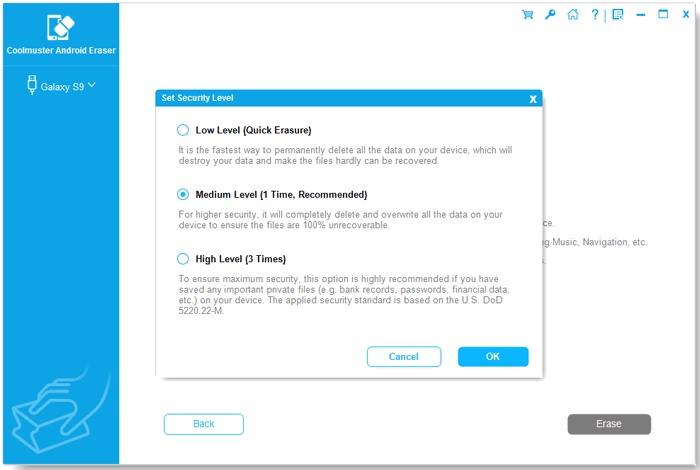
The security level dialog lists the three options and what each does (from the vendor manual).
Generates a report of the erasure
Coolmuster Android Eraser can produce a time-stamped report with device details and wipe status, which the vendor suggests showing to a buyer or keeping for records.
Covers internal storage and SD cards
Coolmuster Android Eraser targets contacts, messages, call logs, photos, videos, audio, apps, accounts, passwords and system settings, across the phone's internal memory and a fitted SD card, according to the vendor.
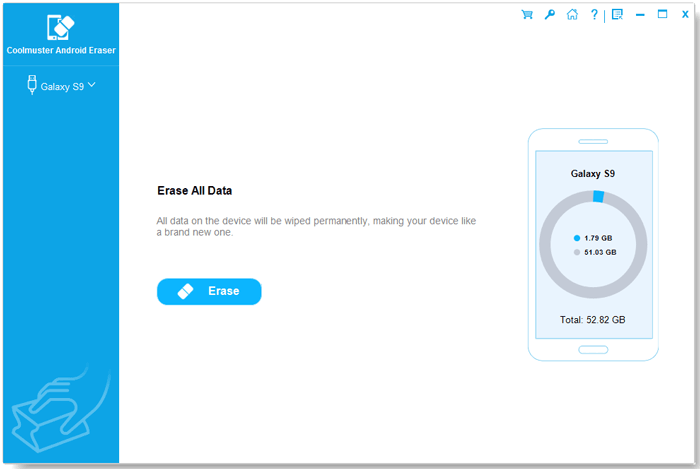
The Erase All Data screen, showing the connected phone and its storage use.
Connects by USB or Wi-Fi
Coolmuster Android Eraser connects either way, through a companion app it installs on the phone. A pop-up may ask you to set the companion app as your default SMS app so it can erase messages.
Benefits
- You have a record to show that the wipe took place.
- You choose how long to spend, from a quick pass to three overwrites.
- Three devices are included on the base license, handy for a household clearing out old phones.
- It's a desktop tool, so nothing is uploaded to a server, the vendor says.
Real-World Uses
- You're selling a phone on a marketplace and want extra reassurance about old photos.
- A small business is retiring a few Android work phones and wants a report for each.
- You're donating an old tablet that held banking apps.
- You're sending a phone away for repair and don't need anything on it.
Who It's For, and Who Should Skip It
It suits careful sellers and small businesses that want a report and a repeatable process.
Skip it if you only want to remove specific files, since it wipes the entire phone. If the phone is recent and encrypted, and you're just passing it to a family member, Android's built-in Reset is free and may be all you need. iPhones need Coolmuster iOS Eraser, and Mac users need the separate Mac edition.
Usage Guide
- Back up anything you want to keep, then install and launch the program.
- Connect the phone by USB or Wi-Fi and allow the connection. The companion app installs on the phone.
- Click Continue, set the security level and type "delete" to confirm.
- Follow the prompts to factory-reset the phone, and then reconnect it.
- Let the program finish scanning and overwriting, and save the report.
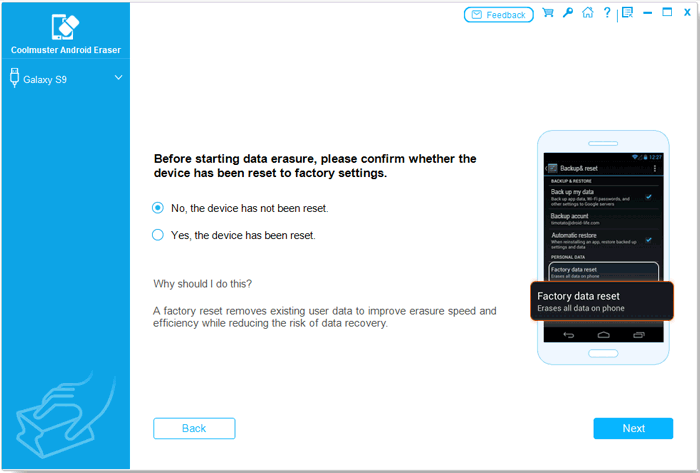
The program asks you to confirm the phone has been factory reset before erasing.
Where it falls short
- Whole-device only, with no way to erase selected files.
- High Level is slow, as FileHorse and customers both note.
- It needs a PC and a working USB or Wi-Fi link, so a phone that won't boot can't be wiped.
- The refund policy gives you little recourse once you've bought it.
What Users Say
This product has a little independent coverage, mainly on download sites. Coolmuster runs a write-a-review-to-win-a-free-license promotion, so read the praise on its own site, and on small blogs, with that in mind.
On Coolmuster's product and review pages (91 reviews shown)
These appear on the vendor's own site.
"I chose high lever when erasing my S9. Yes, it really took some time to do that. But perfect. My S9 looks like a new one now."
Vivi, vendor product page
"Just switched my Samsung S9 to Samsung S20. The tool helps me wiped my Samsung S9 as new, so I could resell it without worry."
Tong, vendor product page
"Requires a computer connection, works well, and even provides an authoritative erase report."
Bennett. .LO, August 26, 2026, vendor review page
FileHorse (software download site)
FileHorse's page for version 4.1.32 carries a 7.12 out of 10 score from 16 ratings in its page data, and lists these pros and cons.
"Multiple Erasing Modes - Offers different security levels."
FileHorse, pros
"Slow Process - Can take time for deep erasures."
FileHorse, cons
"USB Connection Required - Needs a PC to function."
FileHorse, cons
Trustpilot, for the Coolmuster company overall
Coolmuster scores 4.6 out of 5 from 223 Trustpilot reviews, read through a page summarizer. Most are about support, not this tool.
"Quick to resolve my issue 5 star service all the way"
Tim Abshire, May 6, 2026, Trustpilot (excerpt)
People value the simple process and the report. The steady complaint is how long the high-security wipe takes.
Comparisons
Android Eraser vs the built-in factory reset
A factory reset is free and fast, and on an encrypted phone it already makes old data very hard to read. Android Eraser adds overwriting and a report, which matter most if you need evidence.
Android Eraser vs Coolmuster iOS Eraser
They work the same way at the same price, but iOS Eraser is for iPhones and iPads, and its High level makes two passes rather than three.
Editions and Pricing
| Plan | Price | Term | Covers |
|---|
| 1 Year, 3 devices, 1 PC | $25.95 | 1 year, renews automatically | 3 devices |
| Lifetime, 3 devices, 1 PC | $35.95 | One payment, lifetime updates | 3 devices |
| 1 Year, 9 devices, 3 PCs | $35.95 | 1 year, renews automatically | 9 devices |
| Lifetime, 9 devices, 3 PCs | $45.95 | One payment, lifetime updates | 9 devices |
| 1 Year, 30 devices, 1 PC | $185.95 | 1 year, renews automatically | 30 devices |
| Lifetime, 30 devices, 1 PC | $245.95 | One payment, lifetime updates | 30 devices |
Since the tool is usually needed once, either cancel the one-year plan straight after using it or pay $10 more for the lifetime license. The 9-device plan costs just $10 more than the 3-device one.
FAQs
Can Coolmuster Android Eraser delete only certain files?
No. Coolmuster Android Eraser's Erase All Data process wipes the whole phone. For individual files, use the phone's own delete function.
Does Coolmuster Android Eraser need root?
Coolmuster's manual for Android Eraser doesn't mention root. It connects through USB debugging or Wi-Fi and a companion app.
Does Coolmuster Android Eraser remove my Google account?
The vendor says Coolmuster Android Eraser removes Google accounts, passwords and settings. Sign out of your Google account on the phone before you begin, in any case, so factory reset protection doesn't get in the buyer's way.
How long does Coolmuster Android Eraser take?
Coolmuster doesn't publish timings for Android Eraser. Customers and FileHorse note that the High level is slow, so allow plenty of time.
Can erased data be recovered after Coolmuster Android Eraser?
Coolmuster says data can't be recovered after Android Eraser. We haven't tested that claim ourselves.
Is there a refund for Coolmuster Android Eraser?
Don't count on one. Coolmuster's policy lists Android Eraser under a 7-day guarantee and says refund requests for eraser products will not be approved, as erasing can't be reversed.
System Requirements
- Windows 11, 10, 8 or 7 (a separate Mac edition exists)
- Android 6.0 or later, up to Android 17
- 1 GHz CPU or faster, 256 MB RAM, 1 GB recommended
- 200 MB free disk space, USB cable or Wi-Fi
Conclusion
Worth it if you want documented proof of a wipe, or peace of mind on a phone that held sensitive data. The report and the three levels are what you're paying for.
The main reason not to buy is that a factory reset on a modern encrypted phone may already be enough, and this program makes you do that reset anyway.
Download Free Trial Buy Now