Vovsoft Spreadsheet Combiner: Many Excel Files, One Workbook
Spreadsheet Combiner is a $19 Windows program from Vovsoft that merges CSV, XLS and XLSX files into one sheet or one multi-tab workbook. The $19 is a one-time lifetime license, and there's a free trial.
Excel can do this itself, if you know where to look. This tool is for people who'd rather not learn Power Query to merge twelve monthly files.
Quick facts
- Version: 1.3, released July 26, 2024
- Developer: Vovsoft
- Platform: Windows 11, 10, 8/8.1, 7, Vista and XP, 32-bit and 64-bit. No Mac or Linux version
- Input: CSV, XLS and XLSX, by file or by folder
- Output: Single sheet: CSV, XLS, XLSX. Multiple sheets: XLS, XLSX
- Formatting: Keep fonts and colors, or plain text
- Editions: installer (3.35 MB) and portable (2.05 MB), one license for both
- Price: $19, one-time payment, lifetime license with free updates
- Trial: free to try. Merges files, with a nag screen. It isn't allowed for commercial use
- Refunds: Vovsoft's general policy is no refunds, since a free trial comes first. An order placed by accident is generally refunded, at the company's discretion, and PayPro Global has the final say on orders placed through it
- What we checked: installer file version 1.3.0.0 (3,515,648 bytes) with a valid code signature, downloaded from the vendor on November 10, 2026, and $19.00 total on the order page with no auto-renewal on November 10, 2026. We didn't merge files ourselves
Download Free TrialBuy Now
Overview
You add files or a whole folder, choose Merge into Single Sheet or Merge into Multiple Sheets, tick Plain Text if you don't want the formatting, and click Combine.
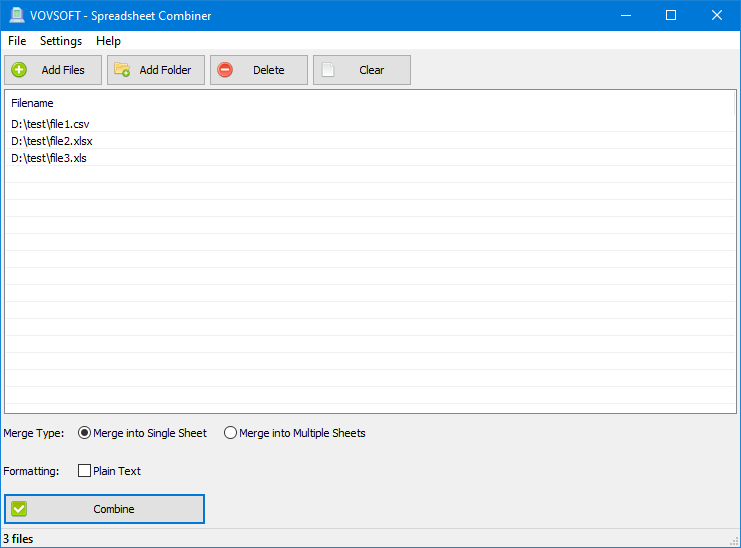
Three files of different types queued, with Merge Type and Plain Text options.
Features
One long list, or one workbook with tabs
Spreadsheet Combiner's Single Sheet mode appends everything into one sheet, for building a long list from smaller ones. Multiple Sheets mode keeps each source sheet as its own tab.
Mixed file types in one run
Spreadsheet Combiner accepts CSV, XLS and XLSX together, so a CSV export and an old XLS can go into the same merge.
Formatting kept or dropped
Spreadsheet Combiner preserves fonts, color, bold and italic, or outputs plain text if you only care about the data.
Fully offline
Spreadsheet Combiner never uploads your files, unlike the many free merge sites, which is the main reason to use a desktop tool for payroll or client data.
Who It's For, and Who Should Skip It
It suits people who merge batches of files now and then and don't want to set up a query.
Skip it if you use a recent Excel and your files share the same columns. Data > Get Data > From File > From Folder (Power Query) combines them for free, and it matches columns by name and can be refreshed when new files arrive.
Usage Guide
- Download the installer or the portable edition and start the program.
- Click Add Files or Add Folder, or drag files in.
- Choose Merge into Single Sheet or Merge into Multiple Sheets.
- Tick Plain Text if you don't want formatting.
- Click Combine.
Before you buy
One license covers one person on as many of their own computers as they use, or one shared workstation used by several people in turn. Using a key on too many computers at the same time can get it revoked.
Where it falls short
- Single Sheet mode appends rows: one reviewer below couldn't skip repeated header rows and wanted a column naming the source file.
- It doesn't match columns by name, deduplicate or transform anything the way Power Query does.
- The last release was July 2024, and there are no open feature requests.
What Users Say
What reviewers say
Vovsoft's product page shows a rating of 4.3 out of 5 from 3 reviews, with this mixed comment.
"Merge is perfect with one exception. I can choose merge to one sheet but i cant avoid merge with headers, also last column with the name from orgin file will be nice." ODON
Editions and Pricing
| Edition | Price | License | What you get |
|---|
| Trial | Free | Personal, non-commercial use | Merges files, with a nag screen |
| Licensed | $19 one-time | Lifetime | Commercial use, no nag screen, lifetime free updates, all features |
The installer and portable editions use the same license key, and the key is delivered right after payment.
FAQs
Can Spreadsheet Combiner merge CSV files with Excel files?
Spreadsheet Combiner can take CSV, XLS and XLSX files in the same batch.
Can Spreadsheet Combiner merge every file in a folder?
Spreadsheet Combiner has an Add Folder button and accepts folders by drag and drop, so a whole folder of files can go in at once.
Is Spreadsheet Combiner a subscription?
Spreadsheet Combiner is a one-time purchase, with a license that doesn't expire and free updates.
System Requirements
- Windows 11, 10, 8/8.1, 7, Vista and XP, 32-bit or 64-bit
- 3.35 MB for the installer, 2.05 MB for the portable edition
Conclusion
Worth $19 for occasional merges if you don't want to learn Power Query. The reason to buy it is that it's simple and offline, with both a single-sheet and a multi-tab mode. The reason not to is that Excel users with matching columns already own a stronger way to do this.
Download Free TrialBuy Now