Remove Duplicates for Google Sheets: Find, Highlight and Delete Dupes Without Formulas
Remove Duplicates is an Ablebits add-on for Google Sheets that finds duplicate or unique rows and cells, compares sheets and columns, and combines repeated records, then highlights, moves or deletes what it finds. It runs in the browser on Windows, Mac and Chromebooks, and the 12-month plan for one Google account is $19.99 with the discount code applied on the order page (regular price $33.60), with a 30-day free trial.
Sheets' own "Remove duplicates" command deletes exact repeats and that's it. If you need to see the duplicates before they go, keep the newest entry instead of the oldest, or check a new list against last month's file, this add-on does those jobs in a four-step wizard.
Quick facts
- Version: 1.16, released September 19, 2024 (the Marketplace listing was last updated May 11, 2026)
- Developer: APPS4GS (Mikalai Mikhuta JDG), which builds Google Workspace add-ons under the Ablebits name
- Works in: Google Sheets in a web browser, on Windows 10 and up, macOS 10.15.7 Catalina and up, and ChromeOS
- Price: 12-month plan $19.99 with the discount code (regular $33.60); lifetime $59.90; each for one Google account
- Trial: 30 days, fully functional
- Guarantee: unconditional 30-day money-back guarantee
- Marketplace rating: 3.3 out of 5 from 1,742 ratings, 3M+ installs
- What we checked: on the order page the 12-month plan was $33.60, or $19.99 with the code TrSbExpr-MjAdns-01 that the vendor's own Buy link uses, and the lifetime plan was $59.90; the Google Workspace Marketplace page showed version 1.16 and a 3.3-star average from 1,742 ratings, all on November 8, 2026. We didn't install the add-on or run it on our own sheets.
Before you buy
- Power Tools may be the better buy. Ablebits' Power Tools add-on ($49.99 a year) contains these same dedupe and compare tools plus 30-odd others, including Merge Sheets.
- One subscription per Google account. Colleagues who share your sheet need their own subscription to run the add-on.
- The 12-month plan has to be renewed, or switched to lifetime, to keep using it after a year. Auto-renewal can be turned on or off from the key icon in the add-on.
Download Free TrialBuy Now
Overview
Remove Duplicates adds a menu under Extensions > Remove Duplicates with six tools: Find duplicate or unique rows, Quick dedupe, Find duplicate or unique cells, Compare sheets for duplicates, Compare columns, and Combine duplicate rows. Each tool walks you through a short wizard (pick the range, choose duplicates or uniques, choose key columns, choose an action) and then does the work without adding a single formula to your sheet.
What sets it apart from the built-in command is control. You can match on any combination of columns, decide whether the first occurrence counts, ignore or respect letter case and blank cells, and choose from seven actions for what it finds. Version 1.16 added an option to remove the first duplicate and keep the last one, so the newest record survives in a log sorted by date, plus export and import of saved scenarios.
Features
Find duplicate or unique rows by key columns
Remove Duplicates checks rows by the key columns you tick, so "Ray Bradbury" counts as a duplicate only when both the first-name and last-name columns match. You can look for duplicates, duplicates plus their first occurrences, uniques, or uniques plus first occurrences, and reverse the scanning order to keep the last entry. Then fill the rows with a color, add a status column, copy or move them, clear the values, or delete the rows.

Step 4 of 4 in Find duplicate or unique rows: the seven actions, from filling the rows with yellow to deleting entire rows from the sheet.
Find duplicate cells anywhere in a range
Remove Duplicates' cell tool looks at single cells rather than whole rows, which suits a list of IDs, emails or SKUs spread over several columns. It offers the same four choices (duplicates, duplicates + 1st occurrences, uniques, uniques + 1st occurrences) and a Match case option.
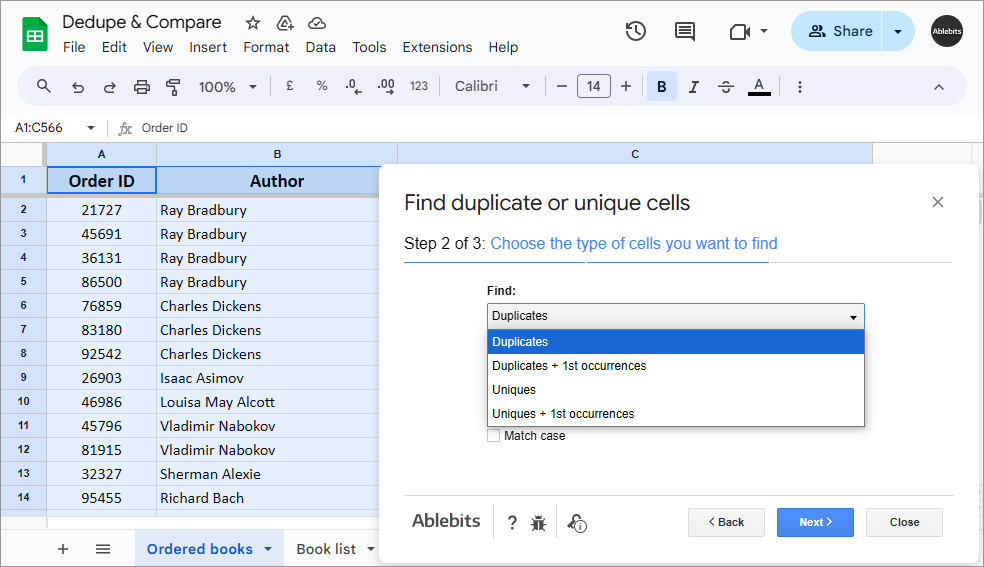
Find duplicate or unique cells, step 2 of 3, with the Duplicates / Uniques and 1st-occurrence options open.
Compare sheets and columns
Remove Duplicates compares a main sheet against one or more other sheets, even in other spreadsheet files on your Drive, and marks the records that appear in both or only in one. A separate one-step Compare columns tool checks two columns on the same sheet for matches or differences, handy for "which of these customers already got the email?" questions.
Combine duplicate rows instead of deleting them
Remove Duplicates' Combine duplicate rows merges repeated records into one row: text values are joined with a delimiter you choose (or your own), and numbers can be summed, averaged or calculated with 14 built-in functions. That turns a list of orders per customer into one line per customer with the order numbers joined and the amounts totaled.
Scheduled dedupes that run while you're offline
Remove Duplicates can save any Find duplicate or unique rows setup as a scenario and run it automatically once or twice a day within time windows you pick, even when the file is closed and your computer is off. Each run can be written to a log sheet, and a scheduled scenario whose file goes missing turns itself off after five failed attempts. The scheduler is labeled Beta in the add-on.

Schedule autostart (Beta): a first run between 8 and 9 AM, a second between 7 and 8 PM, and a log sheet turned on.

The Scenarios schedule log: each start, the result ("247 duplicate rows have been found and colored") and the next start time.
Share scenarios with your team
Remove Duplicates exports all saved scenarios to a file and imports them under another account, so a team lead can set up the dedupe rules once and everyone runs the same thing. Saved scenarios also appear in the Extensions menu for one-click runs.

The Extensions > Remove Duplicates menu with its six tools, two saved scenarios and the Import / Export & share options.
Real-World Uses
- Mailing and lead lists: merge sign-ups from several forms and remove repeated emails before a campaign, keeping the most recent entry.
- Weekly CRM or shop exports: schedule a scenario that colors new duplicates every morning so someone can review them, with a log of each run.
- Reconciling two lists: compare this month's customer list against last month's file to find who is new and who dropped off.
- Order summaries: combine duplicate rows to get one line per customer with order numbers joined and totals summed.
Who It's For, and Who Should Skip It
It's for anyone who regularly cleans lists in Google Sheets (marketers, sales and support staff, office admins, teachers handling class rosters) and wants more control than the built-in command, without formulas or Apps Script.
Skip it if:
- you only need exact repeats deleted now and then. Sheets' built-in Data > Data cleanup > Remove duplicates is free.
- you also merge tables, split names or count by color. Power Tools covers all of that for a little more.
- you work in Microsoft Excel. This add-on runs only in Google Sheets.
- your company blocks third-party Workspace add-ons.
Usage Guide
- Click Download Free Trial to open the add-on's Google Workspace Marketplace page, click Install and grant the permissions, signed in to the Google account you'll use.
- Open your spreadsheet and select the table, including the header row.
- Go to Extensions > Remove Duplicates > Find duplicate or unique rows.
- Confirm the range, choose Duplicates or Uniques (with or without first occurrences), and tick "My table has headers" and the other options you need.
- Tick the key columns to compare, then pick an action. Start with Fill with color or Add a status column to review the results before deleting anything.
- Click Finish, and save the settings as a scenario if you'll run the same check again.
- When you buy, click the key icon at the bottom of the add-on and paste the activation key you receive.
Where It Falls Short
- Exact matches only. "Jon Smith" and "John Smith" are different records to Remove Duplicates. Typos and near-matches need a fuzzy-matching tool (Ablebits offers a separate free Find Fuzzy Matches add-on).
- Several Google accounts in one browser cause trouble. The vendor's known-issues page says the Next button can stay disabled, the progress arrows spin forever, or drive.google.com refuses to connect until you sign out of the other accounts.
- Locked-down networks. If a web filter blocks the add-on's servers, the tools load blank until IT whitelists them.
- Slower release cadence. The last numbered release, 1.16, dates from September 2024, while Power Tools, which includes the same tools, got a version in January 2026.
What Users Say
On the Google Workspace Marketplace, Remove Duplicates has 3.3 out of 5 from 1,742 ratings and more than 3 million installs. The written reviews Google shows first are all 5-star, and two of those reviewers question the low average themselves, so the ratings and the written reviews tell rather different stories. Treat the 30-day trial as your real test.
Google Workspace Marketplace reviews
"This extension has been very helpful with my data cleanup and tracking. It has reduced my time by more than 50%. I'm so grateful to have been able to purchase this on sale, too." Pamela, 5 stars, July 2025
"Maryia Vehera was extremely helpful when I ran into a problem. She actually sent me a very short video step by step on how to do what I was needed. Now I love this program and for price for one year is very well worth it." Shell Segura, 5 stars, April 2025
"This tool does stuff that Excel can't do. It is really fast and easy to use. It walks you right through the steps to do exactly what is needed. And it's well worth the price!" Jason Call, 5 stars, February 2024
"Works great and easy to use. Time saver!" Miguel Jauregui, 5 stars, May 2025
"Excellent tool and customer support!" David Pattee, 5 stars, October 2025
On the low average rating
"I don't really understand why this app a little over a three star rating. This app has saved me more time and money than any other extension. I highly suggest this app especially if you practice on the many different ways you can use it." Ronnie Edmonds, 5 stars, March 2024
"This extension does what it is supposed to do, and then can do a bit more in it's variations. It's been a great help to our business needs. Thank you. Support is very attentive, helpful and clear with further questions and answers to solutions." Jeff Fashion Conservatory, 5 stars, June 2024. The same reviewer argues that the low average comes mostly from people rating the add-on without using it.
The recurring themes
Buyers who write reviews praise the time saved on list cleanup, the step-by-step wizard, and above all the support staff, named individually more than once. The price for a year is described as worth it, and one buyer mentions getting it on sale. Against that stands a 3.3 average from more than 1,700 ratings, which the written reviews don't explain. Expect the setup to take a few runs to learn, and check that it works on your account and network during the trial.
Comparisons
Remove Duplicates vs Google Sheets' built-in command
Data > Data cleanup > Remove duplicates in Sheets deletes exact duplicate rows in a range and keeps the first. Remove Duplicates adds highlighting and status columns instead of deleting, keeping the last occurrence, finding uniques, single-cell checks, comparing sheets across files, combining duplicate rows with totals, and saved, scheduled scenarios.
Remove Duplicates vs Power Tools
Power Tools ($49.99 a year, $99.95 lifetime) includes every Remove Duplicates tool plus merging, splitting, text cleanup, count by color and more. If duplicates are your only problem, Remove Duplicates at $19.99 with the code is the cheaper choice; if you'd also buy Merge Sheets, Power Tools costs less than the two together.
Editions and Pricing
| Plan | Price | Term | Users |
|---|
| 12-month | $19.99 with the code (regular $33.60) | 12 months of use and updates | 1 Google account |
| Lifetime | $59.90 | One-time payment, all future updates | 1 Google account |
The Buy Now button applies the code to the 12-month plan automatically. At $19.99 a year, the lifetime plan pays off after about three years. Buying 10 or more subscriptions gets a volume discount on the order page, from 20% (10-20) up to 50% (51 or more).
FAQs
Can Remove Duplicates keep the newest entry instead of the first one?
Yes. Remove Duplicates can reverse the scanning order with one checkbox, so it treats the earlier rows as the duplicates and keeps the last occurrence.
Does Remove Duplicates find near-duplicates or typos?
No. Remove Duplicates compares values exactly, with options for letter case and blank cells. For misspelled names or partial matches, Ablebits has a separate Find Fuzzy Matches add-on.
Can Remove Duplicates compare sheets in different files?
Yes. Remove Duplicates' Compare sheets for duplicates tool can pick sheets from other spreadsheets on your Google Drive, including files in your Starred folder, and compare them against your main sheet.
Does the scheduled dedupe need my computer to be on?
No. Remove Duplicates' scheduled scenarios run on Google's side once or twice a day, even when the spreadsheet is closed and your computer is off. You pick a time window rather than an exact minute.
Does Remove Duplicates work in Excel?
No. Remove Duplicates runs only inside Google Sheets. The Excel duplicate tools sold on ablebits.com are separate products from a different company.
What happens when the Remove Duplicates subscription ends?
When the Remove Duplicates 12-month plan ends, renew it or switch to lifetime to keep running the tools. Changes already made to your sheets stay, because the add-on edits the spreadsheet directly.
Can I move my Remove Duplicates license to another Google account?
Yes. In Remove Duplicates, click the key icon, copy your activation key, click Deactivate, then start the add-on under the other account and activate it there. One key works under one account at a time.
System Requirements
- A Google account with Google Sheets and an internet connection
- Windows 10 or later, macOS 10.15.7 Catalina or later, or ChromeOS
- Chrome, Firefox, or Safari on a Mac
- Spreadsheets up to 10 million cells
Conclusion
At $19.99 a year with the code, Remove Duplicates is worth it if you clean lists in Google Sheets often and want to review duplicates, keep the newest record or compare files, rather than just delete exact repeats. The scheduled scenarios with a log sheet are the standout: a recurring cleanup that runs without you.
The main reason not to buy it: if you need more than dedupe, Power Tools includes all of this for $49.99, and if you only need the occasional exact-match cleanup, Sheets' free built-in command does that. The 3.3-star Marketplace average is another reason to use the full 30-day trial before paying.
Download Free TrialBuy Now