Sheets Manager for Google Sheets: Handle Dozens of Tabs at Once
Sheets Manager is an Ablebits add-on for Google Sheets that lists every tab of a spreadsheet in a sidebar and lets you select several at once to hide, protect, color, reorder, copy, move or delete them in one action. It runs in the browser on Windows, Mac and Chromebooks; the 12-month plan for one Google account is $12 with the discount code applied on the order page (regular price $15), or $39.95 lifetime, with a 30-day free trial.
Google Sheets lets you select several tabs with Ctrl or Shift, but many actions still mean right-clicking tab after tab, and with 40 or 100 tabs the tab bar itself becomes the problem. Sheets Manager gives you the whole list, a search box and one toolbar.
Quick facts
- Version: 1.3, released February 20, 2026 (rebuilt for Google's V8 runtime)
- Developer: Ablebits (APPS4GS), which also makes Power Tools for Google Sheets
- Works in: Google Sheets in a web browser, on Windows 10 and up, macOS 10.15.7 Catalina and up, and ChromeOS
- Price: 12-month plan $12 with the discount code (regular $15); lifetime $39.95; each for one Google account
- Trial: 30 days, fully functional
- Guarantee: unconditional 30-day money-back guarantee
- Marketplace rating: 4.3 out of 5 from 27 ratings, 429K+ installs
- What we checked: on the order page the 12-month plan was $15, or $12 with the code TrSbrExp-MnrAdns-01 that the vendor's own Buy link carries, and the lifetime license $39.95; the Google Workspace Marketplace page showed version 1.3 of February 20, 2026 as the latest release and a 4.3-star average from 27 ratings, all on November 29, 2026. We didn't install the add-on or run it on our own spreadsheets.
Before you buy
- It works on tabs, not data. It doesn't search or edit cell contents, whatever some Marketplace reviews claim.
- Version 1.3 may feel slower. Ablebits notes that the V8 rebuild Google required "may slightly affect your experience".
- Power Tools includes it. Sheets Manager is in the Process group of Ablebits' Power Tools ($49.99 a year).
Download Free TrialBuy 12-Month PlanBuy Lifetime License
Overview
Sheets Manager opens as a sidebar with a tree of all the sheets in the file. Icons mark protected sheets, tab colors show as they do on the tab bar, hidden sheets can be shown or left out of the list, and a counter at the bottom shows how many tabs there are and how many you've selected. You select tabs with checkboxes (Selection mode) or with Ctrl and Shift, then use the toolbar or a right-click menu.
Version 1.2 added copying or moving sheets to several existing spreadsheets at once; version 1.3 rebuilt the add-on for Google's mandatory V8 runtime, improved tab-color detection and added a key-recovery link on the activation screen.
Features
A list of every tab, with search
Sheets Manager shows all sheets in one scrollable list, with a quick search by name, so a file with 100 tabs stays navigable. Clicking a name jumps to that sheet.
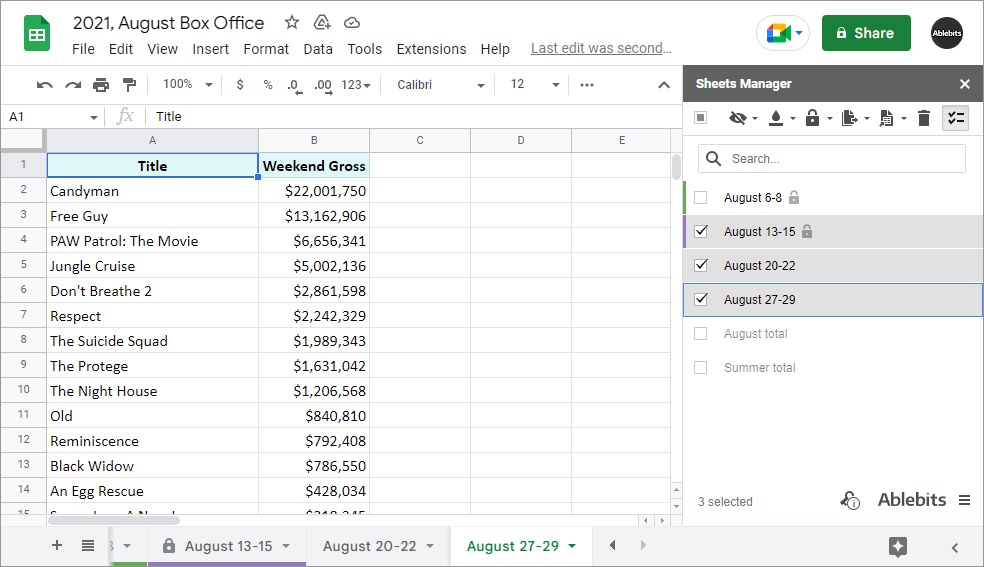
The sidebar with three August tabs ticked; the lock icon marks a protected sheet and the counter reads "3 selected".
Bulk actions from the toolbar or right-click menu
Sheets Manager hides or unhides, protects (restrict editing or show a warning), unprotects, colors, duplicates, moves up or down, and deletes every selected sheet at once (renaming is one tab at a time).

Right-click menu for the selected tabs: Hide, Protect: restrict access, Protect: show warning, Unprotect, Delete, Move up/down/to top/to bottom.
Copy or move tabs to other files
Sheets Manager copies or moves the selected sheets to a new spreadsheet, an existing one, several existing ones, or each sheet into its own new spreadsheet. For the last option it creates a Drive folder next to the source file and gives you a link to open it.

The copy menu: New spreadsheet, Existing spreadsheet, Multiple new spreadsheets.
Hidden sheets in view
Sheets Manager can show hidden sheets in its list with one setting, so you can find and unhide them without opening the View menu for each.
Benefits
The benefit is fewer repetitive clicks and fewer mistakes in big workbooks: protecting 12 monthly tabs, recoloring a quarter's worth of sheets or archiving last year's tabs to their own files becomes one action instead of a dozen. Splitting a workbook into one file per tab, which Google Sheets can't do natively, is the feature that usually justifies the price.
Real-World Uses
- Monthly or weekly reporting files: protect, color and reorder the new period's tabs in one go.
- Sharing per tab: copy each client's or region's tab into its own spreadsheet in a new Drive folder, ready to share.
- Year-end cleanup: move old tabs to an archive spreadsheet and delete them from the working file.
- Inherited workbooks: find the hidden and protected sheets in a file someone else built.
Who It's For, and Who Should Skip It
It's for people who live in Google Sheets workbooks with many tabs: finance and operations staff, teachers with one tab per class, project managers with one tab per week.
Skip it if:
- your files have a handful of tabs. Google Sheets' own right-click menu is enough.
- you need to split one table into many sheets by a column value. That's Ablebits' Split Sheet.
- you'd use other Ablebits tools: Power Tools includes Sheets Manager for $49.99 a year.
- you work in Excel; this runs only in Google Sheets.
Usage Guide
- Click Download Free Trial to open the add-on's Google Workspace Marketplace page, click Install and grant the permissions.
- Open a spreadsheet and go to Extensions > Sheets Manager > Start.
- Select tabs with the checkboxes (turn on Selection mode) or with Ctrl/Shift and a click.
- Use the toolbar buttons or right-click for hide, protect, color, copy, move or delete; drag names to reorder.
- For copy or move to multiple new spreadsheets, open the Drive folder from the link the add-on shows when it finishes.
- Rename a sheet with the pencil icon that appears when you hover over its name.
Where It Falls Short
- Speed after the V8 rebuild. The vendor itself warns version 1.3 "may slightly affect your experience".
- Protection edge cases. Earlier versions moved protected data to other spreadsheets and stopped when one sheet couldn't be processed; both are listed as fixed in version 1.2, but test protected sheets during the trial.
- Reviews you can't lean on. A cluster of five-star reviews from early May 2024 describes features the add-on doesn't have (data search, Dropbox sync, encryption), and Ablebits corrected several of them in its replies. That leaves only a handful of reviews that describe the real product.
What Users Say
On the Google Workspace Marketplace, Sheets Manager has 4.3 out of 5 from 27 ratings and more than 429,000 installs. Treat the average with care: many of the visible five-star reviews were posted within three days in May 2024 and describe a different product.
Reviews that describe the real add-on
"I have a sheets document with over 100 tabs. Sheets manager makes it easier to navigate. Also, it works great for mass delete and move to new document as well as easy rename. Moving the position of a tab is super easy with this. That's a big help when you have more than 10 tabs in a sheet. I changed my Google account and the support team helped me the same day I emailed them. Great product and great support." Mitchell Ablove, 5 stars, August 2026
"I just started using the Sheets Manager add-on. So far it has helped me make changes across multiple sheets in one file at the same time. As I use it more I can offer up additional feedback." Russ Salzman, 4 stars, October 2023
Reviews to discount
"Sheet Manager's powerful search and filter capabilities make finding and managing specific data within sheets a breeze." Bailey, 5 stars, May 2024. Ablebits replied that Sheets Manager "doesn't search for data on the sheets -- it works with the tabs themselves"
"Sheet Manager's integration with cloud storage services like Google Drive and Dropbox is seamless, allowing me to sync my sheets effortlessly across devices and access them from anywhere." Alex kelvin, 5 stars, May 2024. Ablebits replied that the add-on "doesn't integrate with Dropbox"
The recurring themes
The genuine reviews come from people with very large workbooks who value bulk delete, move-to-new-file and drag-and-drop reordering, plus quick support. There are too few of them to judge reliability, so use the 30-day trial on your biggest file.
Comparisons
Sheets Manager vs Google Sheets' own tab menu
Google Sheets can select several tabs with Ctrl or Shift and then hide, delete, duplicate, color or copy them to another spreadsheet. It has no list view or search for 50-plus tabs, no "each sheet to its own new file", no bulk protect with a warning-only option, and no way to copy into several spreadsheets at once. If your files are small, the built-in menu is all you need.
Sheets Manager vs Power Tools
Power Tools ($49.99 a year, $99.95 lifetime) includes Sheets Manager with 40-plus other tools. For tab management alone, Sheets Manager at $12 a year with the code is cheaper.
Editions and Pricing
| Plan | Price | Term | Users | Buy |
|---|
| 12-month | $12 with the code (regular $15) | 12 months of use and updates | 1 Google account | Buy 12-Month |
| Lifetime | $39.95 | One-time payment, all future updates | 1 Google account | Buy Lifetime |
Each button orders that plan; the 12-month button applies the code automatically. Buying 10 or more subscriptions gets a volume discount on the order page.
FAQs
Can Sheets Manager save each tab as a separate Google Sheets file?
Yes. Sheets Manager copies or moves each selected sheet into its own new spreadsheet, puts them all in a new Drive folder next to the source file, and gives you a link to it.
Does Sheets Manager work with protected sheets?
Yes. Sheets Manager marks protected sheets in its list and can protect or unprotect several at once, either restricting editing or only showing a warning; you need permission to change a sheet's protection.
Can Sheets Manager search inside my data?
No. Sheets Manager searches sheet names only; to search cell contents use Ctrl+F or Ablebits' Advanced Find and Replace.
Where is the sheet count in Sheets Manager?
At the bottom of the Sheets Manager pane, next to the Ablebits logo, showing the total number of tabs and how many are selected.
Does Sheets Manager keep the order of copied sheets?
Yes. Since version 1.1, Sheets Manager copies and moves multiple sheets in the order they appear in the source file.
What happens when the Sheets Manager subscription ends?
When the 12-month plan ends, renew or switch to lifetime to keep using the add-on. Changes it made to your files stay.
System Requirements
- A Google account with Google Sheets and an internet connection
- Windows 10 or later, macOS 10.15.7 Catalina or later, or ChromeOS
- Chrome, Firefox, or Safari on a Mac
- Spreadsheets up to 10 million cells
Conclusion
At $12 a year with the code, Sheets Manager is worth it if you manage workbooks with dozens of tabs, and especially if you need to split a workbook into one file per tab, which Google Sheets can't do on its own.
The main reasons not to: small files don't need it, and the Marketplace rating is padded by reviews that describe features it doesn't have, so rely on the 30-day trial rather than the stars.
Download Free TrialBuy 12-Month PlanBuy Lifetime License