Compare Sheets for Google Sheets: Find Differences, Duplicates and Missing Rows
Compare Sheets is an Ablebits add-on for Google Sheets that compares sheets and columns, from the same or different spreadsheets, and highlights the cells that differ, the rows missing from one version, and the duplicates or uniques between lists. It runs in the browser on Windows, Mac and Chromebooks; the 12-month plan for one Google account is $19.99 with the discount code applied on the order page (regular price $33.60), or $59.90 lifetime, with a 30-day free trial.
Google Sheets has no compare command. Spotting what changed between this year's supplier price list and last year's means building COUNTIF and conditional-formatting rules by hand. Compare Sheets runs the comparison from a wizard and marks the results on the sheets or in a report.
Quick facts
- Version: 1.2, released August 13, 2025 (the Marketplace listing was last updated April 17, 2026)
- Developer: APPS4GS (Mikalai Mikhuta JDG), which publishes Google Workspace add-ons under the Ablebits name
- Works in: Google Sheets in a web browser, on Windows 10 and up, macOS 10.15.7 Catalina and up, and ChromeOS
- Price: 12-month plan $19.99 with the discount code (regular $33.60); lifetime $59.90; each for one Google account
- Trial: 30 days, fully functional
- Guarantee: unconditional 30-day money-back guarantee
- Marketplace rating: 4.4 out of 5 from 16 ratings, 222K+ installs
- What we checked: on the order page the 12-month plan was $33.60, or $19.99 with the code TrSbExpr-MjAdns-01 that the vendor's own Buy link carries, and the lifetime license $59.90; the Google Workspace Marketplace page showed version 1.2 as the latest release and a 4.4-star average from 16 ratings, all on November 29, 2026. We didn't install the add-on or compare our own sheets.
Before you buy
- Overlap with Remove Duplicates and Power Tools. Ablebits' Remove Duplicates add-on also compares sheets and columns for duplicates, and Power Tools ($49.99 a year) includes these compare tools, the cell-by-cell difference check among them.
- Compare columns works on one sheet. The two-column tool compares columns on the same sheet; use the other two tools for separate sheets or files.
- One subscription per Google account.
Download Free TrialBuy 12-Month PlanBuy Lifetime License
Overview
Compare Sheets adds three tools under Extensions > Compare Sheets. Compare sheets cell by cell checks every cell of a main sheet against the same cells in other sheets and finds different cells and unique or missing rows. Compare sheets for duplicates checks a main sheet against others by key columns for duplicate or unique rows and acts on them. Compare columns checks two columns on one sheet in a single step.
Version 1.1 let the duplicates tool compare more than two sheets or columns at once; version 1.2 added export and import of saved scenarios and fixed copying duplicates from formula results.
Features
Cell-by-cell differences, highlighted on each sheet
Compare Sheets' cell-by-cell tool colors cells whose values differ from the main sheet, rows that exist in one sheet only, and rows missing from others, and can add Status and Description columns that say which sheet each difference relates to.
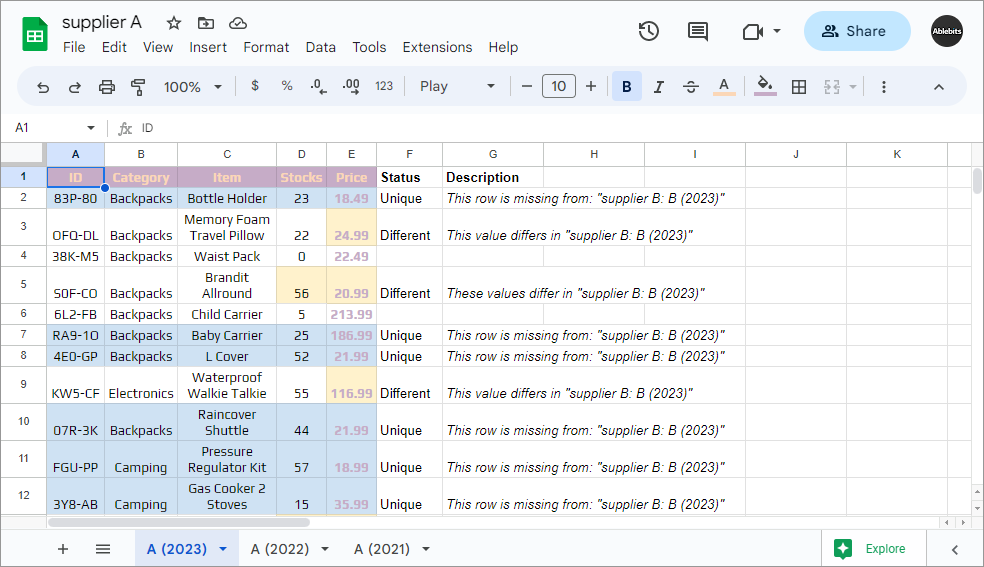
Differences shown on the sheet: changed prices highlighted, with Status ("Unique", "Different") and Description columns naming the other sheet.
Or one comparison report
Instead of marking the source sheets, Compare Sheets can build a single report sheet with a legend, rows grouped by ID, and each row labeled equal, different, unique or missing.

The comparison report: rows from B (2023) and A (2023) grouped side by side and colored by status.
Duplicates and uniques across many sheets
Compare Sheets' duplicates tool compares a main sheet against any number of other sheets by the columns you choose, then fills the rows with color, adds a status column, copies or moves them, clears values or deletes whole rows, on the main sheet, the other sheets, or all of them.

Step 5 of 5 in Compare sheets for duplicates: fill with color, status column, copy, move or delete, applied to the main sheet, other sheets or all sheets.
Two columns in one step
Compare Sheets' Compare columns tool picks a main and a compared column on one sheet, finds duplicates or uniques between them with match-case and skip-empty options, and colors them.
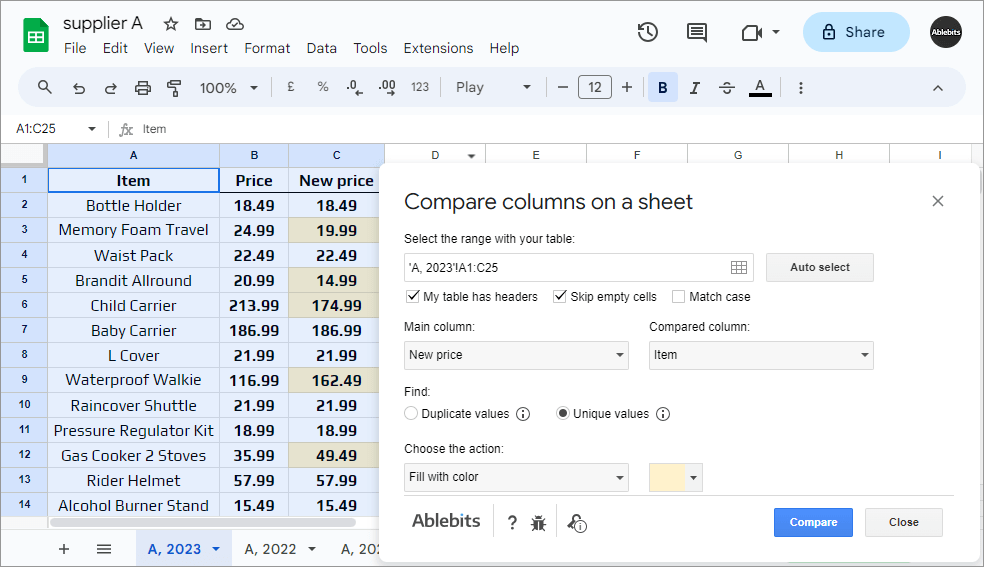
Compare columns on a sheet: finding unique values in "New price" against "Item", filled with color.
Scenarios
Compare Sheets saves duplicate-comparison setups as scenarios you run from the Extensions menu, and exports them so teammates can run the same check. Google Sheets macros can't record add-on steps, so this is the way to repeat a comparison.
Benefits
Version comparisons go from an afternoon of eyeballing to a colored map of exactly what changed. The report option is useful when you need to send someone a summary without touching the original files, and comparing sheets from different spreadsheets means you don't have to copy them into one file first.
Real-World Uses
- Supplier price lists: compare this year's list with last year's to see changed prices and dropped items.
- Attendee or customer lists: find who is new and who dropped off between two exports.
- Data merges: a reviewer uses it to unify different data sets.
- Audit edits: compare a shared sheet against a saved copy to see what collaborators changed.
Who It's For, and Who Should Skip It
It's for anyone who compares versions or lists in Google Sheets regularly: purchasing, finance, event and CRM staff.
Skip it if:
- you already have Remove Duplicates or Power Tools and only need duplicate checks; the cell-by-cell diff is the only extra here.
- you compare two short lists once; a COUNTIF column does it free.
- you need to compare Excel files; this works only in Google Sheets.
Usage Guide
- Click Download Free Trial to open the add-on's Google Workspace Marketplace page, click Install and grant the permissions.
- Open Extensions > Compare Sheets and pick the tool: cell by cell, for duplicates, or compare columns.
- Select the sheets to compare (add files from Drive if needed) and choose the main sheet.
- For cell by cell, choose to show differences on each sheet or create a report; for duplicates, pick key columns and an action.
- Click Compare, then review the colors and status columns.
- When you buy, paste the activation key from the key icon in the add-on.
Where It Falls Short
- Not every task is obvious. A January 2026 reviewer couldn't work out how to compare two attendee lists for new entries; that's the duplicates tool set to Uniques, but the interface didn't make it clear.
- Glitches reported. One 2-star review from November 2024 describes "nothing but glitches".
- Few ratings. The 4.4 average comes from only 16 ratings.
What Users Say
On the Google Workspace Marketplace, Compare Sheets has 4.4 out of 5 from 16 ratings and more than 222,000 installs. Most written reviews praise the time saved; the critical ones are about glitches and finding the right option.
Praise
"Works consistently for me, I love it! Gives me back 30 minutes a day!" Stephanie Santos, 5 stars, June 2025
"Can't emphasize enough how helpful this is when you've got to unify different data sets" Alex Mott, 5 stars, July 2025
"Excellent product and first class customer service." Clive Richards, 5 stars, November 2024
"Great extension and saves a lot of time!" Omar Maged, 5 stars, September 2024
Criticism
"Trying to simply compare 2 attendee lists to find the new entries, but there doesn't appear to be a solution to do so." Paul Arnhold, 1 star, January 2026
"Absolutely nothing but glitches at every turn. It'd be great if it could work consistently!" Monica Bixby, 2 stars, November 2024
"Great for comparing all the columns of the rows of the sheet, OR 2 columns of each row of the sheet. But no option for selecting three or more rows to run the comparison on." Norman Cates, 3 stars, March 2024
The recurring themes
Regular users report real time savings and consistent results. The complaints are about usability (which of the three tools to use for a task) and occasional glitches. Try your exact comparison during the trial before paying.
Comparisons
Compare Sheets vs formulas and conditional formatting
You can flag differences with a conditional-format rule like =A2<>Sheet2!A2 or find new entries with COUNTIF, for free, but you write and adjust them for each layout, and rows that moved break position-based rules. Compare Sheets matches rows by key columns, handles several sheets and files, and can produce a report.
Compare Sheets vs Remove Duplicates
Both Ablebits add-ons compare sheets and columns for duplicates. Remove Duplicates adds dedupe within one table and scheduled runs; Compare Sheets adds the cell-by-cell difference check and report. Power Tools ($49.99 a year) includes both.
Editions and Pricing
| Plan | Price | Term | Users | Buy |
|---|
| 12-month | $19.99 with the code (regular $33.60) | 12 months of use and updates | 1 Google account | Buy 12-Month |
| Lifetime | $59.90 | One-time payment, all future updates | 1 Google account | Buy Lifetime |
Each button orders that plan; the 12-month button applies the code automatically. Buying 10 or more subscriptions gets a volume discount on the order page.
FAQs
Can Compare Sheets compare sheets in two different Google Sheets files?
Yes. Compare Sheets lets you add spreadsheets from Google Drive and compare their sheets against your main sheet; they don't have to be in the same file.
How do I find new entries between two lists with Compare Sheets?
Use Compare sheets for duplicates, choose the newer list as the main sheet, set it to find Uniques, and pick the key column (such as email). Compare Sheets then marks the rows that appear only in the newer list.
Does Compare Sheets change my data?
Only if you choose an action that does: coloring, a status column, moving or deleting rows. The cell-by-cell report option writes to a separate report sheet.
How many sheets can Compare Sheets compare at once?
Compare Sheets' cell-by-cell and duplicates tools compare a main sheet against as many other sheets as you add; Compare columns works with two columns on one sheet.
What happens when the Compare Sheets subscription ends?
When the 12-month plan ends, renew or switch to lifetime to keep comparing. Colors and reports already created stay.
System Requirements
- A Google account with Google Sheets and an internet connection
- Windows 10 or later, macOS 10.15.7 Catalina or later, or ChromeOS
- Chrome, Firefox, or Safari on a Mac
- Spreadsheets up to 10 million cells
Conclusion
At $19.99 a year with the code, Compare Sheets is worth it if you regularly compare versions of price lists, inventories or customer exports in Google Sheets. The cell-by-cell check with a grouped report is the feature you won't easily build with formulas.
The main reason not to buy it: if you already own Power Tools, all of it is covered, and Remove Duplicates covers the duplicate checks, and a few users found it hard to pick the right tool for their task, so try it on your real lists first.
Download Free TrialBuy 12-Month PlanBuy Lifetime License