Split Names for Google Sheets: First, Middle and Last Names in Their Own Columns
Split Names is an Ablebits add-on for Google Sheets that splits a column of full names into first, middle and last names, titles and suffixes, recognizing formats like "Dumbledore, Albus Percival" and "Dr. Barry Allen Jr.". It runs in the browser on Windows, Mac and Chromebooks; the 12-month plan for one Google account is $12 with the discount code applied on the order page (regular price $15), or $39.95 lifetime, with a 30-day free trial.
Google Sheets' own Split text to columns cuts at a delimiter and nothing more: it can't tell a salutation from a first name, and a "Last, First" list has to be split twice and rearranged. Split Names reads each name and puts every part in a labeled column.
Quick facts
- Version: 1.12, released September 20, 2023 (the Marketplace listing was last updated March 27, 2026)
- Developer: APPS4GS (Mikalai Mikhuta JDG), which publishes Google Workspace add-ons under the Ablebits name
- Works in: Google Sheets in a web browser, on Windows 10 and up, macOS 10.15.7 Catalina and up, and ChromeOS
- Price: 12-month plan $12 with the discount code (regular $15); lifetime $39.95; each for one Google account
- Trial: 30 days, fully functional
- Guarantee: unconditional 30-day money-back guarantee
- Marketplace rating: 3.9 out of 5 from 217 ratings, 1M+ installs
- What we checked: on the order page the 12-month plan was $15, or $12 with the code TrSbrExp-MnrAdns-01 that the vendor's own Buy link carries, and the lifetime license $39.95; the Google Workspace Marketplace page showed version 1.12 as the latest release and a 3.9-star average from 217 ratings, all on November 29, 2026. We didn't install the add-on or run it on our own names.
Before you buy
- Power Tools includes it. Split Names is also in the Split group of Ablebits' Power Tools ($49.99 a year), next to Split text and Split sheet.
- The 12-month plan renews. One reviewer's nonprofit ended up paying for two annual subscriptions of the same add-on; check your renewals and keep one plan per account.
- Unusual names need a check. In the vendor's own sample, "Peter the Great" and "Conan IV, Duke of Brittany" landed partly in the Title column.
Download Free TrialBuy 12-Month PlanBuy Lifetime License
Overview
Split Names is a single small dialog under Extensions > Split Names. You select the column with names, tick "My column has headers" if it has one, choose which parts you want (first name, middle name, last name, salutation or title, name suffix or post-nominal letters) and click Split. New columns named after each part appear to the right, and a message tells you how many names were split.
The last update, 1.12 in September 2023, fixed "De" as part of a last name and "Daisy" as a first name; 1.11 handled last names in all caps and "Jr." more reliably. It's a mature, narrow tool rather than one that changes often.
Features
Choose the parts you need
Split Names adds only the columns you tick, so you can pull out just last names for sorting, or just first names for a mail merge greeting, and leave the original column untouched.

The Split Names dialog: first, middle and last name, salutation or title, and name suffix or post-nominal letters.
Titles, suffixes and post-nominals
Split Names recognizes more than 80 titles, suffixes and postfixes (Mr., Prof., Dr., Jr., M.Eng, Ph.D., B.F.A. and the like) and puts them in their own columns instead of mistaking them for names.
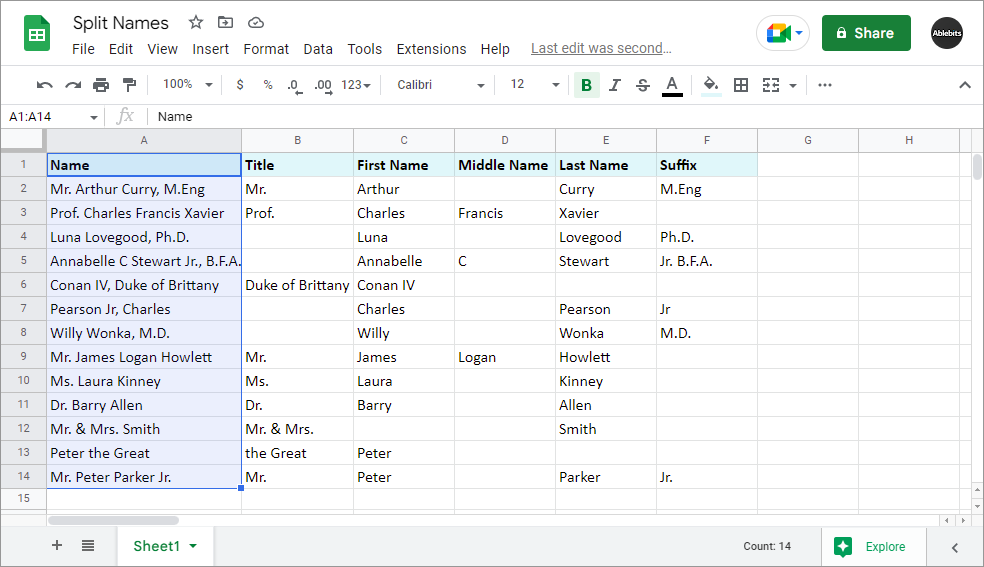
The result: Title, First Name, Middle Name, Last Name and Suffix columns. Note "Peter the Great" and "Duke of Brittany" ended up in Title.
Any order, any punctuation
Split Names handles "First Last", "Last, First" and names with titles before or after them, and copes with commas and extra characters between parts. That's the case where Split text to columns needs several passes.
Also inside Power Tools
Split Names is available on its own or from the Split group in Power Tools, alongside Split text, Split sheet and Split date & time.

The Split group in Power Tools, with Split text, Split names, Split sheet and Split date & time.
Benefits
Name lists arrive in every possible shape: sign-up forms, ad leads, class rosters exported from a school system. Split Names turns them into sortable, mail-merge-ready columns in seconds, without formulas that break on the first "Jr." or a list that puts surnames first.
Real-World Uses
- Lead imports: split names from Facebook ad leads before loading them into a CRM, as one reviewer does weekly.
- Certificates and rosters: schools often supply "last name, first name"; split and reorder for certificates and class lists.
- Mail merge: get a clean first-name column for "Dear Anna" greetings.
- Deduping contacts: separate last names to sort and spot duplicate people listed with and without a title.
Who It's For, and Who Should Skip It
It's for teachers, marketers, event organizers and admins who regularly receive full-name lists in Google Sheets and need the parts separated correctly.
Skip it if:
- your names are all simple "First Last" with no titles. Split text to columns (Data menu) or
=SPLIT(A2," ") is free. - you need other split tools too. Power Tools includes Split Names for $49.99 a year.
- your list is mostly non-Western name orders; the recognition is built around English-style names, so test it in the trial.
- you work in Excel, which has its own Ablebits tools from a different company.
Usage Guide
- Click Download Free Trial to open the add-on's Google Workspace Marketplace page, click Install and grant the permissions.
- Select the column with full names.
- Go to Extensions > Split Names > Start (or Power Tools > Split > Split names).
- Tick My column has headers if it does, and choose the name parts to add.
- Click Split, then review the new columns, especially titles and unusual names.
- When you buy, paste the activation key from the key icon in the add-on.
Where It Falls Short
- Unusual names go to Title. Nicknames, epithets and noble titles ("the Great", "Duke of...") aren't always split the way you'd expect.
- Slow update pace. The last numbered release is from September 2023.
- Subscription for a narrow job. Some users object to paying for something a free formula partly does; a 2018 reviewer was unhappy when the tool moved behind a paywall.
- Billing complaint. A 1-star review from 2022 says Ablebits charged a nonprofit twice for years and refused to refund the double charge.
What Users Say
On the Google Workspace Marketplace, Split Names has 3.9 out of 5 from 217 ratings and more than a million installs. Most written reviews praise the time saved; the negatives are about billing and paying at all.
Praise
"What a great tool! In the past, I'd have to Google ways to do a fraction of what Split Names could do. It was cumbersome, tedious, and wouldn't always do what I needed. With Split Names, I can now take care of getting my data exactly as I need it for a super affordable price!" Felix Jacomino, 5 stars, November 2021
"Really easy to use ..... brilliant when doing certificates .... and the schools supply names as last name, first name ! Saves me thousands of hours !" Alison Leck, 5 stars, April 2023
"Worth paying for. This saves me a ton of time every week importing leads from Facebook ads. Does its job and does it well." Jordan Smith, 5 stars, September 2023
"This add-on is a gamechanger. I have been needing this for years for my classroom rosters." Amy Koger, 5 stars, July 2021
"Easy to use, and very quick! Would highly recommend." PHSC Results, 5 stars, December 2021
Criticism
"BEWARE! Ablebits double charged our small nonprofit for years and when we brought this to their attention they declined to reimburse us for the double charges, even though they admitted that they did charge us for two annual subscriptions for the same product." Danny Wright, 1 star, September 2022
"Tool is now non-functional and stuck behind a paywall. Better off leaning how to write this code on my own and doing it myself." Anonymous Marketplace reviewer, 1 star, January 2018
The recurring themes
Teachers, marketers and admins value it for rosters, certificates and lead lists, and call it quick and easy. The serious complaint is a billing dispute over duplicate annual subscriptions, so watch your renewals; the other is the paywall itself, since simple names can be split for free.
Comparisons
Split Names vs Split text to columns
Google Sheets' Data > Split text to columns, or the SPLIT function, divides text at a separator. It works for clean "First Last" lists but puts "Dr." in the first-name column and needs two passes for "Last, First Middle". Split Names recognizes the name parts and labels each column.
Split Names vs Power Tools
Power Tools ($49.99 a year, $99.95 lifetime) includes Split Names with 40-plus other tools. For name splitting alone, Split Names at $12 a year with the code, or $39.95 once, is cheaper.
Editions and Pricing
| Plan | Price | Term | Users | Buy |
|---|
| 12-month | $12 with the code (regular $15) | 12 months of use and updates | 1 Google account | Buy 12-Month |
| Lifetime | $39.95 | One-time payment, all future updates | 1 Google account | Buy Lifetime |
Each button orders that plan; the 12-month button applies the code automatically. Given how rarely the add-on changes, the lifetime license makes sense if you'll use it for more than three years.
FAQs
Can Split Names handle names written as "Last, First"?
Yes. Split Names recognizes "Last, First Middle" and puts each part in the right column, which Google's Split text to columns can't do in one step.
Can I extract only the last names with Split Names?
Yes. Tick only Last name in the Split Names dialog and you get one new column next to the full names.
Does Split Names change my original column?
No. Split Names adds new columns to the right and leaves the full-name column as it is.
What happens when the Split Names subscription ends?
When the 12-month plan ends, renew or switch to lifetime to keep splitting. Names already split stay in your sheet.
Is Split Names the same as the Ablebits Split Names for Excel?
No. Split Names for Google Sheets runs only in Google Sheets. The Excel tools on ablebits.com are separate products from a different company.
System Requirements
- A Google account with Google Sheets and an internet connection
- Windows 10 or later, macOS 10.15.7 Catalina or later, or ChromeOS
- Chrome, Firefox, or Safari on a Mac
- Spreadsheets up to 10 million cells
Conclusion
At $12 a year with the code, Split Names is worth it if messy name lists land in your Google Sheets every week: titles, suffixes and surname-first formats are exactly where free formulas fail. It's a mature tool that does one job quickly.
The main reason not to buy it: for clean "First Last" names, the free SPLIT function is enough, and the add-on is updated rarely. Keep an eye on renewals, and check unusual names after each split.
Download Free TrialBuy 12-Month PlanBuy Lifetime License