Vovsoft PDF to Image Converter: Save PDF Pages as Pictures, Offline
PDF to Image Converter is a $19 Windows program from Vovsoft that saves each page of a PDF as a PNG, JPG, TIF, GIF or BMP file, or extracts the pictures inside it. The $19 is a one-time lifetime license, and there's a free trial.
It does one job and runs offline, so nothing you convert leaves your PC. That matters more for a contract than for a flyer.
Quick facts
- Version: 1.6, released April 1, 2026
- Developer: Vovsoft
- Platform: Windows 11, 10, 8/8.1, 7 and Vista, 32-bit and 64-bit. No Mac or Linux version
- Output formats: PNG, JPG, TIF, GIF and BMP
- Methods: Snapshot (one image per page) or Extract all images
- Pages: All, or a range such as 1-10
- Editions: installer (6.05 MB) and portable (6.21 MB), one license for both
- Price: $19, one-time payment, lifetime license with free updates
- Trial: free to try. Converts PDFs in full, with a nag screen. It isn't allowed for commercial use
- Refunds: Vovsoft's general policy is no refunds, since a free trial comes first. An order placed by accident is generally refunded, at the company's discretion, and PayPro Global has the final say on orders placed through it
- What we checked: installer file version 1.6.0.0 (6,349,464 bytes) with a valid code signature, downloaded from the vendor on November 10, 2026, and $19.00 total on the order page with no auto-renewal on November 10, 2026. We didn't convert a PDF ourselves
Download Free TrialBuy Now
Overview
You load one or more PDFs, choose Snapshot or Extract all images, choose all pages or a range, and press Save Image Files. The list shows how many pages each PDF has before you start.
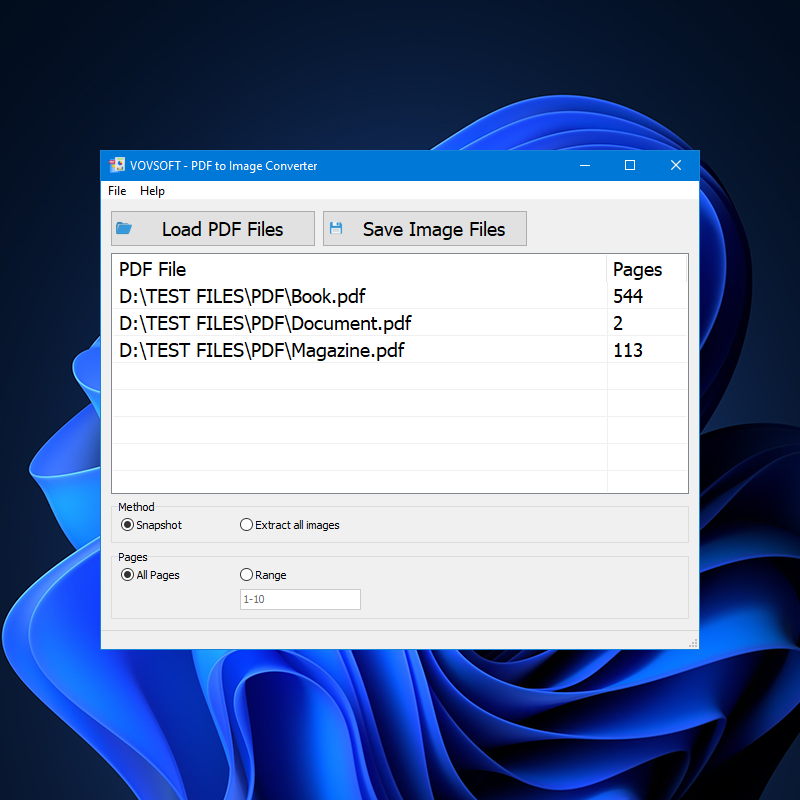
Three PDFs queued, with their page counts, the Method choice and the Pages range.
Features
Two different kinds of output
PDF to Image Converter's Snapshot method renders each page as its own image, text and layout included. Extract all images ignores the page and saves only the pictures embedded in the document, which is what you want when you need the photos from a brochure.
Batches of PDFs, with file names kept
PDF to Image Converter takes several PDFs at once by drag and drop or the file browser, and a setting added in version 1.6 keeps the original file names in the output.
Thumbnails from the first page
PDF to Image Converter can make a set of PDF thumbnails: Snapshot with a range of 1 saves only the first page of every file you loaded.
Fully offline, with no extras installed
PDF to Image Converter doesn't need Adobe Acrobat Reader or a printer driver, and it sends no files to the internet.
Who It's For, and Who Should Skip It
It suits anyone who regularly turns PDFs into images and would rather not upload them to a website: offices handling confidential documents, or anyone preparing page previews in bulk.
Skip it if you only need a page or two. The Snipping Tool built into Windows captures a page on screen for free, at screen resolution. If you need PDF editing or OCR, this isn't that tool.
Usage Guide
- Download the installer or the portable edition and start the program.
- Click Load PDF Files, or drag PDFs onto the window.
- Choose Snapshot or Extract all images.
- Choose All Pages or type a range.
- Click Save Image Files and pick a folder.
Before you buy
One license covers one person on as many of their own computers as they use, or one shared workstation used by several people in turn. Using a key on too many computers at the same time can get it revoked.
Where it falls short
- Password-protected PDFs are a weak spot: users are still asking for the program to prompt for the password.
- There's no command-line mode, and conversion isn't multi-threaded, which also shows in the vendor's open requests.
- It can't stitch a document's pages into one tall image.
- The interface is English only.
What Users Say
What reviewers say
Vovsoft's product page shows a rating of 4.7 out of 5 from 3 reviews, which is too few to mean much.
"Powerful software. Works fine !" Laurent Belt
Editions and Pricing
| Edition | Price | License | What you get |
|---|
| Trial | Free | Personal, non-commercial use | Converts PDFs in full, with a nag screen |
| Licensed | $19 one-time | Lifetime | Commercial use, no nag screen, lifetime free updates, all features |
The installer and portable editions use the same license key, and the key is delivered right after payment.
FAQs
Can PDF to Image Converter export only the first page?
PDF to Image Converter can. Choose Snapshot, set the range to 1, and it saves one image per PDF.
Does PDF to Image Converter upload my PDFs?
PDF to Image Converter works entirely offline, and no PDF or image is sent to the internet.
Is PDF to Image Converter a subscription?
PDF to Image Converter is a one-time purchase. Vovsoft license keys don't expire, updates are free, and the same key works on a new computer.
System Requirements
- Windows 11, 10, 8/8.1, 7 and Vista, 32-bit or 64-bit
- 6.05 MB for the installer, 6.21 MB for the portable edition
Conclusion
Worth $19 if you convert batches of PDFs and want them kept off the internet. The reason to buy it is offline batch output with both page snapshots and image extraction. The reason not to is occasional use, where the Snipping Tool costs nothing. The trial converts in full, so you can judge the output quality first.
Download Free TrialBuy Now