Coolmuster JPG to PDF Converter: Batch Images into PDFs
Coolmuster JPG to PDF Converter is a $15.95-a-year Windows program that turns JPG, PNG, TIF and BMP images into PDFs, one PDF per image or all merged into one.
You've got a stack of phone photos of signed pages, and the form wants one PDF. The phone can do it one picture at a time. On a PC with dozens of images, a batch tool is less tedious.
Quick facts
- Version: 2.7.3 (February 2, 2026)
- Developer: Coolmuster
- Platforms: Windows 11, 10, 8, 7 only
- Input: JPG, JPEG, PNG, TIF, BMP
- Output: PDF
- Trial: free download, limits not published
- Price: $15.95 for one PC for one year at checkout, renewing automatically unless you cancel
- Refund: 30 days on one-year and lifetime licenses, 7 days on monthly ones
- What we checked: the trial installer from coolmuster.com (22.59 MB, server date February 2, 2026) and the $15.95 price on the order page on November 10, 2026. We read Coolmuster's specifications and user guide, but we didn't install the program or run it on our own files.
Before you buy
For one or two images, Windows already does this free. Printing a picture to Microsoft Print to PDF gives you a PDF with no extra software. This tool earns its fee when you have many images and want consistent page sizes, margins or one merged document. OCR isn't listed, so scans stay as pictures with no searchable text.
Download Free TrialBuy Now
Overview
JPG to PDF Converter is a single-purpose image tool. Add pictures or a folder, set the page size and margins, tick Merge into one file if you want a single PDF, and press Start.
The start screen says it can combine multiple images into one PDF without watermarking, and the file list shows each picture's name, size and date.
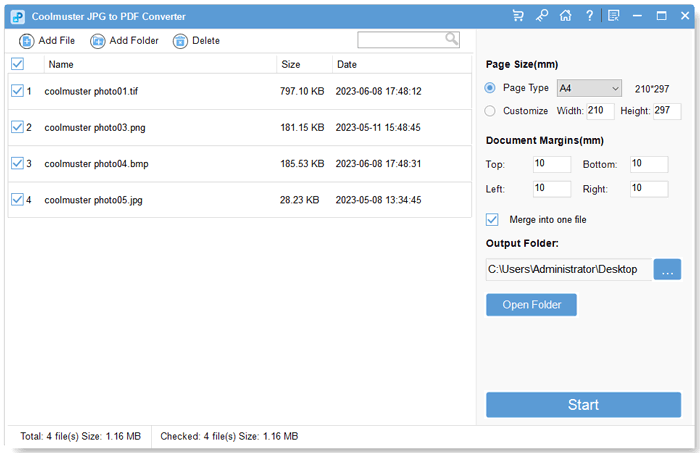
Four images in TIF, PNG, BMP and JPG selected, with page size, margins and Merge into one file on the right.
Features
Several image formats
Coolmuster JPG to PDF Converter accepts JPG, JPEG, PNG, TIF and BMP images, and a batch can mix them.
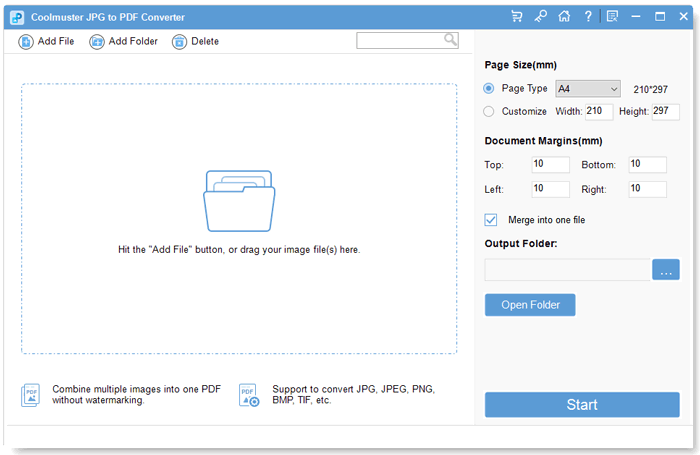
The start window, which accepts images with Add File, Add Folder or drag and drop.
Merge into one PDF
JPG to PDF Converter's Merge into one file option combines all selected images into a single PDF, handy for turning page photos into one document.
Page size and margins
JPG to PDF Converter offers a page type such as A4 or a custom width and height, along with four adjustable margins in millimetres.
Batch conversion
JPG to PDF Converter converts everything you've selected in one run, and a progress bar shows how far along it is before you open the output folder.
Benefits
- Dozens of pictures become one document in a single run.
- Consistent page sizes and margins make a tidier PDF than ad hoc printing.
- Images stay on your PC.
Real-World Uses
- Combining photographed signed pages into one PDF to send back.
- Turning a folder of scanned receipts into one expense document.
- Making a simple photo portfolio as a PDF.
- Converting old TIF scans into a format anyone can open.
Who It's For, and Who Should Skip It
It's for people who convert many images to PDF on a regular basis and want page options.
Skip it if you only do this occasionally, since Windows' Print to PDF and phone scanning apps are free. If you also need Word, ePub or HTML to PDF, PDF Creator Pro at $29.95 includes this function. There's no Mac version of this one.
Usage Guide
- Install JPG to PDF Converter from the Download Free Trial button and launch it.
- Click Add File or Add Folder, or drag images into the window.
- Tick the images you want and set the page size and margins.
- Choose an output folder and tick Merge into one file if you want one PDF.
- Click Start, then Show in folder or Open Folder to see the result.
Where It Falls Short
- OCR isn't listed, so the result isn't searchable text.
- Windows only.
- Free options cover occasional use.
- One buyer reports needing some time to find the best settings.
What Users Say
Coolmuster's site shows customer reviews, but it also runs a "Win Free Coolmuster License Code" offer for writing one, and many entries are short and unspecific. Treat them as a sign of what buyers care about, not as independent testing.
Reviews on Coolmuster's own site
- Not difficult. "It took me some time to figure out the best settings for my files, but once everything was configured, the tool ran very smoothly." Vexoria☎, October 26, 2026
- One minor downside—download speeds are a bit slow. "Honest take - there is no noticeable drop in resolution." ChongBennett, September 23, 2026
- No significant loss of details and colors "Drag in over 70 JPG images and complete processing within a few minutes." R_0@, July 31, 2026
- Intuitive and non oppressive interface "Allow me to easily rearrange and merge files." magic hat, April 17, 2026
- Even users like me who are not proficient in technology can intuitively operate this interface "At first, I was skeptical about image to PDF tools, but this program can preserve all the subtle details." Calliope_finch, January 14, 2026
Independent coverage
Softpedia's editor review describes a simple converter with batch processing and a clear file list.
Buyers like the batch handling and the image quality. The only real complaints are a slow download for one person and a learning curve for settings for another.
Comparisons
JPG to PDF Converter vs PDF Creator Pro
Coolmuster's comparison shows JPG to PDF Converter handling images only for $15.95 a year, while PDF Creator Pro adds Word, text, MOBI, ePub, CHM and HTML for $29.95.
JPG to PDF Converter vs Print to PDF
Windows' Microsoft Print to PDF is free and fine for a handful of pictures. Coolmuster's tool adds batches, merging and consistent margins.
Editions and Pricing
| Seats | 1 month | 1 year | Lifetime |
|---|
| 1 PC | $9.95 | $15.95 | Not on the order page |
| 5 PCs (business) | $19.95 | $25.95 | $35.95 |
| 10 PCs (business) | $29.95 | $35.95 | $45.95 |
Prices exclude VAT. Monthly and yearly licenses renew automatically until you cancel, and the yearly plan includes free upgrades for that year.
FAQs
Can Coolmuster JPG to PDF Converter combine images into a single PDF?
Yes. Coolmuster JPG to PDF Converter has a Merge into one file option that puts all selected images in one PDF.
Does JPG to PDF Converter handle PNG and TIFF?
Yes. JPG to PDF Converter accepts JPG, JPEG, PNG, TIF and BMP files as input.
Does the one-year JPG to PDF Converter license renew automatically?
Yes. The one-year JPG to PDF Converter license at $15.95 renews automatically after 12 months, and Coolmuster's order page says you get a notification email before the renewal date and can cancel at any time. It includes free upgrades during that year.
What is the refund period for JPG to PDF Converter?
JPG to PDF Converter has a 30-day money-back guarantee on one-year and lifetime licenses and 7 days on monthly licenses. Orders can't be canceled once payment has gone through, because the license is issued right away, and a refund goes through support@coolmuster.com with your order ID or receipt.
Is JPG to PDF Converter available for Mac?
No. Coolmuster lists JPG to PDF Converter for Windows 11, 10, 8 and 7 only.
Will JPG to PDF Converter make my scans searchable?
No. JPG to PDF Converter places your images in a PDF, and OCR isn't one of its listed features.
System Requirements
- Windows 11, 10, 8 or 7
- 1 GHz processor or faster (32 or 64 bit)
- 256 MB RAM, 1 GB recommended
- 200 MB of free disk space
Conclusion
Coolmuster JPG to PDF Converter is worth $15.95 if you regularly build PDFs from many images and want control of page sizes and margins.
The one reason to buy it is merging large batches of images. The main reason not to is that Windows and phone apps handle small jobs for free.
Download Free TrialBuy Now