Auslogics Disk Toolkit: Disk Defrag and SSD Optimizer Sold as One Subscription
Auslogics Disk Toolkit is a bundle of two Windows programs for a PC with both kinds of drive: Disk Defrag for hard disk drives and SSD Optimizer for solid-state drives. It costs $59.95 a year at checkout before tax and runs on Windows 7 through 11.
Read the price note below before you buy. On the day we checked, the two programs bought separately cost less than this bundle.
Quick facts
- What it contains: Auslogics Disk Defrag and Auslogics SSD Optimizer
- Current versions: Disk Defrag 12.3.0.1, released August 3, 2026, and SSD Optimizer 2.2.0.6, released April 29, 2026
- Developer: Auslogics Labs Pty Ltd, founded in Sydney in 2008
- Platform: Windows 11, 10, 8.1, 8 and 7. There is no Mac or Linux version
- Price: $59.95 per year before tax, renewing automatically
- Free version: none for the bundle. Each program in it has its own free edition
- Refund: 30 days from purchase
- What we checked: the $59.95 yearly price with auto-renewal on the order page, and installers of 25.6 MB for Disk Defrag and 26.4 MB for SSD Optimizer, on November 10, 2026. We did not install either program, run them or measure any speed gain.
Before you buy
- Compare the total first. On November 10, 2026 the order page charged $59.95 for Disk Toolkit, and $24.95 each for Disk Defrag 12 and SSD Optimizer, which is $49.90 for the pair. Auslogics describes the bundle as cheaper than buying the two separately, but that was not what the order pages showed that day, so check both totals when you buy.
- Disk Toolkit is a subscription. It renews every 12 months and charges the payment method on file unless you cancel before the renewal date. Auslogics says it emails a notice about 30 days ahead.
- Refunds run for 30 days from purchase and cover renewals too. They are generally processed in 5 to 7 business days, and the license and subscription are switched off once the refund goes through.
- To cancel, contact Auslogics by email. The order page also says auto-renewal can be cancelled through your customer account.
- The number of PCs covered isn't stated on the bundle's page or on its order page. Each program sold alone is licensed for 3 PCs, so confirm the bundle's limit with Auslogics if that matters to you.
Buy Now
Overview
Auslogics split drive maintenance into two programs because the two types of drive need opposite care. A hard drive benefits from having file pieces moved together. An SSD has no moving parts and gains nothing from a full defrag, which only adds write cycles. Disk Toolkit is the way Auslogics packages both for people who own one of each, which is common on a desktop with an SSD for Windows and a large hard drive for storage.
You get two separate programs, not a merged one. Each opens in its own window and looks after its own drive type.
What's in the Bundle
Disk Defrag, for hard drives
Disk Defrag is the Auslogics defragmenter for HDDs. It merges fragmented files, consolidates free space, can process one file or folder, and in the paid edition runs on a schedule and applies special HDD optimization algorithms. It detects SSDs and skips them.
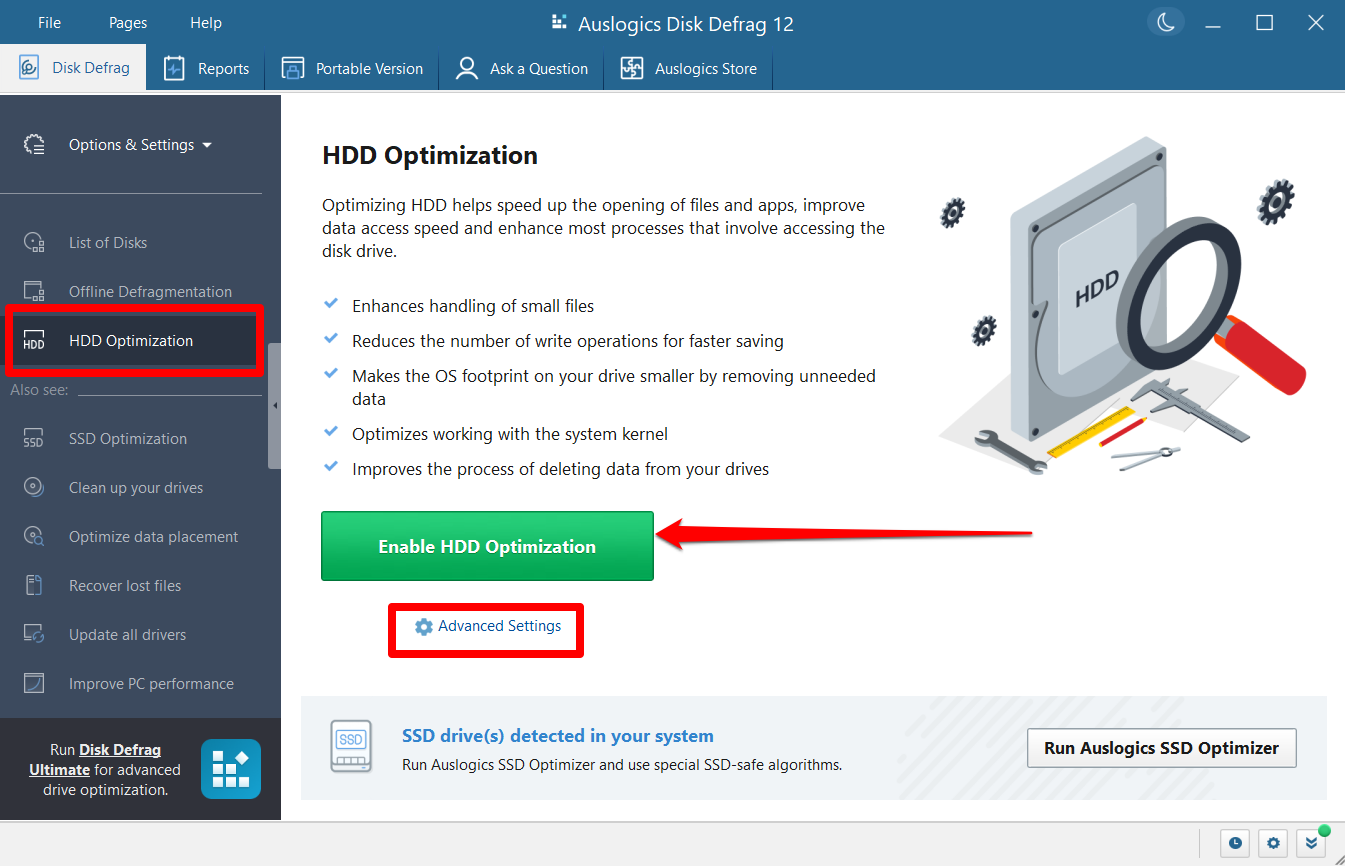
Disk Defrag 12, one of the two programs in the bundle, on its HDD Optimization page. The red highlights were added by Auslogics.
SSD Optimizer, for solid-state drives
SSD Optimizer adjusts settings to reduce write operations, runs TRIM and merges only small fragments. It also shows drive health, temperature and estimated service life, and its Disk Explorer sorts folders by size so you can find what is taking up space.
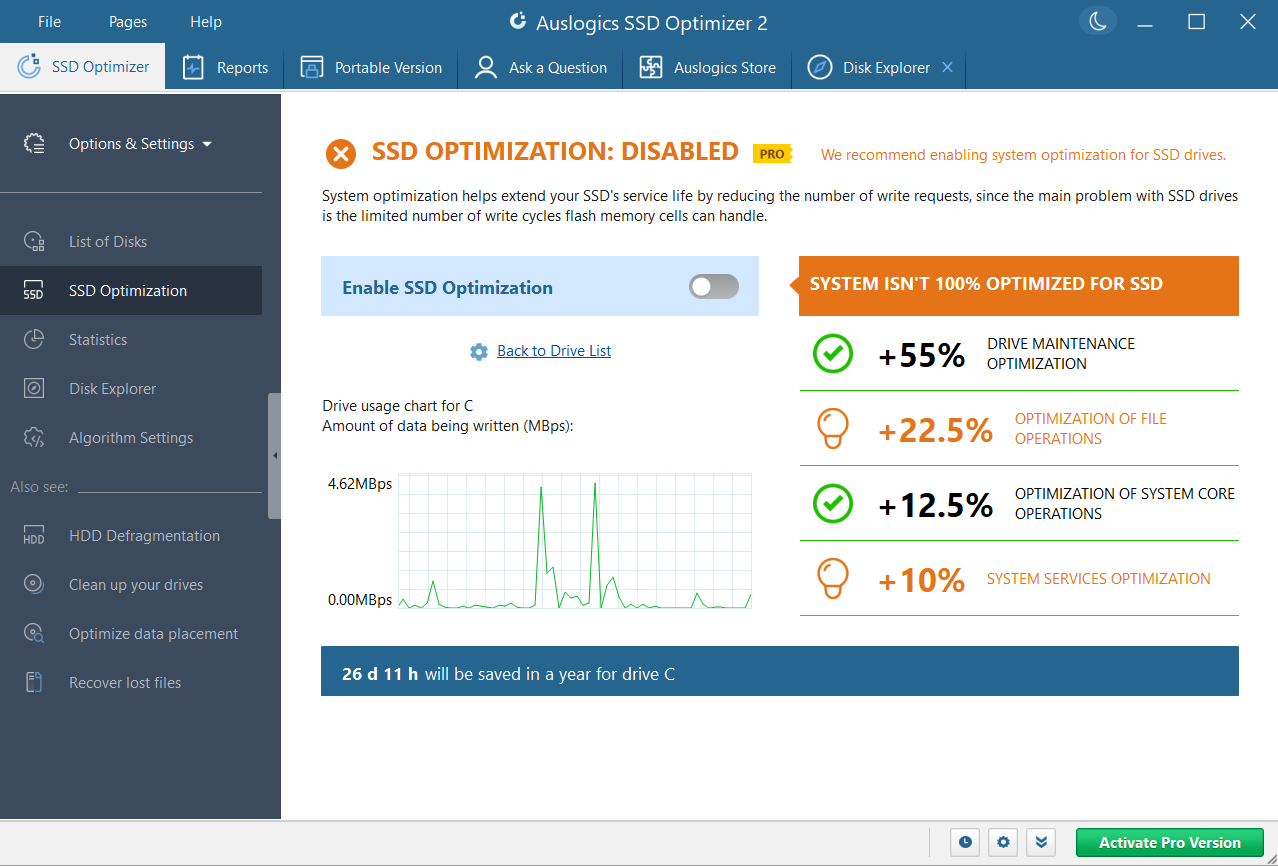
SSD Optimizer 2, the other program in the bundle, on its SSD Optimization page with optimization not yet enabled.
Benefits
- Each drive gets the right treatment, with no risk of defragmenting an SSD by mistake, since Disk Defrag won't do it.
- One order and one renewal date instead of two subscriptions to track.
Real-World Uses
- A desktop has an SSD for Windows and a 4 TB hard drive for photos. Disk Defrag looks after the hard drive while SSD Optimizer watches the SSD.
- A family PC has an older hard drive inside and a newer SSD added later. Each program recognizes its own drive and leaves the other alone.
Who It's For, and Who Should Skip It
Disk Toolkit suits someone with both drive types who wants the paid features of both programs on one order and values having a single renewal.
Skip it if you own only one kind of drive, since you would be paying for a program you can't use. Skip it too if the separate prices are still lower when you check. And if you want general PC cleanup as well, look at Auslogics BoostSpeed, described below.
Usage Guide
- Buy the bundle. Auslogics emails your license key to the address you give.
- Install Disk Defrag and SSD Optimizer from Auslogics and activate them with that key.
- In Disk Defrag, analyze your hard drive and run a defrag.
- In SSD Optimizer, run an analysis on the SSD and click Optimize.
- Set up the scheduler in each program so maintenance runs without you.
Where it falls short
- The bundle price is the obvious weakness if it remains higher than the two programs bought separately.
- Two programs mean two sets of settings. There is no single window for both drives.
- Windows already covers the basics on both drive types with its built-in Optimize Drives tool, so what you pay for is the extra control and reporting.
- The speed and lifespan claims are the vendor's. We did not test them.
What Users Say
We found no user reviews of Disk Toolkit by name. Trustpilot rated Auslogics as a company 4.3 from 2,010 reviews on November 10, 2026, and reviews do mention the two programs inside it. Trustpilot's text below reached us through a summarizing tool and is excerpted.
On Trustpilot, about the two programs
Barry (5 stars, March 2025), on Disk Defrag: "It is the best and fastest defrag program I have used in my 30+ years using a PC."
Dave Payne (5 stars, February 2026), on SSD Optimizer: "The Auslogics SSD optimizer has a clear, easy to understand GUI, I can perform what I need in a few clicks."
Mark Nosanchuk (5 stars, December 2025), who owns Disk Defrag Ultimate and SSD Optimizer: "I have the DiskDefrag Ultimate and the SSD Optimizer and I am totally satisfied."
Jacques Hauben (3 stars, January 2026), comparing the two: "The ssd optimizer is less usefull and versatile than the defragmenter, also it is not user friendley."
Criticism on Trustpilot, about the company in general
Lu k (1 star, November 2025): "They are now reduced to selling software and then stating after purchase that it is a subscription."
Paul Galbraith (1 star, June 2026): "auto-renewing without your explicit consent."
The programs themselves get mostly kind words. Billing and renewals are where the complaints gather, so treat the renewal date as something to write down.
Comparisons
Disk Toolkit or the two programs separately?
Disk Toolkit was $59.95 a year on the order page on November 10, 2026. Disk Defrag 12 and SSD Optimizer were $24.95 each, or $49.90 together. On those prices, buying the two separately costs $10.05 a year less than the bundle, but it means two subscriptions and two renewal dates.
Disk Toolkit or BoostSpeed 14?
Auslogics BoostSpeed 14 Pro was also $59.95 a year on the order page on November 10, 2026. Auslogics says both Disk Defrag and SSD Optimizer come as part of BoostSpeed, and the suite adds junk cleanup, a registry cleaner, startup control and privacy tools. For the same yearly price, check BoostSpeed first if you would use any of those.
Editions and Pricing
| Option | Yearly price on the order page | Covers |
|---|
| Disk Toolkit | $59.95 | HDDs and SSDs, two programs |
| Disk Defrag 12 Pro alone | $24.95 | HDDs |
| SSD Optimizer Pro alone | $24.95 | SSDs |
| BoostSpeed 14 Pro | $59.95 | Both programs plus the rest of the suite |
FAQs
What is included in Auslogics Disk Toolkit?
Auslogics Disk Toolkit includes Auslogics Disk Defrag for hard drives and Auslogics SSD Optimizer for solid-state drives.
Is there a free trial of Auslogics Disk Toolkit?
Auslogics Disk Toolkit has no free version or trial of its own on its product page. Disk Defrag and SSD Optimizer each have a free edition you can try before you buy.
Do I need Disk Toolkit if I only have an SSD?
Disk Toolkit makes little sense with only an SSD, because Disk Defrag will not defragment one. SSD Optimizer alone covers that case.
Does Auslogics Disk Toolkit work on Windows 7?
Auslogics Disk Toolkit's two programs both list Windows 7, 8, 8.1, 10 and 11 as supported, and neither runs on XP or Vista.
What happens to Disk Toolkit after a refund?
Auslogics disables the Disk Toolkit license and subscription once a refund is processed.
System Requirements
- Windows 11, 10, 8.1, 8 or 7
- 256 MB of RAM and 61 MB of free disk space for Disk Defrag
- About 78 MB of storage for SSD Optimizer
Conclusion
Disk Toolkit is hard to recommend at $59.95 a year when the two programs cost $49.90 separately and BoostSpeed 14, which includes both, costs the same $59.95. The one reason to choose it is a single order and renewal for exactly these two tools. The main reason not to is the price. Check the totals on the order pages before you commit, because they may have changed since we looked.
Buy Now