Auslogics Disk Defrag Ultimate: Boot-Time Defrag and File Placement Control for HDDs and SSDs
Auslogics Disk Defrag Ultimate is a Windows defragmenter for advanced users who want control over where files land on the disk, and it handles both hard drives and SSDs. The full version is $29.95 a year at checkout before tax and covers 3 PCs, it runs on Windows 7 through 11 and Windows Server, and a free version is available with a smaller feature set.
It is aimed at the person who has already outgrown a one-button defragmenter and wants to decide when locked system files get moved, how much CPU a defrag may use, and which files sit on the fastest part of the disk.
Quick facts
- Version: 4.13.0.3, released November 27, 2025
- Developer: Auslogics Labs Pty Ltd, founded in Sydney in 2008
- Platform: Windows 11, 10, 8.1, 8 and 7, and Windows Server 2008, 2012, 2016, 2019 and 2022. There is no Mac or Linux version
- Drives: hard disk drives and SSDs
- Price: $29.95 per year before tax, renewing automatically
- Full license: covers 3 PCs
- Free version: yes, with single file or folder defrag, disk checks and cleanup
- Refund: 30 days from purchase
- What we checked: vendor installer of 15.8 MB and the $29.95 yearly price with auto-renewal on the order page, on November 10, 2026. We did not install it, run it or measure any speed gain.
Before you buy
- Disk Defrag Ultimate is a subscription. It renews every 12 months and charges the payment method on file unless you cancel before the renewal date. Auslogics says it emails a notice about 30 days ahead.
- Refunds run for 30 days from purchase and cover renewals too. They are generally processed in 5 to 7 business days, and the license and subscription are switched off once the refund goes through.
- To cancel, contact Auslogics by email. The order page also says auto-renewal can be cancelled through your customer account.
- Try the free version first. It shows you the interface and the analysis on your own drives before you pay.
Download Free VersionBuy Now
Overview
Disk Defrag Ultimate opens on a list of drives with a cluster map below it. After an analysis you can start a defrag straight away or open Defrag Profiles, where the real differences from the simpler Disk Defrag 12 live: placement algorithms, actions to run before and after, exclusions, and compatibility modes for SSDs and Volume Shadow Copy.
The Ultimate edition also recognizes an SSD and applies an optimization algorithm to it instead of defragmentation. You can hide SSDs from the drive list altogether if you would rather leave them out.
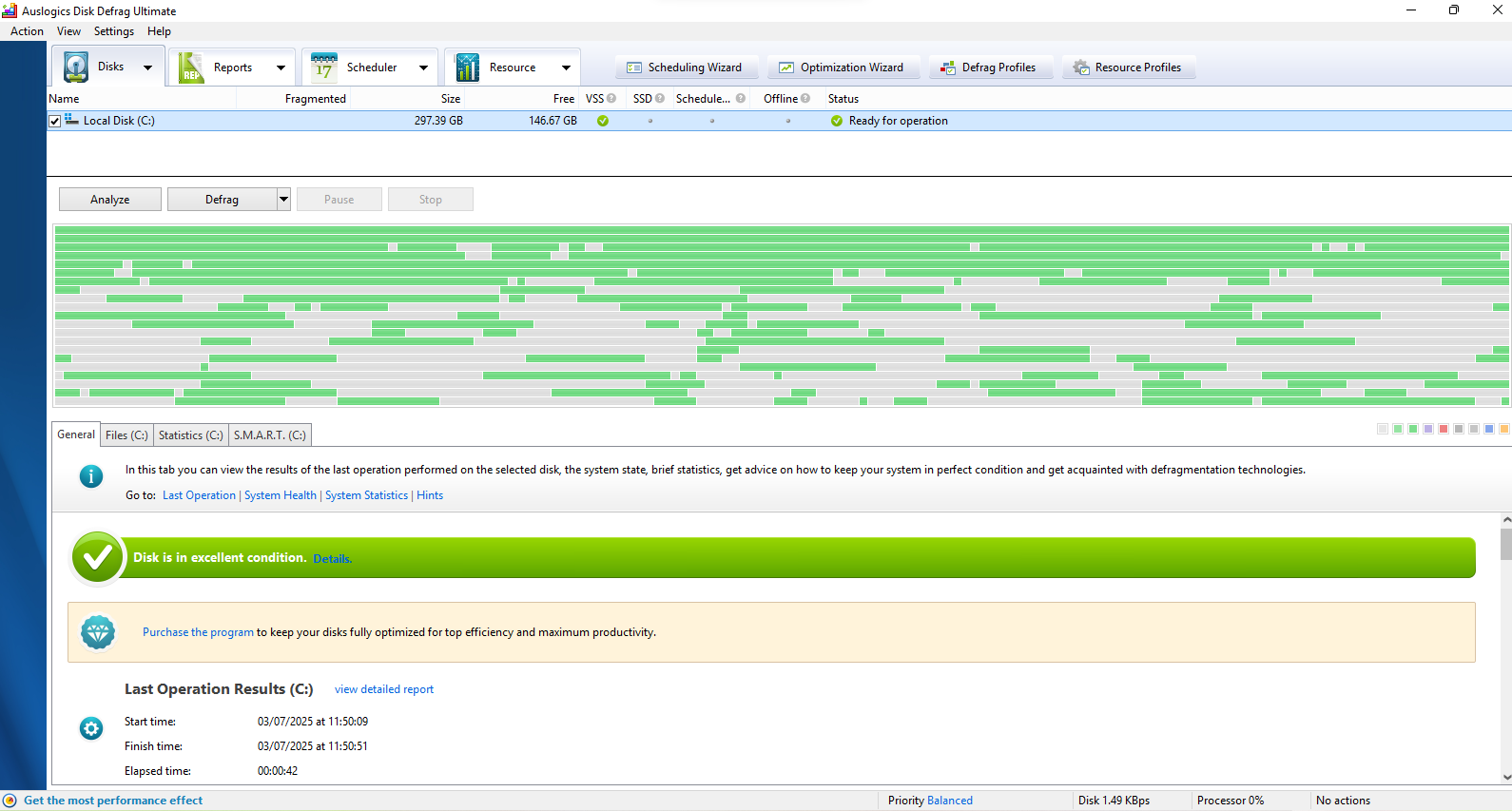
The Disk Defrag Ultimate main window, General tab, with drive status and a banner offering the full version.
Features
Four placement algorithms
Disk Defrag Ultimate sorts files by purpose: Optimize by Access Time favors frequently used files, Optimize by Prefetch Layout targets system loading and application startup, Optimize by Change Time reduces further fragmentation, and Optimize by Disk Zone lets you arrange files manually.
Boot-time defragmentation of locked files
Disk Defrag Ultimate runs an offline defrag at system startup, before Windows loads, so it can reach files Windows normally keeps locked. It covers MFT files, the paging file, the hibernation file and Windows registry files. This is one of the features that needs the full version.
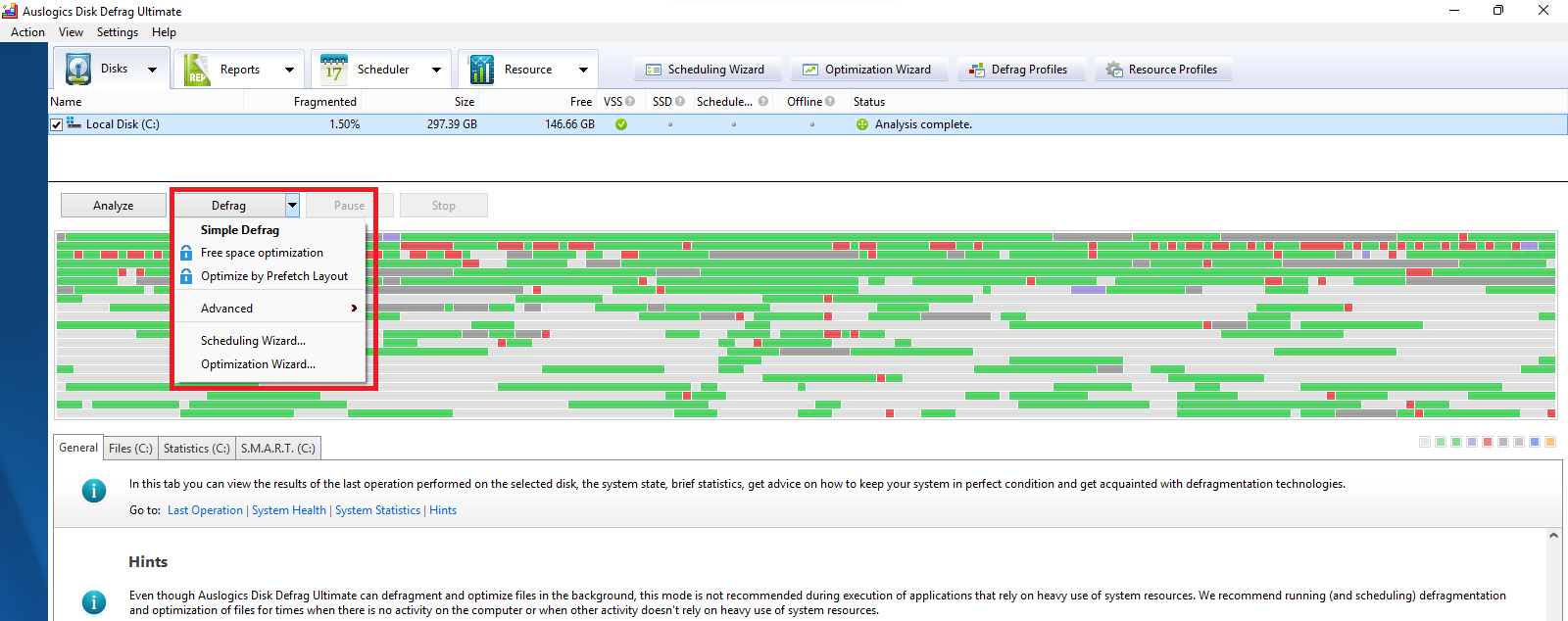
The Defrag menu after an analysis, with padlocks marking options that need the full version. The red highlight was added by Auslogics.
A wizard for choosing settings
Disk Defrag Ultimate includes a wizard that asks what the PC is used for (home, office, gaming or server), how often you work with various types of documents, and when the PC is idle, then suggests algorithms.
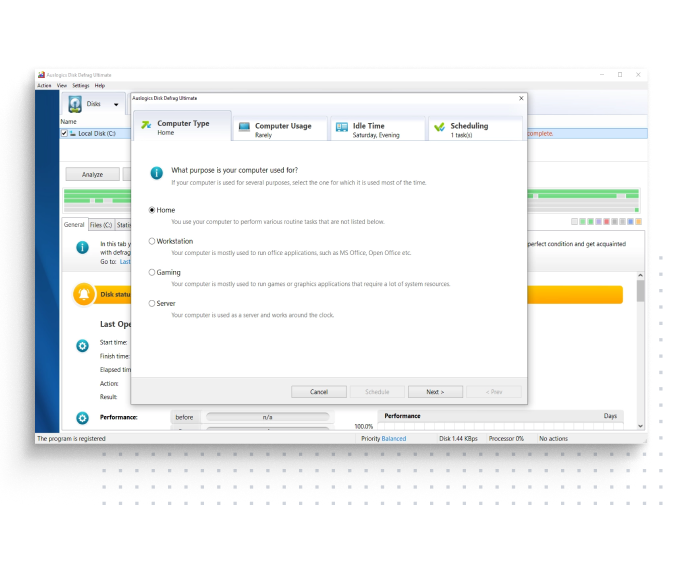
The wizard's Computer Type step, shown over the main window. This image comes from the Auslogics product page.
Fragmentation prevention
Disk Defrag Ultimate can leave a set amount of free space after chosen files so they have room to grow. New data is then written next to the original file instead of somewhere else on the drive.
Limits on system load
Disk Defrag Ultimate offers 4 predefined resource profiles, and you can build your own with specific CPU and disk limits. It can also hold off defragmenting while a named application is running.
Precise or continuous scheduling
Disk Defrag Ultimate can run at an exact time or in Auto Defragmentation mode, which works in real time as fragmentation appears. Both are part of the full version's advanced scheduling.
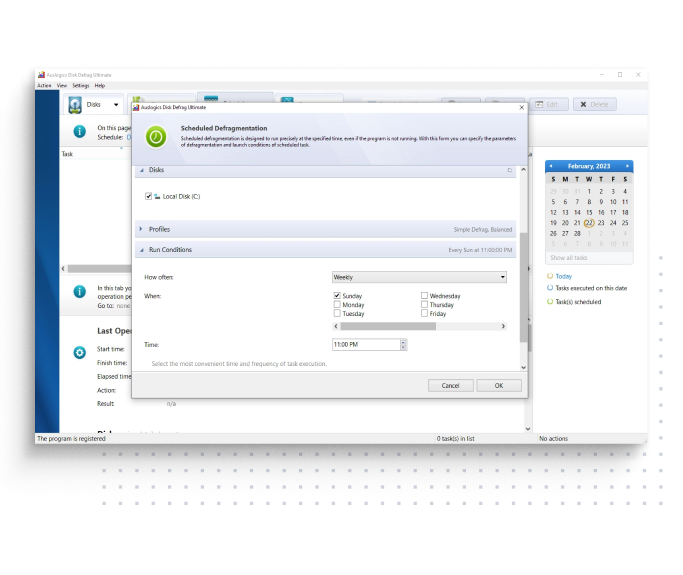
The Scheduled Defragmentation dialog, set to weekly on Sunday at 11:00 PM. This image comes from the Auslogics product page.
Volume Shadow Copy awareness
Disk Defrag Ultimate has algorithms for VSS-enabled drives that limit growth of the shadow storage area and reduce the chance of overwriting earlier snapshots, a concern if you rely on System Restore or previous versions of files.
Benefits
- Locked files stop being a blind spot. A normal defrag has to work around the paging file and registry. Boot-time defrag does not.
- Defrags that stay out of your way. Resource limits let a pass run during work without taking over the disk.
- One program for both drive types, where Auslogics otherwise splits the job between two products.
Real-World Uses
- A file server on Windows Server needs maintenance without slowing users down. Resource profiles and a scheduled window keep the pass off peak hours.
- A workstation boots slowly and the MFT and paging file are fragmented. An offline defrag at the next restart handles them.
- A database or video folder grows constantly. Fragmentation prevention leaves room after those files so they stay in one piece.
- A gaming PC with an SSD and a large hard drive needs different care per drive. Ultimate applies the matching method to each.
Who It's For, and Who Should Skip It
Disk Defrag Ultimate fits system administrators and enthusiasts who know why they want a given file placement, and people who look after Windows Server machines, which it lists as compatible.
Skip it if you just want a hard drive tidied. Disk Defrag 12 is simpler and cheaper for that. Skip it if your PC has only SSDs and you want health monitoring, which is what SSD Optimizer is for. And skip the full version if you dislike subscriptions, because the most distinctive features are not in the free edition.
Usage Guide
- Download the installer from Auslogics and run it.
- Open Disk Defrag Ultimate, select a drive and click Analyze.
- Read the result on the General tab and the list of fragmented files.
- Click the arrow next to Defrag and choose the operation you want.
- With the full version, open Defrag Profiles to set the algorithm and any actions before and after, or run the wizard if you would rather be guided.
- Set a schedule, or turn on Auto Defragmentation, once the results look right.
Where it falls short
- Most of what makes it Ultimate is paid. Smart algorithms, boot-time defrag, advanced scheduling, resource management and free space optimization are all marked as full-version only. Auslogics' own review lists the free version's simple defrag as a drawback.
- It takes more learning. Profiles, algorithms and compatibility modes reward people who know what they are changing. The wizard helps, but a wrong choice is easy to miss.
- SSD health readings are not among its listed features. SSD Optimizer is the Auslogics product that reports drive health and service life.
- Boot-time defrag touches critical files. It runs before Windows loads and works on the MFT and registry, so a current backup is wise.
What Users Say
Trustpilot rated Auslogics as a company 4.3 from 2,010 reviews on November 10, 2026. Few of those reviews name Disk Defrag Ultimate, so this section is shorter than it would be for a more widely reviewed product. Trustpilot's text below reached us through a summarizing tool and is excerpted.
On Trustpilot, about Disk Defrag Ultimate
Ognyan Vasilev (5 stars, January 2026): "Auslogics Disk Defrag Ultimate provides silent and efficient opration, the speed of my PC increased significantly."
Mark Nosanchuk (5 stars, December 2025): "I have the DiskDefrag Ultimate and the SSD Optimizer and I am totally satisfied."
Criticism on Trustpilot, about the company in general
Lu k (1 star, November 2025): "They are now reduced to selling software and then stating after purchase that it is a subscription."
Paul Galbraith (1 star, June 2026): "auto-renewing without your explicit consent."
R K (1 star, September 2024): "I never received the activation key despite paying for a subscription."
The few people who name this edition are pleased with it. The recurring complaints across the company's reviews are about renewal billing and activation rather than about defragmenting.
Comparisons
Disk Defrag Ultimate or Disk Defrag 12?
Disk Defrag Ultimate supports both HDDs and SSDs and adds four smart algorithms, boot-time defragmentation and fragmentation prevention. Disk Defrag 12 Pro, at $24.95 a year on the order page, focuses on HDD defragmentation and optimization, disk error check and repair, and disk cleanup, and has no SSD support.
The Ultimate edition costs $5 a year more. Pay it if you will use those controls. If you only want a hard drive defragmented on a schedule, Disk Defrag 12 is less to learn.
Editions and Pricing
| Capability | Free | Full |
|---|
| Price | $0 | $29.95 per year |
| Single file or folder defragmentation | Yes | Yes |
| Special algorithms for SSD | Yes | Yes |
| Disk error check and repair | Yes | Yes |
| Disk cleanup before defrag | Yes | Yes |
| Free space wiping | Yes | Yes |
| Free space optimization | No | Yes |
| Smart defrag algorithms | No | Yes |
| Advanced scheduling options | No | Yes |
| Boot-time or offline defragmentation | No | Yes |
| Resource management | No | Yes |
| Automatic check for newer versions | No | Yes |
FAQs
Is it safe to use Auslogics Disk Defrag Ultimate on an SSD?
Auslogics Disk Defrag Ultimate detects SSDs and runs an optimization algorithm on them instead of regular defragmentation, which Auslogics says reduces write operations. Regular defragmentation only happens on an SSD if you select it by hand.
Does Disk Defrag Ultimate run on Windows Server?
Disk Defrag Ultimate lists Windows Server 2008, 2012, 2016, 2019 and 2022 as compatible, along with Windows 7 through 11.
Will Disk Defrag Ultimate speed up games?
Disk Defrag Ultimate can shorten load times for game files stored on a hard drive by placing them in contiguous clusters, according to Auslogics. An SSD gets little from file placement because it has no moving parts.
How do I stop Disk Defrag Ultimate from renewing?
Disk Defrag Ultimate renews unless you cancel before the renewal date, by emailing Auslogics or through your customer account as the order page describes.
What happens to Disk Defrag Ultimate after a refund?
Auslogics disables the Disk Defrag Ultimate license and subscription once a refund is processed.
System Requirements
- Windows 11, 10, 8.1, 8 or 7, or Windows Server 2008, 2012, 2016, 2019 or 2022
- 512 MB of RAM or more
- 25 MB of free disk space
Conclusion
Disk Defrag Ultimate is worth $29.95 a year if you will really use boot-time defrag, the placement algorithms or the resource limits. The one reason to buy it is control that the simpler Disk Defrag 12 does not offer. The main reason not to is that most home users never touch those settings, and the yearly auto-renewal keeps charging whether you use them or not. Start with the free version to see whether the interface suits you, and note the renewal date if you buy.
Download Free VersionBuy Now