Auslogics File Recovery: Undelete Files on Windows, With One Big Catch on the Free Plan
Auslogics File Recovery is a Windows program that finds and restores deleted files from hard drives, USB drives and memory cards. The Pro edition is $29.95 a year at checkout before tax and covers 3 PCs. The free version recovers only applications, so you will need Pro to get back a photo or a document.
It is for the bad moment after you empty the Recycle Bin, format the wrong card or lose a partition, and you have no backup to fall back on.
Quick facts
- Version: 12.2.0.6, released April 29, 2026
- Developer: Auslogics Labs Pty Ltd, founded in Sydney in 2008
- Platform: Windows 11, 10, 8.1, 8 and 7. There is no Mac or Linux version
- File systems: NTFS, FAT16/32 and exFAT
- Price: $29.95 per 12 months before tax, renewing automatically
- License: 3 PCs, according to Auslogics' version comparison
- Free version: yes, recovering applications only
- Refund: 30 days from purchase
- What we checked: vendor installer of 20.7 MB and the $29.95 yearly price with auto-renewal on the order page, on November 10, 2026. We did not install it or attempt a recovery.
Before you buy
- File Recovery Pro is a subscription. It renews every 12 months at the same price and charges the payment method on file unless you cancel before the renewal date. Auslogics says it emails a notice about 30 days ahead.
- Cancelling: Auslogics' policy says to contact it by email, and the order page says auto-renewal can also be cancelled through your customer account.
- Refunds run for 30 days from purchase and cover renewals too. They are generally processed in 5 to 7 business days, and the license and subscription are disabled once the refund goes through.
- Stop using the drive first. Deleted data survives only until something overwrites it, so install File Recovery on a different drive from the one holding your lost files if you can.
Download Free VersionBuy Now
Overview
File Recovery opens with your drives on the left and a short wizard on the right that asks what to look for: all files, or only pictures, music, video, documents or software. You press Search, wait, and get a list of what can be restored.
The program also has tools at the opposite end of the job. A File Shredder and a Free Space Wiper make files unrecoverable, and they sit on tabs beside the recovery screen.
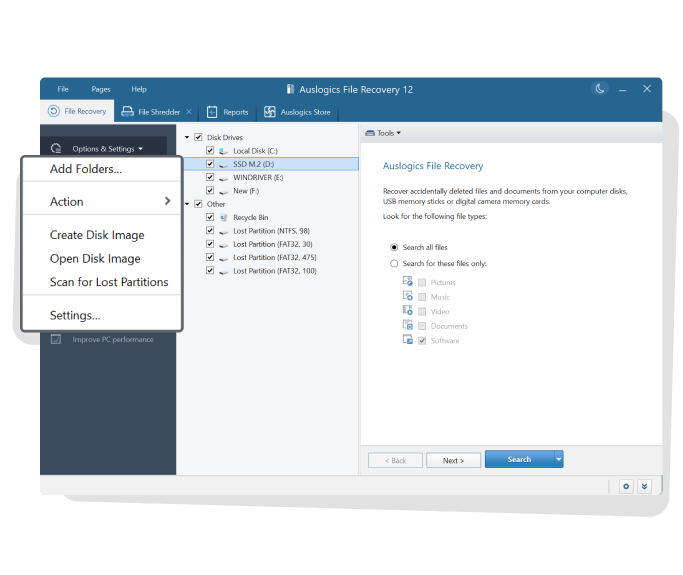
File Recovery 12, with the file type choices on the right and the Tools menu called out on the left.
Features
Filters for finding one file among thousands
Auslogics File Recovery can filter scan results by date, size, file type or name, and you can set criteria before the scan as well. TechRadar found you can narrow a search by when a file was last modified or accessed, and skip zero-size and temporary system files. You can preview photos, videos, documents and PDFs in the results before restoring them.
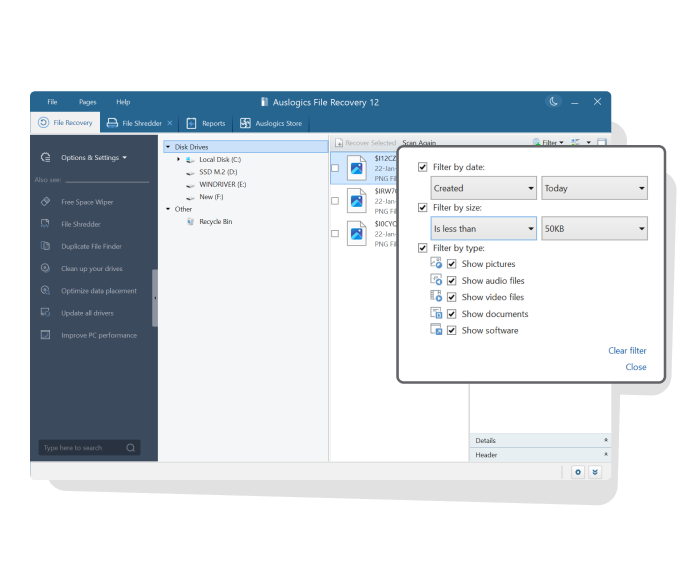
The filter panel, with date, size and file type options.
Restores files from lost partitions
Auslogics File Recovery can search physical disks for partitions that no longer appear in the drive list and restore files from them, as long as the data has not been overwritten. It also handles a quick format. A full format, which erases the disk, is beyond it.
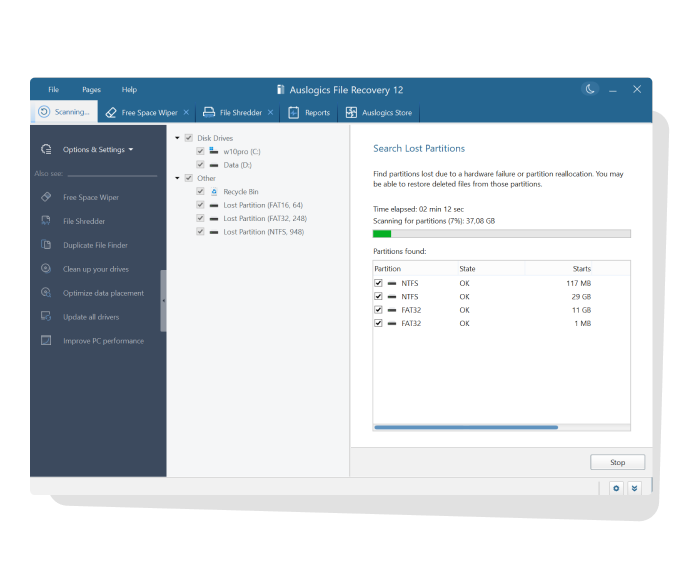
A lost partition search in progress, listing NTFS and FAT32 partitions found.
Disk images to work from
Auslogics File Recovery can save an exact image of a drive, deleted files included, and open that image later as if it were the drive itself. That lets you copy a failing disk once and do the slow searching on the copy. Auslogics says to save the image to a different disk from the one you are imaging.
A shredder and a free space wiper
Auslogics File Recovery includes a File Shredder for deleting chosen files beyond recovery and a Free Space Wiper that overwrites the leftovers of already deleted files without touching your existing ones. Those are useful before you sell or give away a PC.
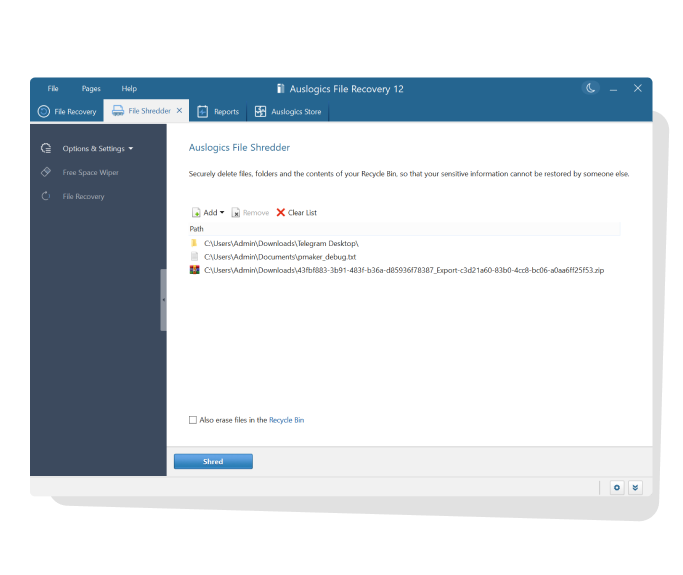
The File Shredder tab, with files queued and a Shred button.
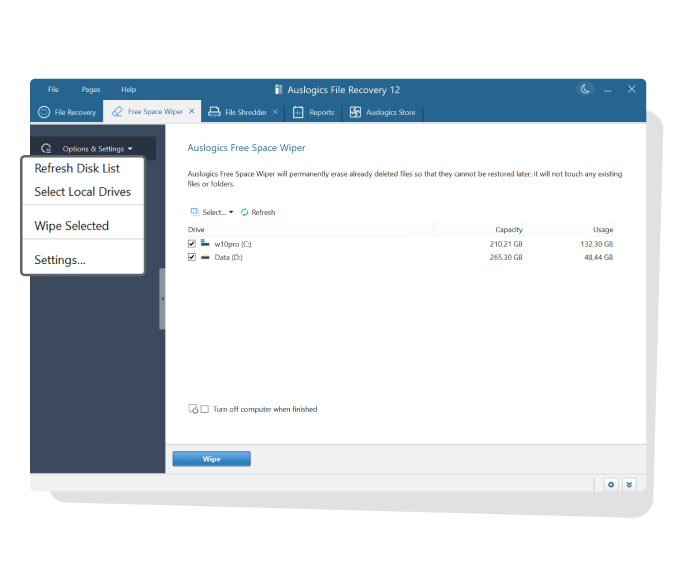
The Free Space Wiper tab, with two local drives selected.
Benefits
- A low annual cost for three PCs. TechRadar called it one of the most affordable data recovery options it has reviewed.
- Recovery and secure deletion in one program, so you can rescue a file on one day and make sure another is gone for good on the next.
- A small download. At about 21 MB, it is quick to fetch on another PC when you need to avoid writing to the affected drive.
Real-World Uses
- You emptied the Recycle Bin and then remembered the folder of tax documents inside it. Filter by date and document type.
- A camera card was quick-formatted by accident. Search the card for pictures and preview what comes back.
- A partition vanished after a disk management mistake. Run Scan for Lost Partitions from the Tools menu.
- A drive is starting to fail. Create a disk image on a healthy drive and search the image instead.
Who It's For, and Who Should Skip It
File Recovery fits Windows users who have lost ordinary files from a working drive and can use a low-cost tool for a year. It also suits people who like having a shredder and wiper in the same place.
Skip it if you hoped to get photos or documents back for free, because the free version won't do that. Skip it for CDs and DVDs, which it doesn't support, for a Mac, or for a drive that has physically failed, where a recovery lab is the realistic option. If you only need one rescue and hate subscriptions, remember to cancel after the job, or request a refund inside 30 days if the files don't come back.
Usage Guide
- Download File Recovery from Auslogics and install it, on a different drive from the lost data if possible.
- Select the drives or partitions to search in the left column.
- Choose Search all files, or tick only the file types you want.
- Set any date, size or name criteria, then press Search.
- Filter the results, preview what you can, and tick the files to restore.
- Press Recover Selected and save the files to a different drive.
Where it falls short
- The free plan is very limited. Auslogics describes it as full search and partial recovery. In its version table only Pro can restore files of any type, and TechRadar named this its biggest complaint.
- Deep scans take time. TechRadar saw a quick scan of 400 GB finish in 7 to 10 minutes, but a deep scan can run two to three hours, and results appear only at the end.
- A restored file can be damaged. Auslogics warns that a file partly overwritten after deletion may look restored while its contents differ from the original. Files on the system drive have the worst odds.
- TechRadar's test was narrow. Because its free copy could only restore software, it recovered one application and did not test photos or documents. No review we found gives recovery percentages.
- Support is by contact form and FAQ. TechRadar found no live chat or phone option.
What Users Say
Few independent reviews of this product exist. TechRadar is the most useful, and Trustpilot has only a couple of old reviews that name it. Trustpilot rated Auslogics as a company 4.3 from 2,010 reviews on November 10, 2026. Its text reached us through a summarizing tool, so the quotes are excerpts.
TechRadar (4 out of 5, by Krishi Chowdhary, updated April 23, 2026)
"This is worth the money, considering it offers features like partition recovery, disk imaging, and a free wipe free space utility."
"The scans are quite fast and light on system resources."
On the free plan: "my biggest complaint with Auslogics is that it has a very limited free plan, which only lets you recover lost applications."
On the interface: "Although it isn’t as modern as EaseUS or Stellar, it is surely an upgrade over DMDE’s old-school interface."
On Trustpilot
MR C P ELMES (5 stars, August 2017): "When File Recovery tracked through the harddrive it found 64,000 pictures." He could not easily find the photos he had lost among so many, and restored them from his original copies instead.
Wesley To (5 stars, May 2014): "File Recovery is a neat program"
Paul Galbraith (1 star, June 2026), about Auslogics in general, under the title "Bait and switch subscription trap." He says a purchase turned into a 12-month auto-renewing license. Auslogics replied that the renewal terms appear at step 2 of its checkout.
Quoted on the Auslogics site
Softonic: "An effective and easy to use program that will recover accidentally deleted files and files deleted by virus attacks and software faults."
The picture is thin but consistent: reviewers like the price and the extra tools, and they dislike the free plan's limits. The Elmes review shows a practical problem too. A deep search can bring back so many files that you need the filters to find yours.
Comparisons
Against other data recovery tools
TechRadar notes that EaseUS, Wondershare Recoverit and Stellar Data Recovery all allow limited recovery of various file types on their free versions, which Auslogics File Recovery does not. If you only need to retrieve a few small photos or documents, one of those may do it without paying.
Against Auslogics BoostSpeed
Auslogics says File Recovery is already part of BoostSpeed, its $59.95-a-year maintenance suite. If you want the cleanup tools anyway, BoostSpeed may cover both. If you only need to recover files, this is the cheaper purchase.
Editions and Pricing
| Capability | Free | Pro |
|---|
| Price | $0 | $29.95 per 12 months |
| Recover applications | Yes | Yes |
| Recover files of any type and size | No | Yes |
| Search for just images, video, audio or documents | No | Yes |
| File shredding | Yes | Yes |
| Priority support | No | Yes |
| Ask a Question | 1 question | 3 questions |
FAQs
Can Auslogics File Recovery restore files from a formatted drive?
Auslogics File Recovery can usually restore files after a quick format, but not after a full format, which erases the information on the disk.
Can Auslogics File Recovery recover data from a CD or DVD?
Auslogics File Recovery does not support CDs or DVDs. It is built for hard drives, USB flash drives and memory cards.
Can Auslogics File Recovery get photos back from a camera card?
Auslogics File Recovery can search a camera memory card for deleted pictures and movies, and you will need the Pro edition to restore them.
Does Auslogics File Recovery work on 32-bit Windows?
Auslogics File Recovery supports both 32-bit and 64-bit editions of Windows 7, 8, 8.1 and 10, plus Windows 11. It does not support XP or Vista.
Why does a recovered file open with errors?
Auslogics File Recovery restores what remains on the disk, and if newer data has overwritten part of the file, the rest cannot be rebuilt. Acting quickly gives the best chance of a whole file.
System Requirements
- Windows 11, or 32-bit or 64-bit Windows 10, 8.1, 8 or 7
- About 21 MB for the installer download
- A second drive to receive recovered files is advisable
Conclusion
Auslogics File Recovery is worth $29.95 if you have lost ordinary files from a working drive and want a simple, low-cost tool with partition search and disk imaging included. The one reason to buy it is that price, set against what the program covers, on three PCs. The main reason not to is the free version: it can't show you that your photo or document will come back before you pay, so buy it knowing the 30-day refund is your safety net, and cancel the renewal if this is a one-time rescue.
Download Free VersionBuy Now