Auslogics Video Grabber: A Paste-the-Link Video Downloader for Windows
Auslogics Video Grabber is a Windows program that saves videos from sites such as YouTube, Facebook and Vimeo to your PC for offline viewing. The Pro edition is $39.95 a year at checkout before tax, and a free version handles a smaller list of popular sites.
It is for the commute, the flight or the slow rural connection, where you want a lesson or a talk on your laptop without depending on the signal.
Quick facts
- Version: 1.0.0.13, released July 24, 2026
- Developer: Auslogics Labs Pty Ltd, founded in Sydney in 2008
- Platform: Windows 11, 10, 8.1, 8 and 7. There is no Mac or Linux version
- Price: $39.95 per 12 months before tax, renewing automatically
- Free version: yes, for select popular sites
- Refund: 30 days from purchase
- What we checked: vendor installer of 74.5 MB and the $39.95 yearly price with auto-renewal on the order page, on November 10, 2026. We did not install it or download any video with it.
Before you buy
- Video Grabber Pro is a subscription. It renews every 12 months at the same price and charges the payment method on file unless you cancel before the renewal date. Auslogics says it emails a notice about 30 days ahead.
- Cancelling: Auslogics' policy says to contact it by email, and the order page says auto-renewal can also be cancelled through your customer account.
- Refunds run for 30 days from purchase and cover renewals too. They are generally processed in 5 to 7 business days, and the license and subscription are disabled once the refund goes through.
- Only save what you are allowed to. YouTube's terms of service restrict downloading without its permission, and copyright applies to most videos online. Stick to your own uploads, openly licensed videos and anything the owner has cleared.
- The order page doesn't state how many PCs one Pro license covers. If you need it on more than one computer, ask Auslogics before you buy.
Download Free VersionBuy Now
Overview
Video Grabber has two tabs. Add Video URL holds a box for one or more links, then rows of choices for quality, output format, resolution and schedule, with a Download button at the bottom. Download List shows each item's size, progress and a Play Now link when it finishes.
Auslogics names YouTube, Facebook, Twitter, Vimeo, Dailymotion, Flickr, Yahoo and IMDb among its supported sites and claims more than 1,000 in total, with content in formats such as MP4, AVI, FLV, WebM, WMV, MP3 and 3GP.
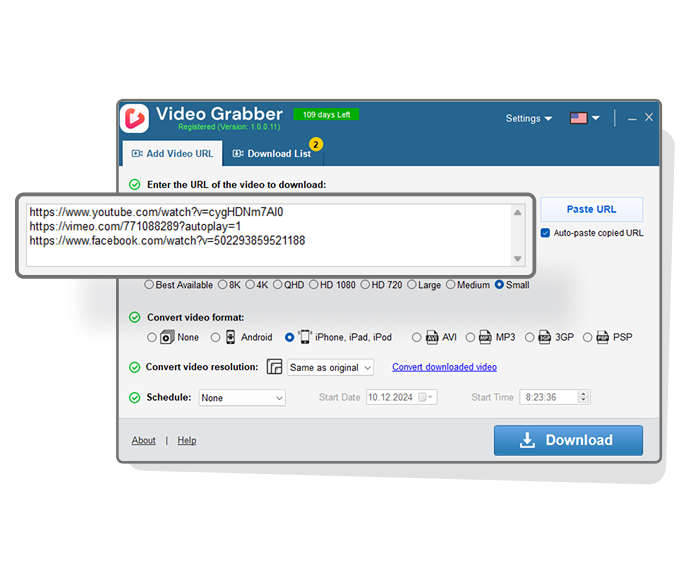
The Add Video URL tab with three links pasted in, and the quality, format, resolution and schedule rows below.
Features
Paste several links and walk away
Auslogics Video Grabber picks up a link you have copied and fills in the URL box, and you can keep adding links while earlier downloads run. Pro removes the limit on simultaneous downloads and adds unlimited videos and playlists from all supported sites.
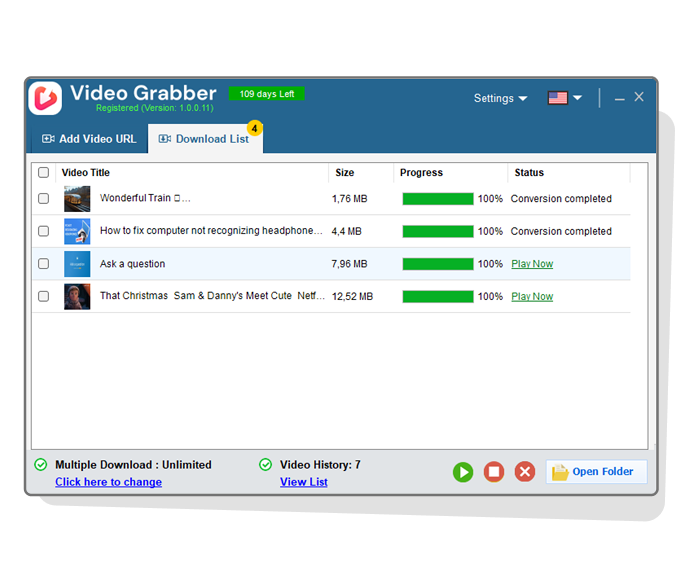
The Download List tab, showing finished items and the Multiple Download and Video History counters.
Quality choices up to the source
Auslogics Video Grabber offers Best Available, 8K, 4K, QHD, HD 1080, HD 720, Large, Medium and Small, and can only deliver what the site actually hosts. HD and Full HD are included in the free version.
Conversion for phones and old players
Auslogics Video Grabber Pro converts downloads to presets for iPhone and iPad, Android, AVI, MP3, 3GP and PSP. You can do this at download time, or later with the Convert Videos window on files you already have.
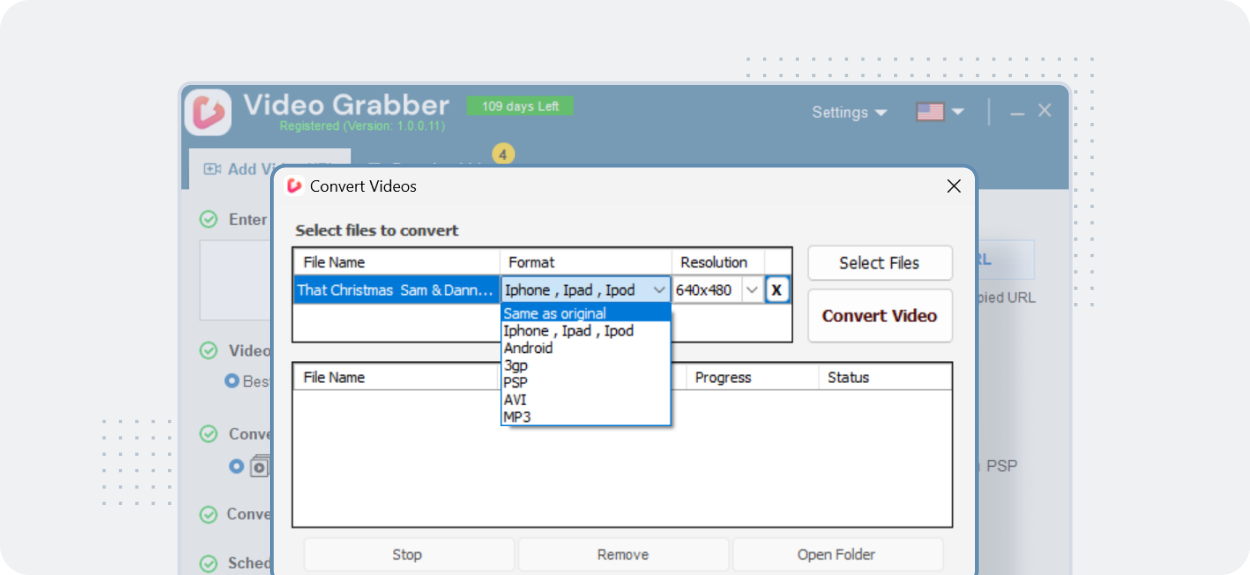
The Convert Videos window with its format list open.
Scheduled downloads
Auslogics Video Grabber Pro can start a download once, daily or weekly, at a time you set, with an optional end time. That suits a metered connection with cheaper hours overnight.
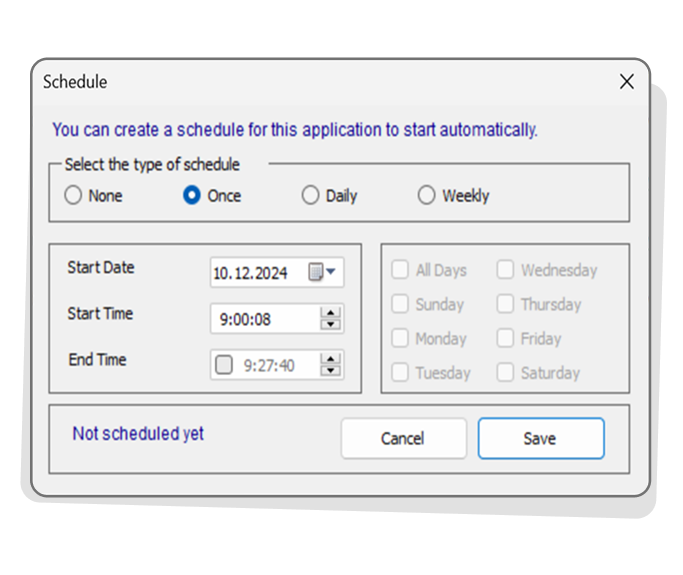
The Schedule dialog, with None, Once, Daily and Weekly options.
Proxy support and basic settings
Auslogics Video Grabber can send its downloads through a proxy that you enter yourself. Settings also cover the download folder, language, default quality and whether the program starts with Windows.
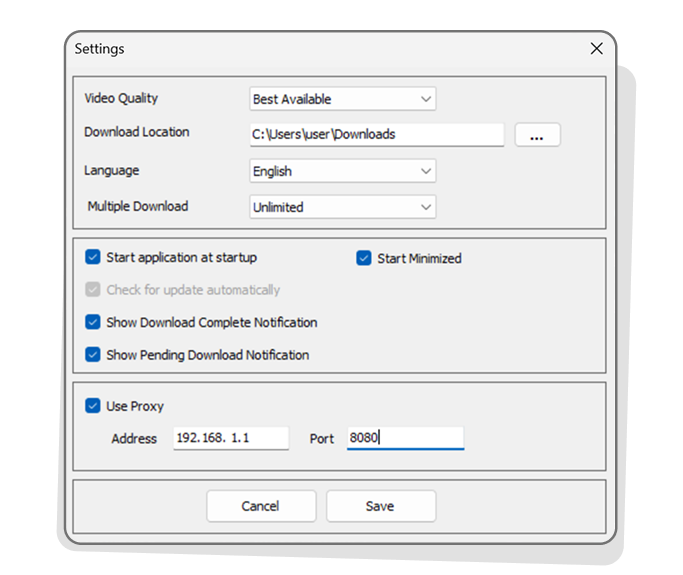
The Settings dialog, with Use Proxy ticked and options to run at Windows startup and start minimized.
Benefits
- One tool for several sites, so you don't need a separate browser add-on for each.
- Downloads you can watch anywhere. Once a file is saved, it plays without a connection and stays available if the original goes offline.
- Less waiting at the keyboard. Queues and schedules let the work happen while you are away.
Real-World Uses
- A teacher saves her own YouTube lessons to a laptop for a classroom with poor Wi-Fi.
- You want your own uploaded videos back in one folder before closing an old account.
- You save a Creative Commons lecture series to watch on a long flight, using a playlist link.
- You convert a saved clip of your own to MP3 so that you can listen to it on the move.
Who It's For, and Who Should Skip It
Video Grabber fits Windows users who regularly need offline copies of videos they are entitled to save and want conversion and scheduling in the same program.
Skip Pro if you only save the odd clip, since the free version does that from popular sites. Skip it if you dislike paying a yearly fee for a downloader or if you use a Mac. At $39.95 a year it is also worth comparing against one-time-purchase downloaders before you commit.
Usage Guide
- Download Video Grabber from Auslogics and install it.
- Copy the address of a video from your browser. If auto-paste is on, it appears in the URL box.
- Choose the quality and, in Pro, a format, resolution or schedule.
- Press Download.
- Open the Download List tab to watch progress, then use Play Now or Open Folder.
Where it falls short
- Sites change, and downloaders break. Auslogics' own FAQ says failures with a video are normal because platforms keep changing how they work, and it asks you to send support the link so the program can be adjusted.
- Very little independent testing exists. Video Grabber is still at version 1.0.0.13. We found no recent hands-on review from a tech publication.
- The free version's site list is short. The comparison table says "select popular services" without listing them, and Auslogics notes that downloading from some sites may require activation.
- The startup setting deserves a look. Settings include options to run at Windows startup and start minimized, which you may want to turn off.
What Users Say
Independent feedback on Video Grabber is scarce, and the three Trustpilot reviews we found that name it are mixed. Trustpilot rated Auslogics as a company 4.3 from 2,010 reviews on November 10, 2026, but most of those concern other products. Its text reached us through a summarizing tool, so the quotes are excerpts.
On Trustpilot
Lydis Nicole Tamas (5 stars, June 2021): "a wonderful free software called Video Grabber, this amazing piece of software is extremely efficient"
José Carlos "JC" da Silva (1 star, September 2024): "it worked about 15 days), it never worked again". He says support did not answer and no refund came. Auslogics replied that it had answered three support requests within 24 hours and recommended updating to the latest version.
Logan Bingham (1 star, June 2022): "instead of installing an update, it installed THREE, not one or two, THREE new programs including BoostSpeed 12". He says Video Grabber arrived with them. Auslogics replied that it could not reproduce the problem and asked him to contact support.
About Auslogics in general
Paul Galbraith (1 star, June 2026), under the title "Bait and switch subscription trap." He says a purchase turned into a 12-month auto-renewing license. Auslogics replied that the renewal terms appear at step 2 of its checkout.
With so few reviews, no firm pattern can be drawn about this program. The two complaints that name it are about reliability and about software arriving unasked, so pay attention to what you tick during installation and updates.
Editions and Pricing
| Capability | Free | Pro |
|---|
| Price | $0 | $39.95 per 12 months |
| Sites | Select popular services | All supported services |
| HD and Full HD downloads | Yes | Yes |
| Download history | Yes | Yes |
| Unlimited simultaneous downloads | No | Yes |
| Unlimited videos and playlists from 1000+ sites | No | Yes |
| Conversion to MP4, AVI, WMV, MP3, iPhone, iPad and more | No | Yes |
| Download schedule | No | Yes |
FAQs
Can Auslogics Video Grabber save just the audio from a video?
Auslogics Video Grabber can extract audio as MP3, and its comparison table lists MP3 conversion as a Pro feature.
Does Auslogics Video Grabber work on 32-bit Windows?
Auslogics Video Grabber supports both 32-bit and 64-bit editions of Windows 7, 8, 8.1 and 10, plus Windows 11. It does not support XP or Vista.
What should I do if Auslogics Video Grabber fails on a certain video?
Auslogics asks you to send technical support the link to the video that fails, because site changes often require changes to the program.
Does Auslogics Video Grabber need a Pro license for YouTube?
Auslogics Video Grabber's free version handles sites including YouTube, Facebook and Twitter, according to Auslogics. Pro adds the remaining sites and the conversion and scheduling tools.
How do I update Auslogics Video Grabber?
Auslogics Video Grabber updates from its Settings menu with the Check for updates option, and you can also run a newer installer over your current version.
System Requirements
- Windows 11, or 32-bit or 64-bit Windows 10, 8.1, 8 or 7
- About 75 MB for the installer download
- An internet connection for downloading videos
Conclusion
Auslogics Video Grabber is only worth $39.95 a year if you regularly need conversion or scheduled downloads for videos you are entitled to keep. The reason to buy is having link paste, format conversion and scheduling in one small window. The main reason not to is that the yearly fee is hard to justify for occasional use, and the program has very little independent testing behind it. Start with the free version and pay only if you run into its limits.
Download Free VersionBuy Now