Auslogics SSD Optimizer: Solid-State Drive Tuning and Health Readings for Windows
Auslogics SSD Optimizer is a Windows tool for solid-state drives that adjusts system settings to cut unnecessary writes, shows drive health and estimated service life, and finds what is filling the disk. The Pro edition is $24.95 a year at checkout before tax and covers 3 PCs, it runs on Windows 7 through 11, and a free version offers disk analysis and basic optimization.
It suits someone who wants to see how an SSD is holding up and likes having the maintenance settings in one window. It will not make a healthy modern SSD dramatically faster, and it is no use on a hard drive.
Quick facts
- Version: 2.2.0.6, released April 29, 2026
- Developer: Auslogics Labs Pty Ltd, founded in Sydney in 2008
- Platform: Windows 11, 10, 8.1, 8 and 7. There is no Mac or Linux version
- Drives: SSDs only. It will not run SSD optimization on hard drives
- Price: $24.95 per year before tax, renewing automatically
- Pro license: covers 3 PCs
- Free version: yes, with disk analysis and basic optimization
- Refund: 30 days from purchase
- What we checked: vendor installer of 26.4 MB and the $24.95 yearly price with auto-renewal on the order page, on November 10, 2026. We did not install it, run it or measure any speed or lifespan change.
Before you buy
- SSD Optimizer Pro is a subscription. It renews every 12 months and charges the payment method on file unless you cancel before the renewal date. Auslogics says it emails a notice about 30 days ahead.
- Refunds run for 30 days from purchase and cover renewals too. They are generally processed in 5 to 7 business days, and the license and subscription are switched off once the refund goes through.
- To cancel, contact Auslogics by email. The order page also says auto-renewal can be cancelled through your customer account.
- Own a hard drive as well? SSD Optimizer leaves it alone. Disk Defrag is the matching Auslogics program for hard drives.
Download Free VersionBuy Now
Overview
SSDs have no moving parts, so the fragmentation that slows a hard drive matters far less. What matters is that flash memory wears out after a limited number of write cycles. SSD Optimizer tries to reduce unnecessary writes and keep an eye on the drive's condition instead of rearranging everything on it.
Pressing the blue Optimize button runs TRIM, adjusts file placement, consolidates free space and merges only small file fragments. Auslogics says it does not defragment the whole drive, since a full defrag is a heavy write job that an SSD gains nothing from.
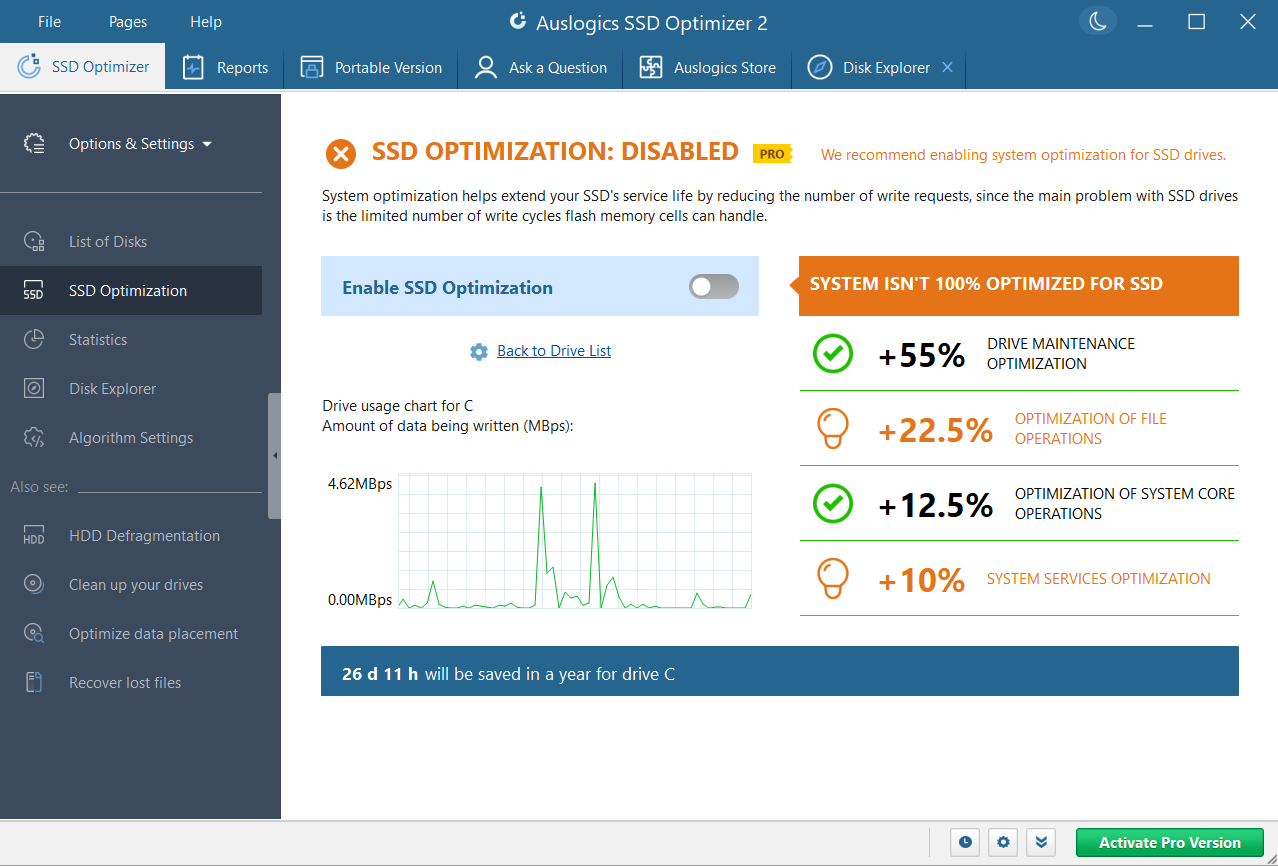
The SSD Optimization page in SSD Optimizer 2, shown with optimization not yet enabled, next to a usage chart.
Features
Drive health at a glance
Auslogics SSD Optimizer reads the SMART data from your SSD and shows its health, temperature and estimated service life on a Drive Health tab, with the full attribute table for anyone who wants the raw figures.
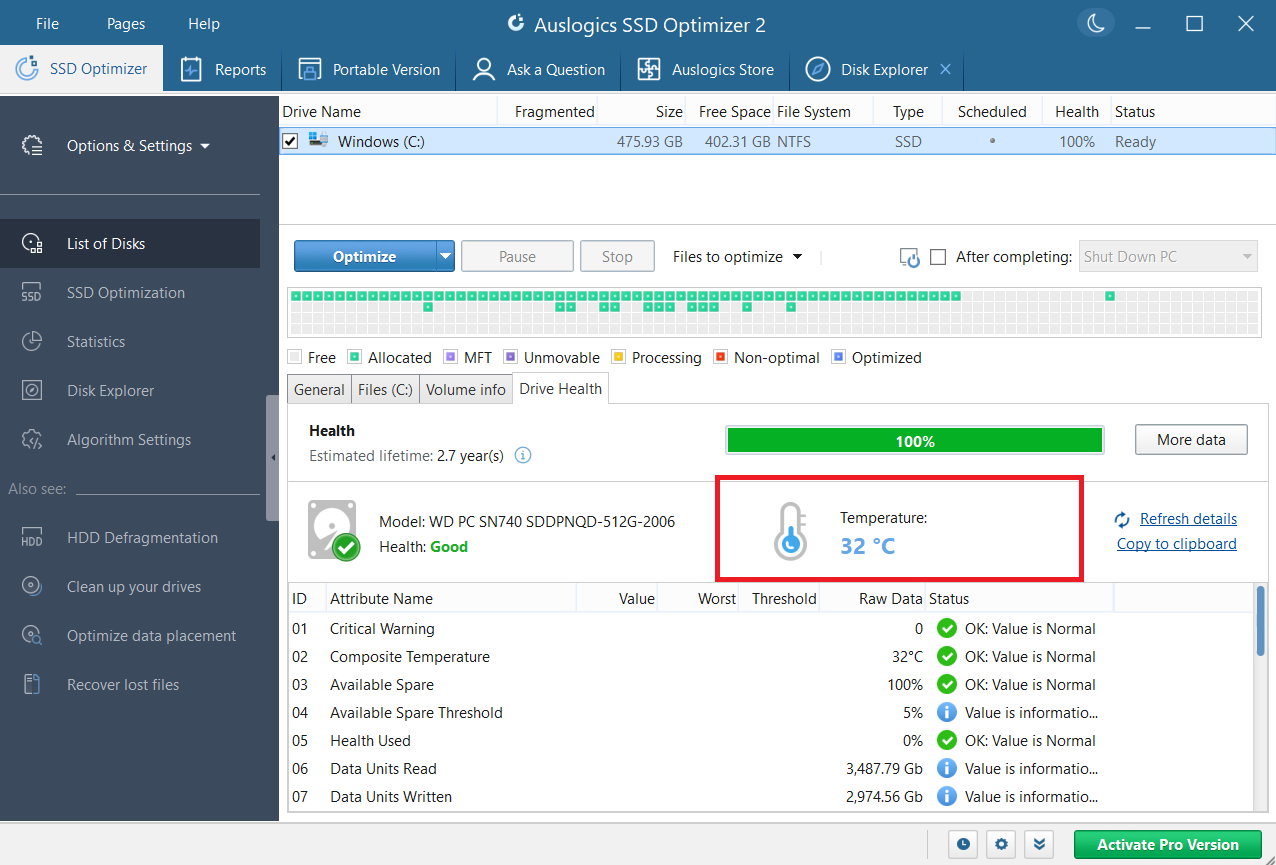
The Drive Health tab, reading 32 °C on this PC. The red highlight was added by Auslogics.
Statistics on what is being written
Auslogics SSD Optimizer charts how much data has been read from and written to the drive over a period you choose. The advanced statistics are a Pro feature.
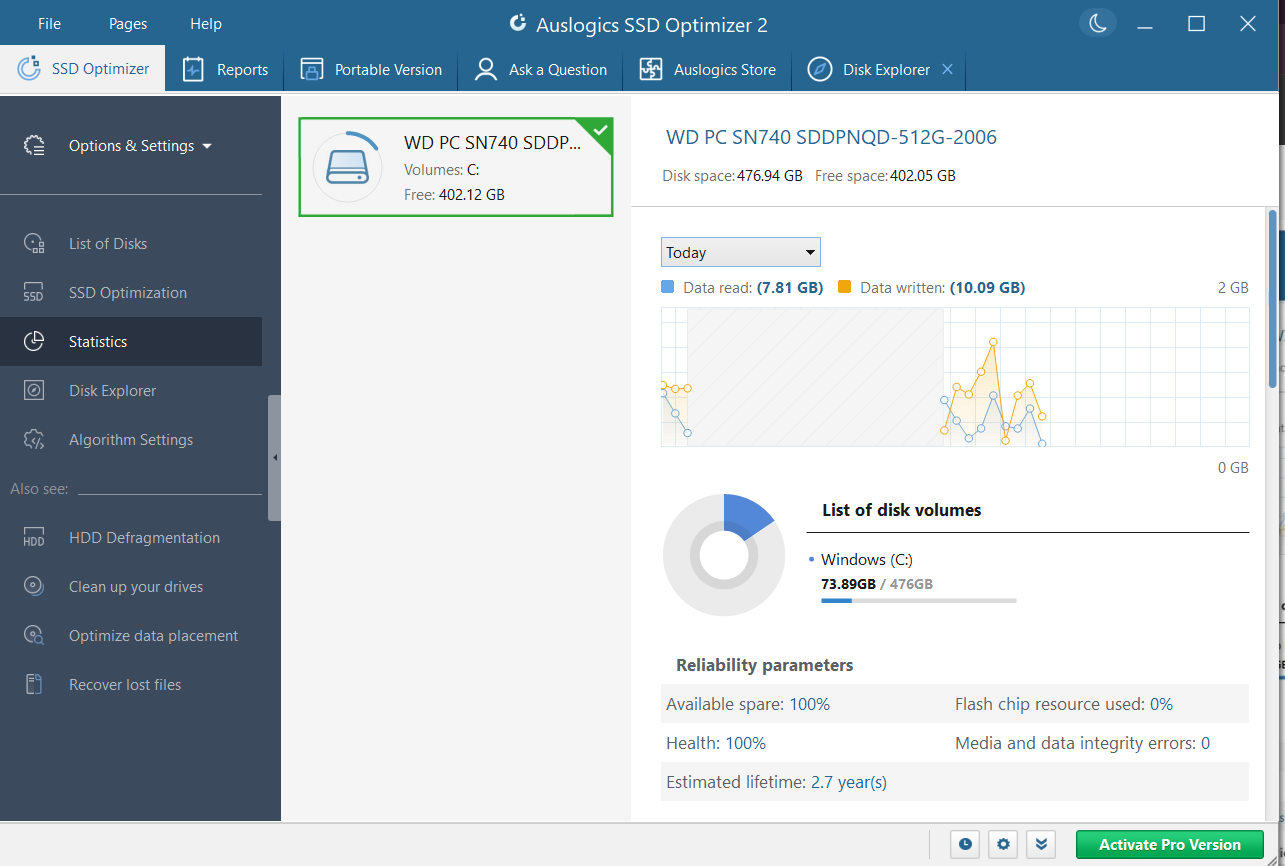
The Statistics page, with a chart of data read and written and a list of reliability parameters.
Disk Explorer for finding space hogs
Auslogics SSD Optimizer scans the drive and sorts folders and files by size, so you can see what to delete or move elsewhere. It matters more on an SSD, which tends to be smaller than a hard drive.
Settings aimed at reducing writes
Auslogics SSD Optimizer adjusts drive maintenance, file and system core operations, and system services to lower the number of write operations. The algorithm settings let you turn TRIM on or off, choose which file types to optimize, and set a maximum operating temperature.
Scheduling and cleanup in Pro
SSD Optimizer Pro can optimize automatically when the PC is idle or at a set time, and can skip a run when the PC is unplugged or an app is full screen. Pro also cleans junk before optimizing, so less data gets moved, and can wipe free space.
Benefits
- You find out how the drive is doing. Health, temperature and write volume are in one place, which can warn you to back up before a drive reaches its end.
- Space problems become visible. The largest files and folders are listed instead of hidden several folders deep.
- Three PCs per Pro license, for a household with more than one laptop.
Real-World Uses
- Your 256 GB laptop SSD is nearly full. Disk Explorer shows which folders to clear or move.
- A secondhand SSD arrives with an unknown history. The health and written-data readings show how much it has already been used.
- A drive in a small case runs warm. The temperature reading tells you whether cooling needs attention.
- You want maintenance to happen unattended. Pro runs optimization when the PC sits idle and stops when you come back.
Who It's For, and Who Should Skip It
SSD Optimizer fits Windows users who like to monitor their hardware and want a single window for SSD health, space and settings. The free version is a low-risk way to look at your drive.
Skip Pro if you only want the basic optimization, which the free version includes, or if you dislike subscriptions. Skip the program entirely if your computer has only hard drives. If your SSD is new and you rarely think about it, Windows already handles routine SSD maintenance by itself, and you may see no difference.
Usage Guide
- Download the installer from Auslogics and run it.
- Open SSD Optimizer and pick your SSD in the list of disks.
- Run an analysis. This is a status check, not a performance benchmark.
- Click Optimize and choose the action you want.
- Open Drive Health and Statistics to see the drive's condition.
- With Pro, open File, then Settings, then Scheduler, and tick Optimize automatically.
Where it falls short
- Speed gains are hard to promise. Windows already sends TRIM to SSDs on its own schedule, so a healthy drive may show little change. Auslogics' claims about faster performance and longer life are the vendor's, and we did not test them.
- It moves some data. Optimizing writes to the drive like anything else, though Auslogics says only small fragments are touched.
- Health estimates are estimates. A good reading does not replace backups, since drives can fail without warning.
- Hard drives need another program, so a mixed PC needs Disk Defrag as well.
What Users Say
Trustpilot rated Auslogics as a company 4.3 from 2,010 reviews on November 10, 2026. Trustpilot's text below reached us through a summarizing tool and is excerpted.
Praise on Trustpilot
Vittorio Riccio (5 stars, September 2026): "Auslogics SSD Optimizer exceeded my expectations."
Martim Macambira (5 stars, May 2026): "SSD Optimizer really made a difference on my PC, really recommend it for people who have SSD's!"
Dave Payne (5 stars, February 2026): "The Auslogics SSD optimizer has a clear, easy to understand GUI, I can perform what I need in a few clicks."
Ernie Osborne (5 stars, January 2026): "I've found Auslogics SSD optimizer to be an excellent tool in keeping my SSD drive in top shape, Highly reccomended!"
Derek (5 stars, October 2025): "Auslogics SSD Optimizer 2 will keep you on top of the health of your SSD and keeps it running smoothly."
Criticism on Trustpilot
Jacques Hauben (3 stars, January 2026): "The ssd optimizer is less usefull and versatile than the defragmenter, also it is not user friendley." He adds: "I din't find any real amelioration of my ssd ."
Andrew Faraday (4 stars, March 2017), on SSD optimisation in an Auslogics program of that time: "I don't like the SSD optimisation because it put my system to sleep and this increase the wearing on SSD."
Lu k (1 star, November 2025), about the company in general: "They are now reduced to selling software and then stating after purchase that it is a subscription."
Paul Galbraith (1 star, June 2026), about the company in general: "auto-renewing without your explicit consent."
Owners who like SSD Optimizer tend to mention its simple interface and the sense of keeping the drive in shape. The one detailed negative review we found says the owner saw no real improvement, a fair warning if your drive is already healthy. Billing complaints are the company-wide theme.
Comparisons
SSD Optimizer or Disk Defrag Ultimate?
Disk Defrag Ultimate, at $29.95 a year on the order page, applies an SSD algorithm and also defragments hard drives, with boot-time defrag and placement algorithms. SSD Optimizer, at $24.95, is the one with drive health, statistics and Disk Explorer. Pick SSD Optimizer if the SSD is what you care about. Pick Ultimate if your priority is detailed defragmentation control.
Editions and Pricing
| Capability | Free | Pro |
|---|
| Price | $0 | $24.95 per year |
| Advanced optimization algorithm | Yes | Yes |
| Enhanced disk protection | Yes | Yes |
| Disk error check and repair | Yes | Yes |
| Advanced stats access | No | Yes |
| Disk cleanup before optimization | No | Yes |
| Scheduling of automatic optimization | No | Yes |
| Wipe free space | No | Yes |
| Ask a Question expert answers | 1 question | 3 questions |
FAQs
Does Auslogics SSD Optimizer defragment my SSD?
Auslogics SSD Optimizer does not defragment the entire drive. Auslogics says it only merges small file fragments to reduce input and output operations, alongside TRIM and free space consolidation.
Will SSD Optimizer work on my hard drive?
Auslogics SSD Optimizer marks each disk as HDD or SSD, and if all your drives are hard drives it will not run SSD optimization on them. Auslogics points those users to Disk Defrag.
Is SSD Optimizer included in BoostSpeed?
SSD Optimizer comes as part of the Auslogics BoostSpeed suite, so a BoostSpeed subscriber may not need it separately.
Does SSD Optimizer run on Windows 7?
Auslogics SSD Optimizer supports 32-bit and 64-bit Windows 7, 8, 8.1 and 10, plus Windows 11. It does not run on XP or Vista.
What happens to SSD Optimizer Pro after a refund?
Auslogics disables the SSD Optimizer license and subscription once a refund is processed.
System Requirements
- Windows 11, 10, 8.1, 8 or 7
- About 78 MB of storage for the program
- A solid-state drive to optimize
Conclusion
SSD Optimizer is worth $24.95 a year if you want scheduled upkeep and the advanced statistics on an SSD you care about, and the free version may be all most people need. The one reason to pay is scheduling that runs without you. The main reason not to is that Windows already looks after a healthy SSD, so you are mostly paying for information and convenience, on a plan that renews each year. Try the free version, look at your drive's health, and decide from there.
Download Free VersionBuy Now