Hard Disk Sentinel Professional: Know a Drive Is Failing Before It Takes Your Files
Hard Disk Sentinel Professional is a $33 lifetime-license Windows program that watches the health and temperature of every hard disk, SSD and NVMe drive in your PC, warns you when one starts to fail, tests and repairs weak sectors, and can back up your files automatically when a problem appears. It's for home users with irreplaceable data, PC builders and technicians, and small offices that can't afford a surprise disk failure.
Drives rarely die without warning. Reallocated sectors creep up, read errors appear, an SSD's remaining life ticks down. Windows doesn't tell you any of this. Hard Disk Sentinel keeps reading those signals and puts them in plain words, such as "The status of the solid state disk is PERFECT" or a warning that the drive should be replaced, so you replace it on your schedule, not after it dies.
Quick facts
- Version: 6.40, released February 23, 2026
- Developer: H.D.S. Hungary
- Runs on: Windows 11, 10, 8.1, 8, 7, Vista and XP, plus Windows Server, 32 and 64-bit. Separate DOS and Linux versions exist.
- Drives: IDE, SATA, SCSI, SAS, NVMe and most USB drives, SSDs and hybrid drives, including many behind RAID controllers
- Price: $33 at checkout, a one-time lifetime license for 1 computer
- Updates: the license covers all future versions of the Professional edition
- Free trial: 30-day evaluation (extendable for home use) that shows health, temperature and S.M.A.R.T. data. Backups and the full test suite need a license.
- Download: 40.9 MB zip containing the installer
What we checked: the Professional installer from the vendor's site (hdsentinel_pro_setup.exe in a 40.9 MB zip), which reports version 6.40.0.0 and is digitally signed by the developer, Janos Mathe, and the price of Hard Disk Sentinel Professional on the order page ($33.00, lifetime license), both on October 27, 2026. We didn't run it on a failing drive.
Download Free TrialBuy Now
Overview
Every modern drive keeps S.M.A.R.T. records: error counts, reallocated sectors, power-on hours, temperature and, on SSDs, the remaining write endurance. Hard Disk Sentinel reads them for every drive, compares them over time and turns them into two numbers, Health and Performance, plus a written explanation and an estimated remaining lifetime. Its health rating is deliberately sensitive: a handful of bad sectors on a drive that other tools still call "Good" will already lower the score.
The Professional edition is the one that acts on that information. It runs disk tests, sends alerts by email and other channels, and runs backup projects, including a panic backup when a drive starts to fail. It runs as a normal program or as a Windows service that works even when nobody is logged in, and it doesn't need .NET, Java or any other runtime.
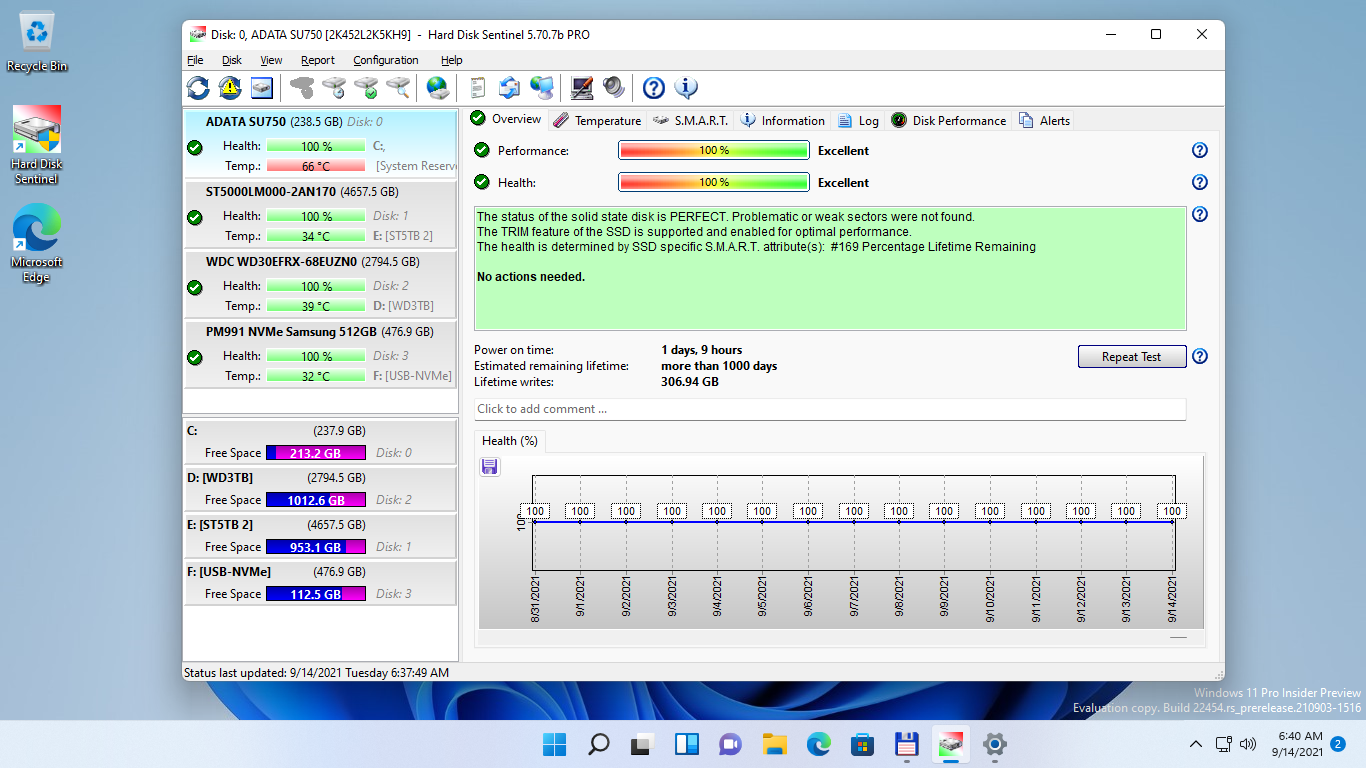
The main window on Windows 11: four drives (two SSDs, a hard disk and a USB-connected NVMe drive) with health and temperature on the left, and the Overview tab showing 100% performance and health, the text report, power-on time, estimated remaining lifetime, lifetime writes and the health history graph. Shown in version 5.70.7b PRO.
Features
Health, temperature and S.M.A.R.T. for every drive
Hard Disk Sentinel Professional shows each drive's health and performance percentage, a plain-language status, power-on time, estimated remaining lifetime and, for SSDs, total lifetime writes. It logs current, average and maximum temperatures with graphs, shows status in the tray and on the desktop, and lists every S.M.A.R.T. attribute with its raw values for anyone who wants the detail. Version 6.40 also shows whether a hard disk uses CMR or SMR recording.

The Temperature tab for a 3 TB WD hard disk: current, today's average and maximum, lifetime and ever-measured temperatures, a link to set custom thresholds, and the temperature graph over the evening.
Surface tests that find, and can fix, weak sectors
Hard Disk Sentinel Professional includes a non-destructive read test that checks every sector and maps slow areas of the disk, plus Professional-only modes that refresh, reinitialise or repair the surface, the drive's own short and extended self tests, seek and stress tests, and a Quick Fix for weak sectors. It also offers industry-standard data destruction for wiping a drive before you sell it. The destructive modes erase data, and the program says so clearly before you start.
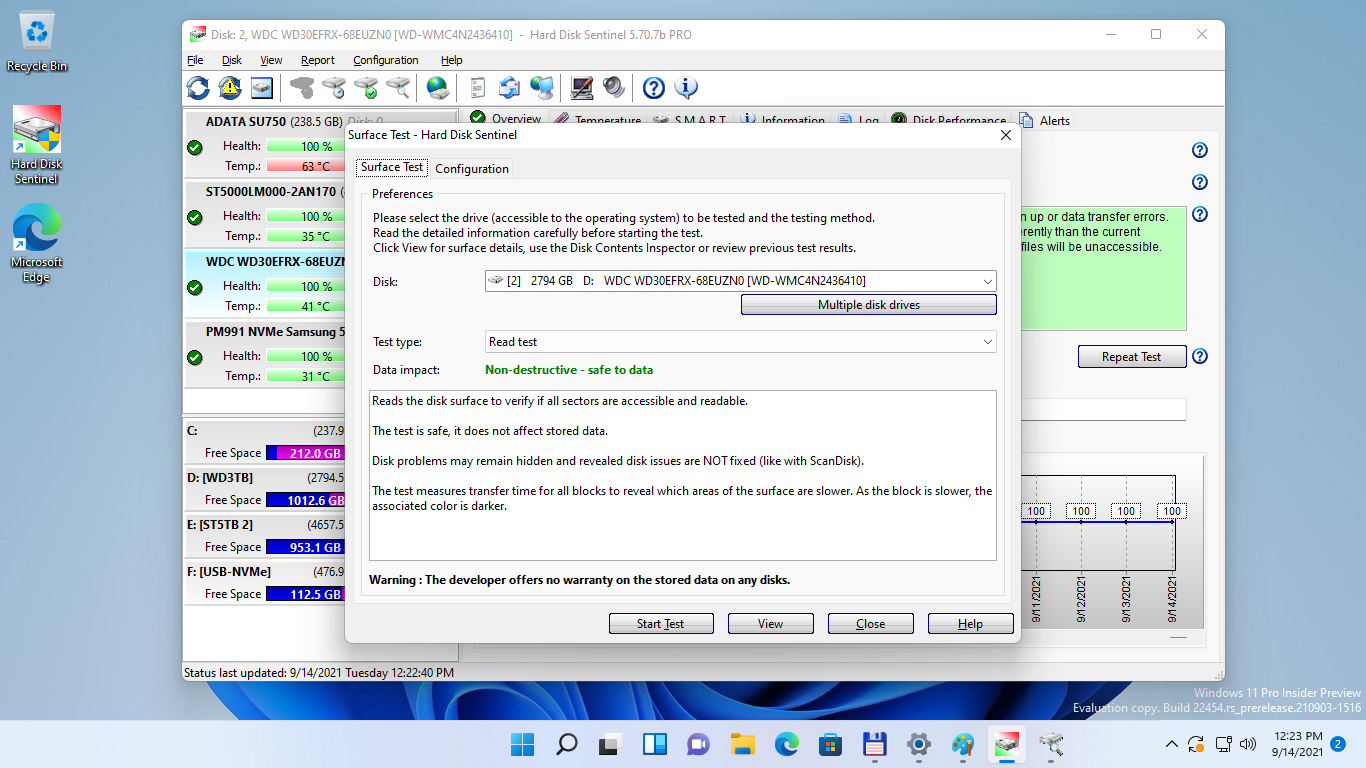
The Surface Test dialog: choose the disk and test type. The Read test is marked "Non-destructive - safe to data", with an explanation that it reveals but doesn't fix problems.
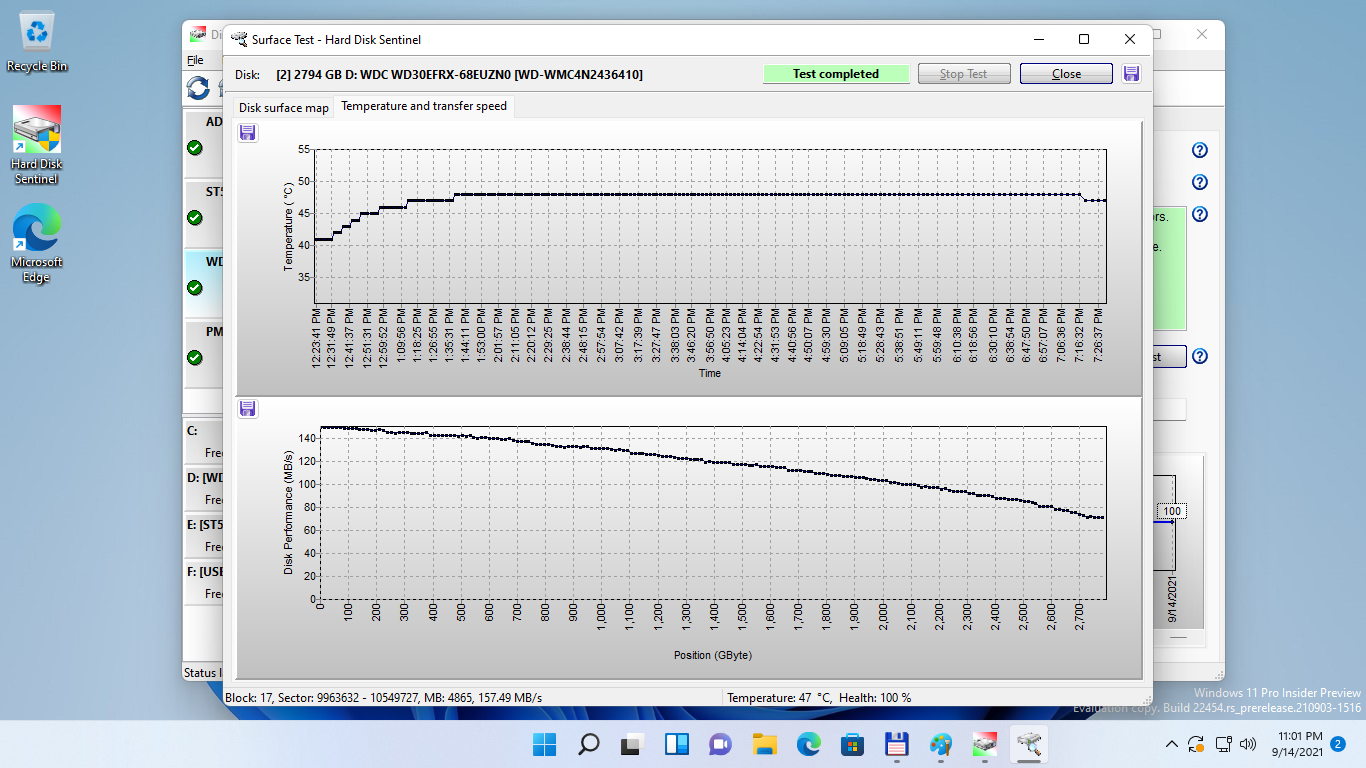
A completed surface test on the 3 TB disk: temperature over the seven-hour test (rising from 41 to 48 °C) and transfer speed falling from about 150 to 70 MB/s from the outer to the inner tracks.
Alerts and daily reports
Hard Disk Sentinel Professional can alert you by email, sound, pop-up message and other methods when health drops, a temperature limit is passed or new errors appear, with custom thresholds per drive and per S.M.A.R.T. attribute. It can also alert when a drive is connected or removed, send daily status reports, and watch Windows disk-related events. Version 6.40 added the date and time to alert pop-ups.
Scheduled and panic backups
Hard Disk Sentinel Professional includes backup projects you can run on a schedule, compress, burn to CD or DVD, or send by FTP or email. The standout is panic backup: when a drive develops a problem, Hard Disk Sentinel automatically starts the backup projects you've attached to it, so your newest files are copied off before the drive gets worse. It's not a replacement for a full backup program, but it's a sensible safety net.

The Panic backup tab under Configuration > Operations: backup projects attached to any hard disk, each set to start automatically or after a number of problems, with Ask before run and Enabled options. This is an older screenshot with the Windows XP look.
Deep hardware support, NAS and a portable version
Hard Disk Sentinel's biggest strength is how many devices it can read: drives in USB enclosures and docks, NVMe drives behind USB adapters, many RAID and SAS controllers, SD Express and some micro SD cards, and NAS disks. The Professional edition also reads Seagate FARM logs and other device-specific information, and comes with a portable version that runs from a USB stick for checking other PCs.
Benefits
The real benefit is time. A drive that loses health slowly gives you weeks to copy your data and replace it, but only if something is watching. Hard Disk Sentinel is that watcher, running quietly in the tray and speaking up only when something changes.
The second is clarity. Raw S.M.A.R.T. numbers mean little to most people. Hard Disk Sentinel's text report tells you whether a problem is serious, what it means and what to do, which is why users on forums say they prefer it to the free CrystalDiskInfo.
Real-World Uses
- A home PC with family photos on an aging hard disk, with an email alert and a panic backup to an external drive.
- A small office server running Hard Disk Sentinel as a service, sending a daily status report to the person who looks after the IT.
- A technician's USB stick with the portable version, checking customers' drives before a repair or upgrade.
- Checking a used drive before trusting it: S.M.A.R.T. history, power-on hours and a full read test.
- Wiping a drive with the data destruction function before selling or recycling the PC.
Who It's For, and Who Should Skip It
Hard Disk Sentinel Professional fits anyone who wants continuous drive monitoring with alerts on a Windows PC: careful home users, gamers with several SSDs, people with home servers or NAS boxes, and technicians. At $33 for life, it costs less than one external backup drive.
Skip it if you only want to glance at a drive's health once in a while: the free CrystalDiskInfo, or Hard Disk Sentinel's own trial, shows that. Skip the Professional edition if you don't need backups or the repair-type surface tests: the Standard edition ($22) already monitors and alerts. And if you need to monitor dozens of PCs from one console, look at the Enterprise edition instead. Mac users are out of luck: there's no Mac version.
Usage Guide
- Install and launch. Unzip the download, run hdsentinel_pro_setup.exe with administrator rights, and start Hard Disk Sentinel. It detects your drives immediately.
- Register. After buying, enter the registration key from your order email to turn on the Professional features on this computer.
- Read the Overview. Check each drive's Health and Performance and the text report. Anything below 100% comes with an explanation.
- Set up alerts. In Configuration, enter your email settings and choose the alert types and thresholds you want, then send a test report.
- Add a backup project and attach it to the panic backup for your most important drive.
- Run a surface test when a drive's health drops: start with the non-destructive Read test.
- Optionally run it as a service so monitoring continues without anyone logged in.
Before you buy
- One license, one computer. Each PC needs its own license. The Family license covers 5 computers for $59, and the Portable version needs a Professional license too.
- Use the trial to check compatibility. USB enclosures and RAID controllers vary, and the trial shows exactly how much your hardware reports.
- Back up before repair tests. Refresh, reinitialise and data destruction modes overwrite data. Only the Read test is safe for your files.
Where it falls short
- Health scores can alarm you. Because the rating is so sensitive, Hard Disk Sentinel can show a low health figure for a drive that CrystalDiskInfo or the manufacturer's tool still calls fine. Users on the developer's forum have raised exactly this. Treat a low score as a reason to back up and investigate, not as proof the drive will die tomorrow.
- A dated, busy interface. The window is packed with tabs, bars and toolbar icons, and some configuration screens still look like Windows XP.
- Startup delay. An AlternativeTo reviewer complains that by default it "starts with Windows and then does a countdown making you wait before you can shut it off."
- Windows only. There's a separate Linux command-line version and a DOS version, but no Mac version.
- Some USB enclosures hide data. The vendor says some USB and FireWire enclosures don't pass complete status information, and controller drivers can limit what it sees.
What Users Say
AlternativeTo: 4.9 out of 5 from 7 ratings
TBayAreaPat (August 2022): "My system was acting up and Hard Disk Sentinel showed very clearly that the Disk Drive was ready to go in 30 days." The same reviewer's con: "The default starts with Windows and then does a countdown making you wait before you can shut it off."
mk2k (July 2020): "CrystalDiskInfo stopped enumerating my HDDs after a certain amount - HDS however works like a treat!"
Alex Dodd (March 2018): "This is by far the most comprehensive tool i've come across for testing lots of hard drives, destructively or not."
scruffyburger (September 2021): "Great program for active drive monitoring, also includes benchmark and surface scans."
These AlternativeTo excerpts were read through a summarizer, which shortened some of them.
Forums and download sites
HighlandeR on the Overclockers UK forum (December 2025), in a thread about disk health tools: "Prefer hdd sentinel, but you need a license. Gives you a few more options like error reporting, drive testing."
SnapFiles, which lists Hard Disk Sentinel Professional 6.40 among its system tools, sums it up this way: it "automatically monitors your hard disk status, health and performance, including temperature and S.M.A.R.T. values for each of your hard drives. Using this data it can predict possible disk failures and alert you of these conditions before they can become a serious problem."
In a July 2025 review that gave the program a Champion award, Softpas.com concluded that "Hard Disk Sentinel Professional stands out as a trustworthy and professional solution for anyone who values their data and wants to extend the lifespan of their storage devices." (quoted on the developer's news page)
Testimonials on the developer's site
These are published by the developer, so read them as testimonials. They're unusually specific, though.
Steve Holmes, a small MSP in Southern California: "The Dell Open Manage utility was reporting the RAID and drives were perfectly healthy, yet some were in fact in poor health and ready to fail." Later: "We have already proactively replaced drives for several clients where the drive health was very poor, yet Open Manage was reporting good health."
Paolo Centroni, computerassistance.it, on about 300 monitored clients: "the monitoring functionality of the single disks is excellent even behind the RAID controllers, not to mention the functionality of checking the hours of operation or single bad sectors, disk by disk". He adds, honestly: "I know it looks like "the perfect family in advertising" review, but that's it".
The recurring themes: users credit Hard Disk Sentinel with spotting failing drives early, sometimes when other tools said everything was fine, and praise its hardware support and test options. The complaints are about the busy interface, the startup countdown, and health scores that can look worse than other tools report. Independent magazine reviews are scarce, so most of the evidence comes from users and technicians.
Comparisons
Professional vs Standard
Both editions monitor health and temperature, read S.M.A.R.T. data, run the drive's self tests and send alerts. Professional adds the full surface analysis with refresh, reinitialise and repair, Quick Fix, data destruction, NAS and Windows event monitoring, device-specific information and Seagate FARM logs, custom alert conditions, the backup and panic backup features, and the portable version. For $11 more, Professional is the better buy unless you're sure you'll never need tests or backups.
Hard Disk Sentinel vs CrystalDiskInfo
CrystalDiskInfo is free and open source and shows S.M.A.R.T. data and a simple Good / Caution / Bad status. Hard Disk Sentinel gives a finer health percentage with explanations, keeps history, runs surface tests, sends alerts and backs up, and reads more USB and RAID setups. Use CrystalDiskInfo for a quick check, and Hard Disk Sentinel when you want the PC to watch its drives for you.
Editions and Pricing
| Edition |
Price |
Computers |
What it adds |
| Trial |
Free |
Any |
Health, temperature and S.M.A.R.T. display |
| Standard |
$22 once |
1 |
Alerts, daily reports, self tests, read-only surface check |
| Professional (this listing) |
$33 once |
1 |
Surface repair tests, backups, custom alerts, NAS, portable version |
| Professional Family |
$59 once |
5 |
Professional for a family or small office |
| Enterprise |
From $219.50 |
Many |
Remote monitoring and management over the network |
FAQs
Do I have to pay again for new versions of Hard Disk Sentinel Professional?
No. A Hard Disk Sentinel Professional license applies to all future versions of the Professional edition, and new functions become available to existing registered users. You pay $33 once.
Why does Hard Disk Sentinel show lower health than CrystalDiskInfo?
Hard Disk Sentinel uses its own, more sensitive health rating, so even a few bad sectors or errors lower the percentage, while CrystalDiskInfo and manufacturers' tools often stay at "Good" until a threshold is crossed. A low figure is a prompt to back up and run a surface test, not a verdict on its own.
Can Hard Disk Sentinel check drives in a USB enclosure or a RAID array?
Usually, yes. Hard Disk Sentinel supports many USB enclosures, docks and NVMe adapters, and drives behind many RAID and SAS controllers, and each release adds more. Some enclosures don't pass full status information, so check your hardware with the trial first.
Does Hard Disk Sentinel slow down my PC?
Not noticeably. Hard Disk Sentinel needs only 64 MB of memory and mostly just reads S.M.A.R.T. data in the background. Only surface tests put a heavy load on a drive, and you run those yourself.
Can I use Hard Disk Sentinel Professional on more than one PC?
Not with one license: each computer needs its own. The Family license covers 5 computers for $59, and businesses can order a pre-registered Corporate version for many PCs.
Does Hard Disk Sentinel work on SSDs and NVMe drives?
Yes. Hard Disk Sentinel reads SSD and NVMe health, including remaining life and total data written, and checks whether TRIM is enabled. Version 6.40 improved NVMe RAID detection with Intel VROC.
Can Hard Disk Sentinel recover files from a failed drive?
No. Hard Disk Sentinel is a monitoring and testing tool, not data recovery software. Its job is to warn you, and back your files up, before the drive fails. If a drive has already failed, stop using it and use recovery software or a lab.
Is there a Mac or Linux version of Hard Disk Sentinel?
There's a separate Hard Disk Sentinel Linux version and a DOS version, but no Mac version. This Professional license is for the Windows program.
System Requirements
- Operating system: Windows 11, 10, 8.1, 8, 7, Vista, XP or Windows Server, 32 or 64-bit
- Processor: Pentium or compatible
- Memory: 64 MB
- Disk: 50 MB
- Account: administrator rights, or service mode for use without them
- Other software: none, no .NET or Java needed
Conclusion
Hard Disk Sentinel Professional is easily worth $33 if your PC holds files you'd hate to lose: it watches every drive continuously, explains problems in plain words, tests and repairs weak sectors, and can back up your data the moment a drive starts to fail, with every future version included. The one reason to buy it is that early warning plus panic backup, which free tools don't give you. The main reason not to is if you only want an occasional health check, which the free CrystalDiskInfo or the trial already cover. Install the trial first to confirm it reads your drives, then register.
Download Free TrialBuy Now