Hard Disk Sentinel (Standard): Watch Your Drives' Health for $22, Once
Hard Disk Sentinel Standard is a $22 lifetime Windows license that monitors the health and temperature of your hard disks, SSDs and NVMe drives and alerts you when one starts to fail. It's for home users who want early warning at the lowest paid price, and don't need repair tests or automatic backups.
Drives rarely fail without warning signs. Reallocated sectors, rising error counts and heat all show up in the data before you lose a file. This program reads that data all day, turns it into a single health percentage, and tells you in plain words what to do.
Quick facts
- Version: 6.40, released February 23, 2026
- Developer: H.D.S. Hungary (Heartfelt Development Services Hungary Kft.)
- Platform: Windows 11, 10, 8.1, 8, 7, Vista, XP and Windows Server, 32-bit and 64-bit
- Price: $22 at checkout, one-time for 1 computer
- Trial: shows health, temperature and S.M.A.R.T. data only
- Upgrades: future versions of your edition included
What we checked: the setup file in the vendor's 40.4 MB zip, which reports version 6.40.0.0, and the Hard Disk Sentinel order at $22.00 with a lifetime license, both on November 5, 2026. We didn't run it on a failing drive.
Download Free TrialBuy Now
Overview
Hard Disk Sentinel sits in your system tray and reads each drive's S.M.A.R.T. and other status data. The main window shows health, performance and temperature for every internal and USB drive, with a text report in plain language. It can run as an application or a service, so monitoring carries on for users without admin rights.
The health rating is the part people notice. It's deliberately stricter than most tools, so even a few bad sectors drop the score. The trial shows you this for free, and the Standard license adds what makes it useful day to day: alerts, reports and tests.
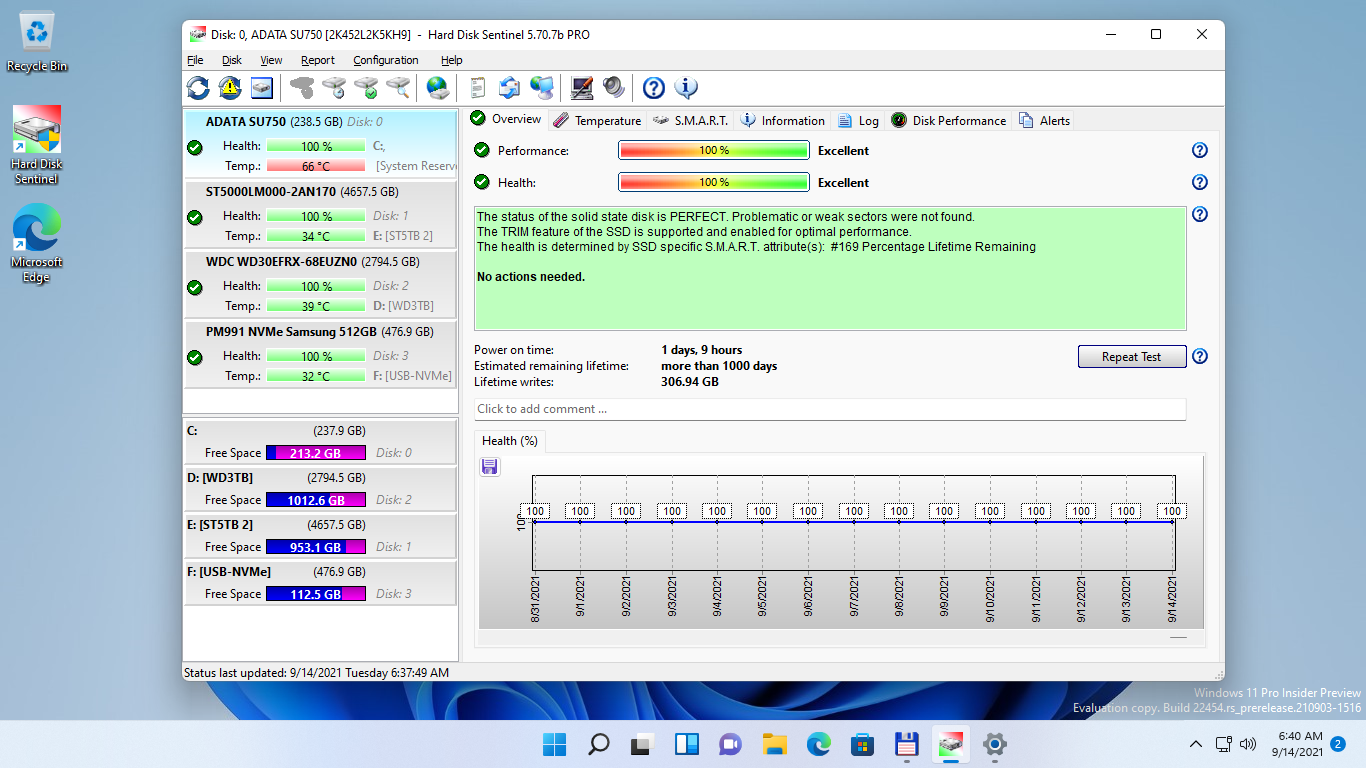
The main window on Windows 11 with four drives on the left, and health, power-on time, estimated lifetime and history on the Overview tab. Shown in the Professional edition.
Features
Alerts that reach you
Hard Disk Sentinel Standard warns you by email, sound and message when a drive's health drops, and it can send daily status reports. This is the main thing you get over the trial, since a warning only helps if you see it.
Hardware self tests and a surface check
Hard Disk Sentinel Standard runs the drive's own short and extended tests, seek and stress tests, and a read-only surface check. These diagnose a problem. The tests that repair and refresh sectors belong to the Professional edition.
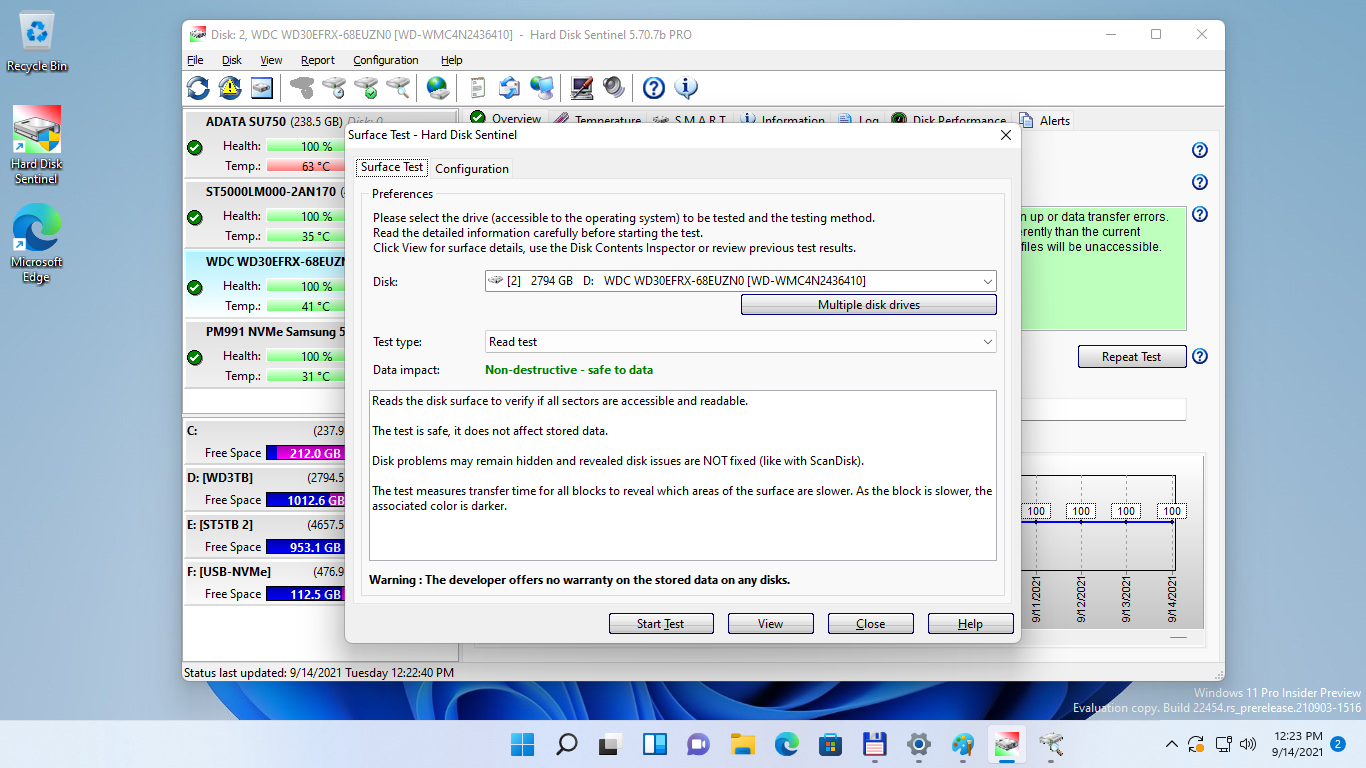
The Surface Test dialog, with the Read test marked as non-destructive. Standard includes the surface check, while the repair-type tests need Professional.
Reports and web status
Hard Disk Sentinel Standard saves disk reports as text or HTML and can show status in a web browser, which helps when you're asking someone for advice about a drive.
Temperature tracking
Hard Disk Sentinel shows current, average and maximum temperatures with a history graph, so you can spot a badly cooled case or drive bay before it does damage.

The Temperature tab for a 3 TB hard disk, with current, average and maximum readings and a graph.
Wide drive support
Hard Disk Sentinel reads IDE, SATA, SCSI, SAS, USB and NVMe drives, including many USB enclosures and RAID controllers. For SSDs, it shows wear and total data written.
Benefits
- Time to act. A falling health score gives you a chance to copy your files before the drive dies.
- Plain explanations. You get a sentence on what's wrong, not just a table of raw numbers.
- Low cost, paid once. $22 is less than a typical replacement drive, and there's no subscription.
Real-World Uses
- A home PC owner getting an email when an old backup disk starts to degrade.
- Checking a used drive with a surface check before trusting it.
- Finding out which of several drives in a tower runs hot.
- Saving an HTML report to send to a repair shop or a warranty department.
Who It's For, and Who Should Skip It
Standard suits home users with one PC who want round-the-clock monitoring and alerts, and who handle backups some other way.
Skip it if you only want an occasional look at drive health: the free CrystalDiskInfo or the Hard Disk Sentinel trial covers that. Choose Professional instead if you want repair tests, scheduled and panic backups, NAS monitoring or a portable version. Mac users should look elsewhere, since this is a Windows program.
Usage Guide
- Download the trial, unzip it and run the setup.
- Check that every drive appears with its health figure. If one doesn't, the enclosure or controller may be hiding its data.
- Read the text report for any drive below 100%.
- Register, then set up email alerts in the configuration.
- Run a short self test or surface check on any suspect drive, after backing it up.
Before you buy
- Test on your own hardware with the trial first. It shows whether the program can read your drives, even without the paid alerts and tests.
- One license covers one computer. For several PCs, the Family license of Professional covers 5 for $59.
- The Standard license doesn't back up your data. It warns you, and copying the files remains your job.
Where it falls short
- No repair tests. Complete surface analysis, refresh and repair need Professional.
- No backups. Scheduled and panic backups need Professional too.
- Health scores can alarm you. A low figure on a drive that other tools call fine is a reason to back up and investigate, not proof it will fail tomorrow.
- A dated, busy interface. The window is packed with tabs and bars, and some settings screens look old.
- Some enclosures hide data. Certain USB enclosures don't pass complete status information.
What Users Say
Most reviews cover Hard Disk Sentinel in general, and many come from Professional users, but the monitoring and health ratings they describe are the same in Standard. AlternativeTo shows 4.9 out of 5 from 7 ratings.
AlternativeTo
Some of these excerpts were read through a summarizer, which shortened them.
"My system was acting up and Hard Disk Sentinel showed very clearly that the Disk Drive was ready to go in 30 days." TBayAreaPat, August 2022
"CrystalDiskInfo stopped enumerating my HDDs after a certain amount - HDS however works like a treat!" mk2k, July 2020
"Great program for active drive monitoring, also includes benchmark and surface scans." scruffyburger, September 2021
"The default starts with Windows and then does a countdown making you wait before you can shut it off." TBayAreaPat, August 2022
Forums and testimonials
"Prefer hdd sentinel, but you need a license. Gives you a few more options like error reporting, drive testing." HighlandeR, Overclockers UK forum, December 2025
"The Dell Open Manage utility was reporting the RAID and drives were perfectly healthy, yet some were in fact in poor health and ready to fail." Steve Holmes, a small MSP, on the developer's testimonials page
The pattern: users trust its early warnings and its reach across drives and controllers. The grumbles are about the look of the interface, the startup behavior and how strict the health score is.
Comparisons
Hard Disk Sentinel Standard vs Professional
Professional costs $33, $11 more, and adds complete surface repair and refresh tests, data destruction, custom thresholds, NAS monitoring, a portable version, scheduled tests, and scheduled and panic backups. For most buyers with important files, that extra $11 is worth it. Standard makes sense when you already have a backup routine.
Hard Disk Sentinel vs CrystalDiskInfo
CrystalDiskInfo is free and fine for a quick look at S.M.A.R.T. values. Hard Disk Sentinel adds a stricter health rating, plain-language reports, and on this license, alerts, tests and daily reports.
Editions and Pricing
| Edition | Price | Computers | What it adds |
|---|
| Trial | Free | Any | Health, temperature and S.M.A.R.T. display |
| Standard (this listing) | $22 once | 1 | Alerts, daily reports, self tests, read-only surface check |
| Professional | $33 once | 1 | Repair tests, backups, custom alerts, NAS, portable version |
| Family (Professional) | $59 once | 5 | Professional on up to five computers |
FAQs
Do I have to pay again for new versions of Hard Disk Sentinel?
No. A Hard Disk Sentinel license applies to future versions of your edition, and the $22 Standard price is a one-time payment.
Can Hard Disk Sentinel Standard fix bad sectors?
No. Hard Disk Sentinel Standard finds and reports them. The repair and refresh tests are in Professional and Enterprise.
Does Hard Disk Sentinel slow down my PC?
Not noticeably. Hard Disk Sentinel needs only 64 MB of memory and mostly reads status data in the background.
Does Hard Disk Sentinel work on SSDs and NVMe drives?
Yes. Hard Disk Sentinel reads SSD and NVMe health, including remaining life and total data written.
Is there a Mac version of Hard Disk Sentinel?
No. There are separate Linux and DOS versions, but no Mac version. This license is for the Windows program.
System Requirements
- Windows 11, 10, 8.1, 8, 7, Vista, XP or Windows Server, 32-bit or 64-bit
- Pentium or compatible processor
- 64 MB of RAM
- 50 MB of disk space
- Administrator rights, or service mode without them
- No .NET or Java needed
Conclusion
Hard Disk Sentinel Standard is worth $22 if you want constant drive monitoring with alerts and have your backups sorted. The one reason to buy is an early warning that actually reaches you.
The main reason not to is that Professional is just $11 more and adds backups and repair tests, which is the better deal for most people. Install the trial first to confirm it reads your drives.
Download Free TrialBuy Now