Auslogics Registry Cleaner 11: A Cautious Registry Cleaner, for a Job Most PCs Don't Need Done
Auslogics Registry Cleaner 11 scans the Windows registry for invalid entries, such as keys left behind by uninstalled programs, and removes the ones you approve. Pro is $29.95 a year at checkout, it runs on Windows 7 through 11, and a free version handles basic cleanup.
It is mainly useful for tidying up after software that uninstalled badly. Be realistic about the rest: we found no independent evidence that registry cleaning makes a modern PC faster, so don't buy it expecting that.
Quick facts
- Version: 11.2.0.6, released April 29, 2026
- Developer: Auslogics, founded in Sydney in 2008
- Platform: Windows 11, 10, 8.1, 8 and 7. There is no Mac or Linux version
- Price: $29.95 per year, renewing automatically
- Pro license: covers 3 PCs
- Free version: yes, with basic scanning and cleanup
- Undo: changes are backed up and can be restored from Rescue Center
- Refund: 30 days from purchase
- What we checked: vendor installer of 23.4 MB and the $29.95 yearly price with auto-renewal on the order page, on November 10, 2026. We did not install it, run a scan or measure any change in speed or stability.
Before you buy
- Microsoft does not support registry cleaning utilities. Its support policy warns that incorrect registry changes made by such tools can be serious enough to require reinstalling Windows, and it advises backing up first. That policy applies to registry cleaners in general, not to this product in particular.
- Registry Cleaner Pro is a subscription. It renews every 12 months and charges the payment method on file unless you cancel before the renewal date. Auslogics says it emails a notice about 30 days ahead.
- To cancel, contact Auslogics by email. The order page also says auto-renewal can be cancelled through your customer account.
- Refunds run for 30 days from purchase and cover renewals too. They are generally processed in 5 to 7 business days, and the license and subscription are disabled once refunded.
- BoostSpeed already includes it. If you own BoostSpeed, you don't need this separately.
Download Free VersionBuy Now
Overview
Registry Cleaner has one main job and a plain layout. A tree on the left lists registry categories such as Shortcuts, Files, Software and System, each with tick boxes. Press Scan Now, review the items by category, then press Resolve to remove them.
Auslogics takes a deliberately conservative line here. It says the program scans only safe categories by default and doesn't try to find as many problems as possible, so it may report fewer "errors" than rival cleaners. Advanced users can tick riskier categories themselves.

The category tree, with the Options menu open to show Check Safe Only and Back Up Changes. Image from Auslogics.
Features
A review step before anything is removed
Registry Cleaner shows what it found by category with a count for each, and you can untick anything you want to keep. A Google It button sits on the toolbar for looking up an entry you don't recognize.
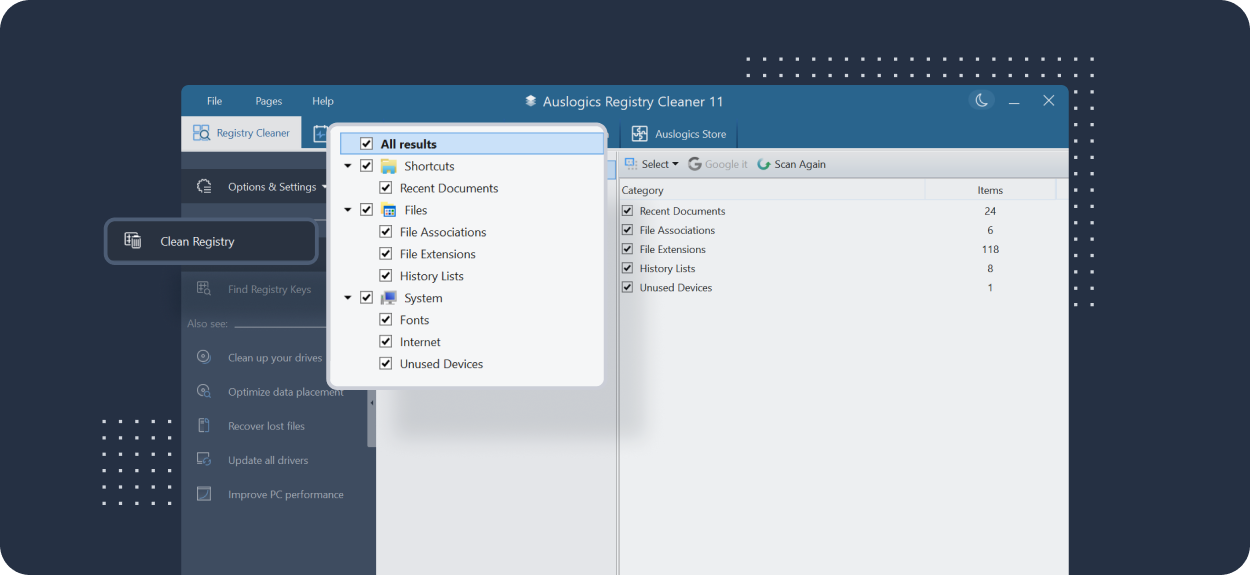
Scan results by category with item counts, with the category list enlarged over the window in this Auslogics image.
A backup before every clean
Registry Cleaner backs up the entries it changes, with the Back Up Changes option in its menu. If Windows or a program misbehaves afterwards, open File, then Rescue Center, choose the backup and press Restore.
Leftovers from uninstalled programs
Registry Cleaner targets keys left behind when software doesn't uninstall cleanly. Pro extends this to invalid file extensions and paths, ActiveX and class entries, fonts, shared libraries, and entries for services, drivers and codecs that no longer exist.
A registry search tool
Registry Cleaner includes Find Registry Keys, which searches the registry for a key you name. It is available in the free version too.
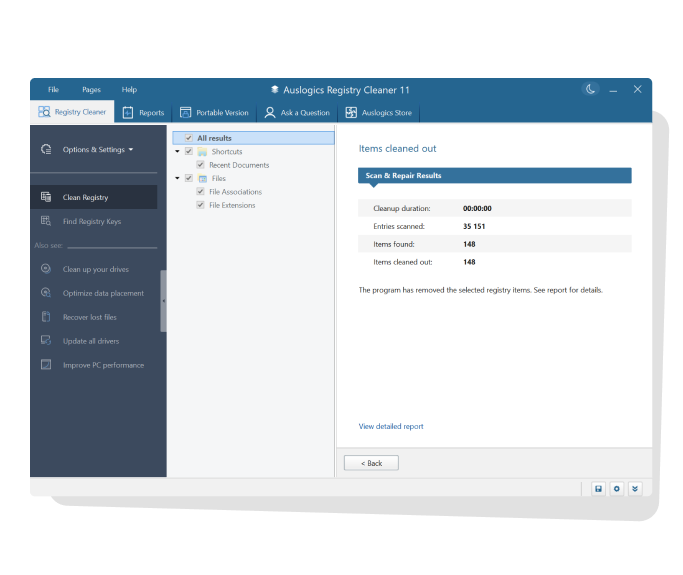
The results page after a cleanup, with entries scanned and items cleaned out. Image from Auslogics.
Benefits
- Less clutter after heavy install-and-remove use. Orphaned keys from old programs are gone.
- A conservative default. Safe categories only, unless you choose otherwise.
- A way back. Rescue Center makes a cleanup reversible, which is the feature that matters most in this type of tool.
Real-World Uses
- You have uninstalled a program that left broken file associations behind, and double-clicking those files now shows errors.
- You test a lot of software on one machine and want the leftover entries cleared out from time to time.
- A support technician wants to look for a specific registry key across the system with Find Registry Keys.
Who It's For, and Who Should Skip It
Registry Cleaner suits careful Windows users who have a specific leftover problem and are comfortable reading a list of entries before removing them.
Most people can skip it. If your PC is slow, look at startup programs, free disk space, memory or a failing drive first, since Windows' own tools cover much of that at no cost. Skip the paid edition if a yearly charge seems out of proportion to an occasional cleanup, and skip it if you already own BoostSpeed.
Usage Guide
- Create a Windows restore point before you begin.
- Download the installer from Auslogics, run it and open Registry Cleaner.
- Under Options & Settings, confirm that Back Up Changes is ticked and choose Check Safe Only if you are unsure.
- Press Scan Now and review the results by category.
- Untick anything you don't recognize, then press Resolve.
- If something stops working, open File, then Rescue Center, and restore the backup.
Where it falls short
- Speed claims are the vendor's. Auslogics says a cleaner registry improves performance, and some users agree, but we found no independent measurement for this product.
- Riskier categories exist for a reason. Auslogics itself tells novices to stay on the default settings. Ticking everything can remove something a program still needs.
- Some entries can't be removed. Auslogics says your antivirus or a running program may block certain keys, and advises adding those to the ignore list.
- Free alternatives exist. One reviewer's complaint, quoted below, is that free tools do the same job without a subscription.
What Users Say
Trustpilot rated Auslogics as a company 4.3 from 2,010 reviews on November 10, 2026, and that figure covers all its products. Auslogics' page shows a rating of 4.6 from 8,864 votes. Trustpilot's text below reached us through a summarizing tool and is excerpted.
On Trustpilot
Robert Soer (4 stars, July 2026): "Registry Cleaner ( in Boostspeed or separate ) is also a nice speed-improving addition."
Suji Johnson (5 stars, September 2025): "Its good and safe."
P (1 star, March 2026): "I would avoid and uninstall." and "There are free alternatives that do exactly the same thing without subscription"
Quoted on the Auslogics site
Steve Johns: "I tried Auslogics free Registry Cleaner 10 and wow its fixed."
K Cockrill: "Currently using Bitreplica and Register Cleaner and both products work really well under Win 11."
The same page quotes press coverage beside magazine logos, including Lifewire: "Auslogics Registry Cleaner is another great registry cleaner program—it's probably one of the easiest registry cleaners to use out of all the tools we've tested." The quote is undated.
Older reviews on SnapFiles
kathy025 (5 stars, March 2009), on an early version, after picking a risky category by mistake: "the easy registry backup mechanism saved the day!"
ianmacm (4 stars, March 2009), on an early version, comparing it with cleaners that exaggerate their benefits: "Auslogics Registry Cleaner does not fall into this trap."
The praise centers on ease of use and the backup. The complaint worth weighing is about value, since the free edition and free alternatives cover basic cleanup.
Editions and Pricing
| Capability | Free | Pro |
|---|
| Price | $0 | $29.95 per year, 3 PCs |
| Basic scan and cleanup | Yes | Yes |
| Registry key search | Yes | Yes |
| File extension and path cleanup | No | Yes |
| ActiveX, font and shared library cleanup | No | Yes |
| Removed services, drivers, codecs | No | Yes |
| Scheduled scans and cleanups | No | Yes |
| Ask a Question tool | 1 question | 3 questions |
FAQs
Why does Auslogics Registry Cleaner find fewer errors than other cleaners?
Auslogics Registry Cleaner scans only safe categories by default, and Auslogics says that is deliberate, to avoid making a system unstable or unbootable. A smaller count does not mean it missed something important.
Does Auslogics Registry Cleaner work on 32-bit Windows?
Auslogics Registry Cleaner supports 32-bit and 64-bit editions of Windows 7, 8, 8.1 and 10, along with Windows 11. It does not run on XP or Vista.
Will Auslogics Registry Cleaner speed up my PC?
Auslogics Registry Cleaner may not make a noticeable difference to speed. Auslogics itself says registry cleaning is sometimes not enough and points to disk cleanup, settings and services as other causes, and we did not measure any change.
System Requirements
- Windows 11, 10, 8.1, 8 or 7
- About 23 MB for the installer download
Conclusion
Auslogics Registry Cleaner is one of the more careful tools of its kind, with safe defaults and a built-in undo, and the free version is the sensible way to use it. We can't recommend paying $29.95 a year unless you have a specific reason to clear the deeper categories on a regular basis. The one reason to pick it is the restorable backup. The main reason not to is that registry cleaning rarely solves a slow PC, so fix the common causes first.
Download Free VersionBuy Now