iFunia YouTube Downloader for Mac: Save Videos, Playlists and Music for Offline Viewing
iFunia YouTube Downloader for Mac is a $49.99 one-time-purchase Mac app that downloads videos, whole playlists and channels, audio and subtitles from YouTube and more than 1,000 other sites, in any resolution the source offers, up to 4K and 8K. It's for Mac users who want to watch or listen offline, on a plane, in class or anywhere the connection is poor.
Paste a link, pick a format, click Download. That's the whole idea, and the app's main appeal is that it does it in batches: twenty lectures from a course playlist or a full music channel go into one queue instead of twenty trips to a website.
Quick facts
- Version: 10.5.0
- Developer: iFunia Studio
- Runs on: macOS 10.15 or later (iFunia's user guide). A Windows version is sold separately, and licenses don't cross platforms.
- Downloads from: YouTube (videos, playlists, channels, Shorts, finished live streams) and 1,000+ other sites, including Instagram, Facebook, X, Reddit, TikTok, Dailymotion and Vimeo
- Saves as: MP4 or WebM video, MP3, M4A or WebM audio, and SRT or VTT subtitles
- Price: $49.99 at checkout for a lifetime license on one Mac, with free updates
- Refunds: 30 days, but only for technical problems iFunia can't fix, not for a change of mind
What we checked: the price on the order page ($49.99 for iFunia YouTube Downloader for Mac, Lifetime License) and the 124 MB Mac installer on iFunia's download server, both on October 29, 2026. We didn't install the app or download videos with it.
Before you buy
- Check YouTube's rules. YouTube's terms don't allow downloading videos except where YouTube offers a download button or the owner permits it. Use a downloader for your own uploads, Creative Commons or public-domain videos, or content you have permission to keep.
- Try the free download first. Test it on the sites you actually use. iFunia's refund policy excludes "changed your mind", software bought for the wrong platform, and software that won't run on your system.
- Mac only. This license won't activate the Windows version.
Download Free TrialBuy Now
Overview
iFunia YouTube Downloader is a single-window Mac app. At the bottom there's an address field, a Save to folder and a Download button. Paste one link or many (Option + Enter starts a new line), and each video appears as a card with its thumbnail, title, length, file size and a Format menu listing every stream the site offers.
It saves the original stream without re-encoding, so a 4K video stays 4K and the download is as fast as your connection and the site allow. Despite the name, it isn't limited to YouTube, and iFunia's site lists the full set of 1,000+ supported sites.
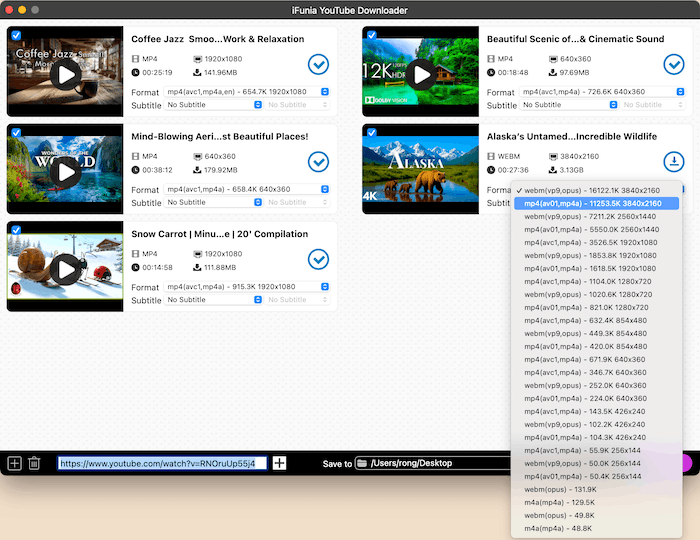
Five analyzed YouTube videos, one of them 4K, with the Format menu open: WebM and MP4 streams from 256x144 up to 3840x2160, plus audio-only options at the bottom. From iFunia's Mac user guide.
Features
Playlists, channels and batches in one go
iFunia YouTube Downloader for Mac takes a playlist or channel URL and lists every video in it, or a stack of individual links pasted at once. Downloads run in a queue in the background, and you can pause and resume them if your connection drops.
Every resolution the source offers, up to 8K
iFunia YouTube Downloader shows each available stream, from 144p to 1080p, 1440p, 4K and 8K, as MP4 or WebM, and picks a sensible default. A practical tip from iFunia's guide: if a downloaded MP4 won't play in Apple's apps, choose an H.264 (avc1) option rather than AV1 (av01).
Audio-only downloads for music and podcasts
iFunia YouTube Downloader saves just the soundtrack as MP3 for compatibility, M4A to keep the original quality when available, or WebM audio, with a choice of bitrate where the source offers several.
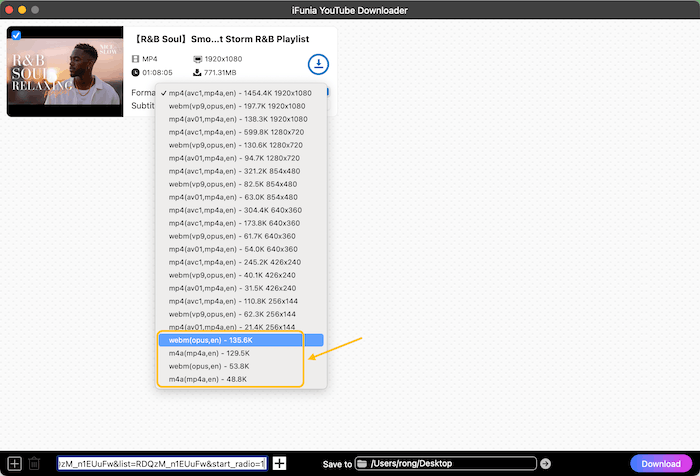
Choosing an audio format for a music video, from iFunia's Mac user guide.
Subtitles as separate files
iFunia YouTube Downloader saves the subtitles a video provides, in the language you pick, as SRT (for most players and editors) or VTT (for web players). If a video has no subtitles, no options appear.
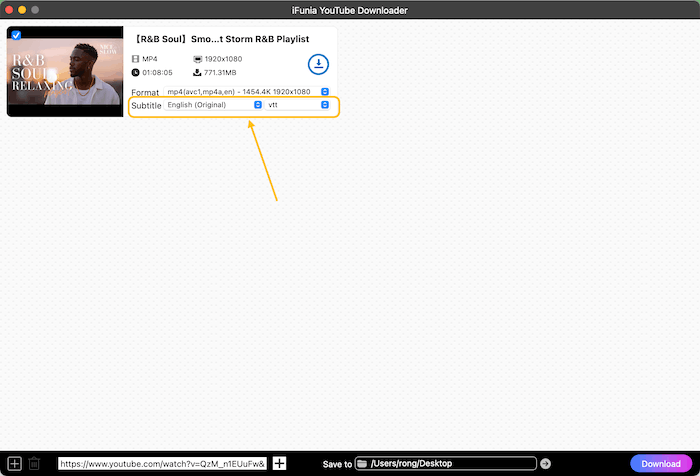
A one-hour playlist video ready to download in 1080p MP4 with English (Original) subtitles saved as VTT. The Save to folder and Download button sit along the bottom.
Shorts, live streams and embedded videos
iFunia YouTube Downloader also saves YouTube Shorts, the played part of a live stream or the whole broadcast once it ends, and YouTube videos embedded in other pages such as Reddit, Quora or blogs.
Real-World Uses
- A long flight: queue a playlist of lectures or documentaries the night before.
- Teaching without Wi-Fi: save the Creative Commons clips you show in class, with subtitles.
- Your own channel's archive: download your uploads in their original quality as a backup.
- Podcasts as audio: keep the M4A of a video podcast to play in the car.
Who It's For, and Who Should Skip It
iFunia YouTube Downloader fits Mac users who download often and want batches, playlists and high resolutions without fiddling with browser extensions or command-line tools.
Skip it if you just want offline viewing on your phone: YouTube Premium includes official offline downloads in the YouTube app. Skip it too if you're comfortable in Terminal: the free, open-source command-line tool yt-dlp does the same job, without a window. And if you need a Windows copy as well, budget for a second license.
Usage Guide
- Install: download the DMG, double-click it, drag iFunia YouTube Downloader to Applications, and open it.
- Activate: click the key icon in the upper-right corner and paste the license code from your order email (it's case-sensitive, so copy and paste it).
- Add links: copy a video, playlist or channel URL from your browser and paste it into the address field. Press Enter or click Analyze.
- Pick formats: choose the format and quality for each video, and a subtitle language if you want one.
- Download: set the Save to folder and click Download (or the download icon on one video).
- Stay current: use iFunia YouTube Downloader > Check for Updates, since sites change often and updates keep downloads working.
Where it falls short
- Strict refund rules. The 30-day guarantee covers only unresolved technical problems. "Changed my mind", a forgotten subscription renewal and "won't run on my Mac" are all excluded.
- Few independent reviews. Most praise comes from iFunia's own site and from list articles. AlternativeTo shows a warning that iFunia has a poor reputation on the WOT site-rating service, where commenters called it a "Forum spammer".
- The free version's limits aren't published. iFunia doesn't say what the free download can't do, so you find out by trying it.
- Downloads break when sites change. Like every downloader, it depends on updates whenever YouTube or another site changes how it delivers video.
What Users Say
AlternativeTo (8 likes, 2 reviews)
Kleinto, July 2025, 5 stars: "Working fine for years, the most simple and powerful yt downloader I've used."
Brian VPF, October 2018, 5 stars: "Until i tried this one, it can download fast, successfully and support batch downloads."
SoftwareTestingHelp (March 2026)
SoftwareTestingHelp's "Best YouTube Downloader for Mac" list put iFunia first of 14, recommending it "for its feature-rich nature, affordable price, and user-friendly interface", but it published no tests or measurements to back that up.
The pattern: the few users who've reviewed it like its simplicity, speed and batch downloads. There isn't enough independent testing to say more, so the free download is the real test.
Editions and Pricing
| License |
1 Mac |
2 Macs |
5 Macs |
Terms |
| One-Year Subscription | $24.99 | $49.98 | $124.95 | Renews yearly, personal use |
| One-Time Purchase | $49.99 | $99.98 | $249.95 | Never expires, personal use |
| Business License | $68.99 | $137.98 | $344.95 | Commercial use |
These are iFunia's regular prices. Its store often runs discounts below them, so check the order page for today's price. This page's Buy Now button is the One-Time Purchase for 1 Mac. iFunia also sells it bundled with its Video Converter and DVD Ripper.
FAQs
Does the iFunia YouTube Downloader lifetime license include future updates?
Yes. iFunia gives license owners free updates, minor and major, for as long as the license is valid, and a lifetime license doesn't expire.
Can I move my iFunia license to a new Mac?
Yes. Email support@ifunia.com and iFunia will release the license code so you can activate it on the new Mac.
Does the Mac license work on Windows?
No. iFunia YouTube Downloader's Mac and Windows versions need separate licenses.
Why won't my downloaded video play in QuickTime?
Videos in AV1 (av01) can cause trouble in Apple's apps. In iFunia YouTube Downloader, pick an MP4 option with H.264 (avc1) instead.
How do I cancel an iFunia subscription?
iFunia subscriptions bought on its website can be cancelled in Stripe's subscription portal with your order email address, or by emailing support@ifunia.com. Cancel before the renewal date, because forgotten renewals aren't refunded.
I haven't received my license code. What should I do?
iFunia sends the license code by email, usually within an hour. Check your spam folder, then contact support@ifunia.com with your order number.
System Requirements
- Operating system: macOS 10.15 or later (iFunia's product page says 10.13 or later)
- Download: 124 MB DMG installer
- Internet: required, plus disk space for your downloads (4K and 8K files run to several GB)
Conclusion
iFunia YouTube Downloader for Mac is worth $49.99 if you download online video regularly and want playlists, batches, 4K and subtitles in a simple Mac window, paid once rather than monthly. The main reasons not to buy it are the strict refund policy, the thin independent track record, and free alternatives: YouTube Premium for phone viewing, or yt-dlp if you don't need a window. Run the free download on the sites you use first, and keep to videos you're allowed to save.
Download Free TrialBuy Now