iFunia Media Player for Mac: A Free 4K Player, With $19.99 Conversion if You Want It
iFunia Media Player for Mac is a free video and audio player that opens MP4, MKV, HEVC, AVI and FLAC files without codec packs. Playback costs nothing, and the $19.99 lifetime license you see at checkout only adds its conversion feature. Most people should stick with the free part.
If a file won't open in QuickTime Player, this is the kind of app you install. The more interesting question is whether to choose it over VLC or IINA, which are also free and more actively developed. It wins on simplicity and a built-in converter, not on power.
Quick facts
- Developer: iFunia Studio
- Version: 4.0.0
- Platform: macOS 10.15 or later. A Windows version is sold separately
- Plays: MP4, H.264, HEVC, AVI, MKV, MOV, WMV, MP3, M4A, WMA, AAC, FLAC, WAV, OGG and AC3, up to 8K by iFunia's claim
- Free: all playback
- Paid: $19.99 at checkout for the conversion feature, lifetime, one Mac
- Guarantee: 30-day money-back guarantee
- What we checked: the current Mac download is 23.0 MB and was last changed on June 9, 2023, and the order page showed $19.99 with no renewal on November 6, 2026. We didn't install it or play a file ourselves, so format and quality claims are iFunia's.
Before you buy
You don't need to buy this to play videos. The license only adds conversion. If all you want is a player, download it and pay nothing.
Check that it runs well on your Mac. The installer dates from June 2023, and RosettaCheck, a community tracker, lists the app as Intel-only. On a recent Apple Silicon Mac, try playing a few 4K files before you pay for anything.
Download Free TrialBuy Now
Overview
iFunia Media Player opens to a dark window with a floating control bar and a playlist that slides in from the right. You drag in files or folders and they play. There are no libraries to set up. It remembers your playlist and where you stopped, and Incognito Mode turns that off when you'd rather it didn't.
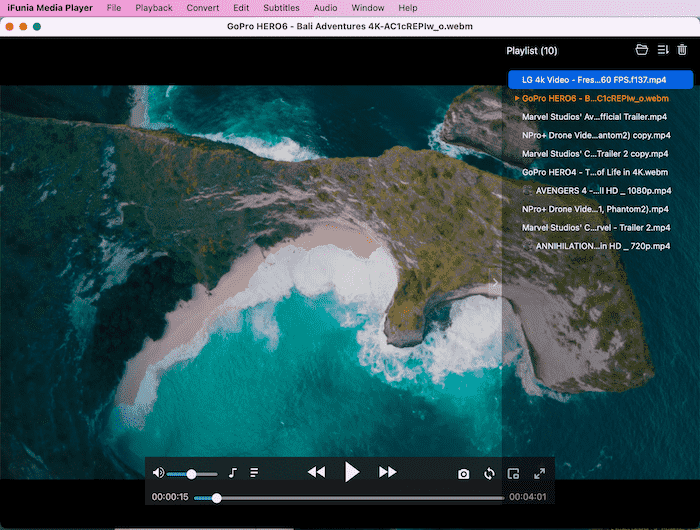
Playing a 4K WebM file, with a ten-item playlist on the right and the control bar below.
Features
iFunia Media Player plays most formats without codec packs
iFunia Media Player handles common video and audio formats out of the box, including HEVC, MKV, WebM, WMV, FLAC and AC3, and lossless audio such as ALAC and AIFF. iFunia also says it uses AMD, Intel and Nvidia hardware acceleration for smooth 4K and 8K playback.
iFunia Media Player gives you full playback control
iFunia Media Player switches between audio tracks and subtitle tracks, loads external .srt and .ass subtitles, and rotates video. Keyboard shortcuts cover play, step, volume and full screen. Press Command+P to save a frame as an image.
iFunia Media Player keeps a simple playlist
iFunia Media Player adds everything you open to a playlist, and whole folders can go in at once. Four modes let you play in order, loop the list, loop one item or shuffle.
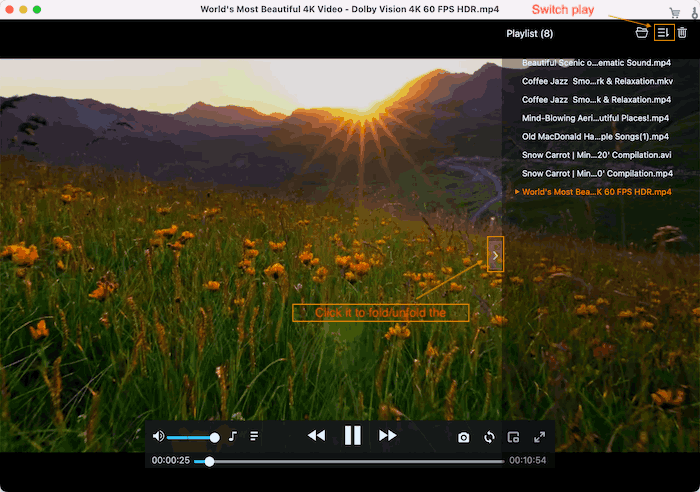
The playlist panel, with iFunia's orange labels marking the play mode button and the fold arrow.
iFunia Media Player can split across screens on a Mac
iFunia Media Player's Separate Mode, on the Mac only, divides the video window, playlist and controls so you can drag each to a different monitor. That's handy if you run a presentation or a screen at an event and don't want the controls on show. There's also a mini floating window for watching while you work.
iFunia Media Player converts files with a paid license
iFunia Media Player's conversion feature, the part you pay for, sits in a Convert menu. Choose MP4, HEVC MP4, WebM, M4V, MKV, MOV, AVI, MP3 or M4A, or a profile for Apple, Samsung, Huawei, Xiaomi or Vivo devices. You can set the name, save location and resolution, up to 4096x2160.
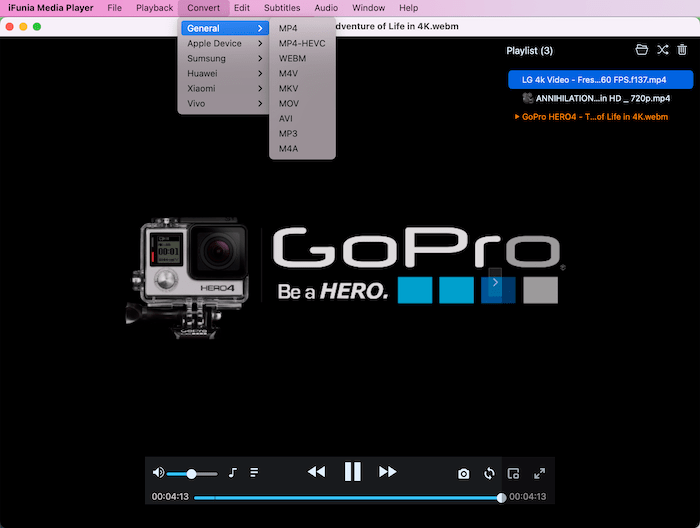
The Convert menu, with general formats and device brands.
iFunia Media Player edits file details
iFunia Media Player shows a file's resolution, frame rate and data rate, and lets you edit metadata such as title, author, genre and year.
Benefits
- No codec hunting. Files that QuickTime Player refuses usually just open.
- Playing is free. You can use it for years without paying.
- One app for watching and converting. If a file plays here, you can turn it into something for your phone in the same window.
Real-World Uses
- Opening an old MKV or AVI collection: drag in the folder and let it play in order.
- Watching a foreign film: switch audio tracks and load an .srt subtitle file.
- Showing a video on a second screen: use Separate Mode and keep the controls on your laptop.
- Getting a clip onto a phone: with the license, convert it from the Convert menu using a device profile.
Who it's for, and who should skip it
Install it if you want a plain, free player that needs no setup. Pay for it only if you occasionally convert a file and like doing that in your player. Skip it if you want a player that's regularly updated, in which case IINA is built for current macOS, or if you want the widest format support, where VLC is the safe choice. If you convert often, a dedicated tool such as HandBrake, or iFunia's own Video Converter, gives you much more control.
Usage Guide
- Download the .dmg, open it and drag iFunia Media Player to Applications.
- Open a video by dragging it in, or use File, then Open File.
- Use the control bar, or the Space and arrow keys, to control playback.
- To turn on conversion, click the key icon at the top right, paste your license code and click Activate.
- Open the Convert menu, pick a format, check the settings and start the conversion.
Where it falls short
- It looks unmaintained on the Mac. The current installer dates from 2023, and iFunia publishes no release history, so you can't tell when problems will be fixed.
- Apple Silicon status is unclear. RosettaCheck lists an Intel-only build, with no sign of a native one. iFunia's pages don't mention it.
- Almost no independent reviews. See below. Claims about 8K playback are hard to check.
What Users Say
There isn't much independent opinion on this player. iFunia shows 4.7 out of 5 from 116 ratings on its own page, but we couldn't trace where those ratings come from, so treat that figure with care.
MacUpdate
The MacUpdate page was still on version 2.4.1 from 2018 when we read it, with one user rating of five stars. Oliver Jenner wrote in October 2019: "I was looking for a piece of software to play my AVCHD file and it works quite well."
Quoted on iFunia's review page
iFunia reprints this from MacGasm: "iFunia offers a minimalistic experience – it can open and smoothly play all sorts of videos and provides some unique convenience features: for example, it remembers where you left off on the timeline, and keeps a playback history which can be exported as a playlist. It is a well-made player in general."
And from Softonic: "Although professional media players such as QuickTime are very useful, lightweight bundles that offer similar functionality might be preferred on occasion. iFunia Media Player offers a wide selection of standard features and is free to download." Those are vendor-chosen and undated, so weigh them accordingly.
The themes: the little praise there is calls it simple and smooth. We found no real body of complaints either, because few people seem to review it.
Comparisons
iFunia Media Player vs VLC
VLC is free, open source and plays almost anything on nearly every platform. It has no paid tier, and it also converts files, though less simply. For most Mac users VLC is the safer default.
iFunia Media Player vs IINA
IINA is a free, open-source player designed for modern macOS. If you care how a player looks and feels on a Mac, try it first. iFunia's edge is the device-based Convert menu and Separate Mode.
iFunia Media Player vs iFunia Video Converter
The conversion here is the light version. iFunia's standalone converter is the one to look at if you convert in batches or need editing tools.
Editions and Pricing
| License | Price | Macs | Term |
|---|
| Free player | Free | Any | Playback only |
| Single User (this listing) | $19.99 at checkout | 1 | Lifetime |
| Double Pack on iFunia's store | $27.99 | 2 | Lifetime |
| Family Pack on iFunia's store | $49.99 | 5 | Lifetime |
FAQs
Is iFunia Media Player really free?
Yes, iFunia Media Player plays video and audio for free. You only pay if you want the conversion feature.
Is the iFunia Media Player license a subscription?
No, the iFunia Media Player conversion license is a one-time lifetime purchase for one Mac, and the order page showed no renewal.
Does iFunia Media Player work on the latest macOS?
iFunia lists macOS 10.15 or later for iFunia Media Player, but the installer dates from 2023 and iFunia doesn't name newer versions, so test it on your Mac.
Does iFunia Media Player work on Windows?
iFunia Media Player has a separate Windows version for Windows 10 and 11, with its own license. This listing is the Mac license.
Can iFunia Media Player play DVDs?
iFunia's pages for iFunia Media Player talk about media files, not discs, and don't promise DVD playback. VLC is the better bet for a disc.
Can I get a refund on iFunia Media Player?
iFunia advertises a 30-day money-back guarantee on the iFunia Media Player conversion license.
Can I get a discount on iFunia Media Player?
iFunia's store offers 30 percent off if you own another iFunia product and 20 percent for academic users, but those go through iFunia directly.
System Requirements
- macOS 10.15 or later
- About 23 MB for the installer
Conclusion
Fine as a free player, and worth $19.99 only if you want conversion in the same app. The one reason to pay is the convenience of converting a file straight from the player. The main reason not to is that VLC and HandBrake do the same jobs for free, and this app's Mac version shows few signs of recent work. Download it, use it free, and decide later.
Download Free TrialBuy Now