Vovsoft Keep Software Alive: Restart Programs Automatically When They Crash, Close or Hang
Keep Software Alive is a $19 Windows watchdog from Vovsoft that keeps an eye on the programs and services you list and starts them again if they crash, get closed, or, optionally, stop responding. It checks on a timer you set, takes command line parameters, and runs on desktop Windows and Windows Server. The $19 is a one-time lifetime license, and the free trial works fully for personal use.
It's for the PC that has to keep something running unattended: a kiosk app, a small server program, a sync tool or a bot that falls over now and then.
Quick facts
- Version: 3.4, released September 15, 2025
- Developer: Vovsoft
- Platform: 64-bit Windows 11, 10, 8/8.1, 7, Vista, XP and Windows Server. No Mac version
- Watches: processes and Windows services, several at once
- Restarts when: the program exits or crashes, and optionally when it stops responding
- Per entry: process name, executable with parameters, optional start directory
- Check period: in seconds, with a countdown and a Check Now button
- Price: $19, one-time payment, lifetime license with free updates
- Trial: free and fully working for personal use, with a nag screen
- What we checked: installer file version 3.4.0.0 (3,780,656 bytes) with a valid code signature, downloaded from the vendor on November 11, 2026, and $19.00 on the order page with no auto-renewal on November 11, 2026
Download Free TrialBuy Now
Overview
You build a list of what to watch. For each entry, pick the running process (or service) with Search Process, pick the file that starts it, add any command line parameters, and optionally a start directory, which some programs need to start properly. Set the check period in seconds. Every time it comes round, Keep Software Alive looks for each process and starts any that's missing.
It doesn't react to a program that's running normally. It only acts when the process has gone, whether it crashed or someone closed it, or, with the unresponsive option on, when it has hung.
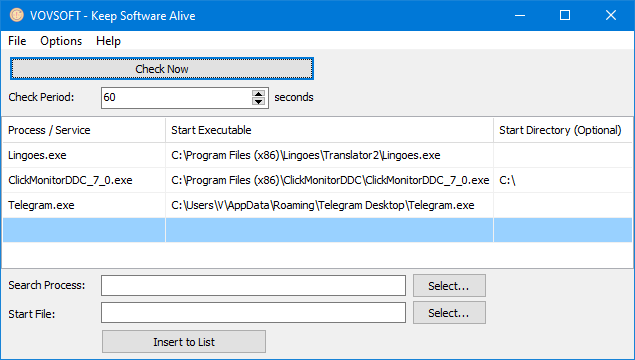
Three watched programs, each with its process name, start executable and optional start directory, checked every 60 seconds.
Features
Restarts crashed and closed programs
Keep Software Alive restarts a watched program whenever its process is missing at a check, however it ended. Start parameters such as "C:\Program Files\Software\executable.exe" /parameter1 /parameter2 are passed on each restart.
Catches hung programs too
Keep Software Alive 3.0 added Restart Unresponsive Applications, which ends and restarts a program that is still running but not responding, plus Check Responsiveness and End Task commands for testing by hand.
Services as well as programs
Keep Software Alive can watch Windows services and start them again if they stop. Listing running services needs administrator rights.
Runs quietly in the background
Keep Software Alive starts with Windows, minimizes to the system tray, shows a countdown to the next check if you want it, and can export its list. Version 3.3 checks that each start executable exists when you add it.
Real-World Uses
- Keeping a kiosk or digital signage app on screen after it crashes overnight.
- Restarting a game server, chat bot or trading tool that occasionally quits.
- Making sure a backup or sync client is always running on an office PC.
- Bringing back a monitoring utility that someone keeps closing by accident.
- Restarting a hung camera or recording program on an unattended PC.
Who It's For, and Who Should Skip It
Keep Software Alive suits system administrators, power users and small businesses who run a few important programs unattended and want a simple, cheap watchdog.
Skip it if the program has to keep running while nobody is logged in: Keep Software Alive runs as a desktop application, not as a service, and running while logged out is its top request. For that, tools like AlwaysUp or FireDaemon, or Windows' own service recovery settings for real services, are the better fit.
Usage Guide
- Download the installer or the portable edition and start Keep Software Alive.
- Start the program you want to watch, then use Search Process to select its running process, or pick a service.
- Select the start file, add any parameters and a start directory if the program needs one, and click Insert to List.
- Set the check period in seconds and turn on Auto Check, and Restart Unresponsive Applications if you need it.
- Set it to start with Windows and minimize to the tray, then leave it running.
Before you buy
The trial is fully working for personal use, with a reminder screen, so you can test it with your program before buying, and work use needs a license. One license covers one person on any number of their own computers, which makes it cheaper than per-PC watchdogs when you look after several machines. Vovsoft's general policy is no refunds once the key is delivered, since a free trial comes first (accidental orders are generally refunded, at its discretion, and PayPro Global has the final say on its orders).
Where it falls short
- It doesn't run as a Windows service, so nothing is watched while the user is logged out (4 votes).
- One check period for everything, not per program, and you can't disable checks for one entry.
- No log of restarts, so you can't see how often a program fell over.
- No restart order or dependencies between programs, and no way to launch an extra program on a restart.
What Users Say
On Vovsoft's site
Keep Software Alive's page shows 4.3 out of 5 from 4 ratings. The longest comment compares it with two well-known watchdogs on price:
"Good software that does the job way cheeper than Fire Damon Pro and Always Up, and the price for Keep Soft Ware Alive is also cheaper if you have more than one pc, because you pay one price and can use the software on more than on pc, as long as it is a pc in your own." Mads Jørgensen
What users want changed
The request list is the clearest criticism: running as a service while logged out (4 votes), per-program check intervals (3 votes), a log, restart order with arguments, launching other programs, sorting, a search box in the process picker, disabling single entries, and closing to the tray instead of exiting when you click X (2 votes each). Restarting unresponsive programs and hiding duplicate processes were added on request.
Vovsoft as a company has a TrustScore of 4.6 out of 5 from 411 reviews on Trustpilot, read through a summarizer, with users mostly describing its tools as simple and dependable.
Comparisons
Keep Software Alive vs AlwaysUp and FireDaemon
AlwaysUp and FireDaemon Pro run programs as Windows services, so they keep going with nobody logged in, and add logging and scheduling, but cost more and are licensed per computer. Keep Software Alive is a one-time $19 for all your own PCs, without service mode.
Keep Software Alive vs Windows service recovery
Real Windows services can be told to restart on failure in their Recovery settings for free. That doesn't help ordinary desktop programs, which is what Keep Software Alive is mostly for.
Keep Software Alive vs Vovsoft Directory Monitor
Directory Monitor watches folders for file changes. Keep Software Alive watches programs.
Editions and Pricing
| Edition | Price | License | What you get |
|---|
| Trial | Free | Personal, non-commercial use | All features, with a nag screen |
| Licensed | $19 one-time | Lifetime | Commercial use, no nag screen or ads, lifetime free updates |
The installer and portable editions use the same key, sent by email right after payment. Vovsoft's $99 Universal License covers all of its desktop programs.
FAQs
Does Keep Software Alive work when no user is logged in?
No. Keep Software Alive runs as a normal program in your Windows session, so it stops when you log out. Running as a service is its top user request.
Can Keep Software Alive restart a program that's frozen but not closed?
Yes. With Restart Unresponsive Applications turned on, Keep Software Alive ends and restarts a program that stops responding.
Does Keep Software Alive run on Windows Server?
Yes. Keep Software Alive runs on Windows Server editions as well as desktop Windows, in 64-bit.
How quickly does Keep Software Alive restart a program?
At the next check. Keep Software Alive checks on the period you set in seconds, so a shorter period means a faster restart.
Can I use one Keep Software Alive license on several PCs?
Yes, on several computers you own and use yourself. A business with several users needs more licenses.
Is the Keep Software Alive license a subscription?
No. The $19 license is a one-time payment that never expires and includes future updates.
System Requirements
- 64-bit Windows 11, 10, 8/8.1, 7, Vista or XP, or Windows Server
- About 4 MB of disk space
- Administrator rights to list and watch services
Conclusion
Keep Software Alive is worth $19 if you have a program or two that must stay up on a PC you're logged in to, such as a kiosk, bot or sync tool, and you want them back automatically after a crash, close or hang. Its low one-time price across your own PCs is the reason to buy it over the big-name watchdogs. The reason not to: it can't run while logged out and keeps no log, so for real unattended servers AlwaysUp or FireDaemon is worth the extra money.
Download Free TrialBuy Now