RoboTask: No-Code Task Automation for Windows PCs and Servers
RoboTask is a Windows automation tool that strings together more than 300 ready-made actions into tasks that run on a schedule or when something happens, with no scripting required. The Personal license is a one-time $149, and there's a limited free license and a 30-day full trial.
If you keep doing the same file moves, uploads, reports or logins by hand, this is the kind of tool that takes them over. It runs on your own machine, offline if you like, and it can keep running as a Windows service with nobody logged on.
Quick facts
- Version: 11.1
- Developer: Neowise Software
- Platform: Windows 7, 8, 10 and 11, and Windows Server 2008 to 2022, 32-bit and 64-bit
- Price: $149 at checkout for the Personal license, one-time
- Updates: one year included, then $59 a year if you want new versions
- Trial: 30 days, all features, no registration
- Free license: personal use only, 5 tasks and 50 steps per task
What we checked: installer on the vendor's server dated October 23, 2026 (213 MB, 32-bit build), and the RoboTask personal license at $149.00 at checkout on November 5, 2026. We didn't build or run any tasks with it.
Download Free TrialBuy Now
Overview
A RoboTask task has two parts: triggers that start it and actions that do the work. You pick actions from a visual list rather than writing code, then add conditions, loops and variables if the job needs them. A task can be two steps or a long workflow that crosses several machines.
RoboTask has been in development for over twenty years. Version 11.0 added the free license, and version 11.1 added a PDF Toolkit plugin that extracts text, images and pages and merges PDF files.
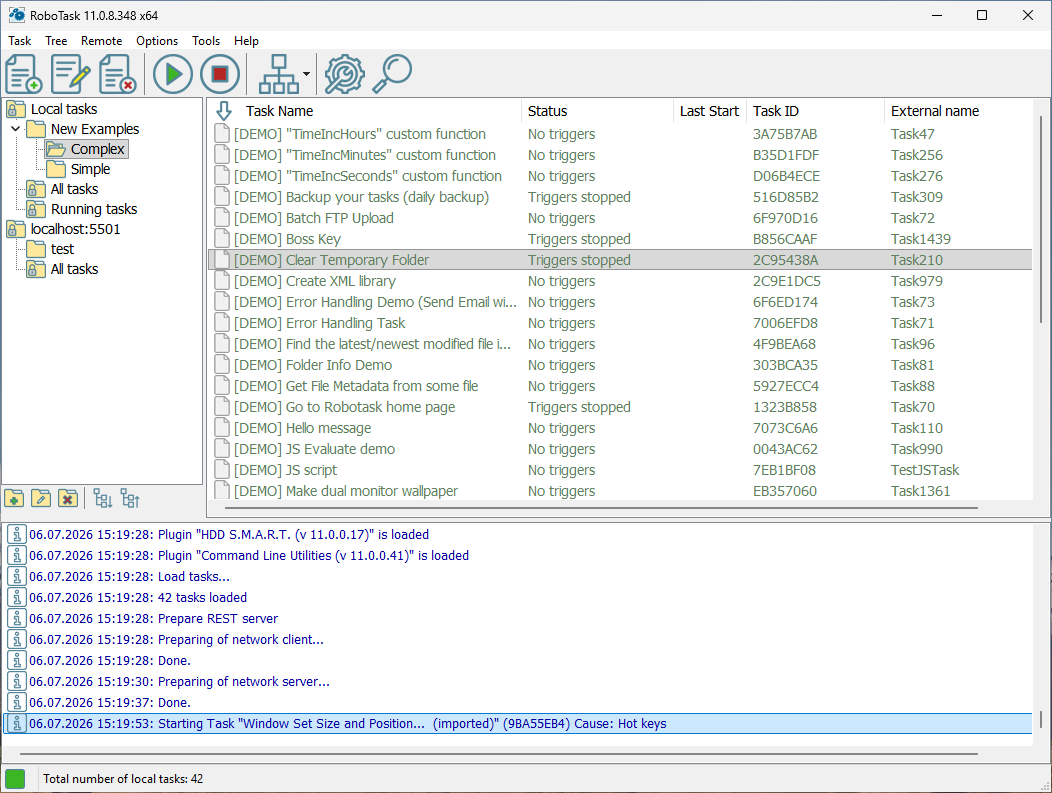
The RoboTask 11 main window, with the task tree on the left, demo tasks in the list and the activity log along the bottom.
Features
More than 300 ready-made actions
RoboTask covers file and folder work, zip archives, FTP, SFTP and FTPS, email, Excel, images, the registry, windows and processes. For most routine PC jobs, you're picking from a list rather than building something from scratch.
Triggers beyond a clock
RoboTask starts tasks on a schedule, and also on hot keys, file and folder changes, window or process activity, plug-and-play device events, user logon and logoff, CPU and RAM usage, clipboard changes and HTTP or WebSocket events. This is the clearest step up from Windows Task Scheduler.
Macro recorder for mouse and keyboard
RoboTask records and replays keyboard and mouse actions and can send keystrokes to any application. That helps with older programs that have no other way in.
Web and email automation
RoboTask can call REST APIs, scrape pages and fill in web forms, and it has a built-in HTTP server with WebSockets. On the email side, it sends personalized and bulk mail, reacts to incoming messages and pulls out attachments.
Real scripting when you want it
RoboTask has native Python, JavaScript and PowerShell support, so you can mix visual actions with code where a step needs it. There's also a task debugger with step-by-step execution.
Runs as a Windows service
RoboTask can run as a regular application or as a service, so scheduled tasks keep going with no one logged on. That's the difference between a desktop macro and something you can leave on a server.
Benefits
- Fewer forgotten jobs. Backups, uploads and reports happen when the trigger fires, not when you remember.
- No subscription. Your license never expires, and the installed version keeps working if you stop paying for updates.
- Works offline. Your tasks run on your own PC with no cloud service in the middle.
- Grows with the job. You can start with a two-step task and add logic later.
Real-World Uses
- Watch a folder and upload new files to a client's SFTP server.
- Pull attachments from a mailbox each morning, then file them by name.
- Print a daily report at midnight, even when the file name changes every day.
- Back up your work folders on a schedule and email you if something fails.
- Fill a web form repeatedly from rows in an Excel sheet.
Who It's For, and Who Should Skip It
RoboTask suits Windows power users, small offices and IT staff who want local automation with a one-time price, and who'll spend an afternoon learning how triggers and actions fit together.
Skip it if your automation is mostly between cloud apps, where a web service such as Zapier fits better. On Windows 11, try Power Automate first for simple flows, since it's already there. If you only need a mouse clicker, this is far more tool than you need. And if your job uses a database, CSV or remote connections, budget for the Business license, not this one.
Usage Guide
- Download the 64-bit or 32-bit installer and run it. No registration is needed for the trial.
- Look through the demo tasks in the task list to see how real ones are built.
- Create a task, add a trigger such as a schedule or a folder change, then add actions from the list.
- Use the task debugger to step through it and check each action.
- When it works, turn on the trigger. Switch to service mode if it should run without anyone logged on.
Before you buy
- The Personal license excludes the Database, CSV Data, WebSockets and Console App plugins, even though the trial includes every feature. Check that your tasks don't rely on them before you pay.
- On the Personal license, the network and REST API features work only on the local machine. Remote connections need the Business license.
- Personal covers personal use on a single computer. Use in a company calls for the Business license at $249, and you can upgrade later for the $100 difference.
- A license includes one year of updates and priority support. After that, new versions cost $59 a year on Personal and $99 on Business, or you can stay on the version you have.
Where it falls short
- Windows only. There's no Mac or Linux version.
- A big install. The download is over 200 MB and the program wants about 500 MB of disk space, far more than a simple macro tool. Web automation with the embedded browser adds a separate 148 to 168 MB download.
- Few independent reviews. There's little current third-party testing to lean on, so the trial is your best evidence.
- Learning time. Complex tasks with variables and error handling take real effort, despite the no-code label.
What Users Say
RoboTask has a loyal user base, but it isn't widely reviewed. We found no substantial rating on Capterra, G2 or Trustpilot. SnapFiles shows 5 out of 5 from just two user reviews, and most of the rest comes from older directory reviews and the vendor's own testimonials page, so read these as praise from people who stayed. We didn't find a detailed negative review.
SnapFiles users
"It's a must for every power-user of PC. The possibilities of automated tasks are endless. Give it a try and I am sure you'll get hooked." yassertariq, October 27, 2007
"I set out with a challenge, I needed to print a text file every night at midnight. The problem was the name of the text file changed, and if no errors were reported that day no text file would be created" OzBrad, February 4, 2007
Quoted on the vendor's testimonials page
"Feature-rich, affordable, solid, capable. Numerous triggers, wide variety of commands. We use RoboTask constantly here at the radio station." Wordensong, CNET Download.com
"Brings Unix-level automation to Windows. RoboTask is saving my office about 40K annually." Brendan, RoboTask forum
"The support of RoboTask is irreproachable" steph@vds, RoboTask forum
Press, as quoted by the vendor
"RoboTask is a great tool at a great price, and the potential for creating powerful automation solutions is fantastic." Mark Gibbs, Network World
"RoboTask offers a more structured and easily accessible approach to PC automation, without requiring extensive technical knowledge." Pranav Bhardwaj, XDA Developers
The pattern: users credit the range of triggers, the value and the quick replies from the developer on the forum. The main caution is how little recent independent testing exists.
Comparisons
RoboTask vs Power Automate
Power Automate comes with Windows 11 and is the cheap choice for everyday flows, and it's strongest at linking cloud services. RoboTask costs money but offers a wider set of local triggers, can run as a service, and doesn't depend on the network.
RoboTask vs Windows Task Scheduler
Task Scheduler starts programs at set times or on system events, and that's about all. RoboTask adds the actions themselves, so you don't need a batch file behind every job.
RoboTask vs AutoHotkey
AutoHotkey is free and open source, and it rewards people who like writing scripts. RoboTask is the better fit if you'd rather choose actions from a list and pay once.
Editions and Pricing
| License | Price | Use | Main limits |
|---|
| Free | $0 | Personal, non-commercial | 5 tasks, 50 steps per task |
| Personal | $149 one-time | Personal use, one computer | No Database, CSV, WebSockets or Console App plugins, local connections only |
| Business | $249 one-time | Company or organization | No functional limits, priority support, volume discounts |
FAQs
Does RoboTask stop working when my update period ends?
No. RoboTask licenses are perpetual, so your installed version keeps working. You only pay if you want newer versions.
Can I use the free RoboTask license at work?
No. The free RoboTask license is for personal, non-commercial use only.
Do my RoboTask tasks survive when I buy a license?
Yes. RoboTask keeps your tasks and settings when you move from the trial to a paid license, and when you upgrade from Personal to Business.
Can RoboTask control another computer on my network?
Only with the Business license. RoboTask Personal limits the network and REST API features to the same machine.
Does RoboTask need an internet connection?
No. RoboTask runs locally, so tasks work without one unless a task itself goes online, such as sending email or uploading a file.
Is RoboTask available in other languages?
The RoboTask site is available in languages including German, French, Spanish, Japanese, Korean and Chinese.
Do I need to know Python to use RoboTask?
No. RoboTask works through a visual editor, and Python, JavaScript and PowerShell are optional for steps that need them.
System Requirements
- Windows 7, 8, 10 or 11, or Windows Server 2008, 2012, 2016, 2019 or 2022 (x86 or x64)
- 2 GB of RAM
- About 500 MB of free disk space
Conclusion
RoboTask is worth $149 if you have regular local jobs on a Windows PC and don't want a subscription. The one reason to buy is its range of triggers, which turns the PC into something that reacts on its own.
The main reason not to buy Personal is what it leaves out: no database or CSV plugins and no remote connections. Those users should go straight to Business. Start with the 30-day trial, and test against the Personal limits rather than the full feature set.
Download Free TrialBuy Now