Print Conductor: Print a Whole Folder of Mixed Files in Three Clicks
Print Conductor is a $149 Windows utility that batch prints more than 90 file types, including PDF, Word, Excel, images, emails and AutoCAD drawings, without opening each file. It suits offices that print stacks of documents, such as legal, medical records and print-room staff. The license is a one-time purchase, and the trial is free.
If your day includes opening file after file just to press Print, you already know the problem. Print Conductor replaces that with a list: drop the files in, pick a printer, press the green button, and go do something else.
Quick facts
- Version: 12.0 (version 12 released May 29, 2026)
- Developer: fCoder SIA
- Platform: Windows 11, 10, 8 and 7, plus Windows Server 2003 through 2025
- File types: over 90
- Printers: local, network and virtual
- Price: $149 per user, one-time, with volume pricing from 5 users
- Trial: free, and it adds a report page at the end of each print session
- Processing: local, with a "Process files locally only" option
What we checked: installer file version 12.0.2610.07140 (206.9 MB) downloaded from the vendor on November 7, 2026, checkout price $149.00 with no auto-renewal on November 7, 2026. We read the installer's version data but did not run a print job.
Download Free TrialBuy Now
Overview
Print Conductor is built around one window: a List of Documents on the right, and large buttons on the left for adding files, adding folders, choosing a printer, changing settings and starting the job. It was first released in 2007 and still gets regular releases from fCoder.
Under that simple surface it picks a method for each file. A Word file on standard settings goes through the Microsoft Word API for speed. Ask for something harder, like forced grayscale or custom pagination, and it switches to its own PDF processing engine. You set the result you want and it handles the route.
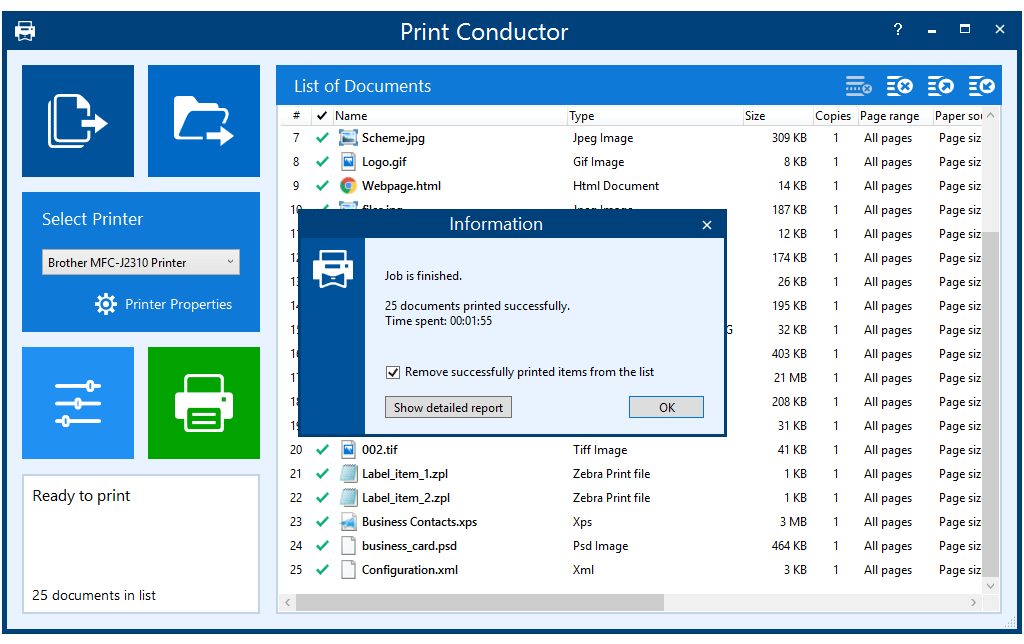
The main window after a job: 25 mixed documents, including JPG, HTML, ZPL labels, XPS and PSD files, printed in 1 minute 55 seconds.
Features
Print 90+ file types from one list
Print Conductor prints PDF, Word, Excel, images, Outlook emails, AutoCAD DWG and DXF drawings, Zebra ZPL labels and PDF Portfolios from a single queue. Version 12 added Apple Pages, DjVu and OFD. Many formats run on its internal engine alone, so you do not need the original program installed.
Add whole folders, archives and saved lists
Print Conductor takes files by drag and drop, from a folder and its subfolders, or straight out of RAR, ZIP and 7ZIP archives. It can also import a list of files from TXT, Excel or FLIST, import URLs to print web pages, and accept Outlook messages dragged directly into the list. Save a list and you can run the same batch again next month.
Set options per file, not just per job
Print Conductor applies copies, page range, duplex, orientation, paper size, scale mode, color mode and paper source to the whole list or to selected items. So the first three documents can print three copies of pages 1, 3 and the last page in grayscale, while the rest print normally.
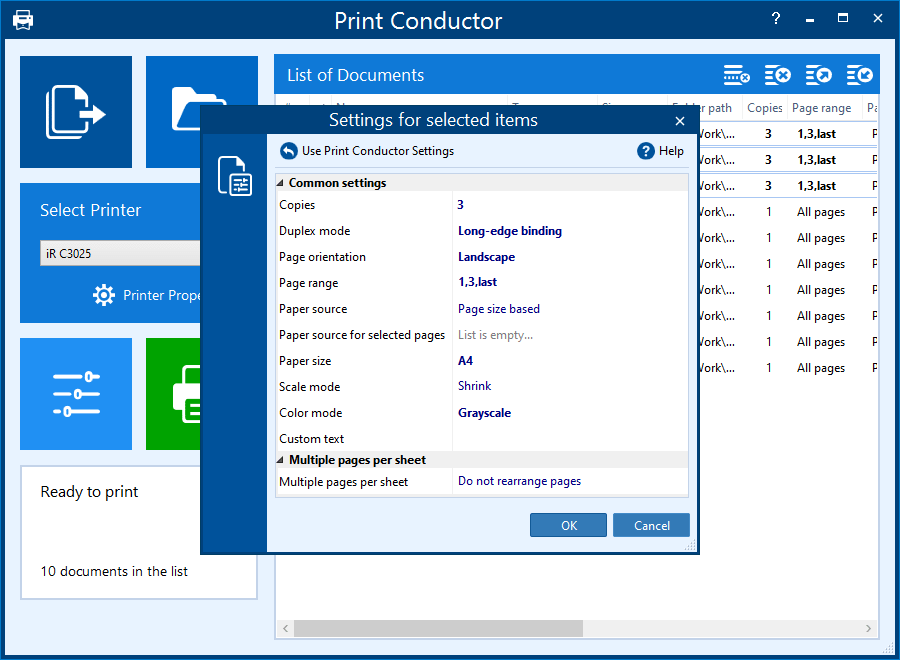
The "Settings for selected items" dialog, set here to 3 copies, long-edge duplex, landscape, A4 and grayscale for three files in the list.
Keep the exact order with Single print job mode
Print Conductor's Single print job mode combines the list into one multi-page file before printing. Your pages come out in the order you set, other people's jobs on a shared printer cannot land between them, and a secure printer asks for your ID only once.
Separate stacks with cover pages
Print Conductor inserts cover pages between documents, from built-in templates that show the filename, folder name or path, or from your own file. The Cover page Designer lets you build one, which helps when a single job holds hundreds of pages for different people.
Estimate paper before you commit
Print Conductor can calculate how many pages a list will use before anything prints, and save that estimate as a PDF. It also produces a detailed report after the job.
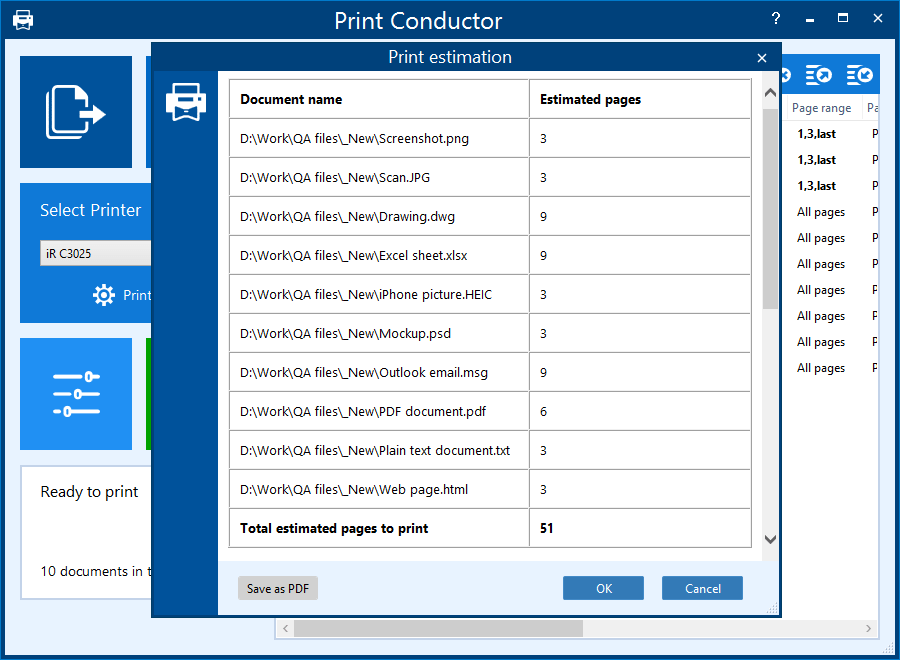
The Print estimation window: pages per file and a total of 51 for a list of ten mixed documents.
Watermarks and pages per sheet
Print Conductor adds text, image or barcode watermarks to printed pages, with macros for page numbers and source file details. Multiple pages per sheet mode fits two or more pages on one sheet, with pagination and gaps you control.
Tools for IT teams
Print Conductor 12 can install silently from the command line and apply a saved .INI settings file. Settings profiles can be exported and shared between users, so a whole team prints the same way.
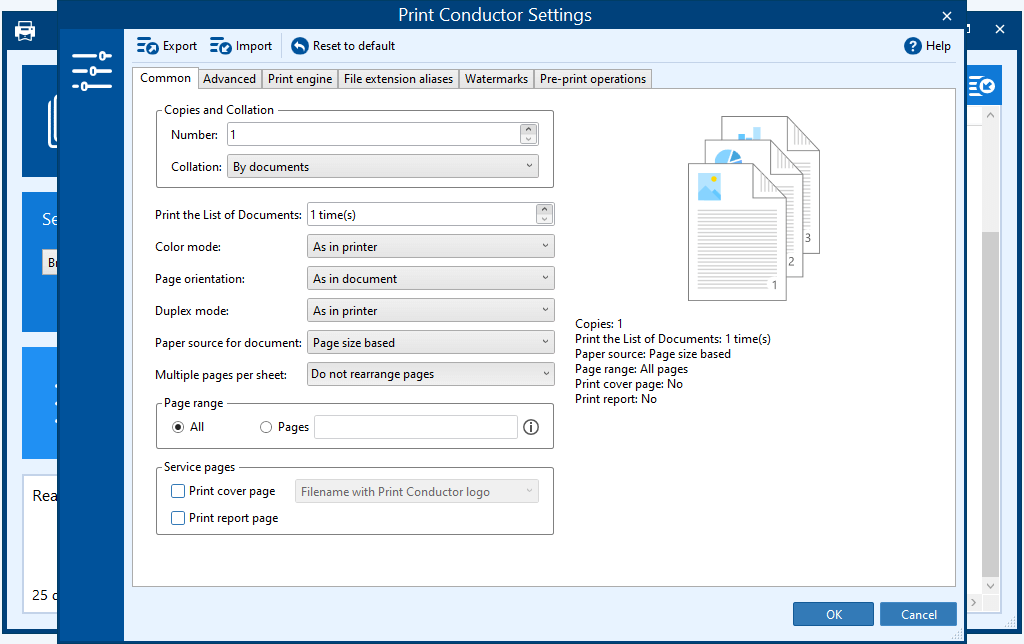
The Settings window, with tabs for Common, Advanced, Print engine, File extension aliases, Watermarks and Pre-print operations.
Benefits
- Hours back on routine printing. You stop opening, printing and closing each file by hand.
- Fewer wrong stacks. Order is set once in the list instead of depending on when each file reached the spooler.
- Less software to keep open. You stop switching between a PDF viewer, Word and Excel.
- Your files stay on your PC. Print jobs run locally, and activation can be done offline, which matters for restricted networks.
Real-World Uses
- A law office printing a client file of PDFs and Word documents in one set order.
- A medical records department answering referral and attorney requests by printing patient PDFs in bulk.
- A warehouse or shipping desk running batches of Zebra ZPL label files.
- An engineering office sending DWG and DXF drawings to a plotter with the right paper source.
- A church or choir organizer printing Word and PDF sheet packs for every member in a fixed order.
Who It's For, and Who Should Skip It
Print Conductor makes sense when printing is a recurring job: dozens of files at a time, several formats, and a need for order or per-file settings. At that volume $149 pays for itself quickly.
Skip it if you print a handful of PDFs a week, since opening them yourself costs nothing but a few minutes. There is no Mac or Linux version. If you want files printed automatically when they land in a folder, with nobody at the PC, you want a hot-folder tool such as FolderMill. If you need printing from scripts, you want a command line tool such as 2Printer.
Usage Guide
- Download the trial installer (about 207 MB) and run it. You need .NET Framework 4.0 or newer.
- Open Print Conductor and click the file or folder button, or drag your documents onto the list.
- Arrange the order, or sort by name or type.
- Choose a printer in the Select Printer box.
- Open Settings to set copies, duplex, color and cover pages. Select individual files first if only those need different settings.
- Click the green print button, then check the job summary or the detailed report when it finishes.
Before you buy
- Some formats need their own program. PowerPoint files need Microsoft Office, OpenOffice or LibreOffice. Publisher needs Microsoft Office, Visio files need Visio, InDesign files need InDesign, and SolidWorks files need eDrawings Viewer. PDF, Word, images and DWG run on the internal engine.
- The license covers minor updates. New releases inside your major version are free. Only the Enterprise license includes major versions.
- Test your awkward files in the trial. Its stated limit is the extra report page, so try the formats and the printer you actually use.
Where it falls short
- The look is plain. Some G2 reviewers call the interface dated. If a file renders badly, try the optional AsposePDF engine added in version 12, on the Print Engine tab, for PDF, XPS and HTML.
- Settings can leak. One G2 reviewer found print settings chosen in the app carried over as that printer's defaults in other programs.
- The upgrade cycle annoys some. Reviewers mention frequent updates, a higher price and having to email the vendor for upgrade links.
- It is not unattended. Someone has to load the list and start the job.
What Users Say
Print Conductor has an average of 4.8 out of 5 from 54 reviews on G2, and the SnapFiles editor gives it 4 stars. Software Advice and GetApp show no user reviews. The G2 notes below are summaries rather than quotes.
Independent sites
SnapFiles editor's review: "Print Conductor is a simple batch printing utility that can be a real time saver" if you "frequently need to print multiple files."
Michael Humpa, CHIP.de: "Print Conductor is a perfect tool for printing lot's of documents. It has no problems dealing with large lists of files, saving lot of tedious clicks."
G2 reviewers, in summary: the praise centers on time saved, drag and drop, and support. One reviewer asked for a blank page insertion feature and saw it added within five days. Another reports a version upgrade made printing faster.
From the vendor's testimonials page
William Johnson, Ph.D., Northwestern Health Sciences University: "We use it in our Medical Records department to print medical records of patients in PDFs for external referrals and medical records requests by attorneys." He adds: "I estimate that it has saved our medical records clerk at least 40% of her time to get her work done."
David Symes: "I had a specific need to print a collection of Word and PDF files for 30 members of a local choir and to print them in a specific, and somewhat random order. Print Conductor proved to be an ideal solution."
Deborah Muller, USA: "Without Print Conductor, it would take up too much of my time just to print the documents. You have really saved my sanity during our busy Spring season!"
Anand C. Mathew, Palmersheim & Mathew LLP: "Solves a very common problem and has a great interface with very helpful support for any issues."
Larry Bruce, USA: "One of the best things I like about Print Conductor is the amazing customer support and constant innovation."
Brian Young, UK: "I work with printing solutions everyday and have found this product and the support to be excellent."
Will Everson, Project Skills Solutions, UK: "I love the ability to change page range, paper source and color settings for each individual file, as it makes my life 100 times easier."
The complaints, in summary
Criticism on G2 is mild and in the minority: a dated, plain interface, printer settings that carry over to other programs, a price that has gone up, and updates that arrive more often than one reviewer wanted. The recurring theme: people like the time saved and the fast support, and grumble about the upgrade cycle.
Comparisons
Print Conductor vs FolderMill
Both come from fCoder. Print Conductor is the tool you run by hand on a list. FolderMill is a server-style app at $499 that watches folders and prints or converts whatever arrives. Choose by whether a person starts the job.
Print Conductor vs DocuFreezer
DocuFreezer, at $49, uses a similar list but saves files as PDF, JPG, PNG, TIFF or TXT rather than printing them.
Print Conductor vs 2Printer
2Printer is fCoder's command line printing tool. It fits scripts and scheduled tasks, while Print Conductor fits people who want a window and a list.
Editions and Pricing
| License | Price | Who it fits | What it adds |
|---|
| Commercial | $149 per user, one-time | One user | No report page, free minor updates, support |
| Volume, 5+ users | $99 per user | Small teams | Same as Commercial, about 30% off |
| Volume, 20+ users | $79 per user | Departments | Same as Commercial, about 45% off |
| Volume, 50+ users | $59 per user | Larger offices | Same as Commercial, about 60% off |
| Enterprise | From $2,450, annual subscription | Whole organization | Priority support, custom builds, all minor and major updates |
Set the quantity on the order page and the volume price applies. Educational, non-profit and public organizations can ask fCoder about discounts.
FAQs
Does Print Conductor work on Windows 11?
Yes. Print Conductor supports Windows 11, 10, 8 and 7 in 32-bit and 64-bit, and Windows Server up to 2025.
Can Print Conductor print password-protected PDFs?
Yes. Print Conductor can batch print password-protected PDF, DOC and DOCX files.
Does Print Conductor need Adobe Acrobat to print PDFs?
No. Print Conductor prints PDF files with its internal engine, and it can use Acrobat or Acrobat Reader instead.
Can Print Conductor print to a PDF or other virtual printer?
Yes. Print Conductor treats virtual printers like any other device, so it works with one that saves output to a file.
Can Print Conductor print email attachments?
Yes. Print Conductor prints Outlook EML and MSG files with or without their attachments, and you choose whether attachments print before or after the message.
Can Print Conductor run on a PC with no internet connection?
Yes. Print Conductor processes files locally and can be activated offline. Its "Process files locally only" setting restricts optional online features such as ZPL label rendering.
Is Print Conductor a subscription?
No. The Commercial license for Print Conductor is a one-time purchase with no additional fees. Only the Enterprise license is an annual subscription.
Can I pay for Print Conductor by bank transfer?
Yes. fCoder takes fax, bank or wire transfer and check by request through its support page, as well as PayPal and cards online.
System Requirements
- Windows 11, 10, 8 or 7 (32-bit or 64-bit), or Windows Server 2003 through 2025
- Intel Core i3, AMD Athlon II X2 or faster
- 4 GB RAM or more
- 326 MB of disk space, plus space for temporary files
- Microsoft .NET Framework 4.0 or newer
Conclusion
Print Conductor is worth $149 if you print batches of mixed documents every week. The one reason to buy it is the list itself: order, per-file settings and cover pages in one place, without opening a single document. The main reason not to is volume. If you only print a few files now and then, or you need printing to run with nobody at the PC, it is the wrong tool. Run the trial on your own files first.
Download Free TrialBuy Now