fCoder 2PDF: Convert Files to PDF from the Windows Command Line
fCoder 2PDF is a $149 Windows command line utility that batch converts documents, emails and images to PDF or PDF/A from Command Prompt, PowerShell, scripts or scheduled tasks. It is made for developers and system administrators who want PDF conversion inside an automated process. The license is one-time, and the trial adds a watermark.
This is not a program you click through. You type or script one line, such as a source folder and a destination folder, and 2PDF converts everything in it. Note that it is a different product from the online service at 2pdf.com: fCoder's tool is desktop software from cmd2pdf.com, and it works offline.
Quick facts
- Version: 4.0 (released October 27, 2025)
- Developer: fCoder SIA
- Platform: Windows 11, 10, 8 and 7, plus Windows Server 2008 and later
- Interface: command line, with Command Prompt, PowerShell and Windows Terminal
- Input: over 275 file extensions
- Output: PDF and PDF/A
- Price: $149 per license, one-time, with discounts from 5 licenses
- Trial: all features, with a watermark on every output file
What we checked: installer file version 4.0.2607.26140 (219.6 MB) downloaded from the vendor on November 7, 2026, checkout price $149.00 with no auto-renewal on November 7, 2026. We read the installer's version data but did not run a conversion.
Download Free TrialBuy Now
Overview
2PDF is one executable with a long list of switches. -src sets the files, -dst sets the output folder, and other switches handle PDF options, page operations and what happens after conversion. The basic form is short:
2PDF.exe -src "C:\In\*.*" -dst "C:\Out"
Because it is a command, it fits anywhere a command can run: a BAT file, a VBScript, PowerShell, Windows Task Scheduler, or your own application. It runs on a desktop or a server, and fCoder says it can convert thousands of files per session.
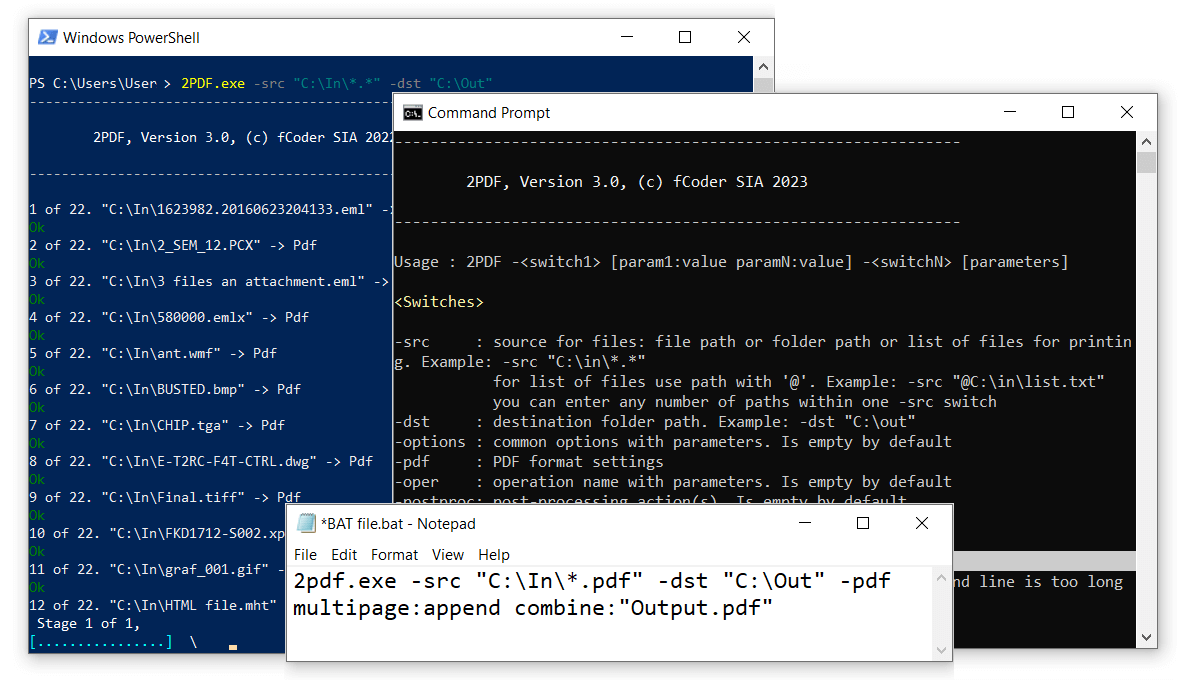
2PDF in PowerShell and Command Prompt, with a BAT file that merges PDFs into Output.pdf. The windows show version 3.0.
Features
Convert 100+ file types without opening them
fCoder 2PDF handles over 100 document and image types: Word, Excel, PowerPoint, TXT, RTF, HTML, XPS, PostScript, Photoshop PSD, CorelDraw, camera RAW, iPhone HEIC and more. It takes single files, wildcards, a list in a text file, whole folders with subfolders, and archives.
Handle Office files without Office
fCoder 2PDF converts Excel XLS and XLSX, Word DOC, DOCX and RTF, and Outlook MSG and EML on its internal engine, so a server needs no Microsoft Office license for those. Formats such as Visio and Publisher do need their own application.
Merge and split PDFs from a script
fCoder 2PDF merges many files into one PDF, splits multipage files into pages or ranges and, since version 4.0, splits a PDF by its bookmark sections. It can also use source file names as bookmarks in a merged PDF.
Make scans searchable with OCR
fCoder 2PDF can run OCR on scans and images and output a searchable PDF. Version 4.0 sped OCR up on 64-bit Windows, added noise removal, and brought in Arabic, Korean and Dutch.
Change pages during conversion
fCoder 2PDF has operations for rotate and autorotate, crop, resize, grayscale, rasterize, text and image watermarks, text annotations, frames, and removing blank pages. It can also add QR codes or barcodes, with each operation set by a parameter.
Set PDF details and security
fCoder 2PDF writes metadata such as title, subject, author and keywords, sets creation and modification dates, attaches external files, compresses output, and can add or remove passwords on PDFs in bulk.
Clean up after itself
fCoder 2PDF can move, copy or delete source files after conversion, with separate handling for files that passed and files that failed. That is what makes a true folder-to-folder process possible.
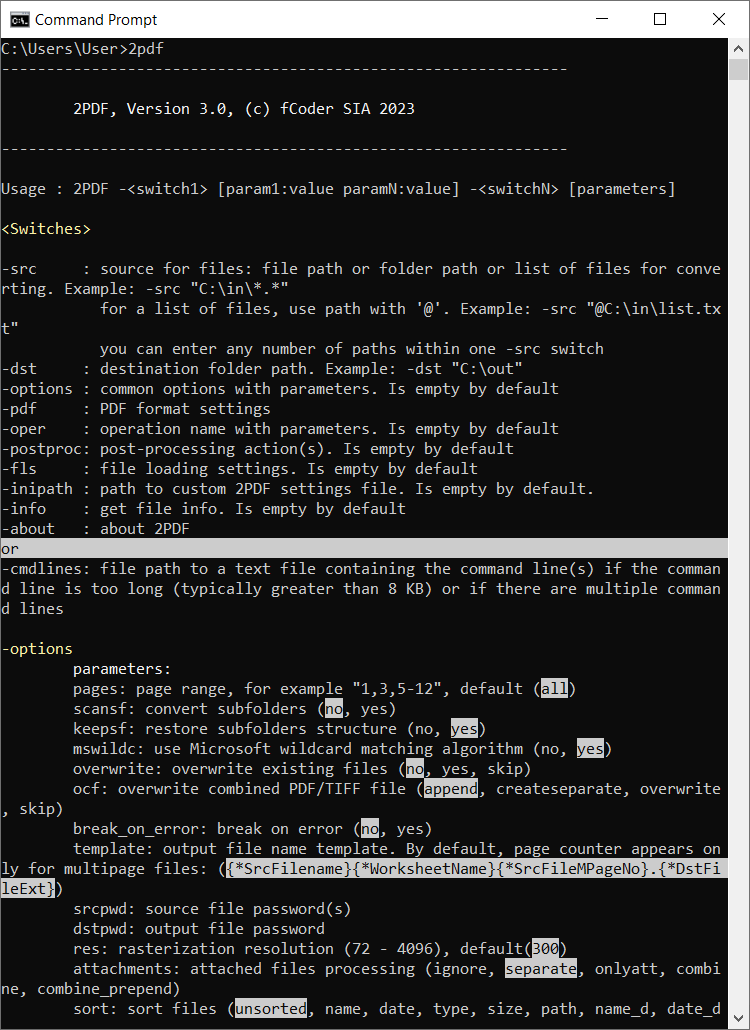
The built-in help in Command Prompt, listing switches such as -src, -dst, -pdf and -oper, and common options. It shows version 3.0.
Benefits
- Conversion becomes part of your system. Your application or scheduled task calls it, and no one has to remember.
- No Office needed for common files. That keeps a conversion server simple.
- Files stay in-house. It is an offline tool, so documents do not go to a web service.
- Test before you pay. The trial has every feature, so you can build the whole script first.
Real-World Uses
- A nightly archive job using Task Scheduler to turn the day's documents into PDF/A.
- A line-of-business application calling 2PDF to produce a PDF from a report or Word template.
- An email archive converting MSG files with their attachments into PDFs.
- A scanning process running OCR on each folder of images, then moving the originals.
- A web server saving pages as PDF for records.
Who It's For, and Who Should Skip It
2PDF fits developers, administrators and power users who are comfortable with the command line and want PDF conversion with no window and no clicks. It also suits teams that build software, through the Developer License.
Skip it if you want a window to click in, since DocuFreezer does similar work for $49. If you need files converted when they land in a folder without writing a script, FolderMill does that. If you only convert the odd file, Word's Save as PDF is enough. And there is no Mac or Linux version.
Usage Guide
- Download the trial installer (about 220 MB) and run it. You need Microsoft .NET Framework 4.0.
- Press Win+R, type
cmd and click OK. - Run 2PDF with a source and a destination, as in the example above.
- Add options as needed, such as
-pdf multipage:append combine:"Output.pdf" to merge into one file. - Check the output, then save the command in a BAT file.
- Schedule that file in Windows Task Scheduler, or call it from your own code.
Before you buy
- Licensing is per activation. The $149 license covers a single activation and use under one Windows user account. Check that the account running your scheduled task is the one you license.
- Trial use is non-commercial. Use the trial to evaluate or for non-commercial work, and buy a license for business use. Every output file carries "Created by trial version of 2PDF."
- Some formats need other software. PowerPoint files need Microsoft Office, OpenOffice or LibreOffice, and Visio and Publisher files need those applications.
- Major upgrades are 50% off. Minor updates are free, and your version keeps working if you do not upgrade.
Where it falls short
- It needs command line skill. The syntax page runs long, and anyone who has never written a BAT file will have a slow start.
- It is PDF only. Output is PDF or PDF/A, so for JPG or TIFF you need another tool, such as fCoder's 2JPEG or 2TIFF.
- Large install. It needs 530 MB of disk space, which is a lot for a command line tool.
- Almost no public reviews. There is no independent track record to lean on, so judge it by testing with your own files.
Comparisons
fCoder 2PDF vs DocuFreezer
Both are fCoder converters with similar abilities. DocuFreezer has a window and costs $49, and it also outputs images and text. 2PDF costs $149 because it can be scripted and called from other software.
fCoder 2PDF vs FolderMill
FolderMill, at $499, watches folders and needs no scripting, and it prints as well as converts. 2PDF is cheaper and more flexible for developers, but you build the automation yourself.
fCoder 2PDF vs Universal Document Converter
fCoder describes 2PDF as a command line alternative to its Universal Document Converter virtual printer.
Editions and Pricing
| License | Price | Who it fits | What it adds |
|---|
| Commercial | $149, one-time | One activation, one Windows account | No watermark, free minor updates, 50% off major upgrades |
| Volume | $99 each for 5-9, $84 for 10-19, $79 for 20-49, $59 for 50 or more | Teams | Same as Commercial, prices shown at checkout |
| Site | $7,450 | Whole company | Any number of desktops, workstations and servers |
| Developer | $10,000 | Software makers | Distribute 2PDF in your own installation kit |
Educational, governmental and non-profit buyers can ask fCoder for special pricing.
FAQs
Is fCoder 2PDF the same as the 2pdf.com website?
No. fCoder 2PDF is a Windows command line program sold from cmd2pdf.com, while 2pdf.com is an unrelated online conversion service with monthly plans.
Does fCoder 2PDF work in PowerShell?
Yes. fCoder 2PDF runs in Command Prompt, Windows PowerShell, Windows Terminal and similar interfaces.
Can fCoder 2PDF create PDF/A files?
Yes. fCoder 2PDF outputs PDF or PDF/A, set with the pdf_a parameter.
Can fCoder 2PDF run without showing alerts?
Yes. fCoder 2PDF has a silent option, which suits scheduled and server jobs.
Can I call fCoder 2PDF from my own application?
Yes. fCoder 2PDF can be started from your own software, and a Developer License allows you to ship it in your installation kit.
Can fCoder 2PDF convert web pages?
Yes. fCoder 2PDF can save web pages as PDF, as well as HTML files on disk.
Is fCoder 2PDF a subscription?
No. A fCoder 2PDF license is a one-time purchase with no recurring fee.
System Requirements
- Windows 11, 10, 8 or 7 (32-bit or 64-bit), or Windows Server 2008, 2012, 2016 or later
- Intel Core i3, AMD Athlon II X2 or faster
- 2 GB RAM or more
- 530 MB of free disk space
- Microsoft .NET Framework 4.0
Conclusion
fCoder 2PDF is worth $149 if you need PDF conversion inside a script, a server job or your own software. The reason to buy it is control: one command, a long list of parameters, and no Office dependency for common files. The reason not to is comfort. If you would rather click than type, DocuFreezer costs a third of the price. Public feedback is scarce, so build your real command in the trial first.
Download Free TrialBuy Now