DocuFreezer: Convert a Whole Pile of Files to PDF in One Go
DocuFreezer is a $49 Windows batch converter that turns documents, emails, drawings and images into PDF, JPG, PNG, TIFF or TXT, with no need to open each file. It suits office staff and anyone archiving or sharing many files at once. It is a one-time purchase, and the trial is free with a watermark.
Word and Excel can export a PDF, but one file at a time: open, save, close, repeat. DocuFreezer exists for the moment you have 200 of them. Drag them in, pick a format, press Start.
Quick facts
- Version: 8.0 (released October 14, 2026)
- Developer: fCoder SIA
- Platform: Windows 11, 10 and 8, plus Windows Server 2008 and newer
- Input: over 80 file types
- Output: PDF, JPG, PNG, TIFF and TXT, plus BMP and others with limited functionality
- Price: $49 for one license, one-time
- Trial: free, with a text watermark on output files
What we checked: installer file version 8.0.2611.06140 (226.4 MB) downloaded from the vendor on November 7, 2026, checkout price $49.00 with no auto-renewal on November 7, 2026. We read the installer's version data but did not run a conversion.
Download Free TrialBuy Now
Overview
The name describes the idea: DocuFreezer "freezes" a document's look. The output keeps the original structure, page layout, text formatting, fonts and hyperlinks, so a recipient sees what you saw, on any device. It can also keep original file names, metadata and folder structure.
The window is simple. Add files or a folder at the top, choose an output type and folder, and press the green Start button. The defaults work for most jobs, and the Settings window holds the rest.
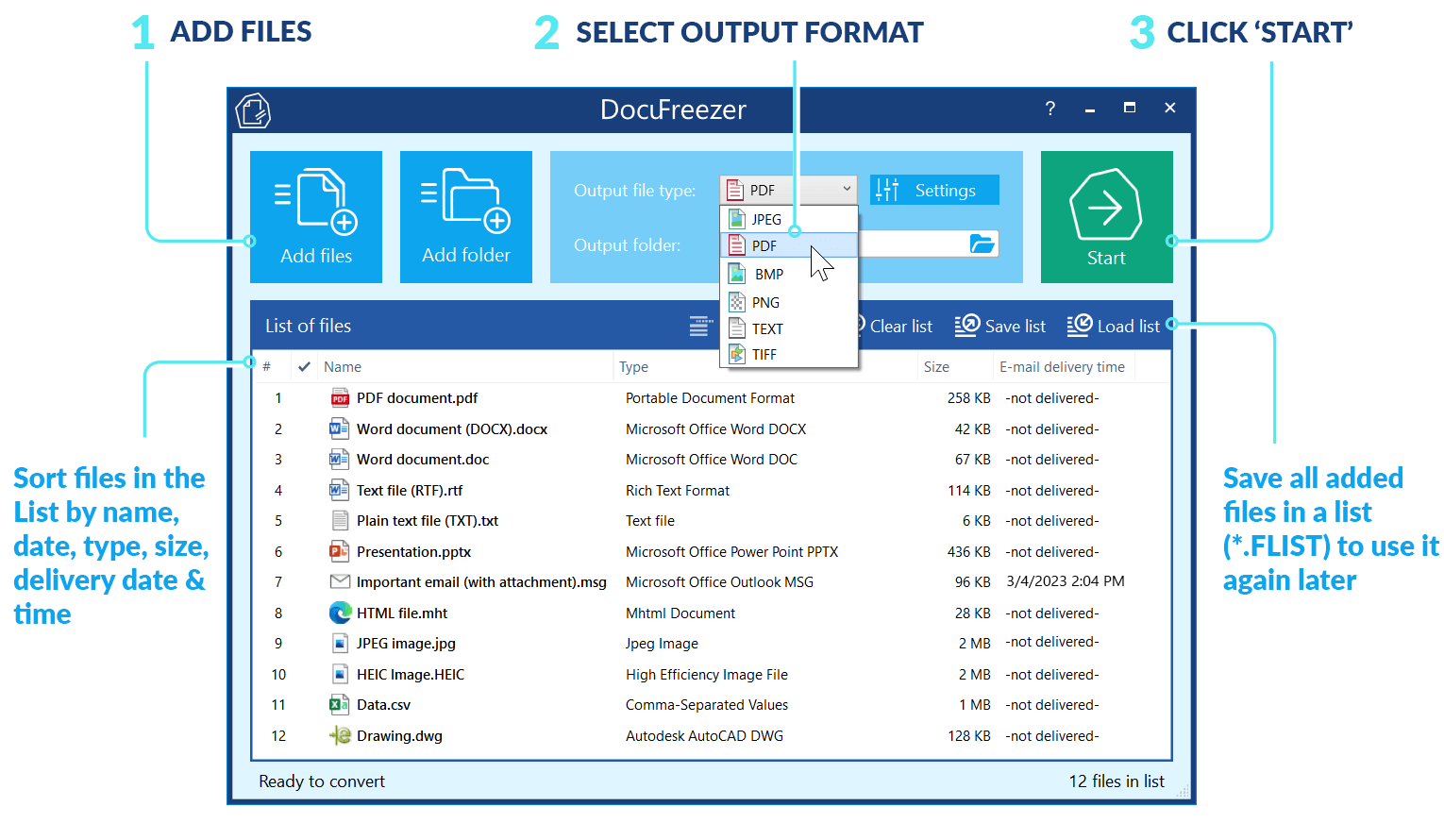
The main window, with the vendor's labels: add files, pick an output format, click Start. The list shows PDF, Word, email, HEIC, CSV and DWG files together.
Features
Convert 80+ file types without opening them
DocuFreezer reads PDF, Word, Excel, PowerPoint, RTF, TXT, XPS, HTML, Outlook EML, MSG, PST and OST, AutoCAD DWG and DXF, Visio, HEIC and more. You can add single files, whole folders, or RAR, ZIP and 7ZIP archives.
Handle Office files without Office
DocuFreezer converts DOC, DOCX, RTF, XLS, XLSX, MSG and EML files on its internal engine, so a PC without Microsoft Office can still process them. Some other file types do need their own application.
Merge and split PDF and TIFF files
DocuFreezer combines several files, even of different types, into one multi-page PDF or TIFF, and it can add pages to an existing file. In the other direction it splits a large PDF into single pages or fixed chunks, such as 5 pages per file.
Make scans searchable with OCR
DocuFreezer runs OCR on scanned documents, images and PDFs and writes a searchable PDF or TXT. You pick the languages, and the list includes English, French, German, Spanish, Arabic, Hebrew, Japanese, Korean and Chinese.

The Common tab of DocuFreezer Settings, with "Make PDF searchable (OCR)" ticked and English, French and German selected.
Create archive-ready and signed PDFs
DocuFreezer 8.0 saves PDF/A, PDF/X and PDF/E files, lets you pick a PDF version from 1.3 to 2.0, and can digitally sign output with a certificate from a P12 or PFX file or a security token. A Minimize file size option shrinks the results.
Turn emails and attachments into documents
DocuFreezer converts Outlook messages to PDF or TIFF, with seven ways to handle attachments, including combining them with the message or saving them separately. Files dragged straight from Outlook work too.
Edit pages during conversion
DocuFreezer can add text, image or barcode watermarks, rotate and crop pages, resize output, remove blank pages, add annotations, rasterize a PDF, remove text, and convert to grayscale, all as part of the batch.

The Edit operations tab with a text watermark being set up, here a page number macro placed at the bottom right.
Work with protected files
DocuFreezer takes a list of passwords for protected source files, one per line, and can password-protect the output as well.
Benefits
- A boring job becomes a two-minute setup. Hundreds of files convert with no one watching.
- One tool instead of five. Conversion, merging, OCR and watermarking sit in a single list-based program.
- Files stay on your PC. It is desktop software, so nothing has to go to an online converter, and version 8.0 made ZPL conversion local too.
- Repeatable results. Saved lists and exported settings let you run the same job again the same way.
Real-World Uses
- Archiving a closed project: turn a folder of Word, Excel and email files into PDF/A.
- Digitizing paper: run a batch of scans through OCR so the text can be searched.
- Legal or HR email records: save Outlook messages and their attachments as PDF.
- Phone photos: batch convert HEIC images to JPG for a PC or web form that rejects HEIC.
- Sending drawings to clients: convert DWG files to PDF so they open anywhere.
Who It's For, and Who Should Skip It
DocuFreezer fits offices and individuals who convert dozens of files at a time and want a plain interface at a low price.
Skip it if you only convert the odd file, since Word's Save as PDF or a free online tool will do. There is no Mac version. If conversion must run on its own when files land in a folder, look at a hot-folder tool such as FolderMill. If you need it inside a script, a command line tool such as 2PDF fits better. And if you want to edit PDF text, you need a PDF editor rather than a converter.
Usage Guide
- Download the trial installer (about 226 MB) and run it. You need .NET Framework 4.8.
- Click Add files or Add folder, or drag items onto the list.
- Choose the output file type and output folder.
- Open Settings to set options such as OCR, merging into one file, or a watermark.
- Click Start and wait for the list to finish.
- Check a few output files, then use Save list if you will repeat the job.
Before you buy
- Licensing is per Windows account. One license covers an installation on one Windows account, and volume pricing starts at 5 licenses.
- Major versions cost extra. Minor updates are free, and a major upgrade, such as 7.0 to 8.0, is 50% off.
- It wants memory. The vendor asks for 8 GB of RAM, which is more than many converters.
- Some extra output formats are limited. BMP, DOCX, GIF, XPS, XLSX, ODS, DXF and CSV output may have limited functionality, so test those first.
Where it falls short
- Batches can have failures. One G2 reviewer says some files in a batch fail to convert, so check your results on a large run.
- The range of settings takes time. G2 feedback mentions a learning curve once you go past the defaults.
- Output is not meant for editing. The point is a frozen copy, and DOCX output is in the limited group above.
- Large installer. At about 226 MB it is a heavy download for a converter.
What Users Say
DocuFreezer has few public reviews. G2 shows an average of about 4.4 out of 5 from 6 reviews, while Software Advice, GetApp and TrustRadius list none. The G2 notes below are summaries rather than quotes.
G2 reviewers, in summary
What they like: batch conversion, turning files into searchable PDFs, an easy interface, and support that one reviewer calls second to none.
What they do not: some files failing inside a batch, limited customization, a learning curve, and one reviewer who felt $49 was high against a free online converter.
Comparisons
DocuFreezer vs Word's Save as PDF
Word is free if you own it and fine for one file. DocuFreezer wins once you have many files or mixed formats.
DocuFreezer vs online converters
Online tools cost little or nothing, but your files leave your PC. DocuFreezer runs locally on files of any sensitivity.
DocuFreezer vs FolderMill
FolderMill, also from fCoder, is the $499 automatic version of this idea: it watches folders and converts or prints what arrives. DocuFreezer needs a person to press Start.
DocuFreezer vs Print Conductor
Print Conductor, also from fCoder, uses a similar list but sends files to a printer. DocuFreezer writes them to files.
Editions and Pricing
| License | Price | Who it fits | What it adds |
|---|
| Commercial | $49 per license, one-time | One Windows account | No watermark, free minor updates, 50% off major upgrades, support |
| Volume | $44 each for 5-9, $39 for 10-19, $34 for 20-49, $29 for 50-99, down to $15 for 300 or more | Teams | Same as Commercial, prices shown at checkout |
| Enterprise | By quote | Whole organization | Unlimited users, priority support, custom builds, all updates |
FAQs
Does DocuFreezer work on Windows 11?
Yes. DocuFreezer runs on Windows 11, 10 and 8 in 32-bit and 64-bit, and on Windows Server 2008 and newer.
Does DocuFreezer need Microsoft Office installed?
No, not for common files. DocuFreezer converts Word, Excel and Outlook message files on its own engine, though some other file types need additional software.
Can DocuFreezer convert PDF to Word?
DocuFreezer lists DOCX as an additional output with limited functionality, so treat it as a bonus. It is built to produce PDF, images and text.
Does the DocuFreezer trial have a time limit or just a watermark?
The DocuFreezer trial is for testing and evaluation, and its stated limit is the text "Created by trial version of Docufreezer" on output files.
Can DocuFreezer convert password-protected PDFs?
Yes. DocuFreezer accepts a list of passwords in its settings, so protected files can stay protected.
Is DocuFreezer a subscription?
No. A DocuFreezer commercial license is a one-time purchase, and the version you buy keeps working.
Does DocuFreezer upload my files?
No. DocuFreezer is a desktop application, and since version 8.0 even Zebra ZPL conversion runs locally rather than through a web service.
System Requirements
- Windows 11, 10 or 8 (32-bit or 64-bit), or Windows Server 2008, 2012, 2016, 2019 or newer
- Intel Core i3, AMD Athlon II X2 or faster
- 8 GB RAM or more
- 412 MB of free disk space
- Microsoft .NET Framework 4.8, plus additional software for specific file types
Conclusion
DocuFreezer is worth $49 if you regularly convert batches of mixed files on Windows. The reason to buy it is value: batch conversion, merging, OCR and PDF/A in one simple list, for a one-time price. The reason not to is occasional use, when free tools are enough. Public reviews are few, so test your own files in the trial before you buy.
Download Free TrialBuy Now