FolderMill: Drop a File in a Folder, and It Prints or Converts Itself
FolderMill is a $499 Windows hot folder application that automatically prints incoming files or converts them to PDF and images, with no one at the keyboard. It is built for offices and IT teams that run the same document jobs all day. The license is one-time, and a free version adds a small watermark.
Think of the desk where invoices arrive and someone opens each one, prints it, and files it. With FolderMill, staff copy a file into a shared folder, and the printout appears in the tray or the PDF appears in the output folder.
Quick facts
- Version: 5.6 (released February 11, 2026)
- Developer: fCoder SIA
- Platform: Windows 11, 10, 8 and 7, plus Windows Server 2008 through 2025
- Sources: local or shared folders, FTP, SFTP, email boxes and cloud storage
- Output: any printer, PDF, XPS, JPG, PNG, TIFF, email, FTP or HTTP
- Price: $499 per system, one-time, with discounts from 2 licenses
- Free version: full features, with a watermark and cover pages
- Trial: 14 days without limits, by request
What we checked: installer file version 5.6.2603.22200 (170.4 MB) downloaded from the vendor on November 7, 2026, checkout price $499.00 with no auto-renewal on November 7, 2026. We read the installer's version data but did not set up a hot folder.
Download Free TrialBuy Now
Overview
FolderMill has two ideas. A Hot Folder is a location it watches. Actions are the steps it runs on every file that appears there. An administrator sets these up once in the Control Panel, and after that nobody needs to touch the program.
End users need no software at all. They do not install a driver or learn an interface: they copy a file into a shared folder. It can run around the clock on Windows or Windows Server, including as a Windows service, which is what the vendor recommends for servers.
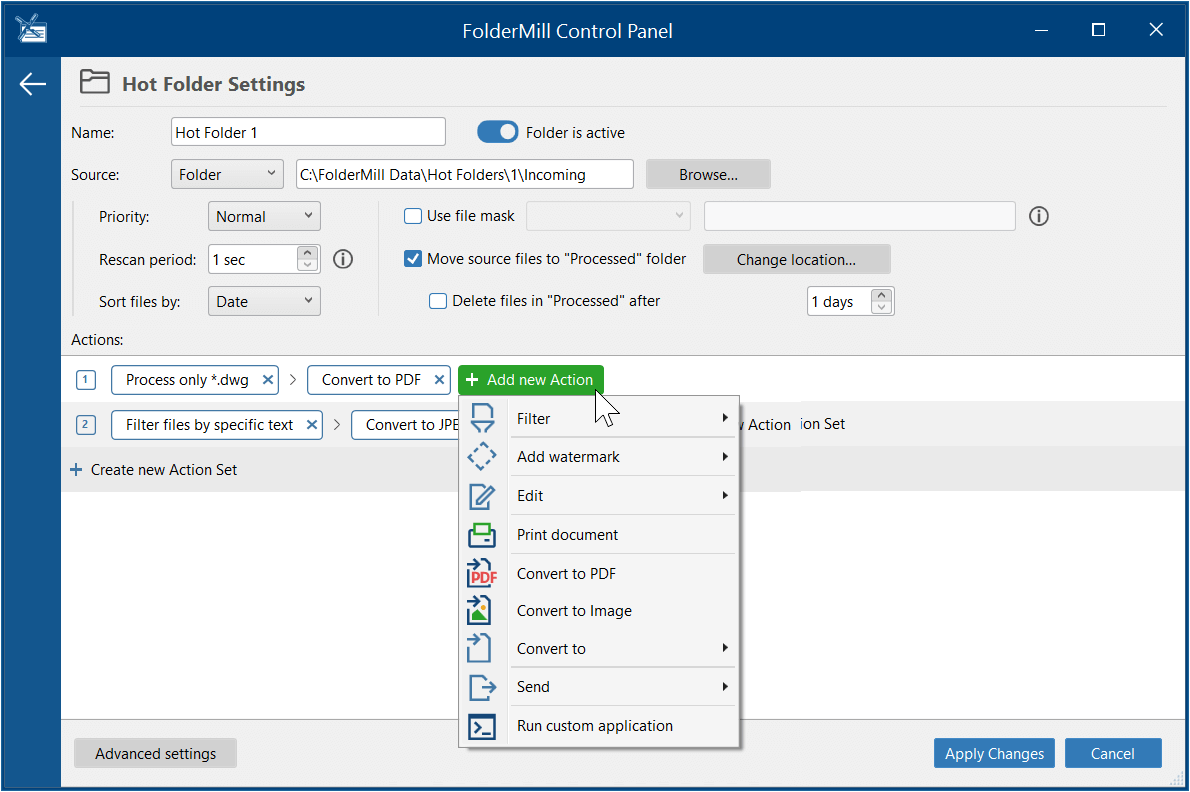
The Hot Folder Settings screen: one Action Set filters *.dwg files and converts them to PDF, and the menu shows the other Actions you can add.
Features
Print everything that lands in a folder
FolderMill starts printing as soon as a new file appears in a Hot Folder, on any local, network or virtual printer. Printer preferences such as stapling and color management are available, and you can set paper size, orientation, cover pages and how email attachments are handled.

The Print document Action: printer, page range, copies, collation, page scaling and where email attachments print.
Send one file to several printers or trays
FolderMill can print the same document on several printers at once, including printers in remote locations, and manage trays through separate Hot Folders or filters. Printing on a schedule is also possible.
Convert to PDF, XPS or images automatically
FolderMill turns incoming Word, Excel, PDF, HTML, CAD, image and other files into PDF, XPS, JPG, PNG or TIFF, with control of color mode, quality and resolution. It can merge and split PDF and TIFF files, create password-protected PDFs, keep bookmarks and run OCR to produce PDFs with text.
Route files with filters
FolderMill filters by filename, file contents, page size, number of pages or page color. So PDFs with "invoice" in the name can go to one printer, and everything else to another, using a mask such as *invoice*.pdf.
Pull files from more than folders
FolderMill watches local and shared folders, FTP, FTPS and SFTP locations, IMAP and POP3 mailboxes, and cloud storage folders such as Google Drive, Dropbox and OneDrive. Results can go to a folder, FTP, HTTP, email or a printer, and to several destinations at once.
Chain Actions into a workflow
FolderMill runs Actions in a row on each file: filter, add a watermark, rename, crop or resize, insert a file or blank page, convert, print, and even run your own EXE or BAT file. Action Sets let one Hot Folder run several paths.
Run more tasks at once
FolderMill 5 added a multitasking mode, with a task limit you set, so a server with many CPU threads can process files in parallel. A built-in Task manager shows each job, logs record the flow, and email alerts tell you when something fails.

General Settings with Multiple tasks mode and a task limit of 12, shown beside a CPU-Z window reporting 12 CPU threads.
Protect the printer queue
FolderMill 5.6 can hold new jobs until the queue is empty or below a set number of jobs, which stops the Windows spooler from being overloaded and losing jobs. It also added OAuth 2.0 sign-in for IMAP and SMTP mailboxes.
Benefits
- No training for staff. If they can copy a file, they can use it.
- Nothing to install on user PCs. One central install does the work.
- Round-the-clock processing. Jobs run at 3 a.m. as they do at noon.
- Files stay in-house. Processing is local, and internet access is needed only for activation and updates, plus any online Actions you choose.
Real-World Uses
- A print shop downloading zipped orders and printing the invoice and packing slip without opening them.
- A clinic printing patient invoices from a server to printers in different rooms.
- A retail chain dropping labels and price tags into a Google Drive folder per store, so each store prints its own.
- A production system that generates PDFs all day, printing them as they appear.
- An accounts team turning incoming email attachments into PDFs in one folder.
Who It's For, and Who Should Skip It
FolderMill fits businesses with a steady stream of documents and a Windows PC or server that can stay on. If a person spends real time every day on printing or converting, $499 can be recovered quickly.
Skip it for occasional batches. If someone is at the PC anyway, Print Conductor at $149 or DocuFreezer at $49 does the job for far less. There is no Mac or Linux version. A small office with one simple printing task may also find the free version enough, if a watermark and cover pages are acceptable.
Usage Guide
- Download the free version (about 170 MB) and install it on the PC or server that will do the work.
- Open the Control Panel and create a Hot Folder.
- Add Actions, such as a filter and Print document or Convert to PDF.
- Click Start. Consider running it as a Windows service on a server.
- Drop test files into the Incoming folder, and check the output folder or the printer tray.
- Share the Hot Folder on the network so colleagues can use it.
Before you buy
- One license covers one Windows system. Each extra server or workstation needs its own copy, or a Site License by request.
- The free version is for testing the logic. It adds a small "Created by free version of FolderMill" watermark to converted pages and a cover page between printed documents. Ask fCoder for the 14-day trial to test without either.
- Some formats need their own program. PowerPoint files need Microsoft Office, OpenOffice or LibreOffice on the FolderMill machine, and Publisher, Visio and Project files need the matching application.
- Major upgrades are 50% off. Minor updates and support for your major version are free.
Where it falls short
- The price is aimed at businesses. $499 is a lot for a single user with light needs.
- Someone has to set it up. Users get simplicity because an administrator built the rules, and a complex routing setup takes planning.
- Thin public review record. Only a handful of independent reviews exist, so test it on your own workload.
What Users Say
FolderMill has an average of 4.2 out of 5 from 3 reviews on G2. The vendor's site carries a set of customer comments, shown without names. There is little else in English, so this section stays short.
Independent reviews
G2 reviewer: "I like that once it is configured, it just works great. We encountered no hassles and no hiccups."
Dutch site ID.nl scored FolderMill 7 out of 10 and noted the modest watermark in the free version.
Customer comments on the vendor's site
A print-from-ZIP user: "FolderMill allows me to download the ZIPs and walk away. Before, I had to download and then open and print each PDF. Not only was this time consuming, but it also wasn't reliable."
A multi-store user: "I created subfolders for each store in a Google Drive storage, and just drop files (labels, price tags, etc.) into the necessary folders configured for printing. It is very convenient."
A user testing the free version: "We've been using the free version of FolderMill to make sure this would suit our needs, and have been amazed at the capabilities it has."
Comparisons
FolderMill vs Print Conductor
Print Conductor is manual: a person builds a list and presses print. FolderMill is automatic and costs more because of it. If files arrive all day from many people or systems, FolderMill is the right one.
FolderMill vs DocuFreezer
DocuFreezer converts lists of files on demand for $49. FolderMill does conversion and printing without being asked, and can pull from email and FTP.
FolderMill vs 2Printer and 2PDF
These fCoder command line tools suit developers who want to call printing or conversion from a script. FolderMill needs no scripting.
Editions and Pricing
| License | Price per license | Quantity | Notes |
|---|
| FolderMill | $499 | 1 | One Windows system, lifetime license |
| FolderMill | $399 | 2-4 | Volume price at checkout |
| FolderMill | $319 | 5-9 | Volume price at checkout |
| FolderMill | $259 | 10 or more | Volume price at checkout |
| Workstation edition | $149 | 1 | Sold at checkout, $119 for 2-4, $95 for 5-9 |
| Site License | By quote | Unlimited | All workstations and servers in a company |
The Workstation edition appears at checkout but not on fCoder's own order page, and fCoder does not publish what separates it from the main license, so ask fCoder support before choosing it for a server. Non-profit, educational and government buyers can ask for special rates.
Buy FolderMill ($499)Buy Workstation Edition ($149)
FAQs
Does FolderMill work on Windows 11 and Windows Server 2025?
Yes. FolderMill supports Windows 11, 10, 8 and 7 and Windows Server 2008 through 2025, in 32-bit and 64-bit.
Can FolderMill print email attachments automatically?
Yes. FolderMill can watch an IMAP or POP3 mailbox as a source and print what arrives, and you choose where attachments go in the print order.
Can FolderMill work with Microsoft 365 mailboxes that need modern sign-in?
FolderMill 5.6 added OAuth 2.0 for IMAP and SMTP, the modern sign-in method, for email sources, Send to Email and alerts.
Does FolderMill need internet access?
Only for activation and updates. FolderMill processes files locally, and most Actions work without a connection.
Is FolderMill a subscription?
No. FolderMill is a one-time purchase with a lifetime license and no monthly or yearly fees.
Can FolderMill process a large number of files?
Yes. FolderMill sets no limit on processed files, folders, end users or connected printers.
How is the FolderMill free version different from the trial?
The FolderMill free version has every feature but adds a watermark and cover pages. The trial, by request, has neither but stops after 14 days.
Can FolderMill run several Hot Folders at the same time?
Yes. FolderMill runs multiple Hot Folders, each with its own Actions, and multitasking mode sets how many tasks run in parallel.
System Requirements
- Windows 11, 10, 8 or 7 (32-bit or 64-bit), or Windows Server 2008 through 2025
- 1 GHz processor or higher, multi-core recommended for heavy use
- 4 GB RAM minimum, 8 GB or more for server use
- 280 MB for installation, plus space for Hot Folders and processed files
- Microsoft .NET Framework 4.5 or later
- Internet connection only for activation and updates
Conclusion
FolderMill is worth $499 for a business that prints or converts documents all day. The reason to buy it is that the work stops needing a person: staff drop files in a folder, and the server does the rest. The reason not to is scale. Anyone with occasional batches should buy Print Conductor or DocuFreezer instead. Start with the free version, because you can build your real workflow in it before you pay.
Download Free TrialBuy Now