Vovsoft Folder Splitter: Break One Huge Folder into Smaller Ones by Size, Count, Date or Type
Folder Splitter is a $19 Windows program from Vovsoft that copies or moves the files in one large folder into several smaller folders, split by a size limit, a number of files, a date, the file type, or the first letter of the name. The $19 is a one-time lifetime license, and the free trial works fully for personal use.
It's for the folder with 40,000 photos that a cloud drive, FTP server or old device chokes on, or a Downloads folder that needs sorting by type.
Quick facts
- Version: 1.3, released August 8, 2026
- Developer: Vovsoft
- Platform: Windows 11, 10, 8/8.1, 7, Vista and XP, 32-bit and 64-bit. No Mac version
- Split by: size, number of files, date, extension, or first letter
- Size presets: floppy, CD, DVD, Blu-ray and FAT32 limits
- Mode: copy or move, with or without subfolders
- Conflicts: ask, skip, or add a numbered copy
- Price: $19, one-time payment, lifetime license with free updates
- Trial: free and fully working for personal use, with a nag screen
- What we checked: installer file version 1.3.0.0 (3,629,136 bytes) with a valid code signature, downloaded from the vendor on November 11, 2026, and $19.00 on the order page with no auto-renewal on November 11, 2026
Download Free TrialBuy Now
Overview
Folder Splitter is one window: pick the source folder, tick Include Subfolders if you want everything below it, pick a destination, choose Copy (safe) or Move (fast, no duplicate space), choose a split type, and click Split Folder. The new folders appear in the destination, and the original is untouched in copy mode.
The five split types cover the two jobs it's for: cutting a folder into chunks of a size or count, and sorting a messy folder into groups.
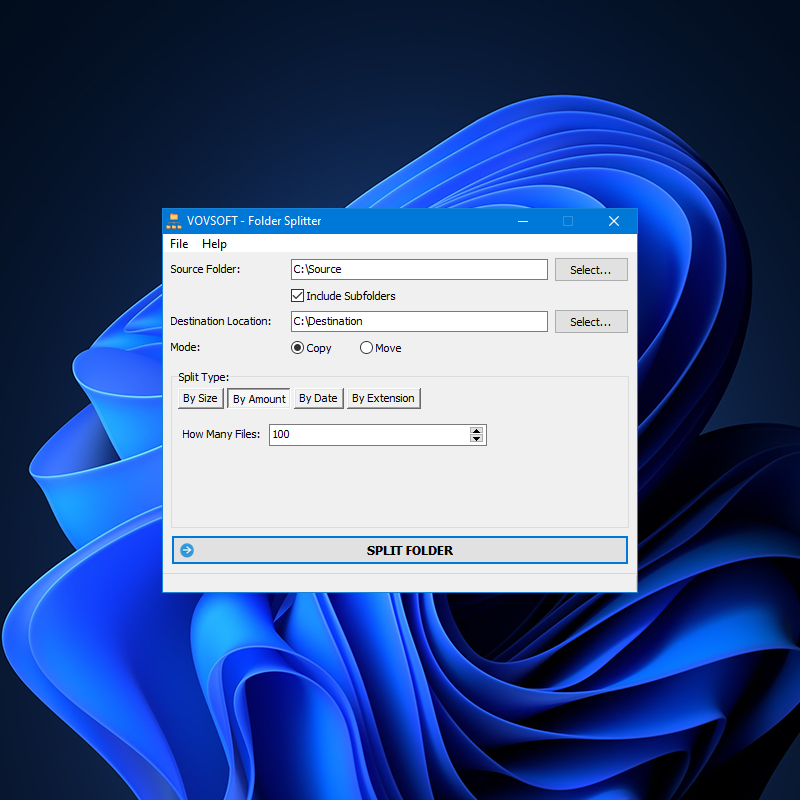
Copy mode, By Amount, 100 files per folder, with Include Subfolders ticked. This screenshot predates the By First Letter option added in version 1.3.
Features
By size or by number of files
Folder Splitter's By Size fills each new folder up to a limit, with presets for a floppy, CD, DVD, Blu-ray disc or the 4 GB FAT32 file limit, so a backup fits its media. By Amount puts a set number of files in each folder, for services that cap files per folder.
By date
Folder Splitter groups files by their created, modified or accessed date, using a date format you choose, such as one folder per month for years of photos.
By extension or first letter
Folder Splitter's By Extension puts each file type in its own folder, which turns a mixed Downloads folder into separate folders of PDFs, JPGs, ZIPs and so on. By First Letter, added in version 1.3, makes A to Z, 0 to 9 and Others folders.
Safe handling of name conflicts
Folder Splitter 1.3 asks what to do when a file name already exists in the destination, or skips it, or saves a numbered copy, so nothing is overwritten by accident. A failed copy no longer stops the job.
Real-World Uses
- Splitting 40,000 scanned photos into folders of 1,000 so a cloud drive or digital frame handles them.
- Dividing a folder of videos into DVD-sized folders for a disc backup.
- Sorting a decade of camera files into one folder per month by modified date.
- Cleaning up a Downloads folder into one folder per file type.
- Preparing a music collection for a USB stick formatted FAT32.
Who It's For, and Who Should Skip It
Folder Splitter suits photographers, people backing up to discs or FAT32 drives, and anyone who has to upload large folders to services with limits.
Skip it if you need rules beyond these five, such as sorting by file name patterns or by photo EXIF data, or want it to run on a schedule: a file organizer like DropIt, or a script, fits better. You also can't choose the order files are distributed in, which matters if you want a series to stay together.
Usage Guide
- Download the installer or the portable edition and start Folder Splitter.
- Select the source folder and tick Include Subfolders if needed.
- Select the destination location and choose Copy or Move.
- Pick a split type (By Size, By Amount, By Date, By Extension or By First Letter) and set its value.
- Set how name conflicts are handled, then click Split Folder.
Before you buy
The trial is fully working for personal use, with a reminder screen. Try Copy mode first on a large folder so nothing is moved until you're happy with the result. One license covers one person on any number of their own computers. Vovsoft's general policy is no refunds once the key is delivered, since a free trial comes first (accidental orders are generally refunded, at its discretion, and PayPro Global has the final say on its orders).
Where it falls short
- You can't choose the order files are distributed in (by name, date or size), the top request with 4 votes.
- No progress display during a long split.
- Output folders are numbered 1, 2 ... 10, 11 with no zero padding, which sorts awkwardly.
- No preview of what would go where, and no scheduling.
What Users Say
On Vovsoft's site
Folder Splitter's page shows 4.7 out of 5 from 9 ratings, with these comments among others.
"It works well as advertised." Richard Hundley
"Easy to use, works great. Thank you!" Arnold Falchook, MD
"Helpfull software!" Anonymous User
What users want changed
The request list shows the friction: control over the order files are moved in (4 votes), a progress display (3 votes), listing files per folder without moving them (2 votes), and zero-padded output folder names. One earlier complaint, that the program stopped when a copy failed instead of skipping the file and reporting it, has been fixed, along with requests for subfolders, splitting by extension and conflict handling.
Vovsoft as a company has a TrustScore of 4.6 out of 5 from 411 reviews on Trustpilot, read through a summarizer, with users mostly describing its tools as simple and dependable.
Comparisons
Folder Splitter vs DropIt
DropIt is a free, rule-based file organizer that sorts files by name, type, size or date and can run on a folder repeatedly. Folder Splitter is simpler to set up and adds splitting into equal chunks by size or count, which DropIt doesn't do as directly.
Folder Splitter vs a ZIP split archive
7-Zip can split a folder into volume-sized archive parts, but you need 7-Zip to rejoin them. Folder Splitter leaves ordinary files in ordinary folders.
Folder Splitter vs Vovsoft Copy Files Into Multiple Folders
Copy Files Into Multiple Folders copies the same files into many folders. Folder Splitter divides one folder's files among new folders.
Editions and Pricing
| Edition | Price | License | What you get |
|---|
| Trial | Free | Personal, non-commercial use | All split types, with a nag screen |
| Licensed | $19 one-time | Lifetime | Commercial use, no nag screen or ads, lifetime free updates |
The installer and portable editions use the same key, sent by email right after payment. Vovsoft's $99 Universal License covers all of its desktop programs.
FAQs
Does Folder Splitter delete my original files?
Only in Move mode. In Copy mode, Folder Splitter leaves the source folder as it was and writes copies to the destination.
Can Folder Splitter split a folder to fit on DVDs?
Yes. Folder Splitter's By Size option has presets for CD, DVD, Blu-ray, floppy and FAT32 limits, or takes a custom size.
Will Folder Splitter split a single large file?
No. Folder Splitter divides a folder's files between folders and never cuts a file. Vovsoft's File Splitter And Joiner splits single files.
Can Folder Splitter sort photos into folders by month?
Yes. Folder Splitter's By Date option groups files by created, modified or accessed date in the format you set. It uses file dates, not the photo's EXIF date.
Is the Folder Splitter license a subscription?
No. The $19 license is a one-time payment that never expires and includes future updates.
System Requirements
- Windows 11, 10, 8/8.1, 7, Vista or XP, 32-bit or 64-bit
- About 4 MB for the program, plus free space for copies in Copy mode
Conclusion
Folder Splitter is worth $19 if you regularly need big folders cut into chunks for uploads, discs or FAT32 drives, or sorted by type, date or letter, without fiddling with rules. Five clear split modes and safe conflict handling are the reasons to buy. The reason not to: there's no progress bar, no control of file order and no scheduling, and a free organizer like DropIt covers type and date sorting if that's all you need.
Download Free TrialBuy Now