Disk Analyzer Pro: See What's Filling Your Windows Drive, Then Clear It
Disk Analyzer Pro is a Systweak tool for Windows that scans a drive and shows exactly which file types, folders and individual files take up the space, then lets you delete or zip what you don't need. A free Personal edition handles local drives; the Pro edition ($39.95 a year) adds network drives, custom searches and exportable reports. It runs on Windows 11 back to XP.
The moment it earns its keep is the red "low disk space" bar in File Explorer. Windows tells you the drive is full but not why. Disk Analyzer Pro answers that in one scan: a 12 GB hibernation file, a forgotten VM image, three copies of the same installer folder.
Quick facts
- Developer: Systweak Software (Jaipur, India, founded 1999)
- Version: 1.0.1400.1315
- Platform: Windows 11, 10, 8.1, 8, 7, Vista and XP, 32 and 64-bit (a separate Mac app has the same name)
- Price: Pro $39.95 a year, renews automatically; a Systweak Photo Organizer license is included
- Free edition: Personal edition, free for personal use, local drives only
- Guarantee: 60-day money-back
- What we checked: the installer from Systweak's download page on November 22, 2026: dapsetup.exe, 4.9 MB, file version 1.0.1400.1315, with a valid Systweak Software signature; and the order page price of $39.95 marked Auto-renewal on November 22, 2026. We didn't run a scan on our own drives.
Before you buy
- It's a yearly subscription. Systweak's buy page says the license is billed annually and that it e-mails you before each renewal. Cancel by writing to support@systweak.com.
- The countdown resets. The buy page shows $69.95 crossed out and a "special download price" of $39.95 that expires the next day, every day. $39.95 is the normal price.
- Extras on the order page. The buy page also offers Advanced PC Cleanup at a discount. Leave it out unless you want it; sales tax may be added for your location.
- Some security tools are wary of Systweak. Malwarebytes has a detection family, PUP.Optional.Systweak, for Systweak programs it considers potentially unwanted. The Disk Analyzer Pro installer we downloaded carried a valid Systweak Software signature.
- Try the free edition first. If you only need to find large files on your own C: drive, the Personal edition may be all you need.
Download Free EditionBuy Pro ($39.95/year)
Overview
Disk Analyzer Pro opens on a folder tree and a drive list on the left, and a row of report tabs across the top: Overview, Explorer, Types, Attributes, Size, Date, Time, Ownership, Summary and Folders List. Pick a drive, click Start Scan, and each tab slices the same scan a different way. Overview shows a pie chart of the drive by file type (images, documents, video, compressed, audio, junk, other) with counts, sizes and percentages, and a Top Files by Size list underneath.
Double-click any slice or row and a File Viewer window opens with the matching files, a filter panel (name, type, path, size range, date range, attributes) and buttons to open, delete, export or zip the selection. That's the whole workflow: look, filter, act.

The Overview tab after scanning a 35.1 GB drive: a pie chart and table by file type, the top files by size (hiberfil.sys at 12.7 GB first), the folder tree and the drive list with usage bars.
Features
Space reports by type, size, date and owner
Disk Analyzer Pro groups everything on a drive by file type, file size, attributes, file date and ownership, with file counts and percentages for each group. The Ownership report (Pro) shows which user account the files belong to, which is how you find the one colleague's profile eating a shared drive.
Biggest folders and oldest files
Disk Analyzer Pro lists the largest folders and files and the oldest, least-used ones in a sortable File Viewer, with the full path, type, size and dates for each. Select rows and delete them, or add them to a zip archive if you're not ready to let go.

The File Viewer showing Big Size Files and Oldest Files: 127 files totalling 19.4 GB, with name, size, date and attribute filters on the left.
Duplicate, junk and zero-size files
Disk Analyzer Pro reports duplicate files (matched by the same name, date and size), plus junk, temporary and zero-size files. It's a quick first pass, not a content-level duplicate finder: two identical photos with different names won't match.
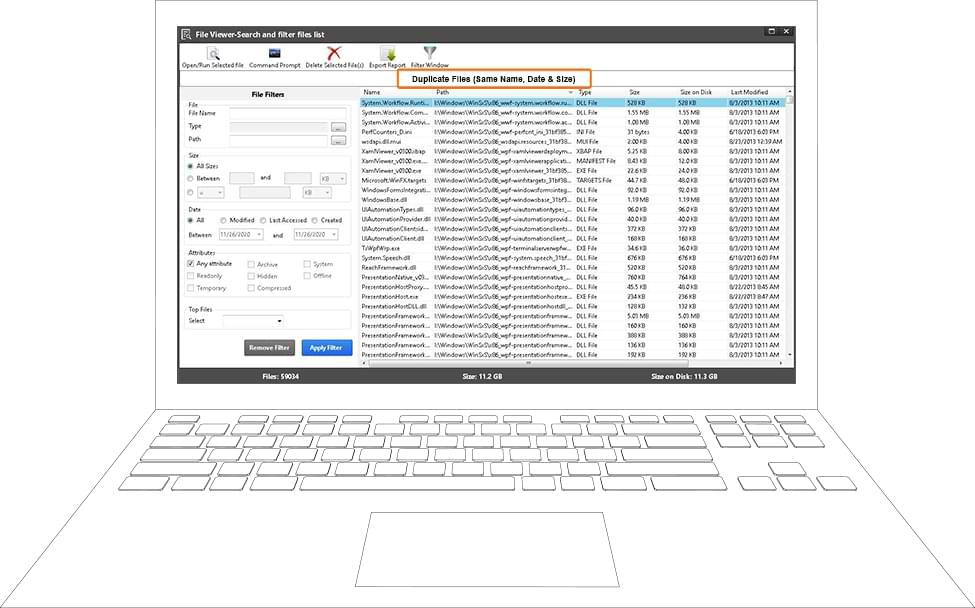
The duplicate files report ("Same Name, Date & Size"): 59,034 files, 11.2 GB, mostly Windows component files that should be left alone.
Network drives, custom searches and exports (Pro)
Disk Analyzer Pro's Pro edition scans network drives and UNC paths (and can map a network drive from inside the program), runs custom searches with your own filters, saves a whole analysis to a single file, lets you define your own file-type reports, and exports any report as HTML, CSV or XML. Exports are what make it useful over time: save a CSV each month and compare how fast a drive is filling.
Benefits
- The answer in one scan. Instead of right-clicking folders for Properties one at a time, you see the whole drive ranked.
- Light and old-PC friendly. A 4.9 MB installer that still supports Windows 7, Vista and XP, which most current tools have dropped.
- Reports you can hand on. HTML and CSV exports suit an office admin who has to show why a server share needs cleaning.
Real-World Uses
- A laptop with a 256 GB SSD: the Overview shows 40 GB of video in Downloads; filter by date, zip or delete the old ones.
- A shared office drive: the Ownership report (Pro) shows whose files take the space before you send the "please clean up" e-mail.
- Before a backup: find and drop ISO files and duplicate installer folders so the backup is smaller and faster.
- An old XP or Windows 7 machine still in use for one program: one of the few maintained analyzers that still installs there.
Who It's For, and Who Should Skip It
It's for Windows users who want a clear, report-style view of their drives, and small-office admins who need network-drive and per-user reports they can export.
Skip it if you only need to find large files on your own PC once in a while: the free Personal edition, or Windows' own Settings > System > Storage page, covers that. Skip the Pro subscription if you don't need network drives or exports, since a free analyzer with a treemap view does the visual part. And Mac users need Systweak's separate Mac app, not this one.
Usage Guide
- Install dapsetup.exe from the download button and launch Disk Analyzer Pro. Watch the installer screens and untick any offer you don't want.
- Pick a drive in the drive list and click Start Scan.
- Read the Overview: the pie chart shows which file types dominate; Top Files by Size shows the biggest single files.
- Drill down through the Size, Date or Types tabs, and double-click a group to open the File Viewer.
- Filter by size, date or attributes, select what you don't need, and choose Delete Selected File(s), or zip it first.
- Pro: export the report to HTML, CSV or XML, or save the whole analysis to compare next month.
Where it falls short
- It shows system files as "deletable". The biggest files on most PCs are hiberfil.sys, pagefile.sys and swapfile.sys, and the duplicate report is full of WinSxS components. Don't delete those from here: turn off hibernation or resize the page file in Windows instead.
- Name-based duplicates only. Duplicates must share name, date and size; renamed copies are missed. For real content matching, a dedicated duplicate finder (such as Systweak's own Duplicate Files Fixer) does better.
- No treemap. The reports are tables and pie charts; there's no block map of the drive like the free treemap tools draw.
- An older-looking interface that hasn't changed much in years.
What Users Say
Disk Analyzer Pro has almost no product-specific reviews on the big review sites: SoftwareSuggest and Alternative.me list it with no user reviews. What there is comes from Systweak's company-wide reputation.
Trustpilot (Systweak Software, all products)
Systweak's company profile has a TrustScore of 3.9 from 279 reviews: 65% five-star and 24% one-star. None of the recent reviews names Disk Analyzer Pro; the complaints are about billing more than the software.
- Brian Ponder, 2 stars, July 2026: "I was secretly enrolled in an automatic annual subscription that charged me a year later without my consent." Systweak replied that subscriptions renew automatically and can be cancelled.
- Adil, 1 star, September 2026: "I paid $40 for their product, but they keep switching my account back to the free plan about once a week."
- Greg Maher, 3 stars, March 2026, "Buyer beware": "They did refund my money, thankfully."
The pattern
Systweak's tools are generally described as simple to use; the recurring complaints are automatic renewals people didn't expect and licenses that needed support to fix. With no independent reviews of this tool, the free Personal edition is the way to judge it: if its local-drive reports already answer your question, you don't need Pro.
Editions and Pricing
| Feature | Free Personal | Pro ($39.95/year) |
|---|
| Local drive space reports | Yes | Yes |
| Delete files, zip files, duplicate report | Yes | Yes |
| Network drive and file ownership reports | No | Yes |
| Custom search with filters | No | Yes |
| Save whole analysis, custom file-type reports | No | Yes |
| Export to HTML, CSV, XML | No | Yes |
FAQs
Is Disk Analyzer Pro free?
Disk Analyzer Pro has a free Personal edition for personal use that scans local drives, deletes and zips files and shows the duplicate report. Network drives, custom searches, ownership reports and exports need the $39.95-a-year Pro license.
Does Disk Analyzer Pro work on Windows 11?
Yes. Systweak lists Disk Analyzer Pro as compatible with Windows 11, 10, 8.1, 8, 7, Vista and XP, both 32 and 64-bit.
Can Disk Analyzer Pro scan a NAS or network share?
Yes, in the Pro edition. Disk Analyzer Pro scans network drives and UNC paths and can map a network drive from inside the program.
Is there a limit on how many files it can scan?
No. Systweak says Disk Analyzer Pro has no file-count limit; it depends on your PC's memory and processor, and it recommends at least 1 GB of RAM for large drives.
Can I get a refund?
Yes. Systweak offers a 60-day money-back guarantee on Disk Analyzer Pro; request it through a support ticket. After 60 days, refund requests are reviewed case by case.
Is Disk Analyzer Pro safe to install?
The Disk Analyzer Pro installer we downloaded was signed by Systweak Software. Malwarebytes does flag some Systweak programs as potentially unwanted (PUP.Optional.Systweak), so read each installer screen and don't let any cleanup tool delete Windows system files.
System Requirements
- Windows 11, 10, 8.1, 8, 7, Vista or XP (32 or 64-bit)
- At least 1 GB of RAM for high-capacity drives
- About 5 MB for the installer
Conclusion
Disk Analyzer Pro does one job clearly: it tells you what's filling a Windows drive and lets you act on it. Start with the free Personal edition; for most home users it's enough. The Pro license at $39.95 a year makes sense for someone looking after network shares or several PCs who needs per-user reports and CSV exports. The main reason not to pay is that free analyzers cover the home case well, and the subscription renews unless you cancel.
Download Free EditionBuy Pro ($39.95/year)