Advanced PC Cleanup: One-Click Windows Cleaner for Junk, Drivers, Startup and Large Files
Advanced PC Cleanup is a $39.95-a-year Windows cleaner from Systweak Software that finds junk and temporary files, outdated drivers, startup clutter, large forgotten files and malware traces in one scan, and fixes them with a single button. It's aimed at people who want one dashboard for routine PC housekeeping rather than five separate tools.
A Windows PC that has been in use for a few years carries gigabytes of cached data, crash logs and old installers, a startup list that keeps growing, and drivers that were never updated after the first week. Windows can deal with most of it, but the tools are spread across Settings, Disk Cleanup, Task Manager and Device Manager. Advanced PC Cleanup puts all of that in one window, with a count of what it found in each area.
Quick facts
- Version: 3.33.33.10081 (installer dated July 13, 2026)
- Developer: Systweak Software, Jaipur, India
- Platform: Windows 11, 10, 8.1, 8 and 7 SP1, 32-bit and 64-bit (not ARM-based PCs)
- Modules: One Click Care, Driver Updater, Junk Cleaner, Temporary Files, Invalid Registry, Malware Protection, Identity Protection, Startup Manager, Uninstall Manager, Space Manager, Disk Analyzer
- Price: $39.95 per year for one PC, renewing automatically
- Free version: scans everything, fixes only part of what it finds; Malware Protection needs a license
- Guarantee: 60-day money-back guarantee
- What we checked: the installer from cdn.systweak.com (9.7 MB, file version 3.33.33.10081, digitally signed by Systweak Software), the free versus full table and user guide on advancedpccleanup.com, and the order page price of $39.95 with automatic yearly renewal on November 20, 2026. We didn't run it on a test PC; the screenshots are Systweak's own.
Before you buy
- It's a subscription. The order page marks the license as auto-renewal, and Systweak's price page says it's billed annually, with an e-mail before each renewal. Cancel by writing to support@systweak.com.
- The countdown resets. The price page shows $69.95 crossed out and a "special download price" of $39.95 that ends the next day, every day. $39.95 is the normal price.
- Extras on the order page. A free Systweak Photo Organizer license is included. Systweak's price page also pushes Systweak Antivirus as a discounted add-on; only add what you want, and sales tax may be added for your location.
- Microsoft doesn't support registry cleaners. One Click Care includes an Invalid Registry scan. Microsoft's support policy says it doesn't support registry cleaning utilities and isn't responsible for problems they cause, so create a restore point first and treat registry "errors" as optional.
- Some security tools are wary of Systweak. Malwarebytes has a detection family, PUP.Optional.Systweak, for Systweak programs it considers potentially unwanted. The Advanced PC Cleanup installer we downloaded carried a valid Systweak Software signature.
Download Free TrialBuy Now ($39.95/year)
Overview
Advanced PC Cleanup is laid out as a left-hand menu split into Cleaner (System Status, One Click Care, Driver Updater, Malware Protector, Identity Protector, Junk Cleaner, Temporary Files) and Manager (Startup Manager, Uninstall Manager, Space Manager, Disk Analyzer). Each module shows a yellow banner with what it found and a Fix All Items button, a table of items with View Details and Manual Fix links, and a Rescan button.
The quickest route is One Click Care, which runs every cleaner module at once and gives a single total. The managers are tools you use on purpose: deciding which apps start with Windows, removing programs, and finding the files that take the most space.
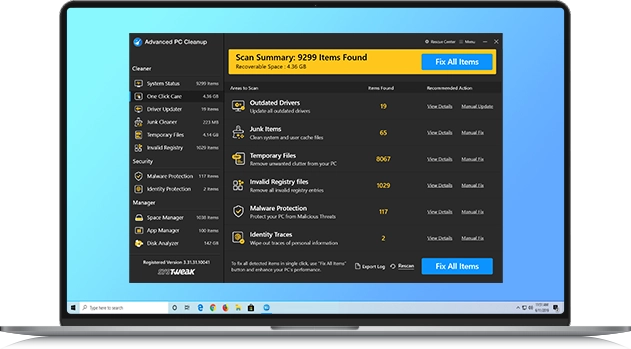
One Click Care: 10,258 items and 5.14 GB recoverable, broken down into 19 outdated drivers, 5 malware traces, 2 identity traces, 386 junk items and 9,846 temporary files, with a Fix All Items button.
Features
Junk Cleaner and Temporary Files clear the clutter
Advanced PC Cleanup's Junk Cleaner looks for log files, crash dumps, system cache and program leftovers, and Temporary Files goes after cache, logs, old prefetch data and reports left by browsing, installs and updates. Both show the total size first and remove everything with one click, or you can untick items. Systweak suggests running Junk Cleaner weekly; a scheduled scan can do it for you from Settings, Schedule.
Driver Updater lists outdated drivers
Advanced PC Cleanup's Driver Updater checks every device driver, lists the outdated or missing ones with their device category, and updates them all with Fix All Items or one at a time with Manual Update. It's a lighter version of what Systweak sells separately as Advanced Driver Updater.
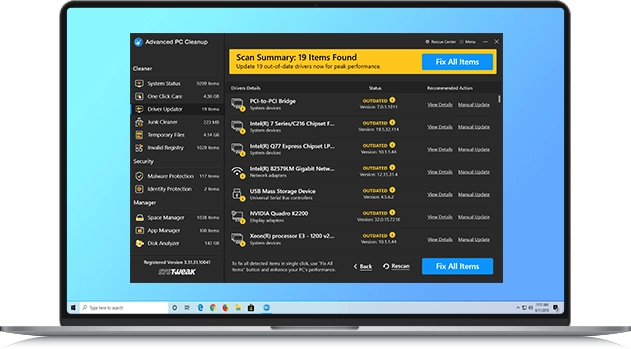
Driver Updater: 19 outdated drivers found, including chipset, network, USB and an NVIDIA Quadro display adapter, each marked OUTDATED with Manual Update.
Malware Protection scans for threats (registered version)
Advanced PC Cleanup's Malware Protection scans for malware, spyware and PUPs and lists each detection by name, category and file path, with Fix All Items to remove them. Systweak's user guide says this module works only in the registered version. It's an on-demand scanner, not real-time protection, so keep Windows Security or your antivirus running.
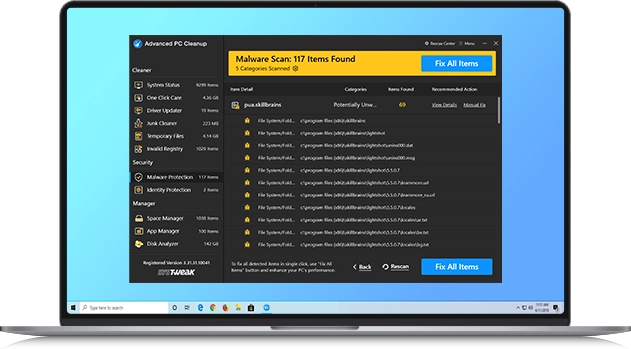
Malware Protector: 5 malware traces in two trojan families, with the file path of each sample.
Identity Protection finds saved logins
Advanced PC Cleanup's Identity Protection scans browsers for saved usernames and passwords and lets you wipe them. You can reveal a password with the eye icon after a warning, and untick anything you want to keep. Read the list carefully: in Systweak's own screenshot the two "identity traces" are Windows encryption keys stored for Microsoft Store installs, not website logins, and wiping saved passwords means typing them again everywhere.
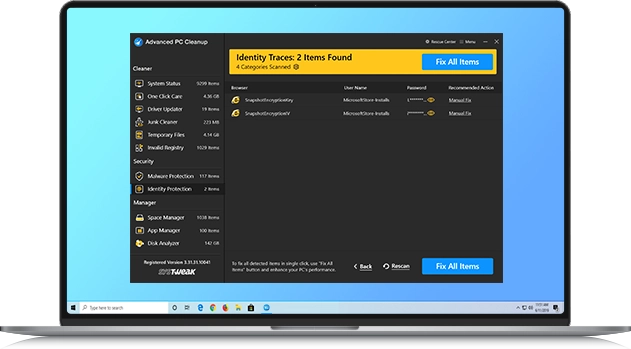
Identity Protector: 2 identity traces, SnapshotEncryptionKey and SnapshotEncryptionIV for MicrosoftStore-Installs, with masked passwords.
Space Manager and Disk Analyzer find what fills the drive
Advanced PC Cleanup's Space Manager lists Large Files above a size you pick (10 MB and up) in a folder you choose, and Old Downloads you no longer need, each with its date and size. Disk Analyzer scans a drive and breaks the space down by file type, so you can see whether videos, archives or installers are the problem. These are often worth more than the junk cleaners: one forgotten video project can outweigh months of temp files.
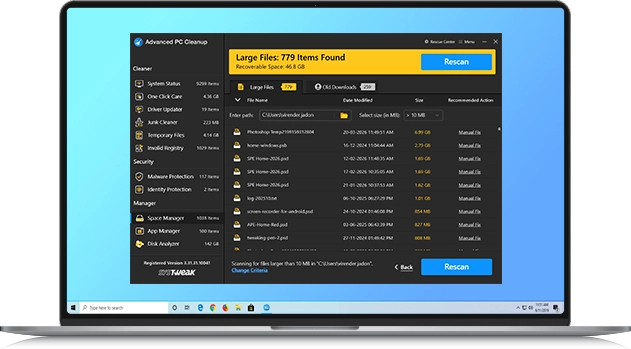
Space Manager: 832 files larger than 10 MB in a user folder, 42.8 GB in total, with Large Files and Old Downloads tabs.
Startup Manager and Uninstall Manager
Advanced PC Cleanup's Startup Manager lists the programs that launch with Windows so you can stop the ones you don't need at boot, and the Uninstall Manager removes programs and the files they leave behind. Windows can do the first in Task Manager and most of the second in Settings; here they sit in the same window as the cleaners.
Benefits
- One place for housekeeping. Junk, temp files, startup, uninstalls, drivers and storage in one window instead of five Windows tools.
- A number before you act. Every module shows how many items and how many gigabytes it found, so you can decide whether it's worth fixing.
- Storage problems you'd miss. Large Files and Disk Analyzer point to the files that actually fill a drive.
- Set and forget. Scheduled scans keep the junk from building up again.
Real-World Uses
- A laptop with a nearly full SSD. Run Space Manager for files over 1 GB and Old Downloads, then Junk Cleaner and Temporary Files, and see what comes back.
- A PC that takes ages to boot. Open Startup Manager and switch off the updaters, chat apps and launchers that don't need to start with Windows.
- A hand-me-down PC. Uninstall Manager for the previous owner's programs, Driver Updater for old drivers, then One Click Care.
- Routine upkeep for a relative. Set a weekly scheduled scan so the junk doesn't pile up between visits.
Who It's For, and Who Should Skip It
Good fit: Windows users who aren't comfortable with Disk Cleanup, Task Manager and Device Manager and want one program that shows what's taking space and slowing boot, and are happy to pay yearly for the convenience.
Skip it if: you're comfortable with Windows' own Storage Sense, Disk Cleanup and Startup apps page, which cover most of the cleaning for free; you want real malware protection, which needs a real-time antivirus, not an on-demand scan; you're on an ARM-based PC, which isn't supported; or you'd rather avoid registry cleaning altogether. Systweak's Advanced System Optimizer is the bigger, more manual toolkit if you want more knobs.
Usage Guide
- Create a restore point. Type "Create a restore point" in the Start menu and make one before the first cleanup.
- Install. Download the 9.7 MB installer and run it with administrator rights. Read each setup screen; Systweak installers can offer other Systweak programs.
- Run One Click Care. Let it scan, then open each category with View Details before pressing Fix All Items.
- Review the sensitive ones. In Identity Protection untick anything you want to keep, and treat Invalid Registry results as optional.
- Use the managers. Startup Manager to trim boot programs, Space Manager and Disk Analyzer to find large files, Uninstall Manager for unused programs.
- Schedule. In Settings, Schedule, pick a day and time for a regular scan.
- Register. After buying, enter the license key you receive by e-mail to turn on full fixing and Malware Protection.
Where it falls short
- Big numbers, small gains. Item counts in the thousands mostly come from temporary files. Deleting them frees space but rarely makes a PC noticeably faster, and browsers and Windows rebuild much of the cache.
- Not an antivirus. Malware Protection is an on-demand scan in the paid version. TechRadar's Michael Graw described it as one that "searches for malware as part of its scans and calls attention to infected files"; it doesn't stop threats as they arrive.
- Overlap with Windows. Storage Sense, Disk Cleanup, Task Manager's Startup apps and Settings, Apps do much of the same for free.
- Thin independent testing. We found no recent hands-on review of the current version from a tech magazine, and few user reviews that name it.
What Users Say
TechRadar
Michael Graw's October 2020 TechRadar review of Systweak's range says "Advanced PC Cleanup is similar to Advanced System Optimizer, but it offers more of a one-click solution." He adds: "This Windows system utility will automatically scan your PC for junk files, such as cached data and old downloads. You can then delete everything it finds, or dive into the scan results to pick and choose what files to eliminate." His overall verdict on Systweak: "Systweak offers more than two dozen high-quality system utilities for business PCs."
Trustpilot (Systweak Software, all products)
Systweak's company profile has a TrustScore of 3.9 from 279 reviews: 65% five-star and 24% one-star. Most reviews name other Systweak tools; the complaints are about billing more than the software.
Christopher Caldwell, 1 star, December 2025, "Asks for more money every time you use it": "Every time you buy something it does not work and wants you to upgrade and pay more."
John Scoggins, 1 star, February 2026: "I asked why I was being billed for things I never purchased."
Adil, 1 star, September 2026: "I paid $40 for their product, but they keep switching my account back to the free plan about once a week."
Greg Maher, 3 stars, March 2026, "Buyer beware": "They did refund my money, thankfully."
The pattern
Reviewers who describe the program itself find it easy: one scan, a clear list, one button. The recurring complaints across Systweak's products are about money: automatic renewals people didn't expect, prompts to buy other Systweak tools, and licenses that needed support to fix. There's little independent, product-specific feedback on Advanced PC Cleanup, so use the free scan to see what it finds on your own PC before paying.
Comparisons
Advanced PC Cleanup vs Advanced System Optimizer
Both are Systweak's. Advanced PC Cleanup is the one-click option with a short list of modules. Advanced System Optimizer is the larger toolkit with more separate tools and settings. If you want to press one button, pick PC Cleanup; if you like going through each tool yourself, Optimizer.
Advanced PC Cleanup vs Windows' own tools
Storage Sense and Disk Cleanup clear temp files and the Recycle Bin, Task Manager handles startup apps, and Settings removes programs, all free. Windows has no single dashboard, no large-file finder that lists files by size across folders, and no driver update list beyond Windows Update. That convenience is what the $39.95 a year buys.
Editions and Pricing
| Edition |
Price |
License |
What you get |
| Free version |
$0 |
No time limit |
All scans, limited fixing, no Malware Protection |
| Advanced PC Cleanup |
$39.95 per year |
1 PC, renews automatically |
Full fixing in every module, Malware Protection, free Systweak Photo Organizer |
FAQs
Does Advanced PC Cleanup replace my antivirus?
No. Advanced PC Cleanup's Malware Protection is an on-demand scan available in the registered version. It doesn't watch files as they arrive, so keep Windows Security or another real-time antivirus turned on.
Does Advanced PC Cleanup work on Windows on ARM laptops?
No. Systweak's system requirements say ARM-based devices aren't supported; it needs an Intel or AMD processor with SSE2.
Is it safe to let Advanced PC Cleanup fix everything?
Advanced PC Cleanup's junk and temporary file cleaning is low-risk. Registry cleaning and wiping saved browser logins are the parts to review item by item, and Microsoft doesn't support registry cleaners. Make a restore point before the first full cleanup.
How do I cancel the Advanced PC Cleanup subscription?
Advanced PC Cleanup renews every 12 months. Systweak's price page says you can cancel at any time by e-mailing support@systweak.com, and that you'll get an e-mail before each renewal.
Can I get a refund for Advanced PC Cleanup?
Systweak gives a full refund within 60 days of purchase. Submit a ticket at systweak.com/contact-us with your name, order number, product name, purchase date and order e-mail; the refund usually arrives in 5 to 7 business days.
Is there a Mac version of Advanced PC Cleanup?
Advanced PC Cleanup is Windows only. Systweak's Mac cleaner is a separate product, Cleanup My System.
Can Advanced PC Cleanup run automatically?
Yes. In Advanced PC Cleanup's Settings, Schedule, you choose the schedule type, date and time, and the scan runs on its own.
System Requirements
- Windows 11, 10, 8.1, 8 or 7 SP1, 32-bit or 64-bit
- Intel Pentium 4 or AMD Athlon 64 or newer with SSE2; ARM-based devices not supported
- 2 GB RAM on 64-bit Windows, 1 GB on 32-bit
- 500 MB free disk space, 1024x768 screen or higher
- Internet connection and administrator rights to install
Conclusion
Advanced PC Cleanup is worth $39.95 a year for someone who wants one window and one button for routine Windows housekeeping, and who will actually use the large-file finder, startup manager and scheduled scans. The reason to buy it is convenience: everything Windows scatters across five places, with sizes and counts up front. The main reason not to is that Windows already does most of the cleaning for free, the malware scan isn't real protection, and the license renews every year. Run the free scan first; if the Space Manager and Startup lists show real problems you'd otherwise ignore, it earns its price.
Download Free TrialBuy Now ($39.95/year)