Duplicate Files Fixer: Find and Delete Duplicate Files on Windows, External Drives and Cloud Storage
Duplicate Files Fixer is a $39.95-a-year Windows tool from Systweak Software that finds duplicate documents, photos, music and videos by their contents, on your PC, external drives, Google Drive and Dropbox, and removes the extra copies in one click. The free version does the same scan and deletes up to 15 duplicates at once, so you can see what it finds before paying.
Copies pile up without anyone meaning to make them: the same attachment saved three times, phone photos imported twice, an old backup folder you forgot about, a Downloads folder that has never been cleaned. Windows has no built-in duplicate finder, and hunting by file name misses the copies that were renamed along the way. Duplicate Files Fixer compares what's inside each file, so "Holiday.jpg" and "IMG_2025.jpg" show up as the same photo if they are.
Quick facts
- Version: 2.0.1.3190 (installer dated October 16, 2026), the release Systweak calls the new version with a redesigned interface and a faster scan engine
- Developer: Systweak Software, Jaipur, India
- Platform: Windows 11, 10, 8.1, 8 and 7, 32-bit and 64-bit (separate Mac and free Android versions exist)
- What it scans: internal and external drives, USB sticks and memory cards, Google Drive, Dropbox, a connected phone, EML e-mail files, empty folders
- Price: $39.95 per year for one PC, renewing automatically
- Free version: full scan and preview, deletes 15 duplicates at once, then one group at a time
- Guarantee: 60-day money-back guarantee
- What we checked: the installer from cdn.systweak.com (18.4 MB, file version 2.0.1.3190, digitally signed by Systweak Software), the free versus registered table and user guide on duplicatefilesfixer.com, and the order page price of $39.95 with automatic yearly renewal on November 20, 2026. We didn't run a scan on a test PC, and the screenshots below come from Systweak's user guide, which still shows the 1.x interface.
Before you buy
- It's a subscription. The order page marks the license as auto-renewal, and Systweak's price page says it's billed annually and that you'll get an e-mail before each renewal. To stop it, write to support@systweak.com. Several Trustpilot complaints about Systweak are from buyers who didn't notice the renewal.
- The countdown resets. The price page shows $69.95 crossed out and a "special download price" of $39.95 that ends the next day, every day. $39.95 is the normal price you'll pay.
- Extras on the order page. A free Systweak Photo Organizer license comes with the order and Duplicate Photos Fixer is offered as a discounted add-on. Only add what you want; sales tax may be added for your location.
- Some security tools are wary of Systweak. Malwarebytes has a detection family, PUP.Optional.Systweak, for Systweak programs it considers potentially unwanted. The Duplicate Files Fixer installer we downloaded carried a valid Systweak Software signature.
Download Free TrialBuy Now ($39.95/year)
Overview
Duplicate Files Fixer opens on a single window: a Last Scan Status strip at the top with the number of duplicates found and the space you'd get back, a choice between All Files and Custom Scan (documents, pictures, videos, music, archives, other), and tabs for the folders to include, exclude and protect. You drag a folder in or click Add Folder, pick a Scan Mode, and press Scan for Duplicates.
When the scan ends, it asks whether you want to select the copies yourself or let Auto Mark do it. The results window lists each file with its copies, split into tabs (All Files, Documents, Images, Music, Videos, Archives, Other Files), with a preview and the file's properties on the right. Delete Marked sends the selected copies to the Recycle Bin.
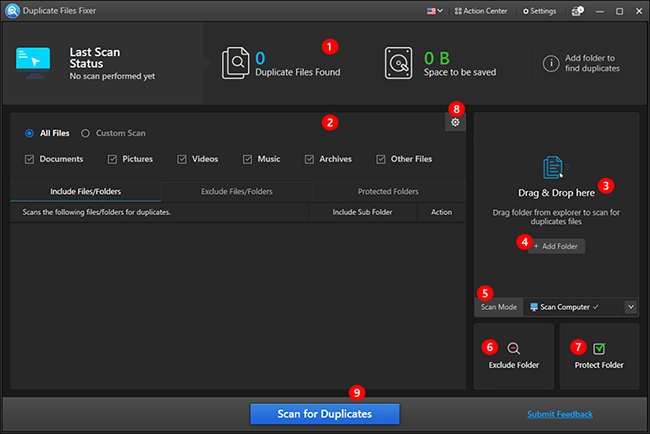
The main window, numbered by Systweak's user guide: last scan status, All Files or Custom Scan, the drag-and-drop area, Scan Mode, Exclude Folder, Protect Folder and the Scan for Duplicates button.
Features
Matches files by content, not just by name
Duplicate Files Fixer compares the contents of each file, so renamed copies are caught. In the scan settings you can also look for files with the same or a similar name, the same created date or the same modified date, and set a minimum and maximum file size so small icons or huge videos stay out of the results. The image list covers RAW formats from most camera makers (CR2, CR3, NEF, ARW, DNG, ORF, RW2 and others) as well as HEIC and WebP.
Auto Mark keeps one copy of everything
Duplicate Files Fixer's Auto Mark selects every extra copy in each group and leaves one unmarked. Which copy survives is set in the Selection Assistant: rules by created date, by folder, by size (the larger file is kept) and by file format, in an order you can change. Files in a Protected Folder are never marked, so you can shield your main photo library and let it clear the copies elsewhere.

Scan results: Automark and UnMark at the top, duplicate groups on the left, a photo preview with file properties on the right, and Delete Marked at the bottom (Systweak's image, with a magnifier added).
Scans Google Drive and Dropbox without downloading
Duplicate Files Fixer for Windows can sign in to Google Drive or Dropbox, scan the folders you pick there and delete the copies in the cloud, so you don't have to sync everything to the PC first. Deleted cloud files go to that service's own trash. The same Scan Mode menu has Mobile SmartScan for a connected phone, Delete Empty Folders and an EML scan for duplicate saved e-mails.

The Scan Mode menu: Scan Computer, Scan Google Drive, Scan Dropbox, Mobile SmartScan, Delete Empty Folders and EML Scan Mode.
Deletes to the Recycle Bin, with a warning where it can't
Duplicate Files Fixer moves files deleted from local drives to the Recycle Bin by default, so a wrong choice can be restored. Before it deletes, it warns that copies on a network drive, external drive or mobile device are removed permanently, which is the case to slow down for. It also skips Windows and system folders by default.
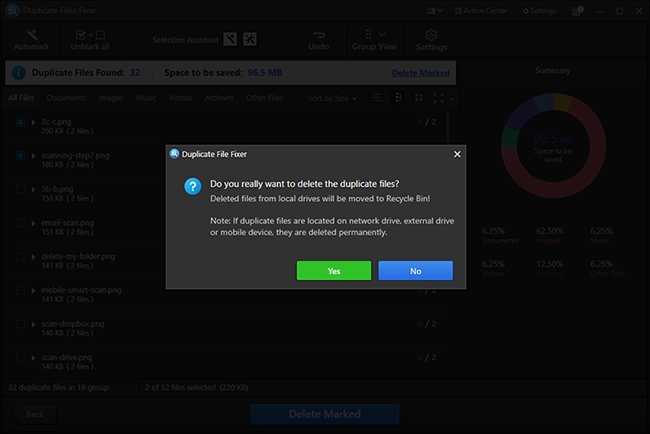
The delete confirmation: local files go to the Recycle Bin, while files on network drives, external drives or mobile devices are deleted permanently.
Cleans out empty folders
Duplicate Files Fixer's Delete Empty Folders mode scans a drive or folder and shows a tree with empty folders in red, protected ones in blue and hidden, locked or trash-holding folders marked by icon. After a big duplicate cleanup this clears the shells that are left. An Undo button works for the current session.

Delete Empty Folders: 35 empty directories found on drive E:, highlighted in red, with an icon legend on the right.
Benefits
- Space back without guesswork. The scan tells you how much space the copies take before you delete anything, so you know whether a cleanup is worth it.
- Thousands of copies in one pass. Selecting extra copies by hand is fine for 20 files and hopeless for 4,000. Auto Mark plus Protected Folders turns it into a few clicks.
- Cloud storage you don't have to pay to upgrade. Clearing duplicates in Google Drive or Dropbox can keep you under a storage tier.
- A safety net. Recycle Bin by default and system folders skipped make it hard to break Windows with it.
Real-World Uses
- The photo archive that grew three times. Phone imports, a camera card copied twice and a "Pictures backup" folder: protect the main library folder, scan the rest, Auto Mark and delete.
- An external backup drive that's full. Years of copied-in backups overlap. Scan the drive, but look before you delete: on an external drive the deletion is permanent, and some copies may be there on purpose.
- A music collection from several sources. Ripped CDs plus downloaded albums plus a phone sync leave the same MP3s in several folders. A Custom Scan limited to Music keeps the results short.
- Google Drive close to its quota. Scan the Drive folders directly and remove the copies there instead of buying more storage.
- Tidying after a cleanup. Run Delete Empty Folders to remove the folder skeletons the deletions left.
Who It's For, and Who Should Skip It
Good fit: Windows users with a large, messy collection of photos, music or documents across internal drives, external drives and Google Drive or Dropbox, who want a guided cleanup with sensible defaults and don't want to learn a technical tool.
Skip it if: you only need one cleanup and don't want a yearly subscription to remember to cancel; you mainly have near-identical photos (bursts, edited versions), which Systweak's separate Duplicate Photos Fixer Pro is built for; or you're comfortable with free, open-source duplicate finders, which do exact-content matching without a license. If you've had trouble with Systweak's renewals or pop-ups before, the free version's 15-at-once limit and one-group-at-a-time deletion may already be enough for a small job.
Usage Guide
- Install. Download the installer (about 18 MB), run it and follow the prompts. Systweak's installers can offer other Systweak programs, so read each screen.
- Choose what to scan. Leave All Files selected, or switch to Custom Scan and tick only the file types you care about.
- Pick a Scan Mode. Scan Computer for drives and USB devices, Scan Google Drive or Scan Dropbox for the cloud (you'll sign in and grant access), or one of the special modes.
- Add folders. Drag folders in or click Add Folder. Add your main library under Protected Folders and anything you never want touched under Exclude.
- Scan. Click Scan for Duplicates. Big drives take a while.
- Select. Choose Auto Mark, or Select Manually and go through the groups with the preview pane. Check the Selection Assistant rules first if it matters which copy survives.
- Delete. Click Delete Marked and confirm. Local files go to the Recycle Bin; empty it only once you're happy.
- Register. After buying, click the orange Activate Now button (or the cog icon, then Enter Activation code) and paste your key.
Where it falls short
- Exact copies, not lookalikes. The content match finds identical files. A resized or re-edited photo is a different file to it. One Trustpilot reviewer says it "doesn't match up most of my duplicate pictures", which is the usual result when the "duplicates" are really similar photos.
- Permanent deletes off the PC. Files removed from USB drives, external drives, network drives and phones skip the Recycle Bin.
- The free version is slow for big jobs. 15 duplicates in one go, then one group at a time with the trash icon: fine for a folder, tedious for thousands.
- Uninstall and pop-up complaints. A Trustpilot reviewer says he couldn't uninstall it, and buyers of Systweak's tools complain about prompts for other Systweak products. Systweak publishes uninstall instructions on the product site.
- Screenshots lag the release. The user guide still shows the 1.x interface, while version 2.0 has a redesigned one.
What Users Say
Trustpilot (duplicatefilesfixer.com)
The product's own Trustpilot page has a TrustScore of 3.8 from only 7 reviews, split three five-star and four one-star. Trustpilot notes the company hasn't invited customers to review.
Swati Gupta, 5 stars, October 2026: "I used duplicate files fixer to clean all the duplicate videos from my external drive."
Amara Smith, 5 stars, September 2026: "I have used Duplicate Files Fixer for for fixing my Duplicate File from my Onedrive Account. Working well for me."
Pooja agarwal, 5 stars, September 2026: "Well I have been using this app quite a long time. This long I have never faced aa such any major problem."
David Barrett, 1 star, December 2025: "Doesn't match up most of my duplicate pictures. Also it rated itself with a 5 star review."
Matt, 1 star, December 2025, "Do NOT download this app": "I cannot uninstall their app, I have tried everything I know."
J Miller, 1 star, May 2020: "Their website says they are the #1 rated File Fixer on Trustpilot and they have not other reviews nor rating."
Trustpilot (Systweak Software, all products)
Systweak's company profile has a TrustScore of 3.9 from 279 reviews: 65% five-star and 24% one-star. Several reviews name Duplicate Files Fixer.
Brian Ponder, 2 stars, July 2026, "Mediocre Software with Deceptive Subscription Practices", about Duplicate Files Fixer and Duplicate Photos Fixer: "I was secretly enrolled in an automatic annual subscription that charged me a year later without my consent."
Greg Maher, 3 stars, March 2026, "Buyer beware", about Duplicate Files Fixer: "They did refund my money, thankfully."
Adil, 1 star, September 2026: "I paid $40 for their product, but they keep switching my account back to the free plan about once a week."
Adrian Bessell, 5 stars, December 2021, who bought several Systweak tools on annual subscriptions: "Have purchased a suite of programs with Systweak, Duplicate photos fixer (DPF), Dupicate files fixer (DFF)".
Review sites
On G2, Duplicate Files Fixer averages 4.4 out of 5 from 28 reviews; reviewers there mostly praise how easy it is and that it deletes cloud duplicates without downloading them first, and one disliked how long repeated files took to open. SourceForge shows a single user review at 4 out of 5. Independent hands-on tests by tech magazines are hard to find for the current version.
The pattern
People who used it on drives and cloud folders say it finds the copies and the cleanup is easy, including on external drives and OneDrive-synced folders. The complaints are mostly not about the scan: they're about the automatic yearly renewal, license and activation trouble, removal, and the expectation that it finds similar photos, which it isn't built for. Buy it with the renewal date in your calendar.
Comparisons
Duplicate Files Fixer vs Duplicate Photos Fixer Pro
Both are Systweak's, both $39.95 a year. Duplicate Files Fixer handles every file type and exact copies, plus cloud, phone, EML and empty-folder modes. Duplicate Photos Fixer Pro is for pictures only, and also finds similar photos (bursts, slightly different shots) with an adjustable matching level. Mostly a photo problem with near-duplicates: Photos Fixer. Mixed files and exact copies: Files Fixer.
Free version vs paid
Systweak's user guide says the only difference is how many duplicates you can delete in one go: 15 in the free version, all of them with a license. Scanning, cloud scanning, preview and the Selection Assistant all work in the free version, so you can judge the results before you pay.
Editions and Pricing
| Edition |
Price |
License |
What you get |
| Free version |
$0 |
No time limit |
All scans and previews, 15 deletions at once, then one group at a time |
| Duplicate Files Fixer (Windows) |
$39.95 per year |
1 PC, renews automatically |
Unlimited one-click deletion, priority e-mail support, free Systweak Photo Organizer |
FAQs
Does Duplicate Files Fixer delete files permanently?
Duplicate Files Fixer moves files from your PC's own drives to the Recycle Bin by default, so you can restore them until you empty it. Files on USB sticks, external drives, network drives and phones are deleted permanently, and cloud deletions go to Google Drive's or Dropbox's trash.
Can Duplicate Files Fixer find similar photos, not just exact copies?
Duplicate Files Fixer is built for exact duplicates, found by comparing file contents, plus name and date matches you can switch on. For near-identical photos such as bursts or edited versions, Systweak sells Duplicate Photos Fixer Pro.
Does it work with OneDrive or iCloud?
Duplicate Files Fixer has built-in scan modes for Google Drive and Dropbox only. For OneDrive or iCloud Drive, scan the folders those services sync to your PC, as with any local folder.
How do I cancel the Duplicate Files Fixer subscription?
Duplicate Files Fixer's license renews every 12 months. Systweak's price page says you can cancel at any time by e-mailing support@systweak.com, and that it e-mails you before each renewal. Cancel before the renewal date if you don't want another year.
Can I get a refund if Duplicate Files Fixer doesn't suit me?
Systweak offers a full refund within 60 days of purchase. You submit a ticket through systweak.com/contact-us with your name, order number, product name, purchase date and order e-mail, and the money usually arrives in 5 to 7 business days.
Is the license for one PC?
The Duplicate Files Fixer license sold on the order page covers one Windows PC for one year. The Mac version is a separate purchase, and the Android app is free on Google Play.
Which languages does Duplicate Files Fixer support?
Duplicate Files Fixer runs in English, Japanese, German, Dutch, Finnish, French, Danish, Italian, Norwegian, Portuguese, Russian, Spanish and Swedish, switched from the flag menu at the top of the window.
Does Duplicate Files Fixer need an internet connection?
Duplicate Files Fixer only needs the internet to download, update and activate, and for Google Drive and Dropbox scans. Scanning local and external drives works offline.
System Requirements
- Windows 11, 10, 8.1, 8 or 7, 32-bit or 64-bit
- 800 MHz processor or faster
- 512 MB RAM or more
- 50 MB free disk space
- Internet connection to download, update and activate, and for cloud scans
Conclusion
Duplicate Files Fixer is worth $39.95 if you have a big, mixed pile of exact copies spread across drives and Google Drive or Dropbox, and you want Auto Mark and protected folders to do the selecting for you. The reason to buy it is that it turns a cleanup of thousands of files into a few clicks, with the Recycle Bin as a safety net. The reason not to is the subscription: it renews every year, and Systweak's reviews are full of buyers who missed that. Start with the free version, which shows exactly what it finds and clears 15 files at once; if the list is long, buy one year and cancel the renewal by e-mail if you only needed one cleanup.
Download Free TrialBuy Now ($39.95/year)