Vovsoft Image Combiner: Merge Many Images into One Strip or Grid, Offline
Image Combiner is a $19 Windows program from Vovsoft that joins any number of JPG, PNG, WEBP, GIF, TIFF or BMP images into one picture: stacked vertically, side by side, or in a grid with the number of columns you choose. It keeps the original size and quality, keeps PNG transparency, and handles outputs over 65,535 pixels. The $19 is a one-time lifetime license, and the free trial limits the number of images.
It's for long webtoon or comic strips, contact sheets, a run of screenshots, or the front and back of scanned photos joined into one file.
Quick facts
- Version: 2.2, released February 18, 2026
- Developer: Vovsoft
- Platform: 64-bit Windows 11, 10, 8/8.1, 7 and Vista. No Mac version
- Input: JPG, PNG, WEBP, GIF, TIFF and BMP, mixed formats are fine
- Layouts: vertical, horizontal, or a grid with a set number of columns
- Output: PNG, JPG or GIF, over 65,535 pixels for PNG, TIFF and BMP
- Options: spacing in pixels, background color, transparency, EXIF orientation, duplicate images
- Price: $19, one-time payment, lifetime license with free updates
- Trial: free, with a limited number of images per combination, for personal use
- What we checked: installer file version 2.2.0.0 (17,962,904 bytes) with a valid code signature, downloaded from the vendor on November 11, 2026, and $19.00 on the order page with no auto-renewal on November 11, 2026
Download Free TrialBuy Now
Overview
Add files, a folder, or drag images in, and Image Combiner lists them with their width and height. Arrow buttons move the selected image up, down, to the top or to the bottom, because the list order is the order in the final picture. Pick Merge Vertically, Merge Horizontally or Grid Layout, click Combine, and the merged image is saved to the folder you choose.
There's no canvas or dragging pieces around: it's a quick, exact join, which is what most of these jobs need.

Eight 1024 x 768 photos in the list, merged into a 1024 x 6144 vertical strip (left) and an 8192 x 768 horizontal strip (top).
Features
Strips and grids
Image Combiner stacks images in one column for a webtoon or a phone screenshot sequence, in one row for a panorama-style strip, or in a grid with as many columns as you set, such as 8 x 8 for 64 images.
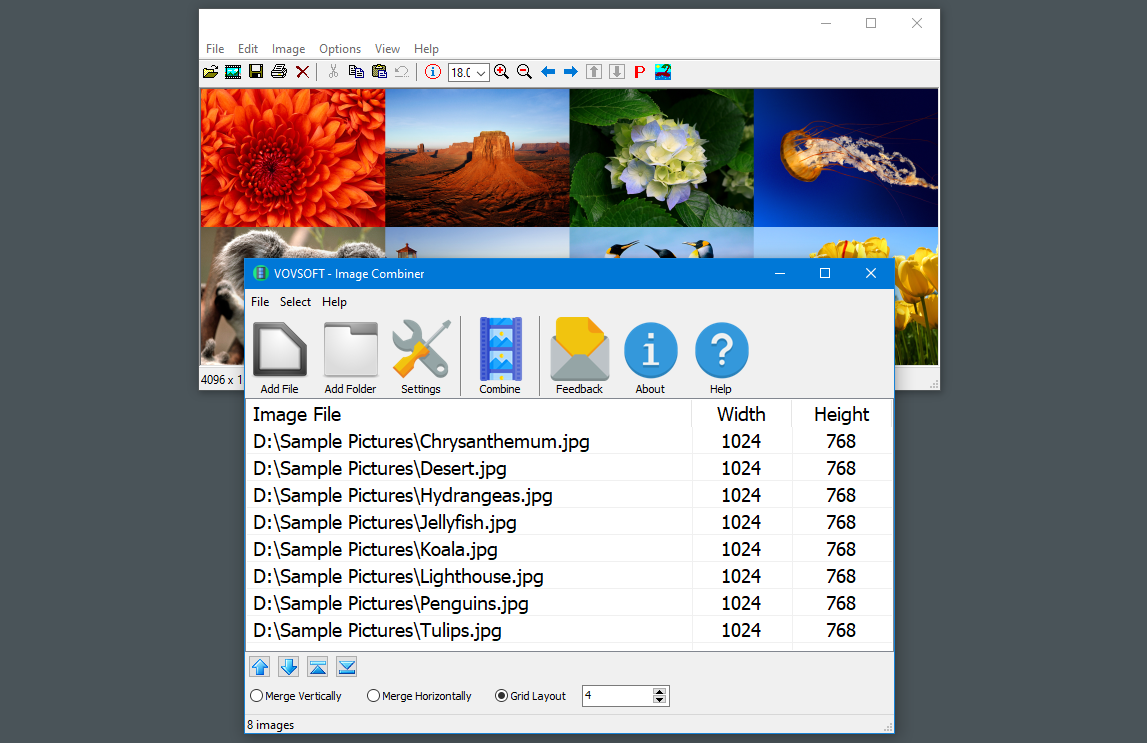
Grid Layout with 4 columns: the eight photos become a 4 x 2 grid.
Spacing, background and transparency
Image Combiner adds a gap of a set number of pixels between images, fills empty space with black, white or any custom color, and keeps the alpha channel of PNG, WEBP and BMP files, so you can build a transparent PNG.
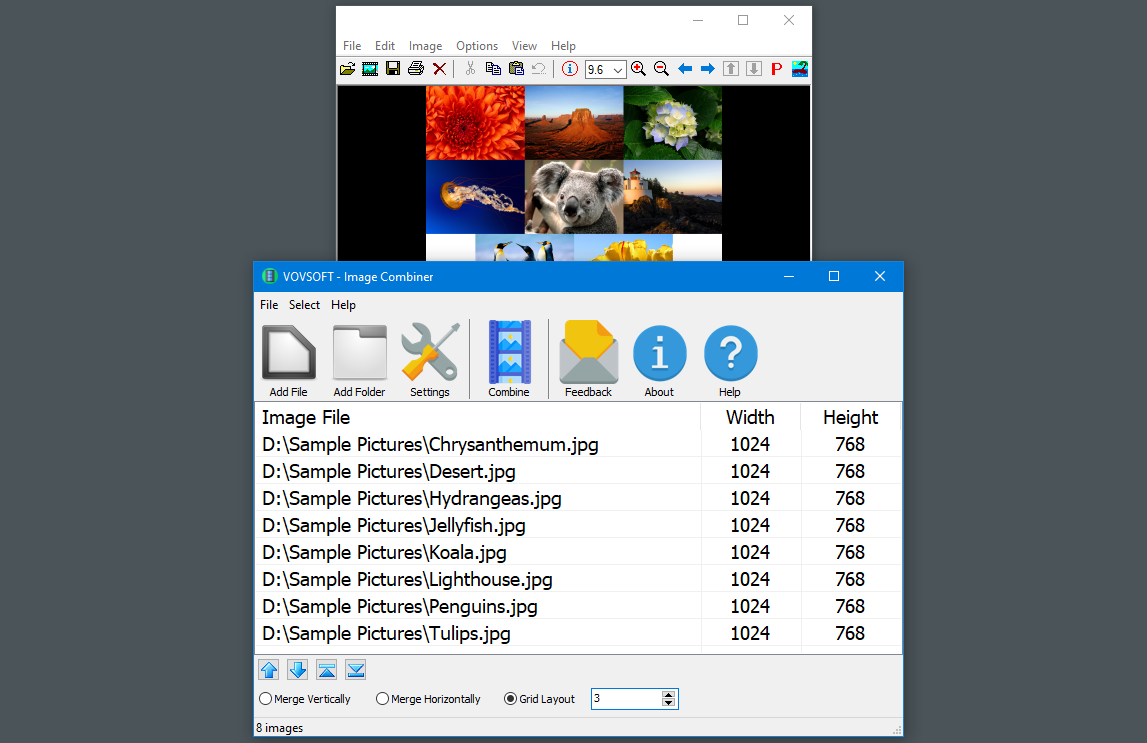
With 3 columns, eight photos make a 3 x 3 grid with the last row one image short.
Very large outputs
Image Combiner 2.0 lifted the old limit of about 65,500 pixels, for both input images and PNG output, so very long strips of hundreds of images no longer fail. It also reads EXIF orientation, so phone photos come out the right way up.
Duplicates and mixed formats
Image Combiner can duplicate a selected image to use it more than once, and accepts a mix of formats in one job, saving the result as PNG, JPG or GIF.
Real-World Uses
- Joining a webtoon's panels or a long chat conversation's screenshots into one tall image.
- Putting the front and back of each scanned photo side by side, so the writing on the back stays with the picture.
- Making a contact sheet of product photos in a 4-column grid.
- Combining step-by-step screenshots into one image for a how-to guide.
- Building a transparent PNG sprite strip from separate frames.
Who It's For, and Who Should Skip It
Image Combiner suits comic and webtoon creators, people digitizing photo collections, documentation writers and online sellers who join images often and want exact, full-quality results.
Skip it if your images are different sizes and you want them matched: it doesn't resize images to equal heights, the joint top request, so mixed sizes leave background gaps. For a designed collage with free placement, borders and text, use a collage maker or photo editor.
Usage Guide
- Download the installer or the portable edition and start Image Combiner.
- Click Add File or Add Folder, or drag images onto the list.
- Put them in order with the arrow buttons, and Duplicate any you need twice.
- Choose Merge Vertically, Merge Horizontally, or Grid Layout with a number of columns.
- Set spacing and background color in Settings if needed.
- Click Combine and choose where to save the PNG, JPG or GIF.
Before you buy
The trial combines only a limited number of images, so it shows how the output looks but not a full job. One license covers one person on any number of their own computers. Vovsoft's general policy is no refunds once the key is delivered, since a free trial comes first (accidental orders are generally refunded, at its discretion, and PayPro Global has the final say on its orders).
Where it falls short
- No automatic resizing to equal heights or widths, so mixed sizes leave gaps.
- No blending or overlapping, no trimming of edges, and no AI layouts.
- JPEG DPI values aren't kept or editable, an issue for print work.
- No RAW files and no pasting from the clipboard.
- The default background is black. Users have asked for white, which prints better.
What Users Say
On Vovsoft's site
Image Combiner's page shows 4.1 out of 5 from 12 ratings, lower than most Vovsoft tools, with this comment:
"This was the perfect software for what I needed to accomplish a large project. The project involved digitizing thousands of photos and documents. Particularly useful was the ability to merge front and back so information written on the back would be attached together with the photos." Anonymous User
What users want changed
The lower average fits the request list: resizing images to match (3 votes) and blending photos with transparency (3 votes) lead, then keeping JPEG DPI, AI combining, trimming edges and RAW support with 2 each. Several earlier complaints have been fixed, including a "Not enough memory resources" error, an access violation error (fixed in version 2.2), and missing WebP support.
Vovsoft as a company has a TrustScore of 4.6 out of 5 from 411 reviews on Trustpilot, read through a summarizer, with users mostly describing its tools as simple and dependable.
Comparisons
Image Combiner vs online image mergers
Online mergers are free for a few pictures but cap uploads and sizes. Image Combiner takes as many images as you like, of any size, offline.
Image Combiner vs a collage maker
Collage makers arrange photos freely with frames, text and effects. Image Combiner does exact strips and grids at full resolution, faster, without design options.
Image Combiner vs Vovsoft Image Splitter
Image Splitter cuts one image into many pieces, Image Combiner joins many into one.
Editions and Pricing
| Edition | Price | License | What you get |
|---|
| Trial | Free | Personal, non-commercial use | Combines a limited number of images |
| Licensed | $19 one-time | Lifetime | Unlimited images, commercial use, no nag screen or ads, lifetime free updates |
The installer and portable editions use the same key, sent by email right after payment. Vovsoft's $99 Universal License covers all of its desktop programs.
FAQs
Can Image Combiner keep a transparent background?
Yes. Image Combiner keeps the alpha channel of PNG, WEBP and BMP images, and can save a transparent PNG.
Does Image Combiner reduce the quality of my photos?
No. Image Combiner joins images at their original size. Saving as PNG keeps them lossless, while JPG output is compressed as JPG always is.
Can Image Combiner make very long webtoon strips?
Yes. Since version 2.0, Image Combiner supports output over 65,535 pixels for PNG, TIFF and BMP.
Will Image Combiner resize images of different sizes to match?
No. Image Combiner places images at their own size, so mixed sizes leave background space. Matching sizes is a user request.
Does Image Combiner run on 32-bit Windows?
No. Image Combiner has been a 64-bit program since version 1.2.
Is the Image Combiner license a subscription?
No. The $19 license is a one-time payment that never expires and includes future updates.
System Requirements
- 64-bit Windows 11, 10, 8/8.1, 7 or Vista
- About 20 MB for the program, plus memory and disk space for large outputs
Conclusion
Image Combiner is worth $19 if you join images often, for webtoons, scanned photos or screenshot sequences, and want exact strips or grids at full quality without an upload limit. Huge outputs, transparency and spacing are the reasons to buy it. The reason not to: it won't resize mismatched images or let you place them freely, and its ratings are lower than Vovsoft's other tools, so try it with the trial on your own images first.
Download Free TrialBuy Now