CollageIt Pro: Automatic Photo Collages on a Windows PC
CollageIt Pro is a $29.90 Windows program that turns a folder of photos, up to 200 at a time, into a laid-out collage in three steps. It's for anyone who wants a poster or a family collage without learning a design tool. The price is a one-time payment for your own PCs, up to two.
Dragging 50 photos around by hand takes an evening. Here you add the photos, pick a template, and the layout appears right away. Random Layout and Shuffle give you a new arrangement until one looks right.
Quick facts
- Version: 1.9.5, installer dated September 5, 2016
- Developer: PearlMountain
- Platform: Windows 10, 8, 7, Vista, XP and 2000. CollageIt Pro for Mac is a separate product.
- Capacity: up to 200 photos in one collage, page sizes up to A1 or larger
- Saves as: JPEG, PNG, PDF and PSD, plus printing, email and desktop wallpaper
- Price: $29.90 once on the order page, Personal License for up to 2 of your own PCs
- Free version: the free CollageIt download shows a splash screen and lacks photo cropping and large-size export
- Refunds: 30-day money-back guarantee
- What we checked: the 8.4 MB installer from PearlMountain, with file version 1.9.5, and the order page, which charged $29.90 for CollageIt Pro with no renewal, on November 6, 2026. We didn't make a collage with it.
Before you buy
This is an old program. The installer dates from 2016, the screenshots show a Windows 7-era window, and PearlMountain's compatibility line stops at Windows 10. It doesn't list Windows 11, so run the free version on your PC first. That tells you whether it runs properly on your machine before you spend anything.
Download Free TrialBuy Now
Overview
The window has three parts: a photo list on the left, a live preview of the page in the middle, and layout controls on the right. Along the bottom are Choose Template, Page Setup, Background, Random Layout, Shuffle and Export. Change a slider and the preview updates at once, so there's nothing to render or wait for.
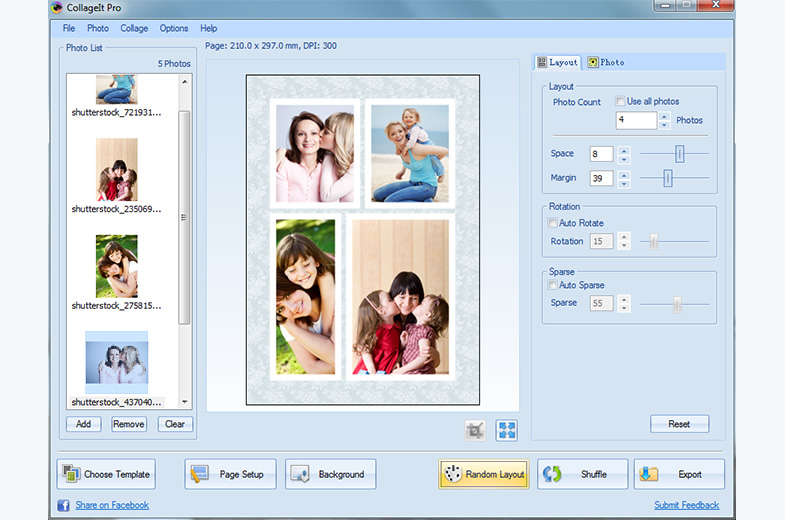
The main window with five photos in the list and a four-photo grid in the preview.
Features
Automatic layout from up to 200 photos
CollageIt Pro arranges your photos as soon as you add them. Photo Count sets how many appear, and a Use all photos checkbox takes them all. The program does the placing, which is the whole reason to use it, so you spend your time choosing photos.
A gallery of ready-made templates
CollageIt Pro includes templates for grids, scattered prints and mosaics, and you can also start from blank. The chosen style only sets the starting point, because all the sliders still work afterward.
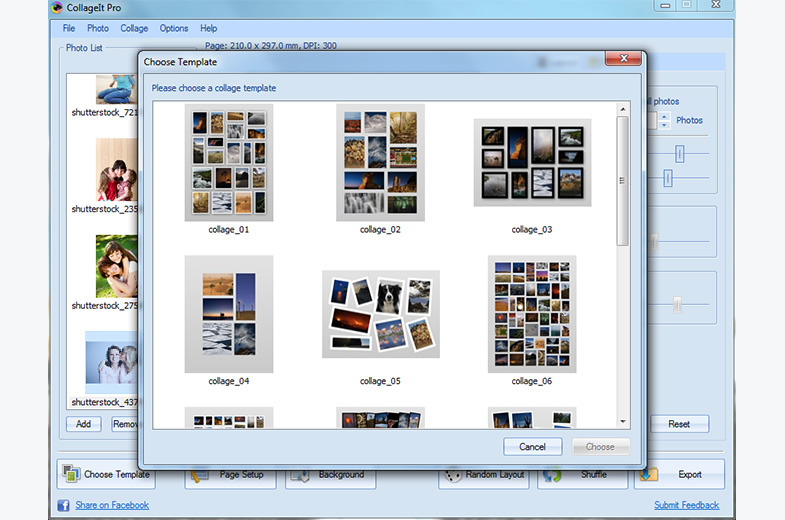
The Choose Template dialog, with grid and scattered-photo styles.
Fine control with simple sliders
CollageIt Pro adjusts space between photos, page margin, rotation and sparseness with sliders or number boxes. Auto Rotate tilts the photos for a scrapbook look. Random Layout and Shuffle produce new versions in one click, and you keep going until one works.

A scattered collage of 50 photos, with Auto Rotate ticked in the Rotation panel.
Backgrounds, frames and shadows
CollageIt Pro fills the background with a solid color, a gradient or an image, which can be tiled, centered or stretched. Photo frames and drop shadows make prints stand out from the page.

The Background dialog set to a top-to-bottom gradient, with image, tile and opacity options.
Pro-only crop and large export
CollageIt Pro adds photo cropping, so faces stay in frame when a shape doesn't fit, and large-size export for posters. These two are the practical difference from the free download.
Benefits
- Fast results. A finished layout can take minutes, because the program does the arranging.
- Works offline. Your family photos stay on your computer, unlike with web collage sites.
- A one-off cost. There's no subscription for something you might use a few times a year.
Real-World Uses
- A holiday poster. Turn 80 trip photos into one large print for the wall.
- A birthday or anniversary gift. Build a single page from years of family pictures.
- School or club displays. Make a photo board for an event without design skills.
- Desktop wallpaper. Save a collage of favorite shots at your screen's size.
Who It's For, and Who Should Skip It
CollageIt Pro fits people who value speed over design freedom and want to work offline on Windows.
Skip it if you want text, stickers and scrapbook pages, which Picture Collage Maker from the same company or a design tool does better. Skip it for phone-first use, since a free phone app will be quicker. If your PC runs Windows 11, test the free version first. For commercial work you need the Commercial License, not this one.
Usage Guide
- Install the program and open it.
- Click Add and pick your photos.
- Click Choose Template and select a style.
- Use Page Setup for the size and Background for the backdrop.
- Adjust the sliders, or press Random Layout and Shuffle until you like the result.
- Click Export and save, print, email or set it as wallpaper.
Where it falls short
- Text isn't on the Windows feature list, so captions need another program afterward.
- Layouts are automatic, so a specific picture in a specific spot takes patience and several shuffles.
- The Windows version hasn't changed since 2016, and PearlMountain doesn't mention Windows 11.
- App Store reviewers of the Mac edition report export failures and unclear differences from the free version, which is another reason to test before paying.
What Users Say
Most reviews of CollageIt are several years old. Reviews from the Mac App Store concern the Mac edition, which shares the concept but not the code.
Editors, as quoted by PearlMountain
CNET editor: "We think this program is a great tool for quickly creating collages for art projects, presentations, and much more."
ghacks.net: "CollageIt is an easy to use photo collage creator that users of all experience levels can use to create photo collages with."
Softpedia: "CollageIt puts at your disposal an easy way to create picture collages of all sizes. Working with it is a no-brainer."
Soft32: "A really nice photo collage software that works as a charm. Fast and easy to use; cool looking output; it's free."
Benjamin Glettenberg: "It's a great photo collage software! A very, very fast and simple photo editor."
Mac App Store reviews of CollageIt Pro
These are about the Mac edition.
One buyer called the Pro edition "worth buying for the higher resolution and variable poster sizes it allows." Another praised "a pretty wide variety of layouts for a few images or dozens."
Others were less happy. One reviewer complained that "when i wanted to export the collage, it does not do the work" after paying for Pro, and another said the app does not let you save what you're working on.
What the reviews add up to
People like how quickly layouts appear and how little there is to learn. Criticism is about age and export problems, mainly on Mac. Nobody praises it as a design tool, and it doesn't try to be one.
Comparisons
CollageIt Pro vs Picture Collage Maker Pro
Both are from PearlMountain. CollageIt Pro is automatic and quick, while Picture Collage Maker Pro ($39.90) is aimed at collages and digital scrapbooks that you build more by hand. Choose CollageIt for many photos and little effort.
CollageIt Pro vs web collage tools
Web tools such as FotoJet, also from PearlMountain, offer modern templates and text but need an upload and often an account. CollageIt Pro keeps files local and takes a one-time payment, but the look is plainer.
Editions and Pricing
| Edition | Price | Use | PCs |
|---|
| CollageIt (free) | $0 | Personal, with limits | Your PC |
| CollageIt Pro, Personal License | $29.90 (list $39.90) | Non-commercial | Up to 2 of your own |
| CollageIt Pro, Commercial License | $49.90 (list $59.90) | Commercial | Up to 5 of your own |
The checkout may also offer PearlMountain Image Converter at half price as an extra. It's optional, and CollageIt Pro alone costs $29.90.
FAQs
Is CollageIt Pro a subscription?
No. CollageIt Pro is a one-time $29.90 purchase, and the order page shows no renewal.
Does CollageIt Pro run on Windows 11?
PearlMountain lists Windows 10 and older only. CollageIt Pro may well run on Windows 11, but that isn't promised, so test the free version first.
How many photos can CollageIt Pro use in one collage?
CollageIt Pro handles up to 200 photos in a collage.
Can CollageIt Pro save a collage as a PDF?
Yes. CollageIt Pro saves as JPEG, PNG, PDF and PSD, and it can print directly.
Does one CollageIt Pro license cover two computers?
Yes, the Personal License covers up to 2 of your own PCs. The Commercial License covers up to 5.
Does a Windows CollageIt Pro license work on a Mac?
No. CollageIt Pro for Mac is a separate purchase.
System Requirements
- Windows 10, 8, 7, Vista, XP or 2000
- About 8.4 MB for the installer
Conclusion
Worth $29.90 if you want big photo collages fast and your PC runs the free version without trouble. The one reason to buy is how little work a 50-photo layout takes. The main reason not to is age: it hasn't been updated since 2016 and offers no text tools, so anyone who wants a modern design look should use something else.
Download Free TrialBuy Now