AKVIS Chameleon: Paste One Photo Into Another Without Careful Selections
AKVIS Chameleon is a photo collage program for Windows, macOS and Linux that blends an object from one photo into another, adjusting its edges and colors for you. It suits hobbyists making cards and composites, and the Home license costs $54 once.
The slow part of any collage is cutting out the object cleanly. Chameleon needs only a rough selection: you drop the fragment on the new background, and the program fades the leftovers and matches the join. The name comes from one of its modes, where the pasted piece takes on the colors around it.
Quick facts
- Version: 12.2
- Developer: AKVIS
- Platforms: Windows 7-11 (32/64-bit), macOS 10.12 to macOS 27 (64-bit), Linux 64-bit (standalone only)
- Editions: standalone app, or a plugin for AliveColors, Adobe Photoshop, Photoshop Elements, Corel PaintShop Pro and other editors
- Price: $54 Home, $65 Home Deluxe, $82 Business, all one-time
- License: never expires, covers 2 computers
- Trial: 10 days, all features, no registration
- What we checked: the license comparison table on the vendor site, the 64-bit Windows installer on the download server (61 MB, file dated April 15, 2026), and the price of all four licenses on the order page on November 6, 2026. We didn't install the program or build our own collages
Before you buy
Double Exposure is not in the Home license. That mode, the popular portrait-filled-with-a-landscape look, and the Post-Processing tools both need Home Deluxe or Business. Home Deluxe is $11 more than Home and also gives you both the plugin and the standalone app.
Home licenses are for personal use only. Business is only $82 here, so anyone doing design work for clients should go straight to it.
Download Free TrialBuy Now
Overview
The basic job is one background plus one fragment. You outline the object roughly, place it on the background, and pick a mode. The program then works out the transition. Opacity options, Preprocessing and Post-Processing panels let you balance the two images, and Before and After tabs show the difference.
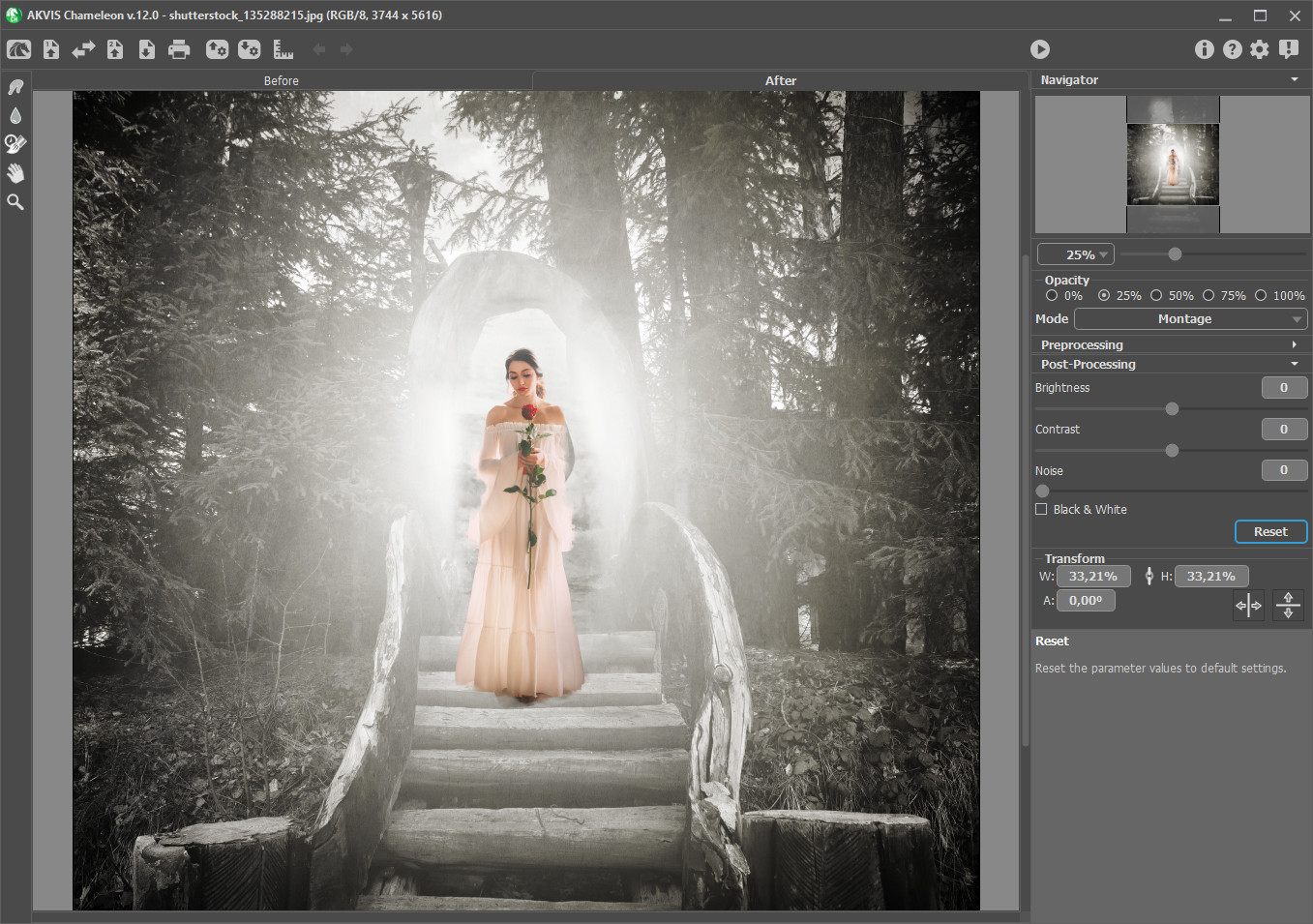
AKVIS Chameleon 12 in Montage mode: a figure placed on forest steps, with Post-Processing controls on the right.
Features
Montage mode
AKVIS Chameleon moves a selected object to a new background here, keeping its own colors and opacity while the edges adapt and smooth. It is the mode for putting a person in a new scene.
Chameleon mode
AKVIS Chameleon adjusts the pasted piece to the color range of the target image and smooths its borders, the way a chameleon adapts to its surroundings.
Blend mode
AKVIS Chameleon makes the pasted object semi-transparent in this mode, as well as adjusting its colors, so the texture of the background shows through. Use it for drawings on brick, wood or crumpled paper.

Blend mode with a city at night showing through a figure. This window shows the Preprocessing panel and History Brush settings.
Emersion mode
AKVIS Chameleon embeds the fragment into the background here rather than laying it on top, so only parts of it show. AKVIS suggests it for difficult objects such as trees.
Double Exposure mode
AKVIS Chameleon superimposes two images with blend modes based on luminance, in the style of the film technique. This mode needs Home Deluxe or Business.
Benefits
You skip the part of collage work most people hate. A rough outline replaces a long session with selection tools and masks, so you can try three ideas in the time one would have taken. It also makes small fixes easy, such as swapping in open eyes from another shot of the same group.
Real-World Uses
- Cards and invitations: put the family into a seasonal scene.
- Group photo repair: replace closed eyes using another frame from the series.
- Graffiti and tattoos: use Blend mode to lay a design onto a wall or skin.
- Rescued-animal flyers or web banners: combine a subject and a background for a simple campaign. Paid work needs Business.
Who It's For, and Who Should Skip It
AKVIS Chameleon suits hobbyists who want composites without mastering masks, and Photoshop or PaintShop Pro users who want a quicker way to blend two images.
Skip it if you need layered composites from many images, since it works on a background and one fragment at a time. Skip it too if you already work fast with masks in a full editor, or if you want AI to generate the scene for you. This is a blending tool, not an image generator.
Usage Guide
- Download the installer and run it. The Windows setup contains the standalone and the plugin.
- Open the background image and add the fragment image.
- Mark the object roughly, then place it on the background.
- Choose Montage, Chameleon, Blend, Emersion or Double Exposure.
- Press Run, then adjust opacity and the Preprocessing settings.
- Save the result, and use it as the new background if you want to add another object.
Where it falls short
- One fragment at a time. A busy collage means repeated runs, not layers you can return to.
- Automatic edges vary. Results depend on the pictures you combine, so test your own in the trial rather than judging from the AKVIS examples.
- Slower updates. Version 12 brought the new interface and Apple M1 support, while 12.1 and 12.2 were compatibility and bug-fix releases.
- Home has no Double Exposure. That is the mode many people come for.
What Users Say
AKVIS Chameleon's reviews are positive but mostly from Mac user groups and download sites, and several cover older versions. We found no sizeable set of user ratings on the big software review sites, and no negative review.
Reviewers
"I was really impressed at how easy it was to use the Akvis Chameleon to combine my images." L. Davenport, Silicon Mountain Macintosh User's Group, September 2020
"During our testing we have noticed that the program is able to create photo collages with excellent image quality and without errors throughout the entire process." Ionut Ilascu, Softpedia, April 2019
"These four modes provide a very wide range of creative options, and offer the user diverse capabilities seldom seen in a single application of this kind." Michael Kleper, The Kleper Report, on version 9
Users, on the AKVIS testimonials page
"I am primarily a Photoshop user but I have found the AKVIS products to be very compatible with PS and have saved me a lot of time effort that achieving the same photo effect in PS I have." David Garcia, who uses Chameleon among others
Reviewers agree on ease of use and quality, and Softpedia adds that it stays light on system resources. Remember that the testimonials are chosen by AKVIS.
Editions and Pricing
| License | Price at checkout | Edition | Use | What you get |
|---|
| Home Standalone | $54 | Standalone app only | Personal, non-commercial | Four modes, no PSD |
| Home Plugin | $54 | Plugin only | Personal, non-commercial | Four modes, PSD |
| Home Deluxe | $65 | Plugin and standalone | Personal, non-commercial | Adds Double Exposure, Post-Processing tools |
| Business | $82 | Plugin and standalone | Commercial use allowed | Everything in Deluxe |
Buy Home Standalone ($54)Buy Home Plugin ($54)Buy Home Deluxe ($65)Buy Business ($82)
FAQs
Does AKVIS Chameleon Home include Double Exposure?
No. AKVIS Chameleon Home has Montage, Chameleon, Blend and Emersion. Double Exposure and the Post-Processing tools need Home Deluxe ($65) or Business ($82).
Can AKVIS Chameleon combine more than two images?
AKVIS Chameleon works with one background and one fragment in each run. To add more, save the result and run it again with the next image.
Does AKVIS Chameleon work in Photoshop?
Yes. AKVIS Chameleon has a plugin for Adobe Photoshop, Photoshop Elements, AliveColors and Corel PaintShop Pro. The Home Standalone license doesn't include it.
Is AKVIS Chameleon a one-time purchase?
Yes. The AKVIS Chameleon license never expires. After your update period, 1 Year of Updates costs $19.95 if you want newer versions.
How many computers does AKVIS Chameleon cover?
Each AKVIS Chameleon license registers on 2 computers, including a Windows PC and a Mac together.
Does AKVIS Chameleon run on Apple Silicon?
Yes. AKVIS Chameleon has had native Apple M1 support since version 12.0.
System Requirements
- Windows: Windows 7-11, 32 or 64-bit. Minimum Pentium IV and 4 GB RAM, recommended Core i5 and 8 GB RAM.
- macOS: 10.12 Sierra to macOS 27, 64-bit. Minimum Intel and 4 GB RAM, recommended Intel or M1 and 8 GB RAM.
- Linux: 64-bit Debian, Ubuntu, Red Hat, CentOS, Fedora or openSUSE, standalone only. Minimum Core i3 and 8 GB RAM, recommended Core i5 and 16 GB RAM.
- Plugin: needs a photo editor that supports plugins.
Conclusion
AKVIS Chameleon is worth it if you make composites for fun or small projects and want them done quickly, and Home Deluxe at $65 is the version to get. The reason to buy is that it cuts out the fiddly selection work for a low one-time price. The main reason not to is its one-fragment-at-a-time design, which will feel limiting if you already use layers well. Use the trial to test it on your own photos.
Download Free TrialBuy Now