AKVIS HDRFactory: HDR Photos From a Bracketed Series or a Single Shot
AKVIS HDRFactory is a Windows, macOS and Linux program that merges photos taken at different exposures into one high dynamic range image, or gives a single photo an HDR look, for photographers who want detail in both the bright sky and the dark shadows. The Home license costs $69 once; Home Deluxe, which adds ghost removal, costs $99.
A camera can't record the full range of light the eye sees, so a landscape comes out with a white sky or black shadows. HDRFactory combines several exposures, or stretches the tones of one, to bring both back, and can push the result from natural to dramatic and painterly.
Quick facts
- Version: 8.1, released April 15, 2026
- Developer: AKVIS
- Platforms: Windows 7-11 (32/64-bit), macOS 10.12 to macOS 27 (Intel and M1), Linux 64-bit (standalone only)
- Editions: standalone app, or a plugin for AliveColors, Adobe Photoshop, Corel PaintShop Pro and other editors
- Input: a bracketed series or one photo, in JPEG, TIFF, BMP, PNG, WEBP, DNG and camera RAW formats
- Price: $69 Home (plugin or standalone), $99 Home Deluxe, $154 Business, all one-time
- License: never expires, covers 2 computers
- Trial: 10 days, all features, no registration
- What we checked: the license comparison table, the What's New notes, the step-by-step guide and the screenshots on the vendor site, the 64-bit Windows installer on the download server (111 MB, file dated April 15, 2026), and the price of all four licenses on the order page on November 8, 2026. We didn't install the program or merge our own brackets
Before you buy
If you shoot brackets of moving scenes, you need Home Deluxe. Ghost Removal, which fixes the doubled people, cars and branches that appear when something moves between exposures, and Local Correction, for adjusting one area of the picture, are Home Deluxe and Business only.
The standalone Home license adds the Crop tool and the Post Processing settings (brightness, contrast, gamma, saturation) that the plugin leaves to your photo editor. Commercial work, such as real estate or client photos, needs the $154 Business license.
Download Free TrialBuy Now
Overview
HDRFactory has three tabs. HDRI opens when you load a series of exposures and merges them. Adjustment is where a single photo starts, and where a merged image gets its look. Effects adds white balance, glow and vignette. A Preview slider runs from Fast, at an eighth of the size, to HQ at full size, so you can try settings quickly and check the final result properly.
Version 8.0, released in December 2023, redesigned the interface to match the other AKVIS programs, added more camera RAW formats and macOS 14 support. Version 8.1, part of AKVIS's spring update of all its programs, brings interface tweaks and bug fixes.

AKVIS HDRFactory 8.0 on the Mac: a single photo of a snowy village with the "AKVIS Early Frost" preset, shown in a split Before and After view with the Adjustment sliders on the right.
Features
Merging bracketed exposures
AKVIS HDRFactory combines several shots of the same scene taken at different exposure values into one HDR image. You choose an alignment mode (none, fast, normal or high quality) for shots taken without a tripod, and the program may ask for the exposure values if the files don't carry them. The merged image then goes to the Adjustment tab for tone mapping.
An HDR look from one photo
AKVIS HDRFactory can create a "pseudo-HDR" from a single image, which is the practical option for moving subjects, old photos or shots you didn't bracket. It works best from a RAW file, which holds more highlight and shadow detail than a JPEG. The same controls also work as a general photo correction tool for brightening shadows and lifting color.
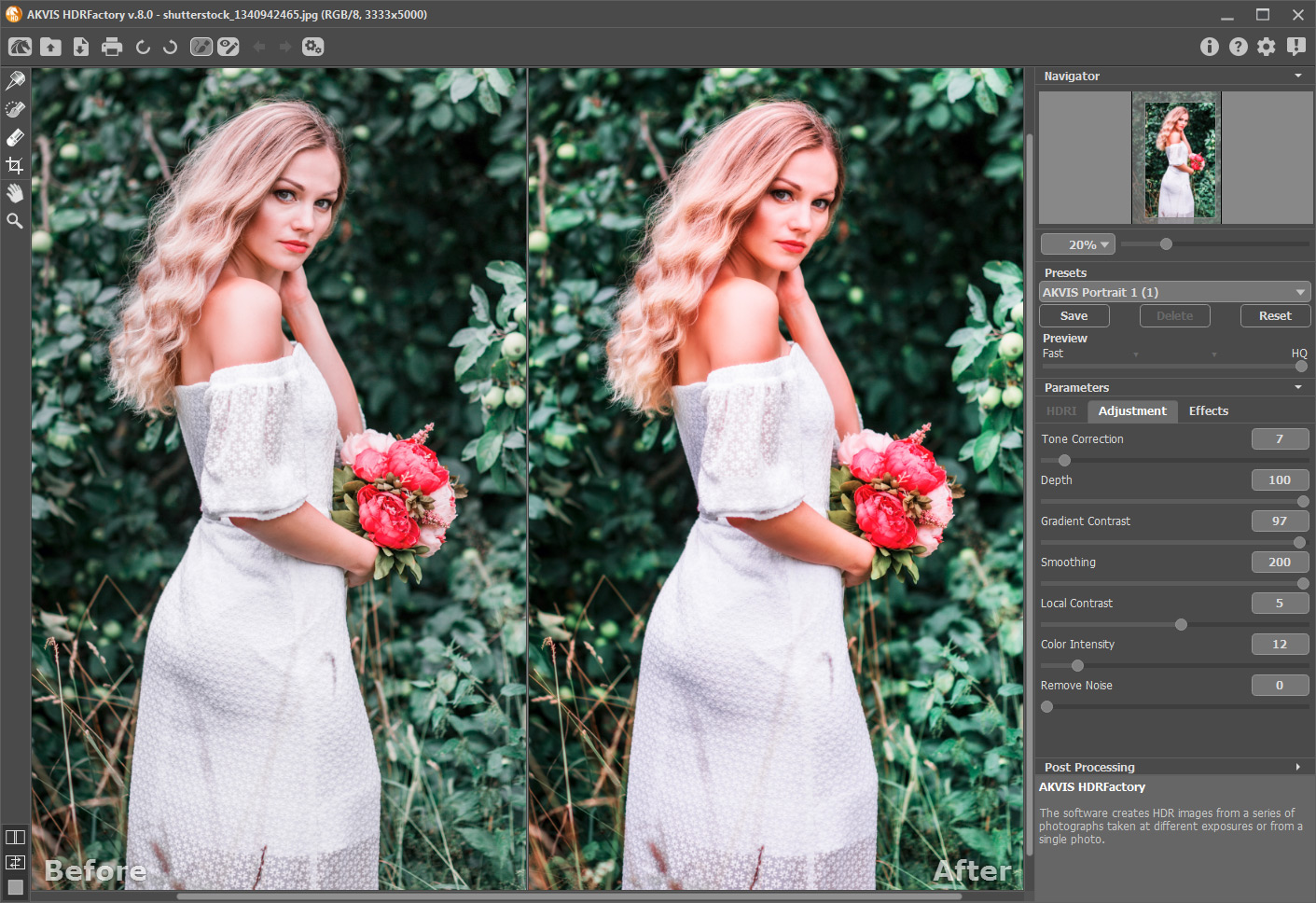
A portrait processed with the "AKVIS Portrait 1" preset on Windows, with the Tone Correction, Depth, Gradient Contrast, Smoothing, Local Contrast, Color Intensity and Remove Noise sliders.
Tone-mapping controls
AKVIS HDRFactory's Adjustment tab has seven sliders: Tone Correction, Depth, Gradient Contrast, Smoothing, Local Contrast, Color Intensity and Remove Noise. Moderate settings give a natural, well-exposed picture, and stronger Local Contrast and Color Intensity move it toward the high-detail look HDR is known for. A Hints panel explains each slider.
Effects: white balance, glow and vignette
AKVIS HDRFactory's Effects tab warms or cools the picture with Temperature and Tint, adds a soft Glow, and darkens or lightens the edges with a Vignette whose center, shape and transition you can move. Presets combine all three tabs, and your own settings can be saved as presets.

The Effects tab with the "AKVIS Soft Glow HDR" preset, showing the White Balance, Glow and Vignette settings.
Ghost Removal and Local Correction (Deluxe and Business)
AKVIS HDRFactory's Ghost Removal tool lets you highlight an area where something moved between shots, such as trees in the wind or people, and the program removes the doubled "ghost" there automatically. Local Correction applies different settings to a chosen part of the picture, for example a calmer sky over a detailed foreground.
Batch processing and wide format support
AKVIS HDRFactory can process a folder of single images with the same settings, through your editor's actions in the plugin. It opens JPEG, TIFF, BMP, PNG, WEBP, DNG and many RAW formats (CRW, NEF, ORF, PEF and others), works at up to 32 bits per channel, and handles PSD files through the plugin.

The "AKVIS High Contrast" preset on a monochrome portrait, bringing out texture that was hidden in the darker original.
Benefits
You get skies with clouds and rooms with visible windows in the same frame, without hand-blending layers. Because it also works on single photos, HDRFactory doubles as a quick fix for flat, underexposed or backlit shots you've already taken. And the presets give you a starting point that a beginner can use right away.
Real-World Uses
- Landscapes and sunsets: merge three to five brackets so the sky and the land are both well exposed.
- Interiors and real estate: show the room and the view through the window at once, with a Business license for paid listings.
- Backlit portraits: lift a face in shadow from a single RAW photo.
- Travel photos: rescue flat midday shots with more local contrast and color.
- Creative edits: push the sliders for a stylized, hyper-real look on architecture or old cars.
Who It's For, and Who Should Skip It
AKVIS HDRFactory suits hobby photographers who want HDR without learning a full raw editor, and Photoshop or AliveColors users who want a one-dialog HDR filter. Choose Home Deluxe if you shoot handheld brackets of scenes with movement.
Skip it if you already use Lightroom Classic or Photoshop: both include an HDR merge, and for natural-looking results you may not need another tool. Skip it if you want a full photo editor with layers and masks; HDRFactory is one effect. And if you only need occasional brightening of shadows, your editor's shadows and highlights controls are enough.
Usage Guide
- Download the installer and run it. On Windows it installs both the standalone app and the plugin; on a Mac they are two separate downloads.
- In the standalone app, open a bracketed series (it opens in the HDRI tab) or a single photo (it opens in the Adjustment tab). In the plugin, start HDRFactory from your editor's filter menu.
- For a series, choose the alignment mode and merge the shots.
- Set Preview to Fast while trying presets and sliders, then switch to HQ to check the final result.
- Add white balance, glow or vignette on the Effects tab, and fix ghosts or one area with the Deluxe tools if you have them.
- Save as TIFF, JPEG, PNG, BMP or WEBP, or apply the result in your photo editor. Save your settings as a preset for the next set.
Where it falls short
- Alignment and speed. ePHOTOzine's test of version 3.0 found it "can be quite slow" and that "the alignment methods don't work particularly well", getting the best results with no alignment plus the ghost tool. We haven't seen a newer test.
- Ghost removal costs more. On Home there's no fix for moving objects in a merged series.
- Slow development. Versions 8.0 and 8.1 brought interface, RAW and compatibility changes rather than new HDR features.
- Edition gaps. Crop and Post Processing are standalone only, the standalone app can't open PSD files, and the Linux version is standalone only.
- Updates after a year cost money. A new version is free for 12 months after purchase; after that it's $19.95.
What Users Say
AKVIS HDRFactory came out in 2011 and drew a burst of reviews then, from photography magazines, tech sites and user groups. Later coverage is thin, and we found almost no ratings on user-review sites (MacUpdate shows a single 5-star rating with no text), so the version and date are noted with each review.
Photography magazines
"For those who are looking for a quick and easy way to create HDR images the AKVIS HDRFactory delivers excellent results." Daniel Bell, ePHOTOzine, October 2012 (version 3.0), rated 3.5. The pros were "Generally impressive results", "Easy-to-use", "Loads of presets to choose from" and RAW support; the cons were "Can be quite slow", "The alignment methods don't work particularly well", and no crop tool, which the standalone app has since added.
"The program does a good job of merging different exposures and it is relatively easy to create a good, well-exposed version of your shot." Digital Camera Essentials, issue 92, June 2011 (version 1.0)
Tech sites and user groups
"All things considered, we come to the conclusion that AKVIS HDRFactory is a quick and powerful way of bringing a bit more light to pictures, add some cool effects, or simply crop them to eliminate unwanted objects." Mircea Dragomir, Softpedia, March 2019
"I played around with the standalone application for Windows and was pretty impressed with how easy it was to use." Gregory Scoblete, Your Digital Life, March 2011, who also liked the text box that "helpfully" explains each slider.
"This is a neat little application to have and use. AKVIS definitely has a winner in this one, and it's only in the v1 release." Mark Mattson, Computer Users of Erie, Horizons, June 2011
Reviewers consistently found HDRFactory easy to use and good at producing well-exposed results quickly, with plenty of presets. The one detailed critical test pointed at speed and the alignment of handheld shots, which is worth checking on your own brackets during the trial.
Comparisons
AKVIS HDRFactory vs Photoshop's and Lightroom's HDR merge
Photoshop and Lightroom Classic can merge brackets into HDR as part of their subscription, and their results are aimed at a natural look you then edit like any photo. AKVIS HDRFactory is a one-time purchase with no subscription, runs on its own on Windows, macOS and Linux, and puts the HDR "look" up front with presets, local contrast, glow and vignette. It also gives a single photo an HDR look, which a merge tool can't. If you already pay for Adobe and want natural results, use what you have; if you want stylized HDR or no subscription, HDRFactory fits.
Editions and Pricing
| License | Price at checkout | Edition | Use | What you get |
|---|
| Home Standalone | $69 | Standalone app only | Personal, non-commercial | HDR merge, single-photo HDR, effects, Crop, Post Processing |
| Home Plugin | $69 | Plugin only | Personal, non-commercial | HDR merge, single-photo HDR, effects, PSD |
| Home Deluxe | $99 | Plugin and standalone | Personal, non-commercial | Adds Ghost Removal and Local Correction |
| Business | $154 | Plugin and standalone | Commercial use allowed | Everything in Deluxe |
Buy Home Standalone ($69)Buy Home Plugin ($69)Buy Home Deluxe ($99)Buy Business ($154)
FAQs
Is AKVIS HDRFactory a subscription?
No. AKVIS HDRFactory is a one-time purchase and the license never expires. Updates are free for 12 months; after that, a newer version costs $19.95, or $49.95 to update all your AKVIS programs at once.
Can I upgrade AKVIS HDRFactory Home to Home Deluxe later?
Yes. AKVIS charges the difference: $30 from Home to Home Deluxe, $85 from Home to Business, and $55 from Home Deluxe to Business.
Do I need a tripod to use AKVIS HDRFactory?
No, but it helps. AKVIS HDRFactory has alignment modes for handheld brackets, and Home Deluxe adds Ghost Removal for things that moved. Without a series at all, it can give a single photo an HDR look.
Does AKVIS HDRFactory open RAW files?
Yes. AKVIS HDRFactory opens DNG and many camera RAW formats, including CRW, NEF, ORF and PEF, and version 8 extended the list.
Does AKVIS HDRFactory run on Apple Silicon Macs?
Yes. AKVIS HDRFactory supports Intel and M1 Macs on macOS 10.12 Sierra through macOS 27, and still runs on 32-bit Windows 7.
Is AKVIS HDRFactory sold in a bundle?
Yes. On the order page, AKVIS offers a Photo Correction Bundle of HDRFactory, Enhancer, Noise Buster AI and Refocus AI; the Home Standalone version of the bundle was $135 on November 8, 2026.
Can I use AKVIS HDRFactory for paid real estate photos?
Only with the Business license. AKVIS HDRFactory Home and Home Deluxe are limited to non-commercial personal use.
System Requirements
- Windows: Windows 7-11, 32 or 64-bit. Minimum Pentium IV and 4 GB RAM, recommended Core i5 and 8 GB RAM.
- macOS: 10.12 Sierra to macOS 27, 64-bit. Minimum Intel and 4 GB RAM, recommended Intel or M1 and 8 GB RAM.
- Linux: 64-bit Debian, Ubuntu, Red Hat, CentOS, Fedora or openSUSE, standalone only. Minimum Core i3 and 8 GB RAM, recommended Core i5 and 16 GB RAM.
- Plugin: needs a photo editor that supports plugins.
Conclusion
AKVIS HDRFactory is an easy, preset-driven HDR tool with no subscription, and it handles both bracketed series and single photos, which makes it useful well beyond classic HDR. It's worth it for hobby photographers who want HDR or punchier landscapes without Lightroom, and Home Deluxe at $99 is the one to buy if you shoot handheld scenes with movement. The main reason not to buy: if you already have Photoshop or Lightroom Classic, their HDR merge covers natural-looking results, and HDRFactory's own development has slowed. Try your own brackets during the 10-day trial, especially handheld ones.
Download Free TrialBuy Now