Vovsoft Image Splitter: Cut Photos into Grids or Tiles, in Batches, Offline
Image Splitter is a $19 Windows program from Vovsoft that cuts JPG, PNG, GIF, TIFF and BMP images into smaller pieces, either a grid of rows and columns or tiles of a set pixel size, for one image or a whole folder at once. It includes preset grids for Instagram, Facebook and Twitter, works offline, and the $19 is a one-time lifetime license. The free trial watermarks its output.
Typical jobs: a panorama split into a swipeable Instagram carousel, a poster cut into pieces you can print on A4, or a sprite sheet sliced into tiles.
Quick facts
- Version: 1.4, released October 5, 2025
- Developer: Vovsoft
- Platform: 64-bit Windows 11, 10, 8/8.1, 7, Vista and XP. No Mac version
- Formats: JPG, PNG, GIF, TIFF and BMP
- Split modes: by grid (rows by columns) or by dimensions (tile width by height in pixels)
- Extras: Exclude Margins, Equal Output Dimensions, Inverse order, social media presets, number padding in file names
- Editions: installer (3.72 MB) and portable (2.62 MB), one license for both
- Price: $19, one-time payment, lifetime license with free updates
- Trial: free, splits images but adds a watermark, for personal use
- What we checked: installer file version 1.4.0.0 (3,907,632 bytes) with a valid code signature, downloaded from the vendor on November 11, 2026, and $19.00 on the order page with no auto-renewal on November 11, 2026
Download Free TrialBuy Now
Overview
Add images one at a time, by folder, or by dragging them in, and Image Splitter lists each with its width and height. Choose a mode on the tabs at the bottom, set the numbers, and the preview on the right draws the cut lines on the selected image. Split All then writes every piece to your output folder, named after the original with a number, keeping the original quality.
Nothing is uploaded, which online splitters can't promise, and there's no size cap or recompression from a website.

Split by Grid Layout: a 1200 x 675 photo set to 3 x 4, with the cut lines drawn in yellow on the preview.

The result: twelve pieces, cpu-1.jpg to cpu-12.jpg, in the output folder.
Features
Split by grid
Image Splitter divides each image into the rows and columns you set, such as 3 x 3 for nine equal parts. Equal Output Dimensions makes every piece exactly the same size, at the cost of dropping a few edge pixels when the image doesn't divide evenly.
Split by dimensions
Image Splitter's second mode, added in version 1.2, cuts tiles of a fixed width and height in pixels, such as 300 x 400, which suits game tiles, printing on a set paper size or building a scrapbook.
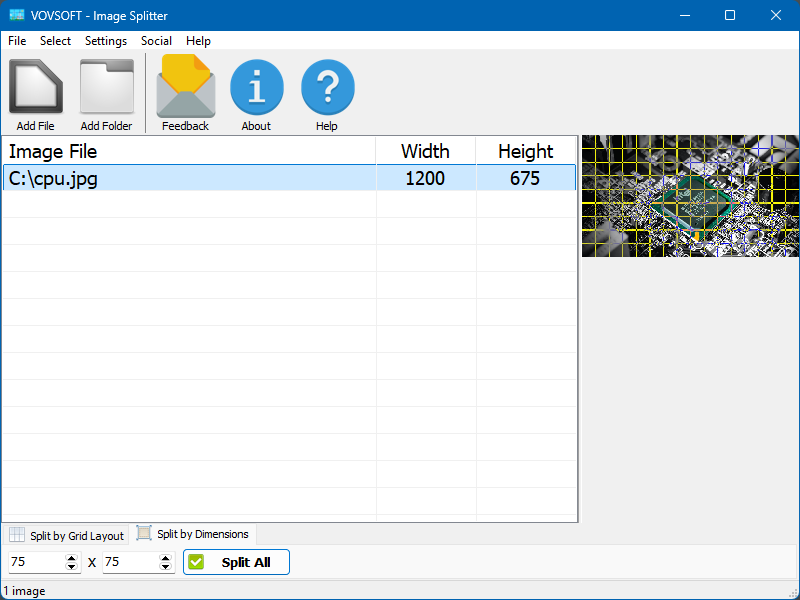
Split by Dimensions: 75 x 75 pixel tiles, with the tile grid previewed.
Batch processing with margins
Image Splitter applies the same split to every image in the list in one click. Exclude Margins trims set amounts from the top, bottom, left and right before splitting, which removes borders or captions so only the main picture is cut.

A batch of twelve images with Exclude Margins (20 left and right, 50 top and bottom) and a 4 x 4 grid.
Ready for Instagram, Facebook and Twitter
Image Splitter's Social menu has preset grid layouts for Facebook, Instagram and Twitter, and the Inverse option numbers the pieces in reverse, because profiles show the newest post first. Add Number Padding names files 01, 02 and so on, so they sort correctly.
Real-World Uses
- Turning a wide landscape photo into three Instagram posts that line up into one picture on your profile.
- Cutting a large poster or map into tiles to print on ordinary paper and tape together.
- Slicing a sprite sheet or texture into equal tiles for a game or app.
- Splitting a batch of scanned double pages into single pages, with margins trimmed.
- Making picture puzzles or classroom handouts from one image.
Who It's For, and Who Should Skip It
Image Splitter suits social media users, designers, teachers and hobbyists who split images regularly or in batches and want it done offline.
Skip it if you need to cut at uneven positions: it splits into equal parts or fixed tiles only, and choosing your own cut lines is the top user request. It also doesn't keep PNG transparency, handle RAW files or very tall images yet. For an occasional split, a free online tool or a photo editor's slice feature will do.
Usage Guide
- Download the installer or the portable edition and start Image Splitter.
- Click Add File or Add Folder, or drag images onto the list.
- Choose Split by Grid Layout and set rows and columns, or Split by Dimensions and set the tile size in pixels. For social media, pick a preset from the Social menu.
- Set Exclude Margins, Equal Output Dimensions or Inverse if needed, and check the preview.
- Click Split All and choose the output folder.
Before you buy
The trial splits images but puts a watermark on the pieces, so it's for testing, and commercial use needs a license. One license covers one person on any number of their own computers. Vovsoft's general policy is no refunds once the key is delivered, since a free trial comes first (accidental orders are generally refunded, at its discretion, and PayPro Global has the final say on its orders).
Where it falls short
- Only equal grids or fixed tiles: you can't place the cuts yourself (4 votes on the request list).
- PNG transparency isn't preserved yet.
- No RAW files, no resizing, and no command line.
- Very large or very tall images, such as 1080 x 80,500 pixels, are an open request.
- Sizes are in pixels only, not inches.
What Users Say
On Vovsoft's site
Image Splitter's page shows 4.7 out of 5 from 3 ratings, with one written comment, which also shows the developer responding to a request:
"Apps that do very practical jobs. Good support/service": "Bought image splitter and photo to video . They both do their job without problems. Additionally I asked for an ending of the split files on 01 02 .. 20 instead of 1 10 .. 20. It was immediately done. Great!" N. Dings
That request is the Add Number Padding setting in version 1.3.
What users want changed
The request list is where the criticism is: free placement of cut lines leads with 4 votes, followed by PNG transparency, resizing, command line support, RAW files and very large images with 2 votes each, and inches as a unit. Instagram grid support, an earlier request, is done.
Vovsoft as a company has a TrustScore of 4.6 out of 5 from 411 reviews on Trustpilot, read through a summarizer, with users mostly describing its tools as simple and dependable.
Comparisons
Image Splitter vs online image splitters
Online splitters are free and quick for one picture, but you upload your photo, sizes are capped and quality can drop. Image Splitter handles folders of images at original quality, offline.
Image Splitter vs a photo editor's slice tool
Photoshop and GIMP can slice an image along guides you place anywhere, but one image at a time and with more setup. Image Splitter is faster for equal grids and batches, and less flexible about where the cuts go.
Image Splitter vs Vovsoft Image Combiner
They're opposites: Image Combiner joins several images into one, Image Splitter cuts one into several.
Editions and Pricing
| Edition | Price | License | What you get |
|---|
| Trial | Free | Personal, non-commercial use | Splits images, with a trial watermark |
| Licensed | $19 one-time | Lifetime | No watermark, commercial use, no nag screen or ads, lifetime free updates |
The installer and portable editions use the same key, sent by email right after payment. Vovsoft's $99 Universal License covers all of its desktop programs.
FAQs
Can Image Splitter make an Instagram grid or carousel?
Yes. Image Splitter has preset Instagram, Facebook and Twitter grids in its Social menu, and an Inverse option for profiles that show the newest post first.
Does Image Splitter reduce image quality?
Image Splitter saves the pieces in the quality of the original, and nothing is uploaded or recompressed by a website.
Does Image Splitter keep PNG transparency?
Not yet. Preserving PNG transparency is an open request for Image Splitter, so transparent areas may not survive.
Can Image Splitter split many images at once?
Yes. Image Splitter applies the same grid or tile size to every image in the list with one Split All click.
Does Image Splitter run on 32-bit Windows?
No. Image Splitter is a 64-bit program.
Is the Image Splitter license a subscription?
No. The $19 license is a one-time payment that never expires and includes future updates.
System Requirements
- 64-bit Windows 11, 10, 8/8.1, 7, Vista or XP
- About 4 MB for the program, plus space for the pieces
Conclusion
Image Splitter is worth $19 if you split images often or in batches, for social media grids, printing or tiles, and want the original quality without uploading anything. The reason to buy is batch splitting with margins and social presets in one simple window. The reason not to: you can't place the cuts yourself, transparency isn't kept, and for a one-off split a free online tool is enough.
Download Free TrialBuy Now