Vovsoft Website Screenshot Generator: Capture Hundreds of Web Pages as PDF or Images in One Run
Website Screenshot Generator is a $19 Windows program from Vovsoft that takes a list of URLs or local HTML files and saves each page as a PDF, PNG, JPEG, TIFF, GIF, BMP or rendered HTML file, one after another, without you touching the browser. It runs on 64-bit Windows 7 to 11. The $19 is a one-time lifetime license, and there's a free trial.
It's for web developers, marketers, SEO people and researchers who need snapshots of many pages: a client's whole site before a redesign, competitors' landing pages each month, or a record of how pages looked on a given day.
Quick facts
- Version: 2.5, released June 7, 2026
- Developer: Vovsoft
- Platform: Windows 11, 10, 8/8.1 and 7, 64-bit only. No Mac version
- Input: URL lists and local HTML files
- Output: PDF, PNG, JPEG, TIFF, GIF, BMP, rendered HTML; portrait or landscape
- Rendering: built-in Chromium 109 browser engine
- Page handling: load delay, scroll to the end for lazy-loaded images, auto-click a link or button, visible area only, print background
- Editions: installer (87.55 MB) and portable (117.81 MB), one license for both
- Price: $19, one-time payment, lifetime license with free updates
- Trial: captures pages, but no command line use, with a nag screen and for non-commercial use only
- What we checked: installer file version 2.5.0.0 (91,809,792 bytes) with a valid code signature, downloaded from the vendor on November 11, 2026, and $19.00 on the order page with no auto-renewal on November 11, 2026. We didn't run a capture ourselves
Download Free TrialBuy Now
Overview
The window has the URL list on the left, a live browser preview on the right with an address bar, and the settings underneath: delay after page load, auto-click link, output format, orientation, file naming and destination folder, then Start. Each page in the list loads in the preview, waits the delay you set, and is saved; the status bar counts through the list ("Loaded 1 / 4").
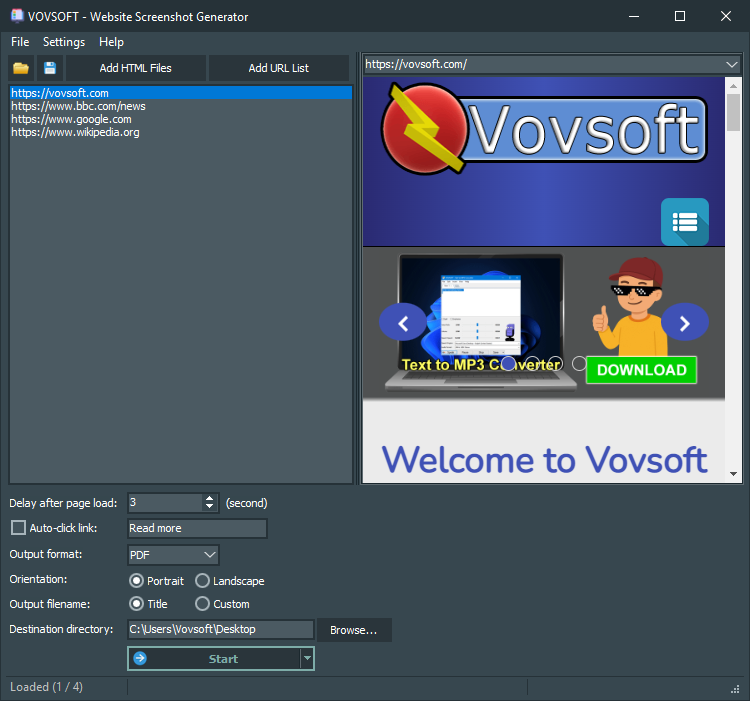
Four URLs in the list, the first loaded in the preview, a 3-second delay, PDF output in portrait, files named by page title.
Features
Batch capture from a URL list or HTML files
Website Screenshot Generator takes a pasted or loaded URL list (it adds https:// to addresses without one, since version 2.3) or local HTML files, including by drag and drop, and works through them all. Lists can be saved and reopened, and a Stop button halts a long run.
PDF, images or rendered HTML
Website Screenshot Generator saves each page as a PDF (good for archiving and printing), as PNG, JPEG, TIFF, GIF or BMP images, or as rendered HTML, meaning the page after scripts have run rather than its raw source. Choose portrait or landscape, name files by page title or a custom name, and add the date and time to the name for dated archives.
Settings for modern, script-heavy pages
Website Screenshot Generator handles the things that ruin simple captures. Scroll to End to Trigger Lazy Loading (on by default) scrolls each page so images further down actually load. A delay after page load (3 seconds by default) gives animations and widgets time to finish. Auto-click link, added in version 2.4, clicks a link or button by its text before capturing, such as "Accept Cookies" or "Read more", to clear a banner or reveal hidden text. You can also capture the visible area only, and print backgrounds or not.
Command line for scheduled captures (licensed)
A licensed Website Screenshot Generator runs from the command line, for example wsgen.exe -input https://example.com -output C:\outputs\example.pdf, with the output format taken from the file extension. Put that in a batch file and Windows Task Scheduler, and you have automatic daily or weekly snapshots.
Benefits
Capturing pages by hand means open, wait, scroll, print to PDF, rename, repeat. For ten pages that's tedious; for two hundred it's a day. Here it's a list and a Start button, and the files come out consistently named and sized, which matters when you're comparing pages or handing a client an archive. Everything runs on your PC, so pages from an intranet or a staging server work too, which online screenshot services can't reach.
Real-World Uses
- A web agency archives every page of a client's old site as PDFs before a redesign.
- A marketer captures competitors' pricing pages on the first of each month with a scheduled command.
- An SEO consultant saves landing pages as images for a client report.
- A researcher keeps dated PDFs of news pages or policy pages as evidence of what they said.
- A developer converts a folder of local HTML reports into PDFs.
Who It's For, and Who Should Skip It
Website Screenshot Generator suits people who capture many web pages, regularly or in bulk, and want it done offline on Windows without writing code.
Skip it if you capture a page now and then: Chrome and Edge print any page to PDF, and Edge and Firefox have built-in full-page screenshots, all free. Developers comfortable with code can script captures with headless Chrome tools at no cost. It's also heavy for what it does (an 88 MB download), and it doesn't run on 32-bit Windows or a Mac.
Usage Guide
- Download the installer or the portable edition and start Website Screenshot Generator.
- Click Add URL List and paste or load your addresses, or Add HTML Files for local pages.
- Set the delay after page load, and the auto-click text if pages have cookie banners.
- Choose the output format, orientation, file naming and destination directory.
- Check the Advanced options in Settings, such as lazy-load scrolling and visible area only.
- Click Start and let it work through the list.
Before you buy
The trial captures pages but can't be run from the command line, shows a nag screen and is for personal use; work use needs the license. One license covers one person on any number of their own computers. Vovsoft's general policy is no refunds, since the trial comes first (it may refund an accidental order at its discretion, and PayPro Global has the final say on its orders), so run your real URLs through the trial before paying.
Where it falls short
- The built-in browser is Chromium 109, a version from early 2023. Some newer web features may render differently than in your current browser.
- No login handling: pages behind a sign-in capture as the sign-in page.
- Auto-click handles one link text per run, so pages with different banners may need separate runs.
- Large download (87.55 MB installer) and 64-bit only.
What Users Say
On Vovsoft's site
Website Screenshot Generator's product page shows 4.5 out of 5 from 2 ratings, with no written comments. We found no independent hands-on reviews.
There's too little feedback to judge it by, so the trial is your best test. On the plus side, Vovsoft released five versions between April and June 2026, adding the stop button, retries, auto-click and other fixes, which shows the program is actively looked after.
Comparisons
Website Screenshot Generator vs your browser
Your browser's print-to-PDF and full-page screenshot are free and use an up-to-date engine, but work one page at a time. Website Screenshot Generator wins as soon as there's a list, with lazy-load scrolling, banner clicking and consistent file names.
Website Screenshot Generator vs online screenshot services
Online services and screenshot APIs need no install and often offer device sizes, but usually charge per capture or per month and can't see intranet or local pages. Website Screenshot Generator is a one-time $19 and runs on your own connection.
Editions and Pricing
| Option | Price | License | What you get |
|---|
| Trial | Free | Personal, non-commercial use | Batch captures, no command line, nag screen |
| Website Screenshot Generator license | $19 one time | Lifetime, commercial use allowed | Command line, no nag screen, all future updates |
| Vovsoft Universal License | $99 one time | Lifetime | All 115+ Vovsoft programs |
The license key arrives by email right after payment. Prices include tax.
FAQs
Does Website Screenshot Generator capture the full page or just the screen?
Website Screenshot Generator captures the whole page by default, and scrolls to the end first so lazy-loaded images appear. A "Screenshot of Visible Area Only" setting limits it to what fits in the window.
Can Website Screenshot Generator get rid of cookie banners?
Often, yes. Website Screenshot Generator's Auto-click link option clicks a link or button by its text, such as "Accept", before each capture, with case-insensitive matching since version 2.5.
Can I schedule automatic website screenshots?
Yes, with a license. Website Screenshot Generator runs from the command line, so a batch file in Windows Task Scheduler can capture pages daily or weekly. Add the date and time to file names to keep a history.
Do I need Chrome installed?
No. Website Screenshot Generator includes its own Chromium browser engine, which is why the download is large.
Is the $19 a subscription?
No. Website Screenshot Generator's $19 is a one-time payment for a lifetime license with future updates, with no per-capture fees. Nothing renews.
Can it capture pages behind a login?
Website Screenshot Generator has no way to sign in to sites, so pages that need an account capture as the sign-in page. Public pages and local HTML files work.
System Requirements
- Windows 11, 10, 8/8.1 or 7, 64-bit
- Internet connection for online pages
- About 88 MB for the installer, or 118 MB for the portable edition
- English interface
Conclusion
Website Screenshot Generator is worth $19 if you regularly need many web pages saved as PDFs or images: the batch list, lazy-load scrolling, cookie-banner clicking and command line together turn hours of manual captures into one run, for a one-time price far below screenshot services. The reason not to buy it: its Chromium 109 engine is dated, it can't sign in to sites, and for occasional single pages your browser already does the job free. Test your real list of URLs in the trial first.
Download Free TrialBuy Now