Vovsoft HTTP Requester: Send Thousands of HTTP Requests and Scrape the Results, No Code
HTTP Requester is a $19 Windows program from Vovsoft that sends GET, POST and HEAD requests to a list of URLs, in parallel if you want, and saves what comes back. It logs each URL's status code and can pull out just the text you need with a regular expression or XPath, so it doubles as a bulk status checker and a no-code web scraper. The $19 is a one-time lifetime license, and there's a free trial.
It's for the jobs where Postman or curl is one request too few and writing a script feels like overkill: checking 5,000 URLs, querying an API for every row of a spreadsheet, or grabbing the title of every page on a site.
Quick facts
- Version: 6.7, released October 28, 2026, the seventh release since September 2025
- Developer: Vovsoft
- Platform: 64-bit Windows 11, 10, 8/8.1, 7 and Vista. No Mac version
- Methods: GET, POST, HEAD, plus a META mode that extracts a page's META tags
- Extraction: RegEx and XPath, per list or per URL
- Network: HTTP and SOCKS proxy lists, cookies, custom headers, user agent, TLS 1.3 through OpenSSL 3
- Scale: CSV import and export of up to 100 million rows, 12 to 300 threads
- Price: $19, one-time payment, lifetime license with free updates
- Trial: free, with a limited number of URLs and no multi-threading, for personal use
- What we checked: installer file version 6.7.0.0 (7,647,248 bytes) with a valid code signature, downloaded from the vendor on November 11, 2026, and $19.00 on the order page with no auto-renewal on November 11, 2026
Download Free TrialBuy Now
Overview
The main window is a table of requests. Each row is a URL with up to ten key and value pairs, which become the query string for GET or the form body for POST. Below it you choose what happens to each response: save it as its own file in a folder, append it to one file, show it with its raw headers, or nothing at all when you only want the status codes. Then set the method, timeouts and a delay between requests, and click Start.
Tabs along the top hold the proxy list, cookies, custom headers and an error log you can copy or save, so a failed URL tells you why it failed.
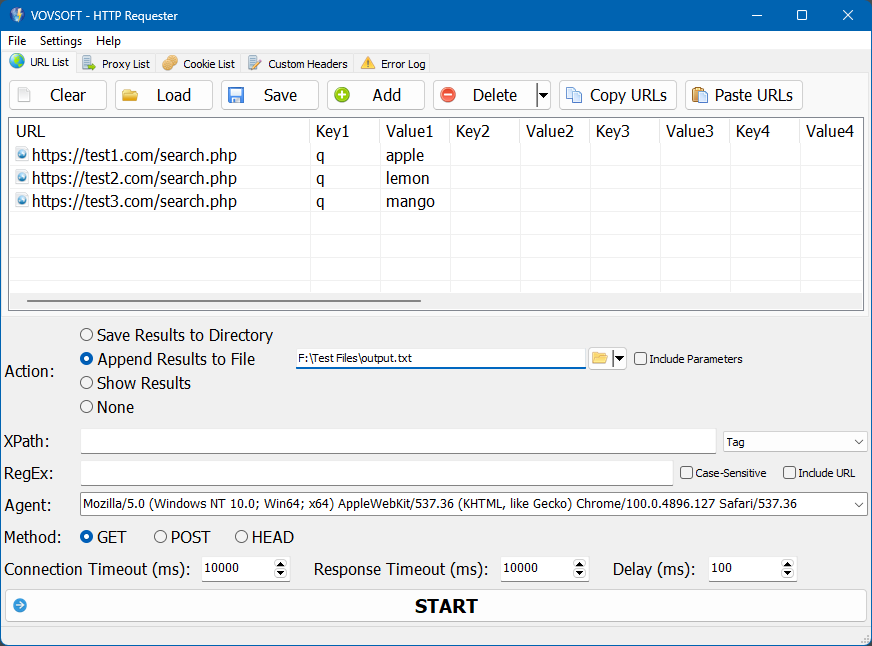
The URL list with one parameter per request, the Append Results to File action, XPath and RegEx boxes, the user agent, method, timeouts and delay.
Features
Batch requests with parameters
HTTP Requester sends every row of the list as its own request, with its own parameters, so one search form or API endpoint can be queried with hundreds of values. Lists load from and save to CSV and save to CSV, and Delete Completed or Delete Failed Items tidies the list between runs.
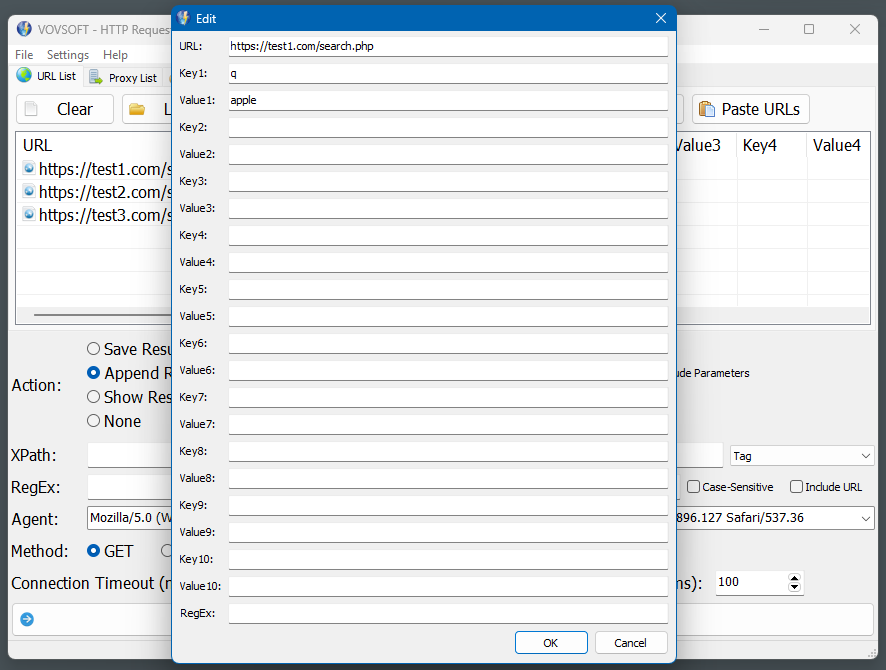
Editing one request: the URL, up to ten key and value pairs, and its own RegEx.
Status codes in bulk
HTTP Requester's Status Code column, added in version 6.3, shows each URL's response code, and the HEAD method fetches only the headers. Feed it a site's URL list and you see the 404s and redirects without downloading every page.
Scraping with RegEx and XPath
HTTP Requester extracts only what you ask for: a regular expression for prices or dates, or an XPath such as //title/text() for page titles or //meta[@name='description']/@content for meta descriptions. Each URL can carry its own XPath and RegEx, and the results can include the source URL.
Proxies, cookies and headers
HTTP Requester routes requests through a list of HTTP or SOCKS proxies, with a username and password where needed, sends cookies for logged-in sessions, and adds custom headers such as Authorization, Content-Type, Origin or Referer. The user agent can be set to any browser string.
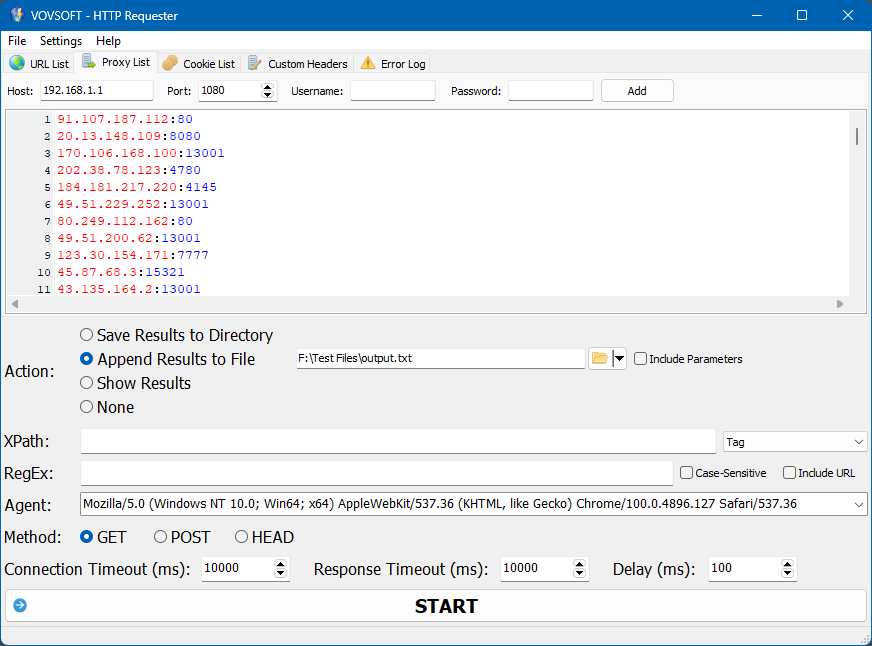
The Proxy List tab: host, port and optional username and password, with a list of proxies to rotate through.
Multi-threading
HTTP Requester's licensed version runs 12 to 300 requests at once, set automatically or by hand. A delay setting slows things down for servers that don't like being hammered.
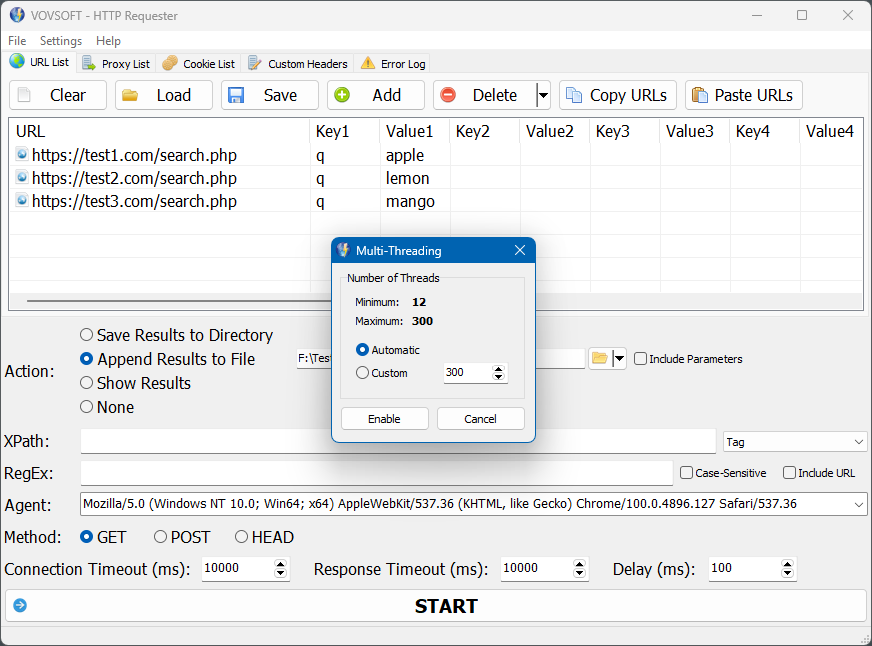
Multi-threading: automatic, or a custom number between 12 and 300 threads.
Real-World Uses
- An SEO checking the status code of every URL in a sitemap after a migration.
- Pulling the title and meta description of 2,000 pages into one file for an audit.
- Querying a public REST API once per row of a spreadsheet and saving each JSON response to a folder.
- Watching prices on a list of product pages with a RegEx for dollar amounts.
- A tester sending the same POST form with many inputs to see which ones fail.
Who It's For, and Who Should Skip It
HTTP Requester suits developers, testers, SEOs and data people who need many requests rather than one, and would rather fill in a table than write and debug a script.
Skip it if you're designing or debugging single API calls: Postman, Insomnia or curl are better for that, and support PUT and DELETE, which HTTP Requester doesn't yet. If you write Python, a short script with requests and a parser costs nothing. It needs 64-bit Windows.
Usage Guide
- Download the installer or the portable edition and start HTTP Requester.
- Add URLs with Add or Paste URLs, or Load a CSV file, and fill in any keys and values.
- Pick an action: save results to a folder, append them to one file, show them, or none.
- Enter an XPath or RegEx if you want only part of each response.
- Set the method, user agent, timeouts and delay, and add proxies, cookies or headers in their tabs if you need them.
- Click Start, then check the Status Code column and the Error Log.
Before you buy
The trial is limited in the number of URLs and runs one request at a time, so it's good for testing your XPath and settings, not for the real batch. One license covers one person on any number of their own computers. Vovsoft's general policy is no refunds once the key is delivered, since a free trial comes first (accidental orders are generally refunded, at its discretion, and PayPro Global has the final say on its orders). Scrape only sites whose terms allow it.
Where it falls short
- No PUT or DELETE methods yet, both open requests.
- No pause and resume button and no saved sessions, both open requests.
- One cookie set at a time, with cookie rotation still a request.
- It doesn't run JavaScript, so pages that build their content in the browser come back mostly empty.
- There are no built-in RegEx or XPath tutorials, another open request, so you need to know the syntax.
What Users Say
Ratings and requests
HTTP Requester's page on Vovsoft's site shows 5.0 out of 5 from 2 ratings, with no written comments, so there's little public review material for it.
Its feature request page says more about how people use it. Most of the features listed, such as proxies, cookies, the Referer header, XPath and RegEx extraction, META tags, the Status Code column, multi-threading and a detailed error log, were added at users' request, and the error log change came from a user who wrote: "I want to know why the URL failed so COPY ALL INFO or SAVE TO FILE, not just the URLs". Still open are PUT and DELETE, pause and resume, saved sessions and cookie rotation.
Vovsoft as a company has a TrustScore of 4.6 out of 5 from 411 reviews on Trustpilot, read through a summarizer, with users mostly describing its tools as simple and dependable.
Comparisons
HTTP Requester vs Postman
Postman is the tool for building, testing and documenting APIs one request at a time, with every method and scripting. HTTP Requester is for running the same kind of request hundreds or thousands of times from a list and saving or scraping the results.
HTTP Requester vs Screaming Frog SEO Spider
Screaming Frog crawls a site by following links and reports on many SEO factors, with a free tier capped at 500 URLs and a yearly license above that. HTTP Requester doesn't crawl; it requests exactly the URLs you give it, which suits status checks and custom extraction at a one-time $19.
HTTP Requester vs Vovsoft Batch URL Downloader
Batch URL Downloader just saves files from a list of links. HTTP Requester adds parameters, methods, headers, proxies and extraction.
Editions and Pricing
| Edition | Price | License | What you get |
|---|
| Trial | Free | Personal, non-commercial use | Batch requests with a limited number of URLs, one at a time |
| Licensed | $19 one-time | Lifetime | Unlimited URLs, multi-threading, commercial use, no nag screen or ads, lifetime free updates |
The installer and portable editions use the same key, sent by email right after payment. Vovsoft's $99 Universal License covers all of its desktop programs.
FAQs
Can HTTP Requester check HTTP status codes for a list of URLs?
Yes. HTTP Requester's Status Code column shows each URL's response code, and the HEAD method checks without downloading the page.
Does HTTP Requester support PUT, DELETE or PATCH?
No. HTTP Requester supports GET, POST and HEAD, plus a META mode. PUT and DELETE are on its feature request list.
Does HTTP Requester work with sites that need a login?
Partly. HTTP Requester can send cookies from a logged-in session, but it doesn't log in for you or run JavaScript.
Does HTTP Requester run on 32-bit Windows?
No. Since version 5.5, HTTP Requester is a 64-bit program only.
Is the HTTP Requester license a subscription?
No. The $19 license is a one-time payment that never expires and includes future updates.
System Requirements
- 64-bit Windows 11, 10, 8/8.1, 7 or Vista
- About 10 MB for the program, plus space for saved responses
- An internet connection
Conclusion
HTTP Requester is worth $19 if you regularly need to hit a long list of URLs, for status codes, API data or scraped titles and prices, and don't want to write a script each time. Batch requests with RegEx and XPath extraction in one window are the reason to buy, and it's updated often. The reason not to: there's no PUT, DELETE, JavaScript rendering or pause button, so API developers and anyone scraping modern script-heavy sites will outgrow it.
Download Free TrialBuy Now