WeBuilder 2025: a fast all-in-one web code editor for Windows, now with an AI assistant
WeBuilder 2025 is an $89.95 Windows code editor from Blumentals for web developers who write HTML, CSS, JavaScript and PHP, plus Ruby, Python and ASP.Net, in one program. It's a one-time purchase, not a subscription, and a $69.95 Personal license covers non-commercial use.
If you've ever waited for a heavyweight IDE to index a project just to fix one line of CSS, or juggled a text editor, an FTP client and a browser to update a site, WeBuilder is built for you. It opens fast, keeps every web language in one window, edits files straight on your server and, since the 2025 version, can ask an AI engine to write or rework the code you've selected.
Quick facts
- Version: 2025 (build 18.9.0.279, released September 17, 2026). The 2025 generation came out in April 2024 and has been updated regularly since (18.1 to 18.9).
- Developer: Blumentals Solutions SIA, Riga, Latvia (making web editors since 2004)
- Platform: Windows 10 and 11. A separate legacy setup runs on Windows 7 and 8. No Mac or Linux version.
- Languages edited: HTML, CSS, SASS, LESS, JavaScript, PHP, Smarty, Ruby, Python, Perl, ASP, ASP.Net, C#.Net, XML, SQL, Apache files
- Price: $89.95 for the standard (commercial) license, $69.95 Personal, one-time fee, free updates for the 2025 version
- Trial: the full program for 30 launches
- AI: free credits for 100+ prompts come with every license; more credits are sold separately
- Interface languages: English, German, Russian, Hungarian
- What we checked: the installer (webuild2025.exe, 119.8 MB, digitally signed by Blumentals Solutions SIA) downloaded from the vendor and the $89.95 one-time price on the order page for the standard license, with $69.95 for Personal, on November 8, 2026. We didn't run a full project or test the AI engines ourselves.
Download Free TrialBuy Now
Overview
WeBuilder sits at the top of a family of four Blumentals editors. Rapid CSS handles HTML and CSS, HTMLPad adds JavaScript, Rapid PHP adds PHP, SQL and a built-in web server, and WeBuilder adds Ruby, Python and ASP/ASP.Net on top of everything Rapid PHP does. They share one code base and one interface, so the difference is the languages and tools you get, not how the editor feels.
The pitch is speed without clutter: a tabbed editor that starts quickly, a code explorer, smart completion, validators and an FTP/SFTP client in one place. The 2025 version added the biggest change in years, an AI chat and prompt panel that works on your open document or, with the experimental AI Tools option, across your whole project.
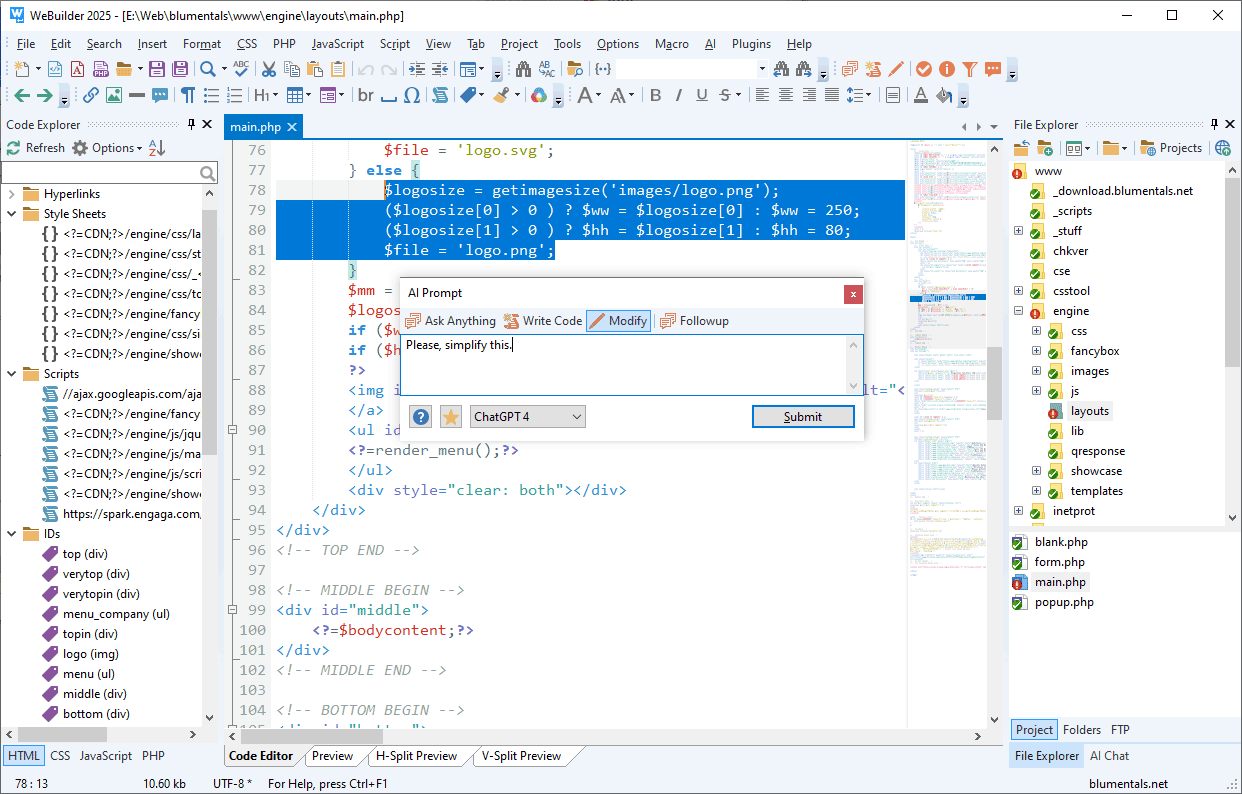
WeBuilder 2025 with the Code Explorer on the left, the File Explorer on the right and the AI Prompt dialog asked to simplify the selected PHP lines.
Features
An AI assistant inside the editor
WeBuilder's AI assistant writes new code, changes or simplifies the code you've selected, explains it, adds comments or answers free-form questions, without copying anything to a browser. It already knows the language of the open document. One-click commands (Check, Explain, Simplify, Add Comments), a prompt library and a chat history save typing. You pick the engine: the list includes Claude Sonnet, OpenAI GPT models, Gemini 3 Flash and others, and update 18.9 added GPT-6 Astra and the ability to stop a running request. With the experimental AI Tools switched on, the AI can search your project, read the files it needs and make changes across several files in one task, which you approve or decline together.
One editor for every web language
WeBuilder highlights and completes HTML, CSS, JavaScript, PHP, Ruby and Smarty, and highlights Python, Perl, ASP, ASP.Net, C#.Net, XML, SQL and Apache files. It has framework support for Bootstrap 3 to 5, jQuery, React and Vue.js, and for Laravel, CodeIgniter, Symfony, Yii, CakePHP and WordPress on the PHP side. The text editor has a code minimap, code folding, split editing, multi-highlighting, a macro recorder, Emmet and a light or dark theme.
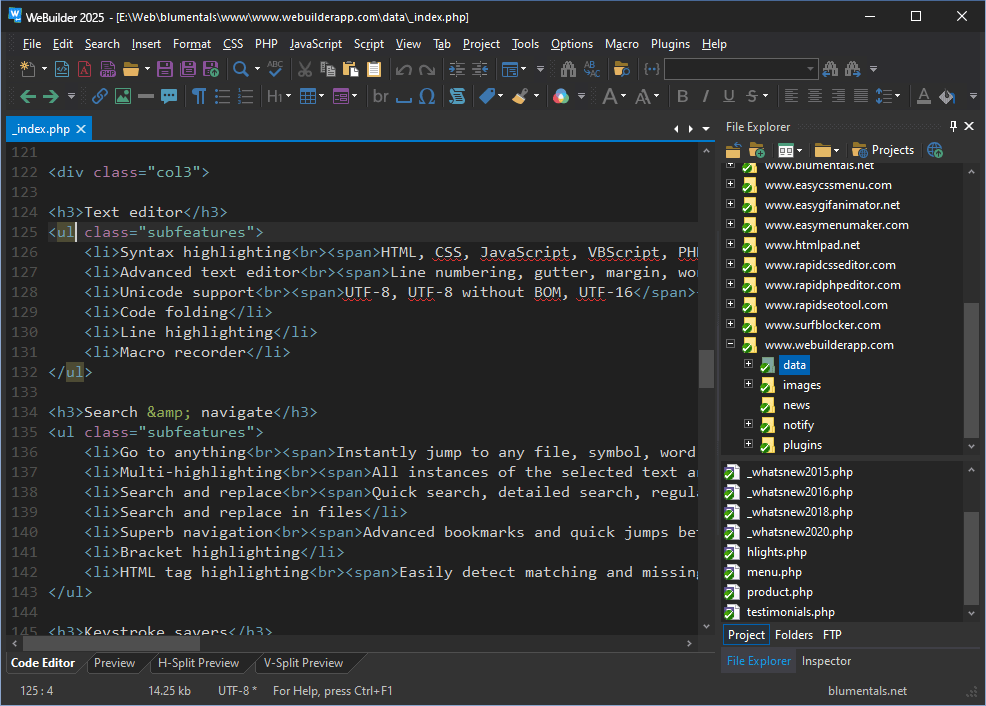
The dark interface style with an HTML file open and the File Explorer showing a folder of website projects.
Code intelligence and fast navigation
WeBuilder's Code Explorer lists every class, function, variable, ID and stylesheet in the open file, and Go to Anything jumps to any file, symbol, word or line from one box. Function hints, matching-tag highlighting, bookmarks and quick jumps between recent places help in large files. Search and replace works in one file, open files or whole folders, with regular expressions and a dockable search window.

A PHP class open in WeBuilder 2025: the Code Explorer lists its members, a hint explains empty(), and a breakpoint line sits next to the Run and Debug toolbar.
PHP checking, debugging and a built-in server
WeBuilder checks PHP syntax as you type, debugs with xDebug (breakpoints, stepping, context variables) and previews PHP pages through its own built-in web server or your external one, such as WAMP. An SQL explorer connects to MySQL databases, and beautifiers tidy PHP, JavaScript and CSS (the 2025 version uses Prettier-based beautifiers and a Terser-based JavaScript minifier).

The PHP debugger paused on a mail() script, with the Context Variables panel showing each variable's type and value.
Edit on the server with FTP, SFTP and FTPS
WeBuilder opens and saves files straight on an FTP, SFTP or FTPS server, or keeps a local copy and publishes only the files you changed with one click. One-click HTML publishing uploads a page with its linked images, CSS and scripts. Projects, a two-pane FTP browser and TortoiseSVN and TortoiseGit integration round it out.

The Browse FTP window: local folders on the left, the server on the right, and the Connection Settings dialog offering FTP, SFTP, FTPS and FTPES.
Chrome and Edge preview with developer tools
WeBuilder previews pages inside the editor with an up-to-date Chromium engine or Microsoft Edge, in a tab or a horizontal or vertical split next to your code, with screen-size testing and the browser's developer tools. XRay shows the HTML and CSS structure of a page, and W3 validators, HTML Tidy, a spell checker and JSHint are built in.

The built-in preview with the Chrome and Edge engine switch at the top and Chrome's Elements and Styles panels below.
Benefits
- No waiting. WeBuilder starts faster than full IDEs. One long-time user found it quicker to launch than PhpStorm or NetBeans.
- Fewer programs open. Editor, FTP client, validators, preview, debugger and an AI chat in one window means less switching and fewer lost uploads.
- You own it. A one-time license that never expires, while most rival IDEs moved to subscriptions. You pay again only if you want the next major version.
- AI where you code. The assistant sees your selection and language, so a quick "make this table responsive" doesn't need a copy-paste into a browser tab.
- Easy to learn. It works like a plain text editor until you reach for the wizards, snippets and assistants, so beginners aren't buried in panels.
Real-World Uses
- Maintaining client sites over SFTP: open the live site, fix a PHP template, preview it and save it back to the server without a separate FTP program.
- A WordPress or Laravel project: PHP completion with framework support, xDebug for a broken plugin, and the SQL explorer for a quick look at the database.
- Mixed-language legacy work: an old ASP.Net intranet page, a Python helper script and a Ruby template all open in the same tabs.
- Refactoring with AI: select a jQuery block and ask the AI to rewrite it in plain JavaScript, or let AI Tools find "the database timeout" setting across the project and change it.
- Working from a USB drive: install the portable version on a flash drive and carry your editor and settings between computers.
Who It's For, and Who Should Skip It
WeBuilder fits freelance and small-agency web developers on Windows who touch several languages, edit sites directly on servers and want one fast tool they buy once. It also suits hobbyists and students who want more than Notepad++ but less than a full IDE (the Personal license is cheaper for them).
Skip it if you work on a Mac or Linux (there's no version for either), if your team lives in Git-based workflows with extensions for everything (free Visual Studio Code has a far bigger plugin ecosystem), or if you need deep refactoring and testing tools for large PHP applications, where a full IDE such as PhpStorm goes further. If you only write HTML and CSS, the cheaper Rapid CSS or HTMLPad gives you the same editor for less.
Usage Guide
- Install: download the trial, run the setup and choose a Standard install or a Portable install to a USB drive. On Windows 7 or 8, use the legacy setup from the download page instead.
- Open your site: point the File Explorer at your local folder, or add your server in the FTP panel (FTP, SFTP or FTPS) and open files remotely. Save the folder as a project for project-wide search and one-click publishing.
- Set up PHP: for PHP previews, use the built-in web server or point WeBuilder at your local server. Turn on the xDebug debugger in the options if you need breakpoints.
- Try the AI: select some code, open the AI menu and choose Explain, Simplify or a free-form prompt. In the trial, AI credits need a free Blumentals account.
- Activate: after buying, you get a 25-digit license key by e-mail. Click Activate in the trial and enter it; there's nothing to reinstall.
Before you buy
- The trial counts launches, not days. You get 30 starts, so leave it open while you test instead of closing and reopening it.
- AI isn't unlimited. The license includes credits for 100+ prompts. Heavy use means buying more credits from Blumentals; the editor itself works without them.
- Major upgrades cost extra. Updates within the 2025 version are free. The next major version is a paid upgrade (the current WeBuilder upgrade price is $69.95), unless you bought within 6 months of its release.
- Personal means non-commercial. The $69.95 Personal license doesn't cover sites with ads or sites for businesses; those need the $89.95 license.
Where it falls short
- Publishing has been the weak spot. A long-time reviewer of Rapid PHP, which shares WeBuilder's code, found folder publishing over FTP unreliable in the 2020 version and the File Explorer short of features. Later updates reworked SFTP and file handling, but if you publish large folders, test that first in the trial.
- A smaller ecosystem. There's a plugin catalog, but nowhere near the extension libraries of Visual Studio Code or JetBrains IDEs. FileHorse lists limited collaboration features and fewer plugins as its main cons.
- New CSS can lag. Users on the vendor's forum have asked for faster support of new CSS properties, which the editor flags in red until the language definitions catch up. Blumentals adds them once they're stable.
- The AI is experimental. Blumentals says so itself: the AI can make mistakes, and features such as AI Tools are still labelled experimental.
- Windows only, with full Chrome preview only on Windows 10 and 11.
What Users Say
WeBuilder isn't listed on the big review sites such as Capterra or G2 (searches there turn up unrelated products with similar names), so most feedback comes from the vendor's testimonials page, long-form reviews of its sister edition Rapid PHP, and the Blumentals user forum.
Customer testimonials (vendor's site)
"Spent the past 5 years switching IDE's trying to find one which wasn't either lacking the important tools or bloated with pointless ones. WeBuilder is spot on." Daniel Paddison, Clicky Games UK
"The coding environment is first class and sets the standard for clarity, ease of use, productivity and configurability. WeBuilder is an ergonomic gem." Mark Davenport, Etiam SA
"I've been in the trade a long time and used a lot of editors, your is one of the best for balance of speed, functionality, features, and ease of use." Christopher Shelley
"Blumentals works tirelessly to improve this product, frequently releasing updates and acknowledging user requests for support and features." Eric Barstad, Shadow Box Creative Media
"This editor has everything I need in one nice package, AND it fits on my flash drive." Anthony Steiner
Will Fastie, fastie.com (reviews of Rapid PHP, WeBuilder's sister edition)
Fastie explains that "The four editors are actually variations of one editor (WeBuilder) from which features are stripped to create the other products," so his notes apply to WeBuilder too.
On Rapid PHP 2018: "It has dramatically improved my PHP coding productivity and enhanced my CSS and JavaScript editing." He added: "Despite the small size of the company, Blumentals has been responsive regarding support and feature suggestions." His gripe: "most of it is fluff and a large number of the listed improvements are vaguely stated," about the vendor's what's-new lists.
On Rapid PHP 2020 he was harsher. He praised startup ("Believe it or not, it's faster on startup than PhpStorm or NetBeans.") but found that "folder publishing is unreliable" and concluded: "The flaws in Rapid's publishing model make it unacceptable for my level of professional work." He went on to try PhpStorm and Visual Studio Code.
Blumentals user forum
A long-time user of the family wrote in September 2025: "I love the editor, especially with the AI features. But I would wish for more small intermediate updates, not with new features, but some love for all the new CSS features, so they don't show in red all the time." Schloime, Rapid PHP 18.3
Another asked in July 2026: "Will there also be support for other, more affordable AI models?" A Blumentals developer answered that cheaper GPT models had just been added and others were being watched. falk
Most recent support threads are how-to questions (search windows, preview settings, frameworks) rather than crash reports, and Blumentals developers answer in the forum within days.
Download sites
FileHorse lists WeBuilder 2025 18.9 with these pros: user-friendly interface, wide language support, fast and lightweight, powerful debugging tools and customizable shortcuts. Its cons: limited collaboration features, no real-time preview, fewer plugins than competitors and Windows-only availability.
The recurring themes: people like the speed, the clean all-in-one design, the one-time price and a vendor that listens and keeps updating. The complaints are about publishing and file-explorer rough edges in older versions, a small plugin ecosystem, newer CSS lagging behind, and no Mac version.
Comparisons
WeBuilder vs the other Blumentals editors
| Edition | Standard price | Languages | Extras |
|---|
| Rapid CSS 2025 | $59.95 | HTML, CSS | Base features |
| HTMLPad 2025 | $59.95 | HTML, CSS, JavaScript | Base features |
| Rapid PHP 2025 | $79.95 | + PHP, Smarty | SQL, built-in web server, Apache, run from USB |
| WeBuilder 2025 | $89.95 | + Ruby, Python, ASP, ASP.Net | Everything in Rapid PHP |
If PHP is the only server language you use, Rapid PHP saves $10. WeBuilder is worth it once Ruby, Python or ASP files show up in your work.
WeBuilder vs Visual Studio Code
Visual Studio Code is free, cross-platform and has an enormous extension library, but PHP debugging, FTP publishing and AI each mean finding and configuring extensions. WeBuilder costs money and runs only on Windows, but everything works out of the box, including SFTP editing, xDebug and an AI assistant with credits included.
WeBuilder vs PhpStorm
PhpStorm is the deeper PHP IDE (refactoring, testing, inspections) and runs on Windows, Mac and Linux, but it's a subscription and starts slower. WeBuilder is lighter, quicker to learn and paid once.
Editions and Pricing
| License | Price | Who can use it | Installs |
|---|
| WeBuilder 2025 | $89.95 one-time | Professionals, companies, government | Work PC, home PC and a laptop or USB drive |
| WeBuilder 2025 Personal | $69.95 one-time | Students and home users, non-commercial only | Home PC and a laptop or USB drive |
| WeBuilder 2025 Team License | $199.95 one-time | Teams of up to 4 users | Each user: work, home and a laptop |
Volume licenses start at $72 per seat for 5 to 9 computers, with academic pricing from $50.40 per seat. Owners of an older version can upgrade for $69.95 (Personal $49.95). Every license includes free updates to the 2025 version and free e-mail support. EU residents pay VAT on top.
FAQs
Is WeBuilder a subscription?
No. WeBuilder is a one-time purchase with a perpetual license that never expires. You get free updates for the 2025 version; a later major version is an optional paid upgrade. Only extra AI credits are bought separately.
Does WeBuilder run on a Mac?
No. WeBuilder is Windows-only, and Blumentals has no Mac version of any of its editors. Mac users would need Windows in a virtual machine.
Can I use WeBuilder 2025 on Windows 7 or 8?
Yes, with the legacy setup linked at the bottom of the download page. WeBuilder's legacy version has almost all the new features except the updated Chrome preview, and it will get only occasional updates.
Do I need my own OpenAI or Anthropic account for WeBuilder's AI?
No. WeBuilder's AI runs through Blumentals' service with credits: each license comes with free credits for 100+ prompts, and you can buy thousands more for a few dollars. In the trial, you get a smaller amount by creating a free Blumentals account.
Can I use the Personal license for client work?
No. WeBuilder Personal is for private, non-commercial use, such as learning or a personal or non-profit site. Sites with paid ads or for businesses need the standard license, and you can upgrade from Personal later at the upgrade price.
How do I move my settings from WeBuilder 2022?
WeBuilder 2025 imports settings from 2022 automatically, layouts included, as long as you keep your settings when uninstalling the old version. Settings don't carry over between a portable and a normal install.
Is WeBuilder available in other languages?
Yes. Besides English, WeBuilder's interface is available in German, Russian and Hungarian.
System Requirements
- Windows 10 or Windows 11 (legacy setup for Windows 7 and 8)
- About 120 MB download
- Internet connection for the AI assistant, FTP/SFTP and online validators
- Optional: PHP and xDebug for debugging (a built-in web server and a zero-configuration package are available)
Conclusion
WeBuilder 2025 is worth $89.95 if you build websites on Windows in more than one language and want a fast editor you pay for once. The one reason to buy it is that the editor, server publishing, PHP debugging, preview and now an AI assistant all work together out of the box, with no extension hunting and no subscription. The main reason not to is the platform and ecosystem: it's Windows-only, its plugin library is small, and if you publish whole folders over FTP every day, test that in the 30-launch trial first. If you never touch Ruby, Python or ASP, Rapid PHP does the same job for $10 less.
Download Free TrialBuy Now