Rapid PHP 2025: a quick-starting PHP editor with IDE tools and an AI assistant
Rapid PHP 2025 is a $79.95 Windows PHP editor from Blumentals that sits between a plain code editor and a full PHP IDE: PHP, HTML, CSS and JavaScript in one window, with xDebug debugging, SFTP editing and a built-in AI assistant. It's a one-time purchase, and a $59.95 Personal license covers non-commercial use.
Plenty of PHP developers know the trade-off: Notepad++ opens instantly but knows nothing about your classes, while a big IDE knows everything but takes its time to load and index. Rapid PHP aims for the middle, opening fast while still giving you code completion, a class explorer, a syntax checker and a debugger.
Quick facts
- Version: 2025 (build 18.9.0.279, released September 17, 2026). The 2025 generation came out in April 2024 and has been updated regularly since (18.1 to 18.9).
- Developer: Blumentals Solutions SIA, Riga, Latvia
- Platform: Windows 10 and 11, plus a legacy setup for Windows 7 and 8. No Mac or Linux version.
- Languages: code intelligence for PHP, HTML, CSS, JavaScript and Smarty, with highlighting for Python, Perl, XML, SQL, SASS, LESS and Apache files
- Price: $79.95 standard (commercial) license, $59.95 Personal, one-time fee, free updates for the 2025 version
- Trial: the full program for 30 launches
- AI: free credits for 100+ prompts come with every license
- What we checked: the installer (rapidphp2025.exe, 119.7 MB, digitally signed by Blumentals Solutions SIA) downloaded from the vendor, and the $79.95 one-time price on the order page for the standard license, with $59.95 for Personal, on November 8, 2026. We didn't debug a project or test the AI engines ourselves.
Download Free TrialBuy Now
Overview
Rapid PHP is one of four Blumentals editors built on the same code base. Rapid CSS covers HTML and CSS, HTMLPad adds JavaScript, Rapid PHP adds PHP with its server-side tools (SQL browser, built-in web server, Apache support, a portable USB install), and WeBuilder adds Ruby, Python and ASP.Net support on top. Blumentals has sold Rapid PHP since the mid-2000s and releases a new major version every two to three years.
The 2025 version brought an AI assistant into the editor, a newer Chromium preview plus Microsoft Edge preview, Prettier-based beautifiers, a faster Code Explorer on large files and updated PHP 8 language support.
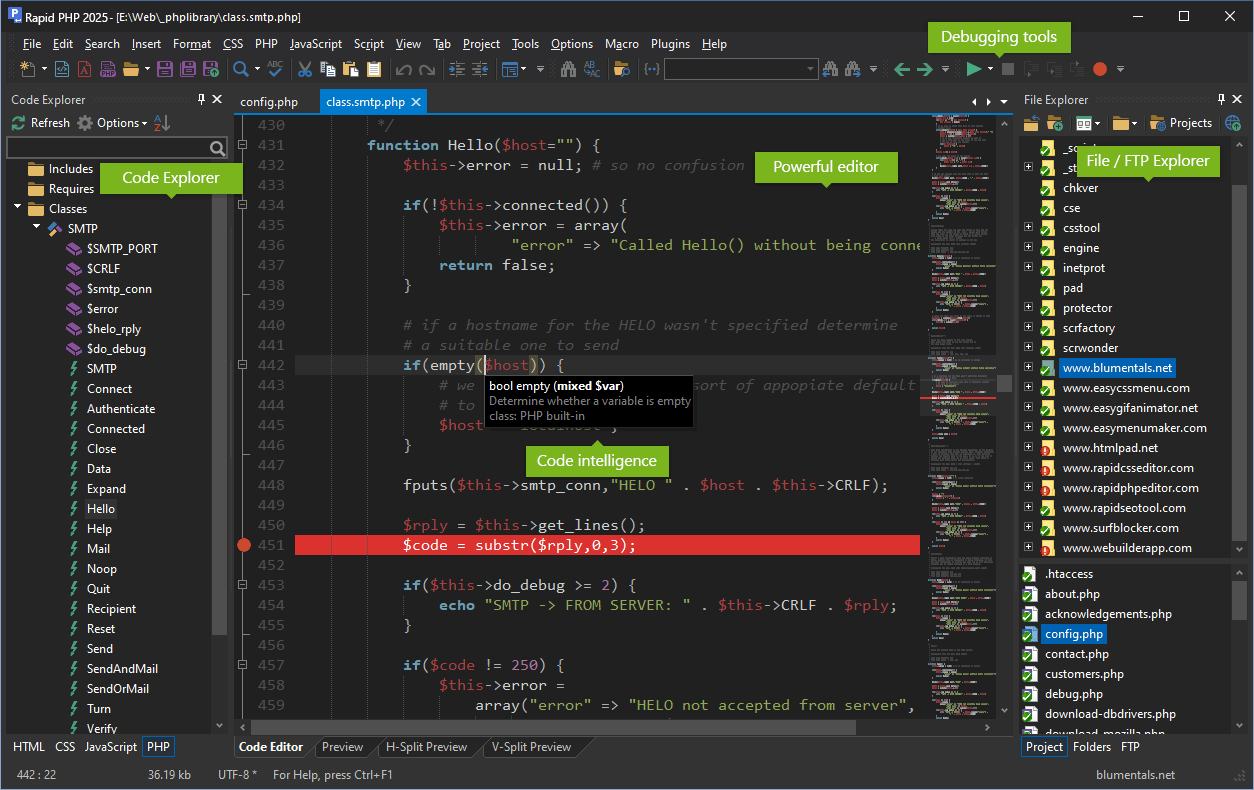
Rapid PHP 2025 in the dark theme: the Code Explorer lists a class's members, a hint explains empty(), a breakpoint is set on line 451, and the File/FTP Explorer is on the right.
Features
PHP code intelligence and navigation
Rapid PHP completes PHP functions, classes and variables, shows parameter hints for built-in functions, and lists everything in the current file in the Code Explorer (includes, classes, members, functions). Go to Anything jumps to a file, symbol, word or line, and Find Declaration opens the file where a function is defined. Code folding, a minimap, multi-highlighting, bookmarks and matching-bracket and tag highlighting help in long files. It is PHP 8 ready.
Live syntax checking and xDebug debugging
Rapid PHP checks PHP syntax as you edit and on save, so a missing semicolon shows before you upload. Its xDebug debugger sets breakpoints, steps through code and shows the context variables with their types and values. A built-in web server (and a zero-configuration PHP package) lets you preview and debug PHP without installing WAMP, though an external server works too.

The PHP debugger stopped on a mail() script, with the Context Variables panel listing each variable's type and value.
Framework and template support
Rapid PHP knows Laravel, CodeIgniter, Symfony, Yii, Nette, Prado, CakePHP and WordPress, has code intelligence for Smarty templates and supports Twig. On the front end it helps with Bootstrap 3 to 5, jQuery, React and Vue.js, and includes HTML and CSS assistants, Emmet, a color picker and CSS gradient and shadow editors.
An AI assistant that sees your code
Rapid PHP's AI assistant generates functions, rewrites or simplifies the code you've selected, explains a regex or adds comments, from a prompt box or one-click commands. You choose the engine (Claude Sonnet, OpenAI GPT models, Gemini and others), keep a library of favorite prompts and can stop a request that runs too long. The experimental AI Tools mode lets the AI search and read your project files and change several files in one task, with each change shown for you to approve.
MySQL browser built in
Rapid PHP connects to MySQL databases, lists their tables and columns in a side panel and runs queries in an SQL Browser window, so you can check what your script wrote without opening phpMyAdmin.

The SQL panel with a local MySQL server's databases and tables, and the SQL Browser showing the results of a SELECT query (the window icon is WeBuilder's, which shares this tool).
Edit live sites over FTP, SFTP and FTPS
Rapid PHP opens and saves files directly on an FTP, SFTP or FTPS server, or keeps a local working copy and publishes only the changed files. Projects keep a site's local folder, server and settings together, and TortoiseSVN and TortoiseGit integration shows version-control status in the File Explorer.

The Browse FTP window with local folders on the left, the server on the right and the connection dialog set to SFTP (SSH).
Preview in Chrome or Edge, with validators
Rapid PHP previews pages in a tab or a split view using a current Chromium engine or Microsoft Edge, through the built-in or an external web server, with the browser's developer tools and screen-size testing. W3 HTML and CSS validators, JSLint, HTML Tidy, a spell checker and PHP, CSS and JavaScript beautifiers are built in.

The built-in preview with the Chrome and Edge switch and Chrome's Elements and Styles panels docked below the page.
Benefits
- Fast to open, fast to navigate. A long-time reviewer measured Rapid PHP starting faster than PhpStorm or NetBeans, and its Code Explorer populates almost instantly when you switch files.
- Bugs caught before upload. Live PHP syntax checking plus xDebug means fewer white screens on the live server.
- One purchase. A perpetual license instead of a yearly subscription; you pay again only if you want the next major version.
- Front end included. Rapid PHP's HTML, CSS and JavaScript tools are as complete as in Blumentals' dedicated HTML editors, so you don't need a second editor for templates and stylesheets.
Real-World Uses
- WordPress theme and plugin work: edit PHP templates with completion, debug a hook with xDebug and preview through a local server.
- Hot fixes on a client's server: open the file over SFTP, fix it with the syntax checker watching, and save it straight back.
- Small Laravel or Symfony apps: framework-aware completion and the MySQL browser for a quick check of the data.
- Legacy PHP clean-up: select an old function and ask the AI to modernize it for PHP 8 or explain what it does before you touch it.
- Teaching or learning PHP: the built-in web server and zero-configuration PHP package let students run scripts without setting up a server stack.
Who It's For, and Who Should Skip It
Rapid PHP fits Windows-based PHP developers, freelancers and small teams who maintain websites and small applications and want something faster and simpler than a full IDE, bought once. It also suits hobbyists learning PHP, who can use the cheaper Personal license.
Skip it if you need Ruby, Python or ASP.Net code support (WeBuilder adds those for $10 more), if you work on Mac or Linux (no versions exist), or if you build large PHP applications that rely on deep refactoring, test runners and static analysis, where PhpStorm goes further. If you never write server-side code, HTMLPad or Rapid CSS is cheaper.
Usage Guide
- Install: download the trial and choose a Standard or Portable (USB) install. On Windows 7 or 8, use the legacy setup at the bottom of the download page.
- Open your project: point the File Explorer at your site folder and save it as a project, or connect to your server in the FTP panel.
- Set up PHP: use the built-in web server for previews, or point Rapid PHP to your own PHP and server. Enable the xDebug debugger in the options to use breakpoints.
- Use the AI: select code, open the AI menu and pick Explain, Simplify or write your own prompt. Trial users get AI credits by creating a free Blumentals account.
- Activate: enter the 25-digit license key from your order e-mail with the Activate button; no reinstall needed.
Before you buy
- The trial is 30 launches, not 30 days. Keep it open while you test.
- AI credits run out. 100+ prompts are included; heavy use means buying more credits. Everything else works without them.
- Major versions are paid upgrades (currently $59.95, or $45.95 for Personal), unless you bought less than 6 months before the new version came out.
- Personal is non-commercial only: no client sites and no sites with paid ads.
Where it falls short
- Publishing whole folders. The most detailed independent reviews of Rapid PHP found its FTP folder publishing unreliable (2020 version) and the File Explorer short of features such as publishing a multi-file selection. SFTP and file handling have been updated since, but test your own publishing routine in the trial.
- Not a heavyweight IDE. There's no deep refactoring, test runner or static analysis on the level of PhpStorm.
- Newer CSS can show as errors until Blumentals adds the properties, which it does once they're stable.
- Small ecosystem. A plugin catalog exists, but it's tiny next to Visual Studio Code's extensions.
- Windows only.
What Users Say
Rapid PHP has no Capterra or G2 profile, so the feedback below comes from the vendor's testimonials page, Will Fastie's three reviews over five years, the Blumentals forum and download sites.
Customer testimonials (vendor's site)
"If you're on the fence - GET IT. It's totally worth the money, it's updated regularly and it's arguably the best PHP editor I've come across in my searching and trying many other programs." James Racine, iVenture Assets Ltd.
"In the mix of programs I tested Rapid PHP editor easily separated itself form the pack. There were plenty of programs that had 85% of the features I wanted and needed but Rapid PHP was everything." Jon Henderson, Ecreativeworks, Inc.
"This is one powerful, all-inclusive editor. Whether you only create PHP files, or use a wide variety of scripting languages (such as HTML and CSS), Rapid PHP editor will fulfill most, if not all, of your needs." Lee Underwood, Web Reference
"I've used Blumental's Rapid PHP for years and it gets better every year." P. Joseph Larson, Joe's Granite Labor
Will Fastie, fastie.com (Rapid PHP 2016, 2018 and 2020)
Fastie bought Rapid PHP 2016, upgraded to 2018 and used it daily. On 2018: "It has dramatically improved my PHP coding productivity and enhanced my CSS and JavaScript editing. For those reasons alone, I consider it an excellent product, more than worth its bargain price." He called the Code Explorer "probably the second most important contributor to my happiness after PHP syntax checking," and noted: "Despite the small size of the company, Blumentals has been responsive regarding support and feature suggestions."
He also said: "I know that Rapid PHP is not the pinnacle of PHP tools. Nonetheless, I have absolutely no hesitation in recommending it."
By 2020 his view had cooled. He welcomed the reworked search ("This improvement is long overdue but very good.") and the fast startup, but wrote that "folder publishing is unreliable" and that dragging files in from Windows Explorer crashed the program. His conclusion: "The flaws in Rapid's publishing model make it unacceptable for my level of professional work. This is not to say Rapid has no place in the PHP world, especially given its price."
Blumentals user forum
"I'm new to the forum, but a user of RapidPHP since v2016. I love the editor, especially with the AI features." The same user asked for "more small intermediate updates, not with new features, but some love for all the new CSS features, so they don't show in red all the time." Schloime, Rapid PHP 18.3, September 2025
In September 2026 another user reported Rapid PHP "randomly inserting [ ```] characters" when saving HTML files; a Blumentals developer replied the next morning, suspected markdown from the AI feature leaking in and asked for steps to reproduce it. jPaul
SnapFiles user reviews
SnapFiles carries four user reviews, all recommending it, though they date from 2005 to 2007. One sums up the appeal that still holds: "It fits nicely in between the expensive IDE's and plain HTML editors."
The recurring themes: users praise the speed, the Code Explorer, live syntax checking, the price and a small vendor that answers on its forum. The criticism centers on FTP publishing and File Explorer limits (strongest in 2020), occasional new bugs around the AI features, lag on new CSS properties, and the gap to a full IDE like PhpStorm.
Comparisons
Rapid PHP vs WeBuilder
WeBuilder ($89.95) is Rapid PHP plus code support for Ruby, ASP and ASP.Net (and highlighting for more languages). If all your server-side code is PHP, Rapid PHP is the same editor for $10 less; you can cross-upgrade later.
Rapid PHP vs HTMLPad
HTMLPad ($59.95) has the same HTML, CSS and JavaScript tools but no PHP support, debugger, SQL browser, built-in web server or portable USB install. Front-end-only developers save $20 with it.
Rapid PHP vs PhpStorm
PhpStorm is the deeper IDE (refactoring, inspections, test integration) on Windows, Mac and Linux, sold by subscription. Rapid PHP is lighter, quicker to start and bought once, with FTP editing built in.
Rapid PHP vs Visual Studio Code
Visual Studio Code is free with a huge extension library, but PHP intelligence, debugging, SFTP and AI each need extensions and setup. Rapid PHP works out of the box.
Editions and Pricing
| License | Price | Who can use it | Installs |
|---|
| Rapid PHP 2025 | $79.95 one-time | Professionals, companies, government | Work PC, home PC and a laptop or USB drive |
| Rapid PHP 2025 Personal | $59.95 one-time | Students and home users, non-commercial only | Home PC and a laptop or USB drive |
| Rapid PHP 2025 Team License | $179.95 one-time | Teams of up to 4 users | Each user: work, home and a laptop or USB drive |
Volume licenses start at $64 per seat for 5 to 9 computers, and academic pricing is available. Upgrades from an older version cost $59.95 (Personal $45.95). Every license includes free 2025 updates and e-mail support; EU residents pay VAT on top.
FAQs
Is Rapid PHP a subscription?
No. Rapid PHP is a one-time purchase with a perpetual license. Updates to the 2025 version are free; the next major version is an optional paid upgrade.
Does Rapid PHP support PHP 8?
Yes. Rapid PHP 2025's language definitions, completion and syntax checking are PHP 8 ready. The syntax checker uses a PHP executable, which you can point at your own PHP version.
Can Rapid PHP run PHP without XAMPP or WAMP?
Yes. Rapid PHP has a built-in web server and a zero-configuration PHP package for previews. You can still use XAMPP, WAMP or a remote server if you prefer.
Does Rapid PHP work on Windows 7?
Yes, through a separate legacy setup on the download page. Rapid PHP's legacy version has nearly all 2025 features except the updated Chrome preview, and gets only occasional updates.
Is there a Mac version of Rapid PHP?
No. Rapid PHP and the other Blumentals editors are Windows-only.
Do I need my own AI API key for Rapid PHP?
No. Rapid PHP's AI runs through Blumentals' credit system: the license includes credits for 100+ prompts and you can buy more cheaply. Trial users get a smaller allowance with a free Blumentals account.
Can I switch from Rapid PHP to WeBuilder later?
Yes. Blumentals offers cross-upgrades between its editors and from Personal to commercial licenses at the upgrade price, so you pay only part of the full price.
System Requirements
- Windows 10 or Windows 11 (legacy setup for Windows 7 and 8)
- About 120 MB download
- Internet connection for the AI assistant and FTP/SFTP
- Optional: PHP and xDebug for syntax checking and debugging
Conclusion
Rapid PHP 2025 is worth $79.95 for Windows PHP developers who maintain websites and want a fast editor with real PHP tools, paid for once. The one reason to buy it is the balance: live syntax checking, xDebug, a Code Explorer and SFTP editing in an editor that opens in seconds, now with an AI assistant built in. The main reason not to is scale: it isn't a full IDE like PhpStorm, it's Windows-only, and its publishing tools have drawn criticism, so run your real workflow through the 30-launch trial first. Need Ruby, Python or ASP.Net too? Take WeBuilder instead.
Download Free TrialBuy Now