Easy CSS Menu: Build Pure CSS Drop-Down Menus Without Writing the Code
Easy CSS Menu is a Windows program from Blumentals that lets you design a website's drop-down navigation menu visually and then generates the HTML and CSS for you, with no JavaScript in the result. The Personal edition costs $29.95 as a one-time purchase on the order page, and there's a free edition for non-commercial sites. It suits people who maintain their own static or hand-built sites and would rather pick a template than debug nested ul lists and hover rules.
Anyone who has hand-coded a three-level drop-down knows where the time goes: the submenu that opens behind the page content, the arrow that won't line up, the menu that collapses badly on a phone. Easy CSS Menu turns that into clicking a template and editing it in place. The trade-off is that it's a small, quietly maintained tool, not an active project, and you should know that before you pay.
Quick facts
- Developer: Blumentals Solutions SIA (Latvia), makers of WeBuilder, HTMLPad and Rapid CSS Editor
- Version: 5.5
- Platform: Windows 7, 8, 10 and 11; there's no Mac version
- Output: pure HTML and CSS menus, horizontal or vertical, with unlimited submenu levels and an optional hamburger menu for phones
- Editions: Free (non-commercial, 20+ templates), Personal $29.95 (non-commercial, 150+ templates), Pro $49.95 (commercial use, 200+ templates)
- License: one-time payment with free updates within version 5
- What we checked: the installer on the vendor's server (cssmenu5.exe, 36.4 MB, dated November 22, 2021), and the order page on November 4, 2026, which charged $29.95 for "Easy CSS Menu 5 Personal" as a one-time purchase with no renewal. We didn't build or publish a menu with it ourselves.
Before you buy
- Personal means non-commercial. The $29.95 Personal license covers personal, educational and non-profit sites only. A business site or client work needs the $49.95 Pro license.
- Try the free edition first. It never expires and uses the same editor, so you can check that the generated menu fits your page before you buy anything.
- Development is slow. The current installer dates from November 2021, and the version 5 release that added hamburger menus came in late 2017 after users had waited about three years for it.
- You need access to your page's HTML. The menu is a block of code plus files you place on your site. If your site runs on a hosted builder that hides the HTML, this tool isn't for you.
Download Free TrialBuy Now
Overview
The editor looks like an Office program: a ribbon with Home, Publish and Help tabs, a live preview of your menu across the top, a template gallery at the bottom and a properties panel on the right split into Top Menu, Submenu and General. You click a button in the preview, rename it, give it a link, and add a submenu under it. Everything you change shows up in the preview straight away.
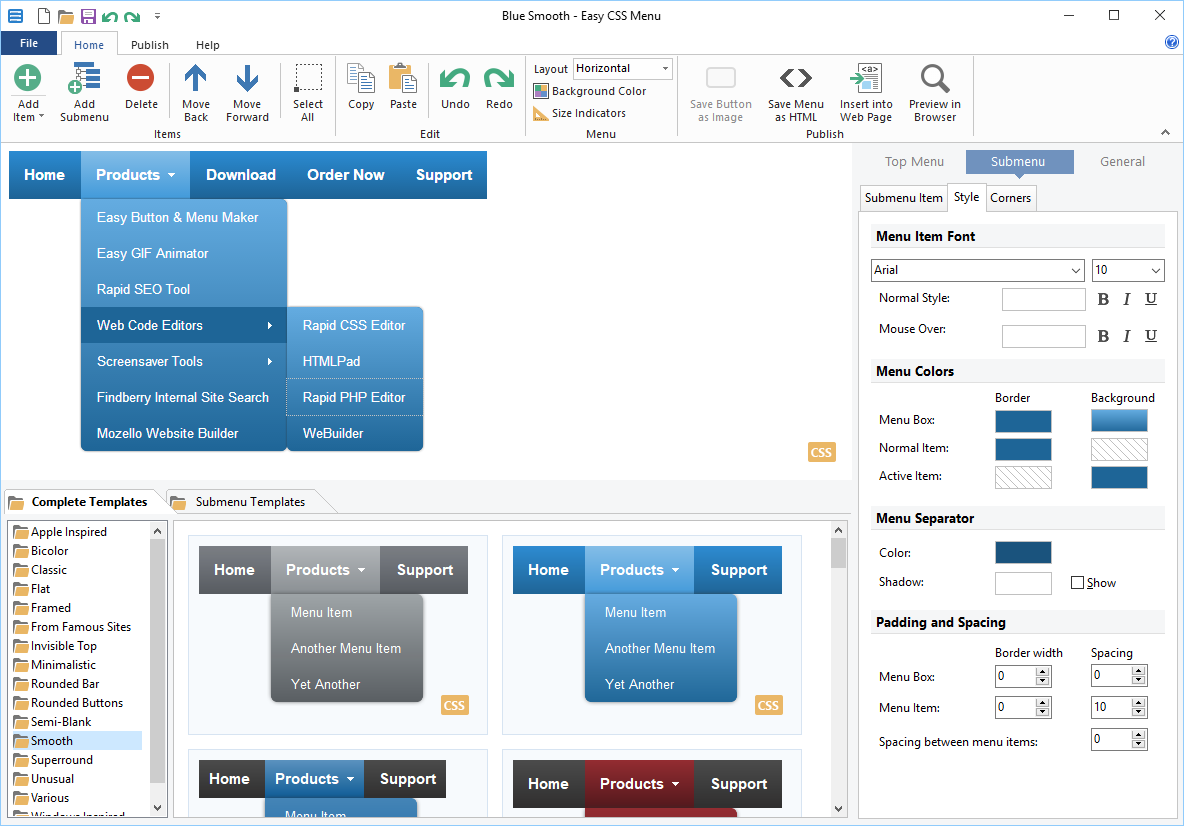
The main editor: a two-level drop-down in the "Blue Smooth" template, the Complete Templates gallery below it, and the Submenu > Style panel with font, colors, separator and spacing settings.
When the menu is done, the Publish ribbon either saves it as a stand-alone HTML page or runs a wizard that inserts it into an existing web page on your computer. You then upload your site as usual. The menu is saved in a project file, and that project is the only way to edit it later: the generated code can't be loaded back into the editor.
Features
Menus that work without JavaScript
Easy CSS Menu generates menus made only of HTML and CSS, so they still open when a visitor has JavaScript turned off, and search engines can read every link. Blumentals' help notes that a pure CSS menu means cleaner code that loads a little faster, and the output is HTML5-compatible while still working in older browsers.
Hundreds of templates as a starting point
Easy CSS Menu ships with template families such as Apple Inspired, Bicolor, Flat, Framed, Rounded Buttons, Smooth and "From Famous Sites". The Personal edition includes more than 150 of them, Pro more than 200, and the free edition about 20. You double-click a template to apply it, and only one submenu style applies across the whole menu.

The File > New template picker (shown in the Pro edition), with flat and Rounded Buttons styles.
Full control over the look
Easy CSS Menu's paid editions let you change every detail of a template: fonts and bold/italic states, border and background colors for normal and active items, separators, padding and spacing, simple or advanced gradients, corner shapes for the menu bar and buttons, custom submenu arrows, icons on menu items, and effects such as half-transparency, shadows and the popup animation. The free edition limits you to fonts and colors.

Top Menu > Corners: square, round, round-top, round-outer or "fit with menu bar" corners with a radius setting.
Hamburger menus for phones
Easy CSS Menu 5 can turn a menu into a hamburger-style menu that opens as a full-height list, either always, never or automatically when the screen gets narrow (the "Auto fit" setting). This was the most requested feature on the vendor's forum before version 5 added it.

An opened hamburger menu in the preview, with the General > Hamburger options (Disabled, Enabled, Automatic).
Vertical menus and unlimited levels
Easy CSS Menu builds horizontal bars as well as left- or right-side vertical menus, and any item can have its own submenu, as many levels deep as you need. Items can be moved back and forward, copied and pasted, so restructuring a menu doesn't mean starting over.
Benefits
- Time saved on the fiddly part. Hover states, nested positioning and mobile behavior are where hand-written menus break. Here they come working.
- No script dependencies. There's no jQuery plugin to update or conflict with the rest of your page.
- Pay once. No subscription, and updates within version 5 are free.
- Edit later. Keep the project file and you can change a link or add a page months later in a minute.
Real-World Uses
- A hobby site built in plain HTML that has outgrown a single row of links and needs a Products or Articles drop-down.
- A club, school or church website (non-commercial, so Personal is enough) whose volunteer editor doesn't write CSS.
- A small static documentation site that wants a left-side vertical menu with two or three levels.
- An older site that needs a phone-friendly hamburger menu without rebuilding it on a framework.
Who It's For, and Who Should Skip It
It's for people who edit HTML pages on a Windows PC and want a good-looking drop-down without learning the CSS behind it, and for developers who'd rather start from a tested template than from a blank file.
Skip it if your site runs on WordPress, Wix, Squarespace or another platform with its own menu system: the theme already builds the menu, and pasting in a separate one fights it. Skip it on a Mac, since there's no Mac version. And if you want image-based buttons as well as CSS menus, Blumentals' own Easy Button & Menu Maker does both; the vendor's support page says to choose Easy CSS Menu only if you need pure CSS menus.
Usage Guide
- Install and launch. Download the installer (about 36 MB) and run it. The free edition works immediately; to switch to a paid edition, click Activate and paste the license key from your order e-mail.
- Pick a template. Open File > New and click a template close to the look you want.
- Edit the items. Click a button in the preview to rename it and set its Link. Use Add Item and Add Submenu on the Home ribbon to build the structure.
- Style it. Use the Top Menu, Submenu and General tabs on the right for fonts, colors, corners, arrows, effects and the hamburger option.
- Save the project. File > Save keeps your work editable. Do this before publishing.
- Publish. On the Publish ribbon, use Preview in Browser to test, then Insert into Web Page (the wizard can place the code in a local page) or Save Menu as HTML. Upload the page and the menu's files to your site.
- Update later. Open the project, make changes, run Insert into Web Page again and replace the old menu code.
Where it falls short
- Dreamweaver's design view shows the menus wrongly. Blumentals says this comes from Dreamweaver's limited CSS support and doesn't affect visitors, but it's confusing if you edit pages there.
- Lose the project file and you lose editability. The generated code can't be imported back into the editor.
- Mobile sizing has drawn criticism. A 2014 user review faulted the responsive mode for keeping buttons at normal size instead of fitting the phone width. The later hamburger option is the fix for most layouts.
- Few updates. One customer on the vendor forum complained in 2016 and 2017 that two years had passed without a release; the current download is from 2021.
What Users Say
There isn't much independent feedback on Easy CSS Menu: it's a niche utility, and most of what exists is on Snapfiles and Blumentals' own forum. Here's all of it that's about this product.
Snapfiles (editor 4 stars, users 5 from 2 reviews)
Snapfiles' editors rated the free edition 4 stars and described it this way: "Easy CSS Menu creates pure CSS menus that work in all browsers, no JavaScript or other plug-ins required."
"Good but they missed a trick", JamJar, 4 stars, December 21, 2014 (version 4.1): "I have the paid for version, because sometimes you get sick of programming and coding your own stuff." He went on: "they didn't put the menu buttons so it went at for eg 300px when viewed on smart phone, so the buttons are just normal size but made responsive. People reading this might say it's nitpicking, it's not, the competition mostly have got it right. Having said that it's still worth using."
"Great freeware", gimpguy, 5 stars, March 21, 2013 (version 3.2): "it saves so much time and has flexible menu buttons and sub buttons, etc... There are limited buttons you can use, some you have to purchase but there should be plenty for most web page tasks."
Blumentals forum
A paying customer, bhennink, wrote in November 2016: "I bought the program with the expectation that these would come in a near future, but it looks like in the past two years no new releases have been there which is a bit dissapointing". Blumentals replied that "Hamburger menu is high on our list", and in December 2017: "There was a release recently and the hamburger menus have been added."
Asked about the difference from its sibling product, Blumentals developer Aivars answered: "Easy Button & Menu Maker supports making both CSS-based and image-based menus, but Easy CSS Menu Maker only CSS-based menus."
The pattern is consistent: people who use it like how much time it saves and how good the templates look, and the complaints are about slow development and how the menus behaved on phones before version 5.
Editions and Pricing
| Edition |
Price |
Templates |
Use |
Customization |
| Free | $0 | 20+ | Personal, non-commercial | Fonts and colors only |
| Personal | $29.95 one-time | 150+ | Personal, non-commercial; one computer and one laptop | Every detail |
| Pro | $49.95 one-time | 200+ | Commercial; work computer, home computer and a laptop | Every detail plus advanced gradient editor |
Our Buy Now button sells the Personal edition. Owners of an older version can upgrade to Personal for $19.95 or to Pro for $29.95, Pro volume licenses run $42.50 per seat for 2-4 seats and $40 for 5 or more, and academic pricing is lower. EU residents pay VAT on top.
FAQs
Can I use Easy CSS Menu Personal for a business website?
No. Easy CSS Menu Personal is licensed for personal, non-commercial use, which Blumentals defines as educational use and personal or non-profit websites. A company site or a site you build for a paying client needs the Pro license.
Does Easy CSS Menu run on a Mac?
No. Easy CSS Menu is Windows-only, and Blumentals doesn't make Mac versions of its software.
Will an Easy CSS Menu menu work in WordPress?
Easy CSS Menu produces HTML and CSS you paste into a page, so it can work anywhere you can edit the page code, but on WordPress and similar platforms the theme's own menu system is usually the better choice. The tool is aimed at hand-built HTML sites.
How do I get updates for Easy CSS Menu?
Download the latest version from the vendor's site and install it over the old one. Blumentals says your settings and your activation are kept, and updates within the current major version are free.
What if I lose my Easy CSS Menu license key?
Blumentals has a lost license key recovery form on its support page that resends your key and download details.
How many computers can I install Easy CSS Menu on?
Easy CSS Menu Personal covers one computer and one laptop. Pro covers one work computer, one home computer and one laptop.
System Requirements
- Windows 7, 8, 10 or 11
- About 36 MB for the installer
- Access to your web page's HTML code and files (directly, over FTP or through a content management system)
- Basic web development knowledge
Conclusion
Easy CSS Menu is worth $29.95 if you run a personal or non-profit site in plain HTML and want a polished, multi-level drop-down with a phone-friendly hamburger mode without writing the CSS yourself. The best reason to buy it is the template library with full styling control, producing clean menus that don't depend on JavaScript. The main reason to hold back is that it's barely developed any more, with the current build from 2021, so start with the free edition and make sure its output works on your site. For commercial sites, budget for the $49.95 Pro license instead.
Download Free TrialBuy Now