Rapid CSS 2025: a lightweight HTML and CSS editor for Windows
Rapid CSS 2025 is a $59.95 Windows code editor from Blumentals for web designers who spend their day in HTML and CSS: code completion, a CSS inspector, color, gradient and shadow assistants, a live split preview and an AI assistant, bought once. A Personal license for non-commercial use costs $39.95 at checkout.
If you style websites and want more help than a plain text editor gives, but don't need a PHP debugger or a full IDE, Rapid CSS is the smallest and cheapest of Blumentals' four code editors. It shares the same fast editor as its bigger siblings, minus the scripting and server tools.
Quick facts
- Version: 2025 (build 18.9.0.279, released September 17, 2026). The 2025 generation came out in April 2024 and has been updated regularly since.
- Developer: Blumentals Solutions SIA, Riga, Latvia
- Platform: Windows 10 and 11 only. No Mac, Linux or Windows 7/8 version of this edition.
- Code intelligence: HTML and CSS (plus SASS and LESS). Highlighting also covers JavaScript, PHP, ASP, XML and Perl.
- Price: $59.95 standard (commercial) license, $39.95 Personal at checkout, one-time fee, free updates for the 2025 version
- Trial: the full program for 30 launches
- AI: free credits for 100+ prompts come with every license
- What we checked: the installer (rapidcss2025.exe, 101.4 MB, digitally signed by Blumentals Solutions SIA) downloaded from the vendor, and the one-time prices on the order page, $59.95 for the standard license and $39.95 for Personal, on November 8, 2026. We didn't build a site with it or test the AI engines ourselves.
Download Free TrialBuy Now
Overview
Blumentals builds four editors on one code base: Rapid CSS (HTML and CSS), HTMLPad (adds JavaScript tools), Rapid PHP (adds PHP and server tools) and WeBuilder (adds Ruby, Python and ASP.Net). Rapid CSS is the entry point, with the same interface, speed and file handling, focused on markup and style sheets. Blumentals markets it to learners as well as experts and says it's used by schools, universities and web courses.
The 2025 version added an AI assistant, an updated Chromium preview, a Prettier-based CSS beautifier, a new CSS minifier for modern syntax and updated CSS language definitions and compatibility charts.
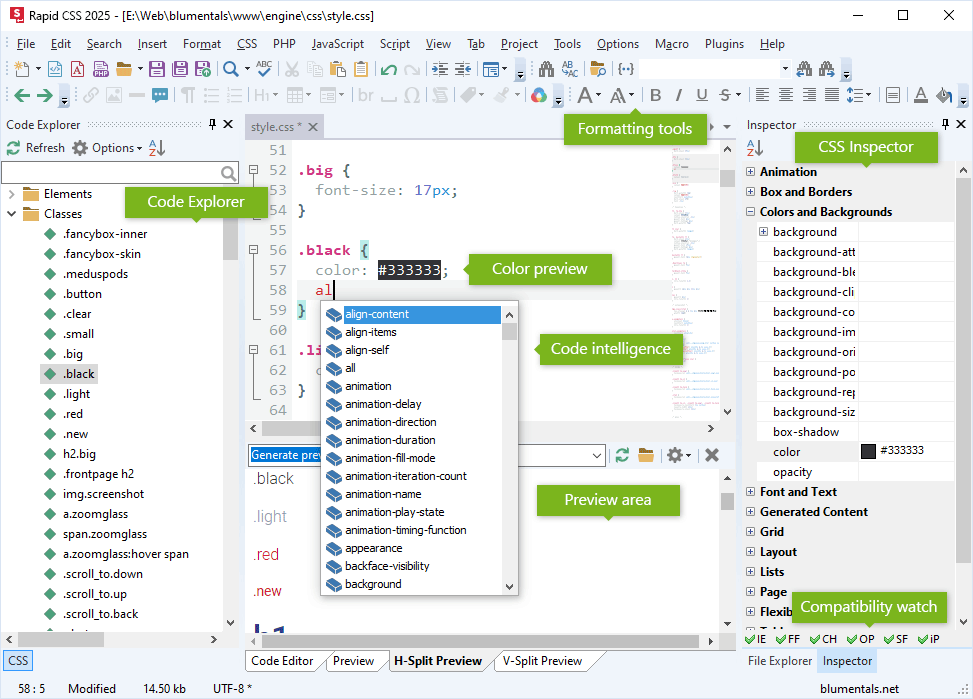
Rapid CSS 2025 editing style.css: the Code Explorer lists the classes, completion suggests CSS properties, the color value is previewed inline, the Inspector on the right groups properties, and a browser compatibility watch sits at the bottom.
Features
CSS completion, inspector and compatibility watch
Rapid CSS completes CSS properties and values and the class and ID names from your linked style sheets, and its CSS Inspector lists every property by group (box, colors, fonts, grid, flex) so you can set values without remembering the syntax. The compatibility watch shows which browsers support the property you're on. A CSS checker, W3 validation and HTML Tidy catch mistakes.
Visual helpers for colors, boxes, gradients and shadows
Rapid CSS previews colors inline in the code and has a color picker with pick-from-screen, palettes and a list of the colors already used in your project. Assistant dialogs build box margins and padding, gradients, box shadows and text shadows, and there's a Google Fonts helper, a viewport assistant and media query support for mobile layouts. A CSS prefixer, beautifier and minifier tidy the result.
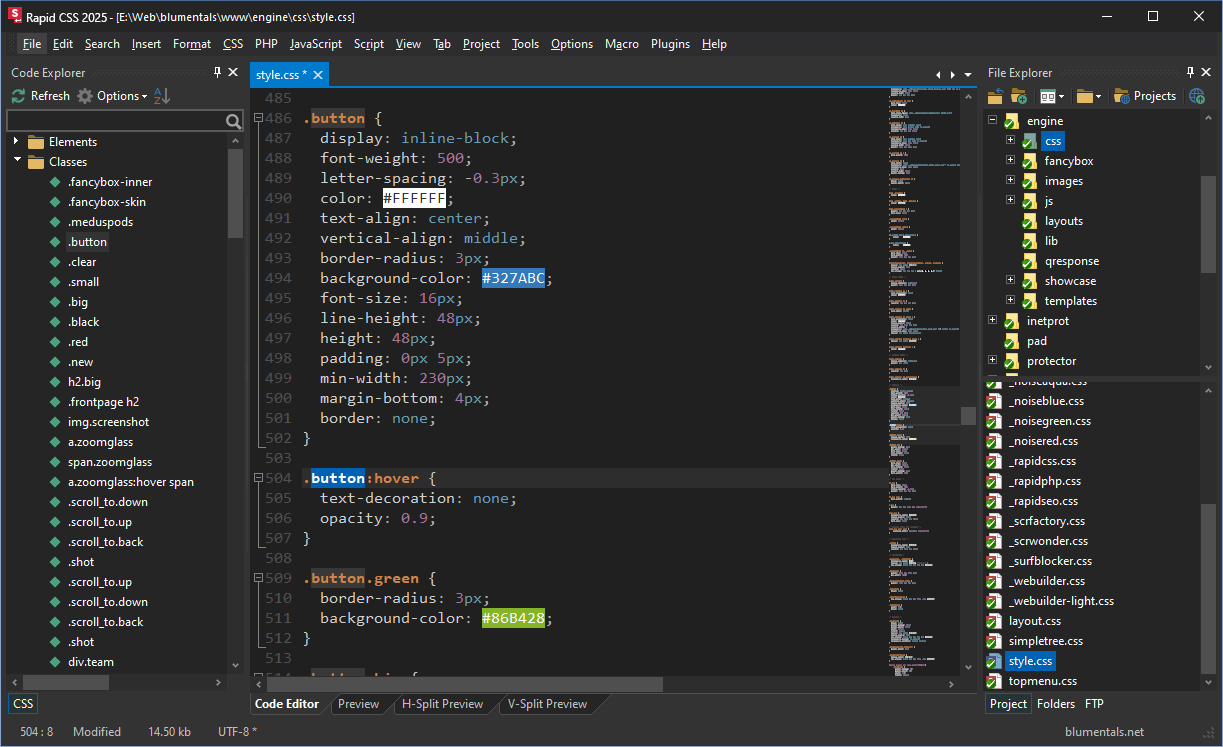
The dark interface style with button rules open: each hex color is shown in its own color, with the Code Explorer and File Explorer on either side.
HTML editing that knows your style sheets
Rapid CSS completes HTML tags and attributes, closes tags automatically, highlights matching and missing tags, and suggests the CSS classes defined in your style sheets when you type a class attribute. HTML wizards, Emmet, a code snippet library, Bootstrap 3 to 5 support and SASS and LESS editing are included.

An HTML menu page in Rapid CSS 2025: typing a class attribute lists the class names from each linked CSS file, and the Code Explorer shows the page's links, style sheets and scripts.
Live split preview
Rapid CSS previews your page inside the editor in a tab or a horizontal or vertical split next to the code, with screen-size testing for responsive layouts and XRay to see the HTML and CSS structure. One click opens the page in your installed browsers too.
AI assistant and FTP editing
Rapid CSS includes the same AI assistant as the bigger editions: ask it to make a table responsive, convert a layout to flexbox or explain a selector, and it works on the code you've selected. You can also edit files directly on an FTP, SFTP or FTPS server, publish changed files with one click, and work with TortoiseSVN or TortoiseGit.

The FTP browser shared by all four Blumentals editors, with the server connection set to SFTP (SSH).
Benefits
- Less syntax to memorize. The inspector, assistants and completion turn CSS into picking values, which helps beginners and saves experts typing.
- See it while you write it. The split preview with screen-size testing shortens the edit-save-refresh loop.
- Cheapest way into the family. You get the same editor core as WeBuilder for $30 less, and can cross-upgrade later if your work grows into JavaScript or PHP.
- Pay once. A perpetual license instead of a subscription.
Real-World Uses
- Restyling a site: open the theme's style sheet, find rules in the Code Explorer, change colors from the project palette and watch the split preview update.
- Making a layout responsive: add media queries with the viewport assistant and check them in the preview's screen sizes.
- Teaching HTML and CSS: students get completion, wizards and validation without the clutter of a full IDE.
- Quick fixes on a live site: open the CSS over SFTP, change a rule and save it straight back.
Who It's For, and Who Should Skip It
Rapid CSS fits web designers, front-end beginners, teachers and students on Windows 10 or 11 who mostly write HTML and CSS and want a fast, helpful editor they buy once.
Skip it if you write much JavaScript (HTMLPad adds JavaScript tools for the same $59.95 standard price), PHP (Rapid PHP) or several server languages (WeBuilder). It's also the wrong buy on Mac, Linux, Windows 7 or 8, and if you're happy with free Visual Studio Code and its extensions, Rapid CSS mainly saves you the setup time.
Usage Guide
- Install: download the trial and run the setup on Windows 10 or 11.
- Open your site: point the File Explorer at your site folder, or connect to your server in the FTP panel.
- Edit a style sheet: use completion (Ctrl+Space) and the Inspector panel, and the CSS menu's assistants for gradients, shadows and boxes.
- Preview: switch to H-Split or V-Split Preview to see the page beside your code.
- Activate: after buying, click Activate and enter the 25-digit key from your order e-mail.
Before you buy
- Compare the price with HTMLPad. Both standard licenses cost $59.95, and HTMLPad adds JavaScript code intelligence. Rapid CSS only saves money on the Personal license ($39.95 vs $49.95).
- The trial is 30 launches, not 30 days.
- Personal is non-commercial only: no client work and no sites with paid ads.
- Major versions are paid upgrades (currently $49.95, Personal $39.95).
Where it falls short
- Brand-new CSS can show as errors until Blumentals adds it to the language definitions, which it does once a property is stable. Users have asked for faster updates here.
- No legacy version. Unlike WeBuilder and Rapid PHP, Rapid CSS 2025 has no setup for Windows 7 or 8.
- Few advanced and team features. FileHorse lists limited advanced features, no collaboration tools and a limited plugin ecosystem as its cons.
- Little independent coverage. There are few recent reviews of this edition, so lean on the trial.
What Users Say
Rapid CSS gets far less coverage than its bigger siblings: no Capterra or G2 profile, no user reviews on SnapFiles, and an empty testimonials page on its own site. What exists is below.
Downloadcrew review
Downloadcrew calls Rapid CSS "a powerful cascading style sheets editor that's packed with time-saving features," praising the templates, the Style Sheet Wizard, the CSS Inspector, the code library and validation, and sums it up as a "Versatile, easy to use editor that could save you considerable web development time." It also warns: "the trial version can only be launched 30 times, so be sure to make the most of each run."
The review was written for an earlier version (it mentions Rapid CSS 2014), though the listing now carries the 2025 release.
FileHorse
FileHorse lists Rapid CSS 2025 18.9 with these pros: new AI integration, lightweight and fast performance, built-in debugging tools, customizable UI, syntax highlighting and FTP/SFTP integration. The cons: limited advanced features, no collaboration tools, a paid license and a limited plugin ecosystem.
Will Fastie, fastie.com (on the family)
Reviewing Rapid PHP, Fastie notes that "The four editors are actually variations of one editor (WeBuilder) from which features are stripped to create the other products," and that "those interested in Rapid CSS or HTMLPad can be reasonably sure that comments here about how Rapid PHP handles CSS and HTML will apply to those lesser products." He found the family fast and productive and Blumentals responsive, but criticized its FTP folder publishing in the 2020 version as unreliable.
Blumentals user forum
A user of the family asked for "some love for all the new CSS features, so they don't show in red all the time." A Blumentals developer replied that they avoid adding properties that aren't stable yet but add stable ones on request. Schloime, September 2025
The recurring themes: reviewers like the speed, the CSS helpers and how easy it is to learn; the complaints are the 30-launch trial, new CSS lagging behind, few advanced or team features and thin recent coverage.
Comparisons
Rapid CSS vs HTMLPad
HTMLPad has everything in Rapid CSS plus JavaScript code intelligence and tools (completion, explorer, beautifier, JSHint). The standard licenses cost the same $59.95, so HTMLPad is the better buy for commercial use unless you never touch JavaScript. Rapid CSS Personal ($39.95) is $10 cheaper than HTMLPad Personal.
Rapid CSS vs Rapid PHP and WeBuilder
Rapid PHP ($79.95) adds PHP, SQL, a debugger and a built-in web server; WeBuilder ($89.95) adds Ruby, Python and ASP.Net on top. Choose them only if you write server-side code.
Rapid CSS vs Visual Studio Code
Visual Studio Code is free and cross-platform with extensions for everything, but you assemble the setup yourself. Rapid CSS costs money and runs only on Windows, but the CSS inspector, visual assistants, preview and FTP work out of the box.
Editions and Pricing
| License | Price | Who can use it | Installs |
|---|
| Rapid CSS 2025 | $59.95 one-time | Professionals, companies, government | Work PC, home PC and a laptop |
| Rapid CSS 2025 Personal | $39.95 one-time at checkout | Students and home users, non-commercial only | Home PC and a laptop |
Volume licenses start at $48 per seat for 5 to 9 computers, with academic pricing from $33.60 per seat. Upgrades from an older version cost $49.95 (Personal $39.95). Free 2025 updates and e-mail support are included; EU residents pay VAT on top.
FAQs
Is Rapid CSS a one-time purchase?
Yes. Rapid CSS is sold with a perpetual license and free updates for the 2025 version. The next major version will be an optional paid upgrade.
Does Rapid CSS support SASS and LESS?
Yes. Rapid CSS highlights and edits SASS and LESS files alongside plain CSS.
Can I use Rapid CSS 2025 on Windows 7?
No. Rapid CSS 2025 needs Windows 10 or 11. Blumentals' legacy setup for Windows 7 and 8 exists only for WeBuilder and Rapid PHP.
Can Rapid CSS edit PHP or JavaScript files?
Rapid CSS can open and highlight JavaScript and PHP files, but its completion and code tools cover only HTML and CSS. For JavaScript tools choose HTMLPad, and for PHP choose Rapid PHP.
Can I upgrade from Rapid CSS to WeBuilder later?
Yes. Blumentals offers cross-upgrades between its editors and from Personal to commercial licenses at the upgrade price.
Is Rapid CSS available in languages other than English?
Yes. Rapid CSS also comes in German, Russian and Hungarian.
System Requirements
- Windows 10 or Windows 11
- About 101 MB download
- Internet connection for the AI assistant and FTP/SFTP
Conclusion
Rapid CSS 2025 is a good buy for Windows users who write HTML and CSS for personal or learning projects, where the $39.95 Personal license undercuts the rest of the family. The reason to buy it is the CSS help: the inspector, visual assistants, inline colors and split preview make styling quicker without the weight of an IDE, and you pay once. The main reason not to is value at the commercial price: at $59.95 the standard license costs the same as HTMLPad, which adds JavaScript tools, so most professionals should pick HTMLPad instead. Either way, use the 30-launch trial to make sure it fits your workflow.
Download Free TrialBuy Now