Easy GIF Animator 7 Pro: a frame-by-frame animated GIF editor for Windows
Easy GIF Animator 7 is a Windows program from Blumentals for creating and editing animated GIFs frame by frame: banners, buttons, small cartoons and short clips cut from video. The Pro edition costs $59.95 once and allows commercial use; the $29.95 Personal edition is for non-commercial use.
It's built for the classic GIF jobs: an animated web banner, a button that sparkles, a logo that spins, or a few seconds of video turned into a looping GIF, with full control over each frame. It's a mature program; the installer you download today was last rebuilt in 2018.
Quick facts
- Version: 7.3
- Developer: Blumentals Solutions SIA, Latvia
- Platform: Windows 7, 8, 10 and 11 (no Mac version)
- Opens: GIF, PNG, JPEG, BMP and ICO images, plus AVI, MPG, MP4, MOV and other video for conversion
- Saves: animated GIF; Pro also saves SWF Flash (with sound) and AVI video
- Price: $59.95 Pro, $29.95 Personal, one-time, free updates to version 7
- Trial: runs 20 times, with some features limited
- Best for: GIFs up to about 1000 x 700 pixels, the size the program is designed for
- What we checked: the installer (egifan7.exe, 23.13 MB, digitally signed by Blumentals Solutions SIA), which the vendor's server dates May 9, 2018, and the Pro edition's one-time price of $59.95 on the order page, on November 8, 2026. We didn't make an animation with it.
Download Free TrialBuy Now
Overview
Easy GIF Animator has been around since the early 2000s and is now in its seventh major version. The window follows a familiar layout: an Office-style ribbon on top (Home, Frames, Selection, Animation), a strip of frames down the left with each frame's delay, and an Edit and Preview area in the middle with drawing tools. The Animation Properties panel at the bottom sets looping, the background color and palette options.
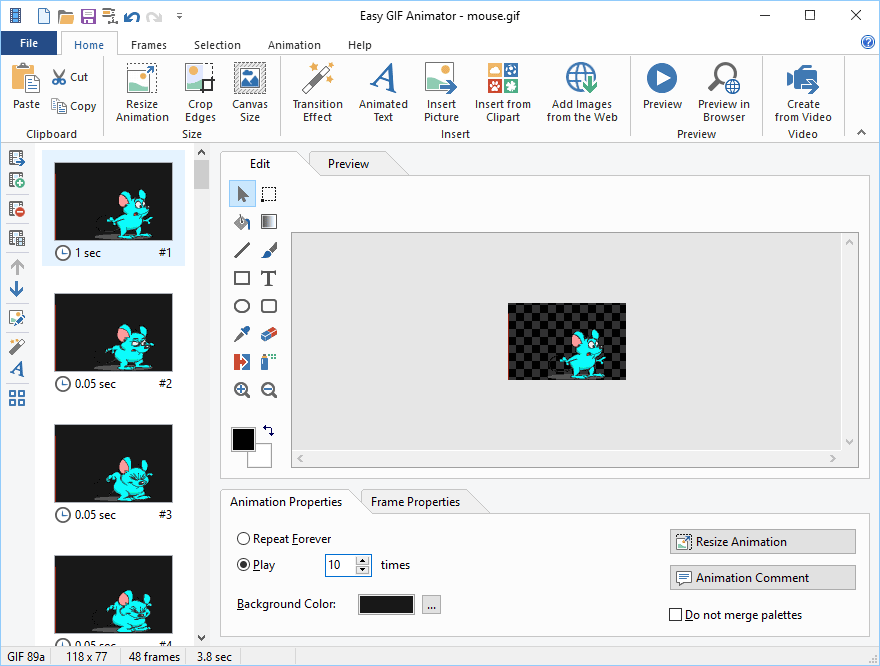
The Easy GIF Animator main window with mouse.gif open: frames with their delays on the left, drawing tools and the frame on a transparent background, and animation properties (play 10 times, background color, "Do not merge palettes") below. The status bar shows 48 frames, 3.8 seconds.
Features
Frame management and a built-in image editor
Easy GIF Animator lets you add, remove, duplicate, move, swap and extract frames, several at a time, and set each frame's delay. Each frame can be edited in place with line, shape, brush, spray, fill and gradient tools, a text tool, a color picker and replacer, and an eraser that makes areas transparent, or opened in an external editor.

The built-in editor: a red car picture on a transparent background, the rectangle tool selected, with line width and fill options above.
Convert a video clip to GIF
Easy GIF Animator imports a fragment of an AVI, MPG, MP4, MOV or other video: you mark the start and end on a timeline, shrink the size in pixels or percent, and drop frames to cut the file size. The result opens as normal frames you can edit.

The Import Video File dialog: a video frame with start and end markers below, size reduction to 640 x 360 pixels, smooth resize, and the frame rate reduced 2 times.
Banner and button wizards with text effects
Easy GIF Animator's banner wizard builds an animated banner from up to three text messages, each with its own font and an entrance, display time and exit (slide, fade, bounce, zoom, drop, merge or rotate). A button wizard does the same for animated buttons, and the effect generator adds spin, zoom, iris, fade, sparkle and clock transitions between pictures.

The Banner Wizard's Text Messages step: three message tabs, font and color settings, "Slide in from Left", "2 sec." and "Slide out to Right", with a preview of the banner below.
Resize, crop, reverse and optimize
Easy GIF Animator resizes or crops a whole animation in one step, reverses all or part of it, and optimizes the GIF to shrink the file. It previews in its own player or your browser, and generates the HTML code to place the GIF on a page.
Pro extras
Easy GIF Animator Pro adds placing a text or image (such as a watermark or logo) on every frame at once, a built-in image web search, and export to SWF Flash with background sound or to AVI video. Pro is also the edition licensed for commercial work.
Benefits
- Frame-level control that online GIF makers don't give you: exact delays, per-frame edits and transparency.
- Everything offline. Your files stay on your PC, which matters for client or unreleased material.
- Quick for repeat jobs. The wizards turn a banner or button into a few minutes' work.
- Paid once, with no subscription.
Real-World Uses
- A web designer making an animated 468 x 60 banner with sliding text for a client (Pro).
- Cutting three seconds of a product video into a looping GIF for a support article.
- Fixing an old animated logo: removing a frame, changing a color and saving it smaller.
- Adding a company logo to every frame of a set of GIFs before publishing them (Pro).
Who It's For, and Who Should Skip It
Easy GIF Animator fits webmasters, designers and hobbyists who make small animated GIFs often and want a dedicated, offline editor. Blumentals itself says the program is aimed at casual users, webmasters and beginners.
Skip it if you need large or full-screen GIFs (it's designed for about 1000 x 700 pixels and smaller), if you only make the odd GIF (free online tools such as Ezgif cover that), if you want to record your screen as a GIF (free tools like ScreenToGif do that), or if you're on a Mac. Skip the Personal edition for anything commercial.
Usage Guide
- Download the trial with the button on this page and install egifan7.exe on Windows 7, 8, 10 or 11.
- Open an existing GIF, start the banner or button wizard, or choose Create from Video on the Home ribbon.
- Add or rearrange frames in the left strip and set each frame's delay in Frame Properties.
- Edit frames with the drawing tools, or add Animated Text and Transition Effect from the ribbon.
- Click Preview or Preview in Browser to check the timing.
- Set looping in Animation Properties and save as GIF (the program optimizes it), or export to SWF or video in Pro.
Before you buy
- Blumentals defines "personal, non-commercial" narrowly: no business sites and no sites with paid ads. Most website use needs Pro.
- The SWF Flash export is of little use now that browsers no longer run Flash; judge Pro by its commercial license and the logo-on-all-frames and video export features instead.
- Run the 20-use trial on your own files, especially big ones, before paying.
Download Free TrialBuy Now
Where it falls short
- No updates since 2018. The installer dates from May 2018, and several questions on the product's support forum since 2021 have gone unanswered.
- Size limits. Blumentals says the program is designed for images up to 1000 x 700 pixels, ideally with frames under 20 KB and a total GIF under 1,000 KB; very large images can give a "not enough storage" error.
- 256 colors per frame. Photos and video can look grainy, a limit of the GIF format itself. Turning on "Do not merge palettes" and Floyd Steinberg dithering helps, at the cost of a larger file.
- Preview timing. A user reported in 2018 that the preview can't show frame delays shorter than 0.06 seconds; the developer said they'd look into it.
- Drag and drop. Users reported in 2017 and 2021 that dropping a GIF onto the program didn't open it; the developer said in 2017 it was fixed in the latest version, but the 2021 report got no reply.
What Users Say
Easy GIF Animator was widely reviewed in the 2000s and early 2010s, but there's little recent coverage. Its testimonial page on easygifanimator.net is empty.
SnapFiles
SnapFiles' editors rate Easy GIF Animator 4 stars (listing for version 7.2, updated May 2018): "Easy GIF Animator helps you to create animated GIF images with ease." and "The interface allows for frame by frame preview and configuration."
Its two user reviews average 3 stars. JamJar (December 2014, version 6.1, 3 stars) titled the review "I still use this but it's boring." and called the company's licensing "quite sly". sundog_279 (December 2005, version 3.21, 2 stars): "This is a cheap-tidy little package. I found it easy to use but my needs outgrew it's ability very quickly".
Blumentals replied: "This software was designed and optimized for easy use by casual computer users, webmasters and beginner-level", adding that professionals wanting more may need another tool.
Blumentals support forum
Uberskunk, August 2018: "the fastest the preview window can read a frame delay is 0.06 seconds." He added: "I'd be willing to buy the full version if the preview speed is improved in a later version of the software." The developer replied: "We'll look into it, thanks for reporting."
OleSmokey, November 2017, after upgrading to version 7: "I can't drop a gif file on the .exe file." The developer: "Please update to the latest version where this issue has been resolved." phillip54, September 2021: "Facing same issue but no response from anyone".
johnfaig, June 2021: "I don't get an error, but the file does not show up." The saved GIF later appeared as a recent file "with a file size of zero". There was no reply.
The common thread: people find it easy for banners and small animations, and those who need more control or bigger files outgrow it. Most complaints are about small bugs that haven't been answered in recent years.
Comparisons
Easy GIF Animator vs free online GIF makers
Free web tools like Ezgif can crop, resize, optimize and convert video to GIF in a browser with no install. Easy GIF Animator is worth paying for when you need per-frame drawing, wizards for banners and buttons, and to keep your files offline.
Easy GIF Animator vs a full image editor
Programs like Adobe Photoshop or GIMP can edit GIF animations as layers with far stronger image tools, but making a simple animated banner takes much longer there. Easy GIF Animator is the faster, simpler tool for small web animations.
Editions and Pricing
| Edition | Price (one-time) | Computers | Use | What it adds |
|---|
| Personal | $29.95 | 1 computer + 1 laptop | Non-commercial only | Create and edit GIFs, frames, effects, resize, browser preview |
| Pro | $59.95 | Work and home computer + 1 laptop | Commercial use allowed | Text or image on all frames, image web search, SWF with sound, video export |
Owners of an older version can upgrade for $19.95 (Personal) or $39.95 (Pro), and multi-seat and academic prices are on the vendor's order page.
FAQs
Can Easy GIF Animator add sound to a GIF?
No. The GIF format can't hold sound. Easy GIF Animator Pro can export your animation to SWF Flash with background sound, but modern browsers no longer play SWF files.
Why do my GIFs look grainy after saving in Easy GIF Animator?
A GIF frame can hold only 256 colors. In Easy GIF Animator, enable "Do not merge palettes" in Animation Properties and try Floyd Steinberg dithering under Tools, Options, Import; the file gets bigger but looks better.
Will an Easy GIF Animator GIF play in Outlook?
Not always. Blumentals notes that Outlook 2007 stopped playing animated GIFs, a limit of Outlook rather than the GIF, so test in the mail program your readers use.
Is there a Mac version of Easy GIF Animator?
No. Easy GIF Animator runs on Windows only, although the GIFs it makes work everywhere.
Is Easy GIF Animator a subscription?
No. Easy GIF Animator is a one-time purchase with free updates within version 7.
System Requirements
- Windows 7, 8, 10 or 11
- About 23 MB for the installer
- Designed for animations up to about 1000 x 700 pixels
Conclusion
Easy GIF Animator 7 is still a quick, friendly tool for small web animations: banners, buttons, logos and short video clips, with the frame-by-frame control free online tools lack. Pro at $59.95 makes sense only if you need the commercial license or the logo-on-every-frame and video export features; for personal projects the $29.95 Personal edition does the core job. The main reason not to buy is its age: no updates since 2018, Flash-era export options, and unanswered bug reports. Use the 20-run trial on your own files first, and if you only make a GIF now and then, a free online tool will do.
Download Free TrialBuy Now