HTMLPad 2025: an all-in-one HTML, CSS and JavaScript editor for Windows
HTMLPad 2025 is a $59.95 Windows code editor from Blumentals for front-end developers and designers: HTML, CSS and JavaScript with code completion, a CSS inspector, a live split preview, FTP editing and a built-in AI assistant, bought once. A $49.95 Personal license covers non-commercial use.
If your work stops at the browser (markup, style sheets and scripts, but no PHP or server code), HTMLPad gives you the same fast editor as Blumentals' WeBuilder without paying for server-side tools you won't use.
Quick facts
- Version: 2025 (build 18.9.0.279, released September 17, 2026). The 2025 generation came out in April 2024 and has been updated regularly since.
- Developer: Blumentals Solutions SIA, Riga, Latvia
- Platform: Windows 10 and 11 only. No Mac, Linux or Windows 7/8 version of this edition.
- Code intelligence: HTML, CSS and JavaScript, with SASS and LESS support. Highlighting also covers PHP, ASP, XML and Perl.
- Price: $59.95 standard (commercial) license, $49.95 Personal, one-time fee, free updates for the 2025 version
- Trial: the full program for 30 launches
- AI: free credits for 100+ prompts come with every license
- What we checked: the installer (htmlpad2025.exe, 101.9 MB, digitally signed by Blumentals Solutions SIA) downloaded from the vendor, and the one-time prices on the order page, $59.95 for the standard license and $49.95 for Personal, on November 8, 2026. We didn't build a site with it or test the AI engines ourselves.
Download Free TrialBuy Now
Overview
HTMLPad is the front-end member of Blumentals' four code editors, which share one code base. Rapid CSS covers HTML and CSS, HTMLPad adds JavaScript code intelligence and tools, Rapid PHP adds PHP and server tools, and WeBuilder adds Ruby, Python and ASP.Net. HTMLPad has been around since the early 2000s; one customer on the vendor's site says they've used it every day for about 15 years.
The 2025 version added an AI assistant, an updated Chromium preview with Microsoft Edge as an option, Prettier-based CSS and JavaScript beautifiers, a Terser-based JavaScript minifier for modern syntax, and a faster Code Explorer on large files.
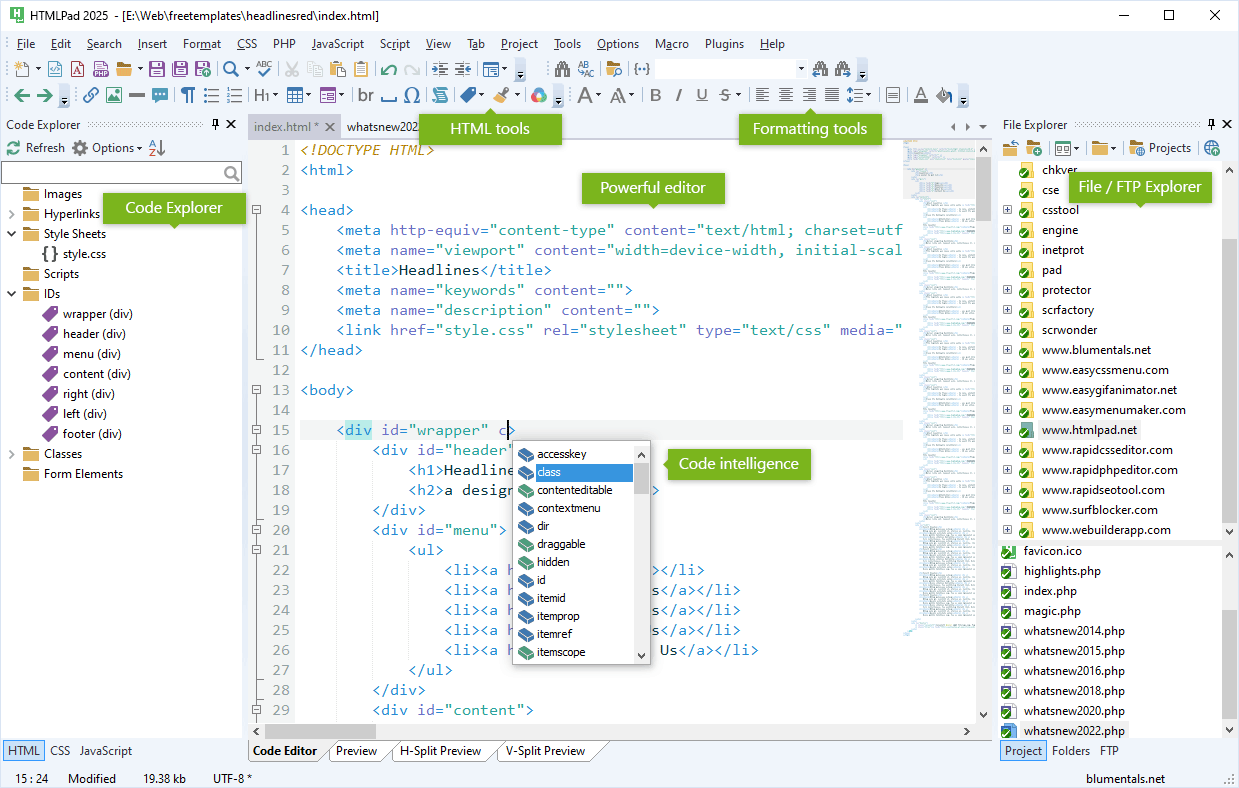
HTMLPad 2025 with an HTML5 page open: attribute completion on a div, the Code Explorer listing the page's style sheets and IDs, and the File/FTP Explorer on the right.
Features
HTML editing with code intelligence
HTMLPad completes HTML5 tags and attributes, closes tags as you type, highlights matching and missing tags, and suggests the class names from your linked style sheets. The Code Explorer lists a page's links, images, scripts, style sheets, IDs and classes, and Go to Anything jumps to any file, symbol or line. HTML wizards, Emmet, snippets with shortcuts and Bootstrap 3 to 5 support speed up the routine parts.
A JavaScript editor with jQuery, React and Vue.js support
HTMLPad completes JavaScript and jQuery, lists functions and classes in the Code Explorer, and supports React and Vue.js. JSHint checks your scripts, and a JavaScript beautifier and minifier format or compress them. This JavaScript tooling is what separates HTMLPad from the cheaper Rapid CSS.
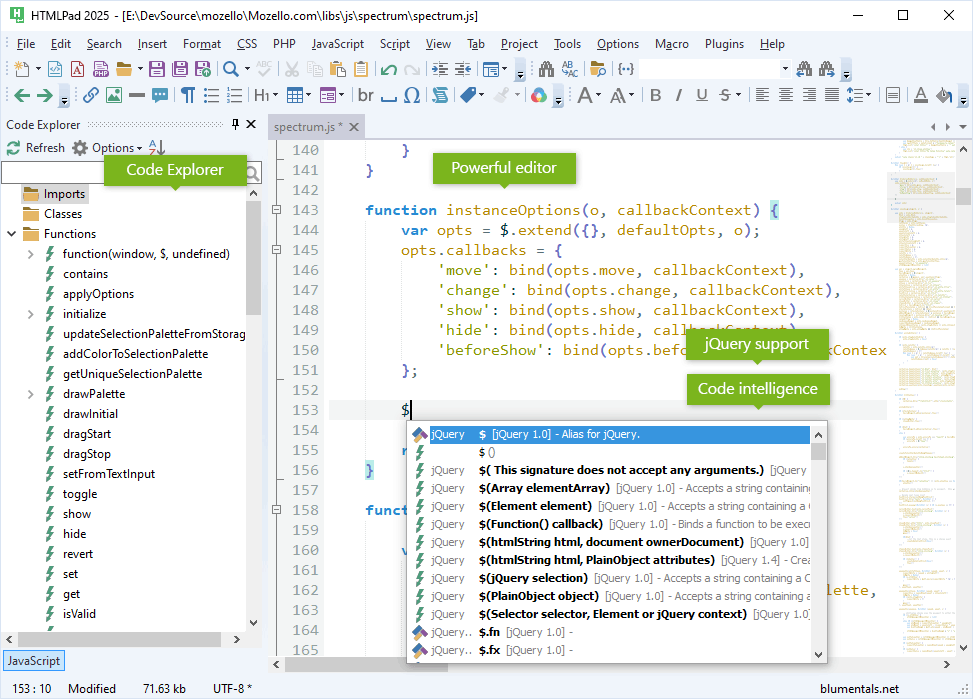
A jQuery plugin open in HTMLPad 2025: typing $ lists jQuery's signatures with the version each appeared in, and the Code Explorer lists the file's functions.
CSS studio: inspector, assistants and compatibility watch
HTMLPad's CSS tools match Rapid CSS: property completion, a CSS Inspector grouped by box, colors, fonts, grid and flex, inline color previews, a color picker with project colors, gradient, shadow and box assistants, a CSS prefixer, beautifier and minifier, SASS and LESS, and a compatibility watch showing browser support for each property.

The dark theme with a style sheet open: CSS property completion in the editor, selectors and media queries in the Code Explorer, and the Inspector on the right.
Live preview and validation
HTMLPad previews pages inside the editor in a tab or a split beside the code, with a current Chromium engine or Edge, screen-size testing and the browser's developer tools, through an external or built-in web server. W3 HTML and CSS validation, HTML Tidy, a CSS checker and a spell checker catch errors before you publish.
AI assistant and direct server editing
HTMLPad's AI assistant writes a snippet, converts a table to a div layout, rewrites jQuery as plain JavaScript or explains a selector, working on the code you've selected. You can also open and save files directly on FTP, SFTP or FTPS servers, publish only changed files, and use TortoiseSVN or TortoiseGit.

The FTP browser shared by all four Blumentals editors, with the connection set to SFTP (SSH).
Benefits
- One tool for the whole front end. Markup, styles and scripts get equal support, so you don't switch editors between files.
- Fast to start and light to run. No project indexing wait before you can fix a typo.
- Pay once, keep it. A perpetual license instead of a subscription.
- Room to grow. If you move into PHP later, a cross-upgrade to Rapid PHP or WeBuilder keeps the same interface and settings.
Real-World Uses
- Static and landing-page sites: build the HTML, style it with the Inspector and check it at phone and desktop widths in the split preview.
- Theme front ends: edit a CMS theme's templates, CSS and JavaScript, then publish the changed files over SFTP.
- jQuery to plain JavaScript: select an old jQuery block and ask the AI to rewrite it, then run JSHint on the result.
- Teaching web design: wizards, completion and validation help students without a full IDE's clutter.
Who It's For, and Who Should Skip It
HTMLPad fits front-end developers, web designers, students and teachers on Windows 10 or 11 who write HTML, CSS and JavaScript and want a fast editor with good tooling for a one-time price.
Skip it if you write PHP (Rapid PHP adds PHP, a debugger and an SQL browser for $20 more) or Ruby, Python or ASP.Net (WeBuilder). It's also not for Mac, Linux, Windows 7 or 8 users, and if you build large JavaScript apps with TypeScript, npm tooling and test runners, Visual Studio Code or WebStorm is the better home.
Usage Guide
- Install: download the trial and run the setup on Windows 10 or 11.
- Open your site: point the File Explorer at your site folder and save it as a project, or connect to your server in the FTP panel.
- Write and check: use completion (Ctrl+Space), the Inspector for CSS and the validators and JSHint from the Tools menu.
- Preview: switch to H-Split or V-Split Preview to see the page beside your code, and try the screen-size presets.
- Activate: click Activate and enter the 25-digit key from your order e-mail.
Before you buy
- The trial is 30 launches, not 30 days. Leave it open while you test.
- Same price as Rapid CSS for business use. Both standard licenses cost $59.95, so HTMLPad is the better pick for commercial work.
- Personal is non-commercial only: no client sites and no sites with paid ads.
- Major versions are paid upgrades (currently $49.95, Personal $39.95). AI credits beyond the included 100+ prompts are also extra.
Where it falls short
- No Windows 7 or 8 setup. The legacy version Blumentals made for older Windows covers only WeBuilder and Rapid PHP.
- Brand-new CSS can show as errors until Blumentals adds it to the language definitions.
- Preview layout isn't remembered. A user on the vendor's forum asked for the split preview to keep its width between files instead of resetting.
- Not built for modern JavaScript app tooling such as TypeScript projects, npm scripts or test runners.
- Small plugin ecosystem next to Visual Studio Code.
What Users Say
HTMLPad has no Capterra or G2 profile. The feedback below comes from the vendor's testimonials page, an older HTML Goodies review, SnapFiles users and the Blumentals forum, plus a long-form review of its sister edition.
Customer testimonials (vendor's site)
"I've been working with HTMLPad every day for about 15 years now, and I love it." John Hayes, Hayes Anderson Ltd
"It is lightweight and powerful. The user interface is elegant and sensible. I am more productive on HTMLPad than on any other editor out there." Glen Lipka, UX Architect at Marketo
"I have over 20 years experience writing computer programming code. The best HTML/XHTML editor I have used." David Tristan, Webmaster, LA Pierce College
"I am recommending this to all of my hosting customers who ask "what program do you suggest for building web sites?". Blumentals is fantastic, not just the products, but the customer support as well." Dave, www.saratogahosting.com
HTML Goodies review (Nathan Segal, April 2013)
Segal liked the time-savers: "As soon as I finished typing the first tag, the closing tag appeared, which was a time-saver," and the Gradient Assistant and Text Shadow dialogs. His main complaint was auto-complete: "Sometimes it would kick in while typing and other times it wouldn't work at all. The performance was unreliable, at best."
This review covers a much older version (it mentions Internet Explorer 9 as a preview browser), so treat it as history rather than a verdict on 2025.
SnapFiles user reviews
Two users, both recommending it, though from 2006 and 2007. One titled their review "Probably the best html editor, period" and wrote: "HTMLPad is visually attractive and easy to use. While it is particularly suitable for the neophyte coder, it is by no means lacking in the necessary bells and whistles. In short, this is a very solid program that one will not outgrow."
Will Fastie, fastie.com, and the Blumentals forum
Reviewing Rapid PHP, Fastie wrote that "those interested in Rapid CSS or HTMLPad can be reasonably sure that comments here about how Rapid PHP handles CSS and HTML will apply to those lesser products." He found the editor fast and productive and Blumentals responsive, but called its FTP folder publishing unreliable in the 2020 version.
On the forum in December 2025, a user suggested HTMLPad remember the split-preview proportions (code one third, preview two thirds) when opening files, instead of resetting it each time.
The recurring themes: long-time users praise how light, fast and productive it is and the vendor's support. The criticism is older (auto-complete reliability in 2013, FTP publishing in 2020) or small (preview layout, new CSS lag), and recent independent reviews are scarce.
Comparisons
HTMLPad vs Rapid CSS
Rapid CSS has HTMLPad's HTML and CSS tools but no JavaScript code intelligence, explorer or JSHint. The standard licenses cost the same $59.95; only Rapid CSS Personal is cheaper ($39.95 vs $49.95).
HTMLPad vs Rapid PHP and WeBuilder
Rapid PHP ($79.95) adds PHP completion, live syntax checking, xDebug, an SQL browser and a portable USB install; WeBuilder ($89.95) adds Ruby, Python and ASP.Net. Pay for them only if you write server-side code.
HTMLPad vs Visual Studio Code
Visual Studio Code is free, cross-platform and stronger for modern JavaScript app development, but needs extensions for previews, FTP and AI. HTMLPad is Windows-only and paid, with those tools ready from the first launch.
Editions and Pricing
| License | Price | Who can use it | Installs |
|---|
| HTMLPad 2025 | $59.95 one-time | Professionals, companies, government | Work PC, home PC and a laptop |
| HTMLPad 2025 Personal | $49.95 one-time | Students and home users, non-commercial only | Home PC and a laptop |
Volume licenses start at $48 per seat for 5 to 9 computers, with academic pricing from $33.60 per seat. Upgrades from an older version cost $49.95 (Personal $39.95). Free 2025 updates and e-mail support are included; EU residents pay VAT on top.
FAQs
Is HTMLPad a subscription?
No. HTMLPad is a one-time purchase with a perpetual license and free updates for the 2025 version. The next major version will be an optional paid upgrade.
Can HTMLPad edit PHP files?
HTMLPad can open and highlight PHP files and preview them through a web server, but it has no PHP completion, syntax checker or debugger. For PHP work choose Rapid PHP or WeBuilder.
Does HTMLPad 2025 run on Windows 7?
No. HTMLPad 2025 needs Windows 10 or 11; the legacy setup for Windows 7 and 8 is offered only for WeBuilder and Rapid PHP.
Is there a Mac version of HTMLPad?
No. HTMLPad and the other Blumentals editors are Windows-only.
Do I need an OpenAI account for HTMLPad's AI?
No. HTMLPad's AI runs on Blumentals' credits: the license includes credits for 100+ prompts, and more are sold cheaply. Trial users get a smaller amount by creating a free Blumentals account.
Will my HTMLPad 2022 settings carry over?
Yes. HTMLPad 2025 imports 2022 settings and layouts automatically if you keep your settings when uninstalling the old version. Owners of older versions can upgrade for $49.95.
System Requirements
- Windows 10 or Windows 11
- About 102 MB download
- Internet connection for the AI assistant and FTP/SFTP
Conclusion
HTMLPad 2025 is worth $59.95 for Windows front-end developers and designers who write HTML, CSS and JavaScript and want one fast editor they pay for once. The reason to buy it is balance: full JavaScript tools on top of Blumentals' strong CSS studio, live split preview, SFTP editing and an AI assistant, at the same commercial price as the CSS-only Rapid CSS. The main reasons not to are scope and platform: there's no PHP support, no Windows 7/8 or Mac version, and modern JavaScript app tooling lives elsewhere. Run your own pages through the 30-launch trial first.
Download Free TrialBuy Now